var triangulate:Triangulate = new Triangulate();

var poly:Array=[];

stage.addEventListener(MouseEvent.MOUSE_DOWN, onDown);
function onDown(evt:MouseEvent):void {
	poly.push(new Pnt(mouseX, mouseY));
}

addEventListener(Event.ENTER_FRAME, onLoop);
function onLoop(evt:Event):void {
	var i:int;
	graphics.clear();
	var verts:Array=triangulate.process(poly);

	if (verts==null) {
		// draw a red polygon if there is some kind of error,
		// or if there are too few points on the poly
		if (poly.length>1) {
			graphics.lineStyle(0,0xFF0000);
			graphics.moveTo(poly[0].x, poly[0].y);
			for (i = 1; i<poly.length; i++) {
				graphics.lineTo(poly[i].x, poly[i].y);
			}
		}
	}else{
		// draw the triangulated polygon
		var tcount:int = verts.length / 3;
		graphics.lineStyle(0,0x000000);
		for (i = 0; i<tcount; i++) {
			var index:int = i * 3;
			var p1:Pnt=verts[index];
			var p2:Pnt=verts[index+1];
			var p3:Pnt=verts[index+2];
			graphics.moveTo(p1.x,p1.y);
			graphics.lineTo(p2.x,p2.y);
			graphics.lineTo(p3.x,p3.y);
			graphics.lineTo(p1.x,p1.y);
		}
	}
}
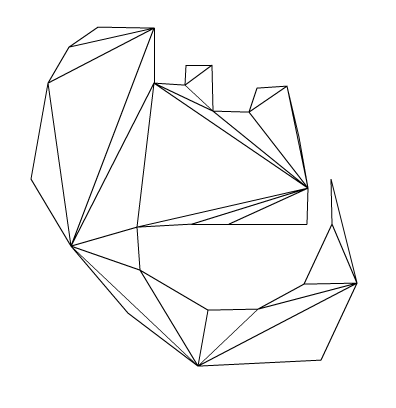
The above demo’s a class that triangulates a polygon given a list of points. To test this snippet you’ll need the Pnt and Triangulate Classes, which you can download or copy from below.
Polygon triangulation is useful for lots of things… I first found that I needed it back in my Director days. I wanted to be able to draw a polygon and then extrude it into 3D space – in order to do this I needed to triangulate the polygon that was drawn. Luckily there was an undocumented feature in Lingo that did the triangulation. I’ll probably do an extrusion demo soon. I’ve been looking into this to make the QuickBox2D polygon stuff a little easier.
Download all source and fla here….
Here is the Triangulate class:
/**
This code is a quick port of code written in C++ which was submitted to
flipcode.com by John W. Ratcliff  // July 22, 2000
See original code and more information here:
http://www.flipcode.com/archives/Efficient_Polygon_Triangulation.shtml

ported to actionscript by Zevan Rosser
www.actionsnippet.com
*/

package {

	public class Triangulate {

		private const EPSILON:Number = 0.0000000001;

		public function Triangulate(){}

		public function process(contour:Array):Array{
			var result:Array = [];
			var n:int = contour.length
			if ( n < 3 ) return null

			var verts:Array = [];

			  /* we want a counter-clockwise polygon in verts */
			var v:int

			  if ( 0.0 < area(contour) ){
				for (v=0; v<n; v++) verts[v] = v;
			  }else{
				for(v=0; v<n; v++) verts[v] = (n-1)-v;
			  }

			  var nv:int = n;

			  /*  remove nv-2 vertsertices, creating 1 triangle every time */
			  var count:int = 2*nv;   /* error detection */
			 var m:int;
			  for(m=0, v=nv-1; nv>2; )
			  {
				/* if we loop, it is probably a non-simple polygon */
				if (0 >= (count--)){
				  //** Triangulate: ERROR - probable bad polygon!
				 // trace("bad poly");
				  return null;
				}

				/* three consecutive vertices in current polygon, <u,v,w> */
				var u:int = v; if (nv <= u) u = 0;     /* previous */
				v = u+1; if (nv <= v) v = 0;     /* new v    */
				var w:int = v+1; if (nv <= w) w = 0;     /* next     */

				if ( snip(contour,u,v,w,nv,verts)){
				  var a:int,b:int,c:int,s:int,t:int;

				  /* true names of the vertices */
				  a = verts[u]; b = verts[v]; c = verts[w];

				  /* output Triangle */
				  result.push( contour[a] );
				  result.push( contour[b] );
				  result.push( contour[c] );

				  m++;

				  /* remove v from remaining polygon */
				  for(s=v,t=v+1;t<nv;s++,t++) verts[s] = verts[t]; nv--;

				  /* resest error detection counter */
				  count = 2 * nv;
				}
			  }

			  return result;
		}

		// calculate area of the contour polygon
		public function area(contour:Array):Number{
			var n:int = contour.length;
			var a:Number  = 0.0;

			for(var p:int=n-1, q:int=0; q<n; p=q++){
				a += contour[p].x * contour[q].y - contour[q].x * contour[p].y;
			}
			return a * 0.5;
		}

		// see if p is inside triangle abc
		public function insideTriangle(ax:Number, ay:Number, bx:Number, by:Number, cx:Number, cy:Number,px:Number,py:Number):Boolean{

			  var aX:Number, aY:Number, bX:Number, bY:Number
			  var cX:Number, cY:Number, apx:Number, apy:Number;
			  var bpx:Number, bpy:Number, cpx:Number, cpy:Number;
			  var cCROSSap:Number, bCROSScp:Number, aCROSSbp:Number;

			  aX = cx - bx;  aY = cy - by;
			  bX = ax - cx;  bY = ay - cy;
			  cX = bx - ax;  cY = by - ay;
			  apx= px  -ax;  apy= py - ay;
			  bpx= px - bx;  bpy= py - by;
			  cpx= px - cx;  cpy= py - cy;

			  aCROSSbp = aX*bpy - aY*bpx;
			  cCROSSap = cX*apy - cY*apx;
			  bCROSScp = bX*cpy - bY*cpx;

			  return ((aCROSSbp >= 0.0) && (bCROSScp >= 0.0) && (cCROSSap >= 0.0));
		}

		private function snip(contour:Array, u:int, v:int, w:int, n:int, verts:Array):Boolean{
			  var p:int;
			  var ax:Number, ay:Number, bx:Number, by:Number;
			  var cx:Number, cy:Number, px:Number, py:Number;

				  ax = contour[verts[u]].x;
				  ay = contour[verts[u]].y;

				  bx = contour[verts[v]].x;
				  by = contour[verts[v]].y;

				  cx = contour[verts[w]].x;
				  cy = contour[verts[w]].y;

	      if ( EPSILON > (((bx-ax)*(cy-ay)) - ((by-ay)*(cx-ax))) ) return false;

			  for (p=0;p<n;p++){
					if( (p == u) || (p == v) || (p == w) ) continue;
					px = contour[verts[p]].x
					py = contour[verts[p]].y
					if (insideTriangle(ax,ay,bx,by,cx,cy,px,py)) return false;
			  }
			  return true;
		}
	}
}
… and the Pnt class:
// Point class, no reason to use AS3's build in Point
package{
	public class Pnt {
		public var x:Number;
		public var y:Number;
		public function Pnt(x:Number, y:Number){
			this.x = x;
			this.y = y;
		}
	}
}
I also found a nice description of the basic technique being employed here.
UPDATE:
This should be obvious, but I was targeting fp9 with this… thus the use of Array instead of Vector.
when i think about try doing something… next day you just did it! man! you can read my mind! love it! ;D
That’s funny 🙂 You could try creating 3D extruded objects with this – I plan on doing that at some point soon, but probably won’ get around to it for the next few days….
hey Zevan , i think we need you on twitter, you already famous there 😉
http://www.sakri.net/blog/2009/06/12/an-approach-to-triangulating-polygons-with-holes/
heh… yeah I have a twitter account but I only use it to follow a bunch of people… so I see all the great links people post there. I may start a twitter where I actually post stuff… not sure… If I decide to start posting I’ll definitely post about it here 😀
Thanks a ton for this!!
Thank you for the code. It really helped me out when I was trying to draw some concave shapes with box2d 🙂 – http://chronosign.com/rant/yadurajiv/2011/01/694