Browse the notebook

Tag: actionscript

Circle Fitting

var circs:Array = []
var circNum:int = 600;
addEventListener(Event.ENTER_FRAME, onAdd);
function onAdd(evt:Event):void {
	if (circs.length < circNum){
		makeGrowable();
	}
}

function makeGrowable(){
	
	var s:MovieClip = MovieClip(addChild(new MovieClip()));
	s.x = Math.random() * stage.stageWidth;
	s.y = Math.random() * stage.stageHeight;
	with(s.graphics){
		lineStyle(0,0);
		drawCircle(0,0,10);
	}
	s.scaleX = s.scaleY = 0;
	circs.push(s);
	s.addEventListener(Event.ENTER_FRAME, onScaleUp);
}

function onScaleUp(evt:Event):void {
	var c:MovieClip = MovieClip(evt.currentTarget);
	c.scaleX = c.scaleY += 0.05;
	for (var i:int = 0; i<circs.length; i++){
		var circ:MovieClip = circs[i];
		if (circ != c){
			var amt:Number = circ.width/2 + c.width/2;
			var dx:Number = circ.x - c.x;
			var dy:Number = circ.y - c.y;
			var dist:Number = Math.sqrt(dx * dx + dy * dy);
			if (amt > dist){
				c.removeEventListener(Event.ENTER_FRAME, onScaleUp);
				if (c.scaleX < 0.1){
					if (contains(c)){
					removeChild(c);
					}
				}
			}
		}
		
	}
}

Circle fitting is one of those things I’ve never bothered to do… today I figured I’d give it a try and this is what I came up with. I posted it on wonderfl:
CircleFitting – wonderfl build flash online
Read snippet: Circle Fitting

Fill in the Blank


var story:String = "Fill in the _____.";


var txt:TextField = new TextField();
txt.defaultTextFormat = new TextFormat("Georgia", 20);
txt.width = stage.stageWidth;
txt.multiline = true;
txt.wordWrap = true;
txt.text = story;
addChild(txt);

var alph:Array = "abcdefghijklmnopqrstuvwxyz".split("");
var keys:Object = {};
for (var i:int = 0; i<alph.length; i++){
	keys[65 + i] = alph[i];
}
stage.addEventListener(KeyboardEvent.KEY_DOWN, onKeyPressed);
function onKeyPressed(evt:KeyboardEvent):void{
	 
	if (evt.keyCode == Keyboard.ENTER){
		story = "Fill in the _____.";
		txt.text = story;
	}
	
	for (var i:int = 0; i<story.length; i++){
		if (story.charAt(i) == "_"){
			var head:String = story.substr(0, i);
			var tail:String = story.substr(i + 1);
			var letter:String = keys[evt.keyCode];
			if (!letter) return;
			story = head + letter + tail;
			
			txt.text = story;
			
			break;
		}
	}
}

I needed to do a fill in the blank for a personal project that I’m working on and this is what I came up with. Have a look at the swf here:

(you need to click first so you can type with the keyboard):
Fill in the blank

Read snippet: Fill in the Blank

Epicycloid Again

var xp:Number = 0;
var yp:Number = 0;
var t:Number = 0;
var a:Number = 100;
var b:Number = 10;
x = stage.stageWidth / 2;
y = stage.stageHeight / 2;

graphics.lineStyle(0,0x000000);
addEventListener(Event.ENTER_FRAME, onRun);
function onRun(evt:Event):void {
	var p:Number = ((a + b)/b)*t
	xp = (a + b) * Math.cos(t) - b * Math.cos(p);
	yp = (a + b) * Math.sin(t) - b * Math.sin(p);
	if (t == 0){
	  graphics.moveTo(xp, yp);
	}else{
	  graphics.lineTo(xp, yp);
	}
	t += 0.05;
}

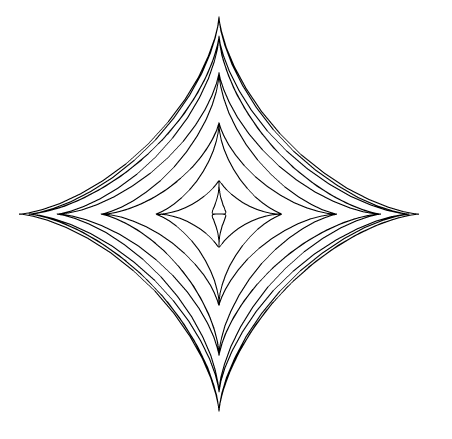
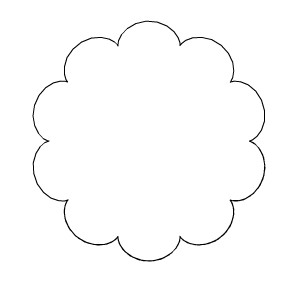
I’ve messed with Epicycloids in the past – browsing mathworld I decided to create this snippet. It will draw a curve like this:

Read snippet: Epicycloid Again

Fish Curve

var xp:Number = 0;
var yp:Number = 0;
var t:Number = 0;
var a:Number = 200;
x = stage.stageWidth / 2;
y = stage.stageHeight / 2;

graphics.lineStyle(0,0x000000);
addEventListener(Event.ENTER_FRAME, onRun);
function onRun(evt:Event):void {
	xp = a * Math.cos(t) - (a * Math.pow(Math.sin(t),2))/Math.sqrt(2);
	yp = a * Math.cos(t) * Math.sin(t);
	if (t == 0){
	  graphics.moveTo(xp, yp);
	}else{
	  graphics.lineTo(xp, yp);
	}
	t += 0.05;
}

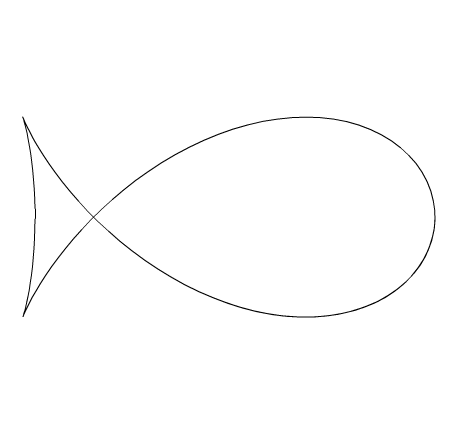
While surfing mathworld I stumbled upon the equation for something called the Fish Curve. This snippet will draw something like this:

Read snippet: Fish Curve

Astroid Pedal Curve Variation

var xp:Number = 0;
var yp:Number = 0;
var t:Number = 0;
var r:Number = 200;
x = stage.stageWidth / 2;
y = stage.stageHeight / 2;

graphics.lineStyle(0,0x000000);
addEventListener(Event.ENTER_FRAME, onRun);
function onRun(evt:Event):void {
	r = 200 * Math.cos(t / 10);
	xp = r * Math.pow(Math.cos(t), 3);
	yp = r * Math.pow(Math.sin(t), 3);
	if (t == 0){
	  graphics.moveTo(xp, yp);
	}else{
	  graphics.lineTo(xp, yp);
	}
	t += 0.1;
}

While browsing mathworld I decided to do a variation on this curve . The above snippet will draw something like this:

Read snippet: Astroid Pedal Curve Variation

3D Ring

[SWF(width = 500, height=500)]
var ring:MovieClip = createRing();
ring.x = stage.stageWidth / 2;
ring.y = stage.stageHeight / 2;
addChild(ring);

function createRing(sectionNum:int = 30):MovieClip{
	var container:MovieClip = new MovieClip();
	container.circles = [];
	container.theta = 0;
	container.thetaDest = 0;
	var step:Number = (Math.PI * 2) / sectionNum;
	for (var i:int = 0; i<sectionNum; i++){
		var c:MovieClip = new MovieClip();
		with (c.graphics){
			lineStyle(0,0x000000);
			beginFill(0xCCCCCC);
			drawCircle(0,0,20);
		}
		c.thetaOffset = step * i;
		container.addChild(c);
		container.circles.push(c);
	}
	container.addEventListener(Event.ENTER_FRAME, onRun);
	return container;
}
function onRun(evt:Event):void {
	var container:MovieClip = MovieClip(evt.currentTarget);
	var num:int = container.circles.length;
	for (var i:int = 0; i<num; i++){
		var c:MovieClip = container.circles[i];
		var angle:Number = container.theta + c.thetaOffset;
		c.x = 200 * Math.cos(angle);
		c.y = 100 * Math.sin(angle);
		c.scaleX = (100 + c.y) / 120 + 0.2;
		c.scaleY = c.scaleX;
	}
	container.circles.sortOn("y", Array.NUMERIC);
	for (i = 0; i<num; i++){
		container.addChild(container.circles[i]);
	}
	if (container.mouseX < -100){
		container.thetaDest -= 0.05;
	}
	if (container.mouseX > 100){
		container.thetaDest += 0.05;
	}
	container.theta += (container.thetaDest  - container.theta) / 12;
	
}

This snippet shows how to create a 3D ring navigation using sine and cosine. Have a look:

Ring – wonderfl build flash online
Read snippet: 3D Ring

Propeller Sketch

makeFlyer();

function makeFlyer():void{
	var thing:MovieClip = new MovieClip();
	thing.x = 200;
	thing.y = 200;
	
	addChild(thing);
	
	var prop:Shape = new Shape();
	with (prop.graphics){
		lineStyle(0,0x000000);
		beginFill(0x000000);
		moveTo(-100,0);
		curveTo(-100, -30, 0, 0);
		curveTo(100, 30, 100, 0);
		curveTo(100, -30, 0, 0);
		curveTo(-100, 30, -100, 0);
	}
	prop.scaleX = prop.scaleY = 0.5;
	var container:MovieClip = new MovieClip();
	//container.x = -50;
	container.addChild(prop);
	container.scaleY = 0.6;
	thing.addChild(container);
	
	var body:Shape = new Shape();
	with (body.graphics){
		lineStyle(0, 0x000000);
		beginFill(0x000000);
		lineTo(0,80);
		drawCircle(0,80,10);
	}
	thing.addChild(body);
	thing.velX = 0;
	thing.velY = 0;
	thing.posX = thing.x;
	thing.posY = thing.y;
	thing.theta = 0;
	thing.prop = prop;
	thing.addEventListener(Event.ENTER_FRAME, onRun);
}
function onRun(evt:Event):void{
	var t:MovieClip = MovieClip(evt.currentTarget);
	t.prop.rotation += 10
	t.velY = 3 * Math.cos(t.theta);
	t.velX = 3 * Math.sin(t.theta / 2);
	t.theta += 0.05
	t.posX += t.velX;
	t.posY += t.velY;
	
	t.x = t.posX;
	t.y = t.posY;
}

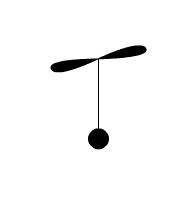
This snippet creates a small flying object that moves with sine and cosine.


Have a look at the swf…

Read snippet: Propeller Sketch

TextLineMetrics

var word:String = "TextLineMetrics are useful";
var letters:Array = word.split("");

var pre:TextField;
for (var i:int = 0; i<letters.length; i++){
	var t:TextField = new TextField();
	t.defaultTextFormat = new TextFormat("Arial", 40);
	t.autoSize = TextFieldAutoSize.LEFT;
	t.textColor = int(Math.random() * 0xFFFFFF);
	t.text = letters[i];
	if (pre){
		var metrics:TextLineMetrics = pre.getLineMetrics(0);
		t.x = metrics.width + pre.x;
	}
	pre = t;
	addChild(t);
}

Sometimes you need to do something to a TextField one letter at a time. One way to do this is to create a separate TextField for each letter and position them based on the TextLineMetrics object. This snippet creates textFields for a string and colors each TextField randomly.

Read snippet: TextLineMetrics

QuickBox2D Editor

When I first created QuickBox2D I simultaneously developed a simple editor to aid in the creation of complex simulations. The result is very alpha and should be used cautiously. There is no UI, it is entirely key controlled. It generates actionscript files that can be copy and pasted into working simulations. It also has a preview mode for previewing simulations as you develop them. This is by no means a full featured editor, there is a good deal of work to be done on it. I am releasing the code as a simple zip for people who would like to develop it further. If there is enough interest I’ll create some kind of code repositiory, but for now I’m just releasing the below zip.

Take a look at the editor

Download the Source

I may post further instructions for the editor in the future… Remember to save your work frequently and to create new versions for every change that you make to a file.

Suggested Features:
Simple GUI
Base64 encoding for get string

Known Issues:
Making joints that don’t touch things can break the preview app.

Read snippet: QuickBox2D Editor