Browse the notebook

Month: November 2009

Float as a Fraction

// print some floats as fractions
printFraction(0.5);
printFraction(0.75);
printFraction(0.48);

// try something a little more complex
var float:Number = 0.98765432;
trace("na more complex example:");
printFraction(float);
var frac:Array = asFraction(float);
trace("double check it:");
trace(frac[0] + "/" + frac[1] +" = " + frac[0] / frac[1]);

/* outputs:
0.5 = 1/2
0.75 = 3/4
0.48 = 12/25

a more complex example:
0.98765432 = 12345679/12500000
double check it:
12345679/12500000 = 0.98765432
*/


function printFraction(n:Number):void{
	var frac:Array = asFraction(n);
	trace(n + " = " + frac[0] + "/" + frac[1]);
}

// takes any value less than one and returns an array 
// with the numerator at index 0 and the denominator at index 1
function asFraction(num:Number):Array{
    var decimalPlaces:int = num.toString().split(".")[1].length;
	var denom:Number = Math.pow(10, decimalPlaces);
	return reduceFraction(num * denom, denom);
}

// divide the numerator and denominator by the GCF
function reduceFraction(numerator:int, denominator:Number):Array{
	// divide by the greatest common factor
	var divisor:int = gcf(numerator, denominator);
	if (divisor){
		numerator /= divisor;
		denominator /= divisor;
	}
	return [numerator, denominator];
}
					
// get the greatest common factor of two integers
function gcf(a:int, b:int):int{
	var remainder:int;
	var factor:Number = 0;
	var maxIter:int = 100;
	var i:int = 0;
	while (1){
		if (b > a){
		   var swap:int = a;
		   a = b;
		   b = swap;
		}
		remainder = a % b;
		a = b;
		b = remainder
		if (remainder == 0){
			factor = a;
			break;
		}else if (remainder==1){
			break;
		}else if (i > maxIter){
			trace("failed to calculate gcf");
			break;
		}
		i++;
	}
	return factor;
}

This snippet contains a few functions for calculating fractions based on float values. Writing this brought back some memories from grade school math.
Read snippet: Float as a Fraction

Greatest Common Factor (divisor)

trace(gcf(75,145));

// outputs 5

function gcf(a:int, b:int):int{
	var remainder:int;
	var factor:Number = 0;
	while (1){
		if (b > a){
		   var swap:int = a;
		   a = b;
		   b = swap;
		}
		remainder = a % b;
		a = b;
		b = remainder
		if (remainder == 0){
			factor = a;
			break;
		}else if (remainder==1){
          
			break;
		}
	}
	return factor;
}

I was messing around with Egyptian Fractions and found myself in need of some interesting functions. The first function I realized I would be needing was for a greatest common factor (GCF or GCD).

The above snippet is a quick implementation of Euclid’s algorithm. It will return 0 if no GCF is found…

I wrote a few helper functions while working with Egyptian fractions… will post them over the next few days.

Read snippet: Greatest Common Factor (divisor)

Ancient Egyptian Multiplication

egyptianMultiply(12, 99);

// trace(12 * 99) // test to make sure it works

/* outputs:
/64 768
/32 384
 16 192
 8 96
 4 48
/2 24
/1 12
---
1188
*/
 

function egyptianMultiply(valueA:Number, valueB:Number):void {
	
	var left:Array = [];
	var right:Array = []
	
	// swap if valueB is smaller than value A
	if (valueB < valueA){
		var swap:int = valueB;
		valueB = valueA;
		valueA = swap; 
	}
	
	// create left and right columns
	var currentLeft:int = 1;
	var currentRight:int = valueA;
	
	while (currentLeft < valueB){
		left.push(currentLeft);
		right.push(currentRight);
		currentRight += currentRight;
		currentLeft += currentLeft; 
	}
	
	
	// add up the right column based on the left
	currentLeft = 0;
	var rightSum:int;
	var leftSum:int;
	var i:int = left.length - 1;
	
	while (currentLeft != valueB){
	 
	  leftSum = currentLeft + left[i];
	  // if the next number causes the sum
	  // to go above valueB, skip it
	  if (leftSum <= valueB){
		currentLeft = leftSum;
		rightSum += right[i];
		trace("/" + left[i]  + " " + right[i]);
	  } else {
		trace(" " + left[i]  + " " + right[i]);
	  }
	  i--;
	}
	trace("---");
	trace(rightSum);
}

Someone mentioned egyptian multiplication to me yesterday… So read a little about it here and whipped up this example. For some reason I decided to do it in processing … once it worked I ported it to ActionScript.

The above link describing the technique I used is from http://www.jimloy.com/… I haven’t spent much time digging around the site, but it appears to have some pretty nice stuff on it…

If you’re curious, here is the original processing version:

Vector left = new Vector();
Vector right = new Vector();

int valueA = 10;
int valueB = 8;

if (valueB < valueA){
    int swap = valueB;
    valueB = valueA;
    valueA = swap; 
}

int currentLeft = 1;
int currentRight = valueA;
while (currentLeft < valueB){
    left.add(currentLeft);
    right.add(currentRight);
    currentRight += currentRight;
    currentLeft += currentLeft; 
}
 
currentLeft = 0;
 
int result = 0;
int i = left.size() - 1;
while (currentLeft != valueB){
 
  int temp = currentLeft + (Integer) left.get(i);
  if (temp <= valueB){
    
    currentLeft = temp;
    result += (Integer) right.get(i);
    println("/" + left.get(i) + " " + right.get(i));
  } else {
    println(" " + left.get(i)  + " " + right.get(i));
  }
    
  i--;
}
println("---");
println(result);

After writing, this I took a look at the wikipedia entry… I also found myself on this short page about a scribe called Ahmes. (I recommend reading this if you are interested in PI)

Read snippet: Ancient Egyptian Multiplication

Fp10 3d Logo

var container:Sprite = new Sprite();
container.x = stage.stageWidth / 2;
container.y = stage.stageHeight / 2;
addChild(container);

var redBox:Sprite = new Sprite();
redBox.graphics.beginFill(0xFF0000);
redBox.graphics.drawRect(-50,-250,100,500);
redBox.rotationZ = 10;
container.addChild(redBox);

var logos:Array = []
var elements:Array = [];
elements.push({element:redBox, z:0});

// add the logos
for (var i:int = 0; i<6; i++){
	var logoContainer:MovieClip = new MovieClip();
	var logoText:TextField = new TextField();
	logoText.defaultTextFormat = new TextFormat("_sans", 50);
	logoText.text = "LOGO";
	logoText.autoSize = "left";
	logoText.selectable= false;
	
	logoText.x = -logoText.width / 2;
	logoText.y = -logoText.height / 2;
	logoContainer.addChild(logoText);
	logoText.backgroundColor = 0xFFFFFF;
	
	container.addChild(logoContainer);
	logos.push(logoContainer);
	elements.push({element:logoContainer, z:0});
}

var ang:Number = -Math.PI / 2;
var rotationSpeed:Number = 0.05;
addEventListener(Event.ENTER_FRAME, onLoop);
function onLoop(evt:Event):void {
	
	 var dx:Number = (mouseY - stage.stageHeight / 2) / 10;
	 var dy:Number = (mouseX - stage.stageWidth / 2) / 10;
	 container.rotationX += (dx - container.rotationX) / 4;
	 container.rotationY += (dy - container.rotationY) / 4;
	 
	 ang += rotationSpeed;
     for (var i:int = 0; i<logos.length; i++){
		 var logo:Sprite = logos[i];
		 logo.x = 150 * Math.cos(ang + i);
	     logo.z = 150 * Math.sin(ang + i);
		 logo.alpha = 1 - logo.z / 200;
		 logo.rotationY = -Math.atan2(logo.z, logo.x)  / Math.PI * 180  - 90;
	 }
	 
	 // z-sort
	 for (i = 0; i<elements.length; i++){
		  elements[i].z = elements[i].element.transform.getRelativeMatrix3D(this).position.z;
	 }
	 
	elements.sortOn("z", Array.NUMERIC | Array.DESCENDING);
	for (i = 0; i<elements.length; i++) {
		container.addChild(elements[i].element);
	}
}

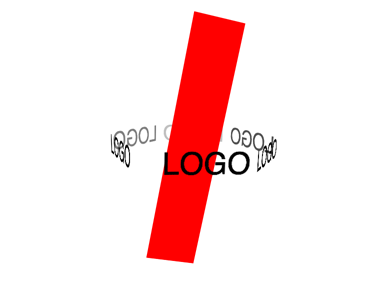
A student of mine was having trouble creating a 3D logo for a client. I created this snippet to help explain how some of the fp10 3D stuff works…. z-sorting etc… The code could be optimized a bit… but it works nicely…


Have a look at the swf…

Read snippet: Fp10 3d Logo

Functions Returning Functions

var connect:Function = function(xp:Number, yp:Number, col:uint=0):Function{
	graphics.lineStyle(0,col);
	graphics.moveTo(xp, yp);
	var line:Function = function(xp:Number, yp:Number):Function{
		graphics.lineTo(xp, yp);
		return line;
	}
	return line;
}

// draw a triangle
connect(200,100)(300,300)(100,300)(200, 100);

// draw a box
connect(100,100, 0xFF0000)(150,100)(150,150)(100, 150)(100,100);

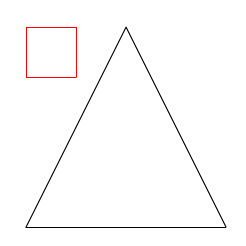
This is one of those techniques that I never really get tired of. It’s pretty useless, but fun to play around with every now and then. This draws the somewhat boring looking picture below:

[EDIT]
A few people pointed out that this could be simplified with arguments.callee… So here is an example… it does the same thing as the original code…

var connect:Function = function(xp:Number, yp:Number, col:uint=0):Function{
	graphics.lineStyle(0,col);
	graphics.moveTo(xp, yp);
	return function(xp:Number, yp:Number):Function{
		graphics.lineTo(xp, yp);
		return arguments.callee;
	}
}
Read snippet: Functions Returning Functions

QuickBox2D Custom Debug Draw

import com.actionsnippet.qbox.*;
import Box2D.Dynamics.*

stage.frameRate = 60;

var sim:QuickBox2D = new QuickBox2D(this, {debug:true});

// get at the b2DebugDraw instance
var debug:b2DebugDraw = sim.w.m_debugDraw;
debug.m_drawScale = 30.0;
debug.m_fillAlpha = 0.5;
debug.m_alpha = 0.5;
debug.m_lineThickness = 1.0;
debug.m_drawFlags = 0xFF;

sim.createStageWalls();  

for (var i:int = 0; i<10; i++){
  sim.addBox({x:3 + i, y:3 + i, width:2, height:0.5});
}
sim.addCircle({x:12, y:5, radius:2});

sim.start();
sim.mouseDrag();

Note: This snippet requires the QuickBox2D library

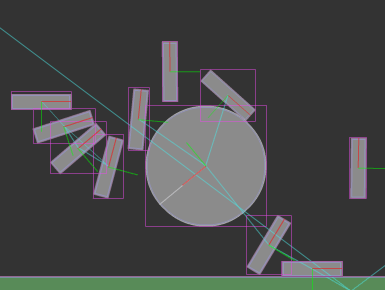
This snippet shows an easy way to get at the settings for Box2D’s debug renderer.


Have a look at the swf…

Read snippet: QuickBox2D Custom Debug Draw

Obfuscated Slider

var slider:MovieClip = makeSlider();
slider.addEventListener(Event.CHANGE, function(evt:Event):void{
	trace(evt.currentTarget.percent);									
});

function makeSlider():MovieClip{
	var slider:MovieClip = MovieClip(addChild(new MovieClip()));
	var circle:Sprite = Sprite(slider.addChild(new Sprite()));
	with (circle.graphics) beginFill(0x000000), drawCircle(0,0,10);
	var line:Shape = Shape(slider.addChild(new Shape()));
	with (line.graphics) lineStyle(0,0x000000), lineTo(0, 100);
	slider.x = slider.y = 100;
	circle.addEventListener(MouseEvent.MOUSE_DOWN, function(evt:Event):void{ evt.currentTarget.startDrag(false, new Rectangle(0,0,0,100)), slider.addEventListener(Event.ENTER_FRAME, onChange) });
	var stopIt:Function = function(){ stopDrag(), slider.removeEventListener(Event.ENTER_FRAME, onChange) };
	stage.addEventListener(Event.MOUSE_LEAVE, stopIt);
	stage.addEventListener(MouseEvent.MOUSE_UP, stopIt);
	return slider;
}
function onChange(evt:Event):void { evt.currentTarget.percent = evt.currentTarget.getChildAt(0).y / 100, evt.currentTarget.dispatchEvent(new Event(Event.CHANGE)) }

This is a pretty nasty implementation of a basic slider. Just felt like writing some obfuscated code today… It could probably be made even more confusing with some additional tweaks…

Have a look at the swf over at wonderfl…

Read snippet: Obfuscated Slider

ActionSnippet Contest Winner

The other judge for the contest was Rich Shupe. We just reviewed the entries together and have decided on a winner….

The winner is Petri Leskinen (piXelero)

Have a look at the winning snippet if you haven’t seen it already.

Rich and I thought that Kyle Phillips deserved honorable mention for his google analytics snippet.

Thanks to everyone who sent in snippets. Even though there were only a handful of submissions I had a good deal of fun reviewing and judging. I still have two more entries that I have yet to publish… so stay tuned…

Read snippet: ActionSnippet Contest Winner

Bounce Ball Inside a Circle

package  {
	import flash.display.Shape;
	import flash.display.Sprite;
	import flash.geom.Point;

	/**
	 * Re: http://board.flashkit.com/board/showthread.php?t=797453
	 * @author makc
	 * @license WTFPLv2
	 */
	public class BouncingBall extends Sprite{
		public function BouncingBall () {
			r = 10;
			ball = new Shape;
			ball.graphics.beginFill (0);
			ball.graphics.drawCircle (0, 0, r);
			addChild (ball);
			v = new Point;
			v.x = Math.random ();
			v.y = Math.random ();
			V = 1 + 20 * Math.random ();
			v.normalize (V);
			R = 200; X = 465 / 2; Y = 465 / 2;
			graphics.lineStyle (0);
			graphics.drawCircle (X, Y, R);
			ball.x = X + 100;
			ball.y = Y - 100;
			addEventListener ("enterFrame", loop);
		}
		private var r:Number;
		private var ball:Shape;
		private var v:Point;
		private var V:Number;
		private var R:Number;
		private var X:Number;
		private var Y:Number;
		private function loop (e:*):void {
			ball.x += v.x;
			ball.y += v.y;
			// R-r vector
			var P:Point = new Point (X - ball.x, Y - ball.y);
			if (P.length > Math.sqrt ((R - r) * (R - r))) {
				// normalize R-r vector
				P.normalize (1);
				// project v onto it
				var vp:Number = v.x * P.x + v.y * P.y;
				// subtract projection
				v.x -= 2 * vp * P.x;
				v.y -= 2 * vp * P.y;
				v.normalize (V);
				// move away from bounding circle
				P = new Point (X - ball.x, Y - ball.y);
				while (P.length > Math.sqrt ((R - r) * (R - r))) {
					ball.x += v.x;
					ball.y += v.y;
					P = new Point (X - ball.x, Y - ball.y);
				}
			}
		}
	}
}

Makc3d said I could choose one of his excellent wonderfl.net pieces and submit it to the contest. This snippet creates a ball that bounces off the inside of a circle. I thought this was a pretty unique way to go about doing this – and found it easy to add gravity and other cool features to it.

Have a look at the swf over at wonderfl….

Some Makc3d links:
>> http://makc3d.wordpress.com/
>>http://code.google.com/p/makc/
>> http://wonderfl.net/user/makc3d

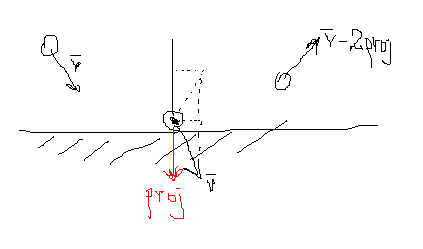
Makc3d elaborated on his code a bit via e-mail. He said that his technique sacrifices accuracy for simplicity… and that if you simplify too much it would be easy to break the code. “e.g. comment out piece of code where it says “move away from bounding circle””…

Here is a picture that Makc3d drew explaining why you need to multiply by 2:

Read snippet: Bounce Ball Inside a Circle

Google Analytics Utility

package com.hapticdata.utils
{
	import flash.external.ExternalInterface;
	/**
	 * Simplifies posting to Google's Analytics Tracker, allows easily disabling for development phase
	 * and uses ExternalInterface rather than navigateToURL
	 * @class Urchin 
	 * @author Kyle Phillips - <a href="http://www.haptic-data.com">http://www.haptic-data.com</a>
	 * @created October 28, 2008
	 * @example Analytics.post("section");
	 */
	
	
	public class Analytics
	{
		
		public static var enabled:Boolean = true;
		//appended as a directory to all trackings
		public static var swfID:String="/flashevent/";
		//correct for default snippet. Change this if you have a custom-wrapped analytics method
		public static var functionToCall:String = "pageTracker._trackPageview";
		
		/**
		 * Will invoke the set javascript function
		 * @param location:String - a string identifying where the user is in the site
		 */
		public static function post(location:String):void
		{
			if(enabled && ExternalInterface.available)
			{
				ExternalInterface.call(functionToCall,swfID+location);
			}
		}
	}
}

This contest entry by Kyle Phillips is a utility class for dealing with google analytics. If you haven’t messed with google analytics I suggest you give it a try.

Kyle Phillips links:
>> http://workofkylephillips.com
>> http://labs.hapticdata.com

I usually find myself adding google analytics code in a very hacky way… usually because the client asks for it at the 11th hour. Using a class like Kyle’s would enable you to simply add the tracking code from the start and then if the client doesn’t ask for it… you can just keep the class disabled… or charge more when you offer google analytics tracking for “phase 2” of the project 😉

Read snippet: Google Analytics Utility