// calculate the slope of a line
function calculateSlope(x1:Number, y1:Number, x2:Number, y2:Number):Number {
        // rise over run
	var s:Number = (y1 - y2) / (x1 - x2);
	/*if (x1==x2) {
		// slope is Infinity or -Infinity
	}*/
	return s;
}

/**
 Test it out
*/
function draw(x1:Number, y1:Number, x2:Number, y2:Number):void {
	graphics.moveTo(x1, y1);
	graphics.lineTo(x2, y2)
	var txt:TextField =TextField(addChild(new TextField()));
	txt.text = calculateSlope(x1, y1, x2, y2).toFixed(2);
	txt.x = x2, txt.y = y2;
}

graphics.lineStyle(0,0xFF0000);
draw (100, 100, 200, 200);

draw(100, 100, 200, 150);

draw(100, 100, 200, 100);

draw(100, 100, 99, 200);
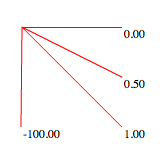
This snippet shows how to calculate the slope of a line … It demos the function by drawing a few lines and showing the corresponding slope of each.
It will draw this:
If (x1 == x2), the slope will be -Infinity or Infinity… depending on where you’re using this calculation you may want to reset the s variable to something else, return null etc… I commented it out for simplicity.