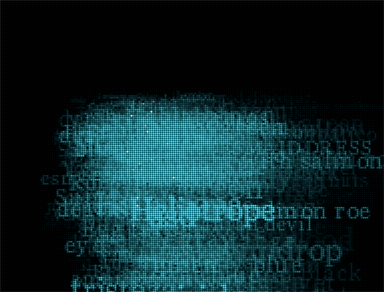
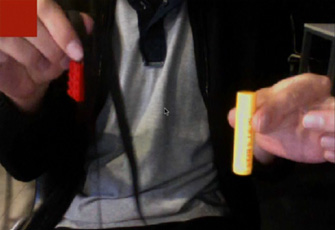
We’re still working on this long term project for medialab prado in madrid. Here is a camera test from today. It uses frame differencing and places names of colors on the areas of motion.
So no one attempted to post their version for capturing saturated moving colors from a video feed.
I’ve had one working for some time now and based on the reactions I’m getting I think the approach I took is a relatively interesting one. Below You can watch a demo and view a descriptive diagram, as well as view the source code and and online version of the color selector.
Because we are working with a small group of developers on this project we’ve ported everything to processing (since that’s what most everyone is using)… but here is the original actionscript code, its a tad messy but it gets the job done:
var bufferSize:int = 20;
var blurAmount:Number = 20;
var motionColor:uint = 0xFF222222;
var pixelNum:int = 800 * 600;

var cam:Camera =  Camera.getCamera();

cam.addEventListener(ActivityEvent.ACTIVITY, onActivityStart);

function onActivityStart(evt:ActivityEvent):void {
	trace("start");
	addEventListener(Event.ENTER_FRAME, onLoop);
	cam.removeEventListener(ActivityEvent.ACTIVITY, onActivityStart);
}
 cam.setMode(800,600,30);

var video:Video = new Video(800, 600);
video.attachCamera(cam);

var canvas:BitmapData = new BitmapData(800,600,false, 0x000000);
//addChild(new Bitmap(canvas));
var feed:BitmapData = new BitmapData(800,600,false, 0x000000);
addChild(new Bitmap(feed));

var prev:BitmapData = new BitmapData(800,600,false, 0x000000);

var thresh:BitmapData = new BitmapData(800, 600, true, 0xFF000000);
//addChild(new Bitmap(thresh));
var cm = new ColorMatrixFilter([0.3086,0.6094,0.082,0,0,0.3086,0.6094,0.082,0,0,0.3086,0.6094,0.082,0,0,0,0,0,1,0]);

var threshSamples:Vector.<uint> = new Vector.<uint>();
var samples:Vector.<uint> = new Vector.<uint>();
var pixelSampleRate:int = 10;

var shape:Shape = Shape(addChild(new Shape()))


function onLoop(evt:Event):void {

		canvas.draw(video);
		feed.draw(video);

		canvas.draw(prev, null, null, BlendMode.DIFFERENCE);
		canvas.applyFilter(canvas, canvas.rect, new Point(0,0), new BlurFilter(blurAmount, blurAmount, 1));
		//canvas.applyFilter(canvas, canvas.rect, new Point(0,0), cm);
		prev.draw(video);

		thresh.fillRect(thresh.rect, 0x000000);
		thresh.threshold(canvas, canvas.rect, new Point(0,0), ">=", motionColor, 0xFFFF0000, 0xFF00FF00);

		threshSamples = thresh.getVector(thresh.rect);

		var cols:Array = []
		var index:int = 0;
		for (var i:int = 0; i<pixelNum; i+=pixelSampleRate){
			if (threshSamples[i] == 0xFFFF0000){
				var col = feed.getPixel(i % 800, int(i / 800));
				var r = col >> 16 & 0xFF;
				var g = col >> 8 & 0xFF;
				var b = col & 0xFF;
				var sl = toHSB(r, g, b);
				if (sl[0] > 60 && sl[1] > 30 && sl[1] < 60){
				  cols[index++] = col;
				}
			}
		}

		if (cols.length > 0){
			shape.graphics.clear();
			shape.graphics.beginFill(cols[int(cols.length * Math.random())]);
			shape.graphics.drawRect(0,0,100,100);
		}

}

// this is from somewhere online, if I can find the link I'll post it
function toHSB(R, G, B):Array{
	var H, S, L
	var var_R = ( R / 255 )                     //RGB from 0 to 255
	var var_G = ( G / 255 )
	var var_B = ( B / 255 )

	var var_Min = Math.min( var_R, var_G, var_B )    //Min. value of RGB
	var var_Max = Math.max( var_R, var_G, var_B )    //Max. value of RGB
	var del_Max = var_Max - var_Min             //Delta RGB value

	L = ( var_Max + var_Min ) / 2

	if ( del_Max == 0 )                     //This is a gray, no chroma...
	{
	   H = 0                                //HSL results from 0 to 1
	   S = 0
	}
	else                                    //Chromatic data...
	{
	   if ( L < 0.5 ) S = del_Max / ( var_Max + var_Min )
	   else           S = del_Max / ( 2 - var_Max - var_Min )

	  var del_R = ( ( ( var_Max - var_R ) / 6 ) + ( del_Max / 2 ) ) / del_Max
	  var del_G = ( ( ( var_Max - var_G ) / 6 ) + ( del_Max / 2 ) ) / del_Max
	  var del_B = ( ( ( var_Max - var_B ) / 6 ) + ( del_Max / 2 ) ) / del_Max

	   if      ( var_R == var_Max ) H = del_B - del_G
	   else if ( var_G == var_Max ) H = ( 1 / 3 ) + del_R - del_B
	   else if ( var_B == var_Max ) H = ( 2 / 3 ) + del_G - del_R

	   if ( H < 0 ) ; H += 1
	   if ( H > 1 ) ; H -= 1
	}
	return [ int(S * 100), int(100 * L)]
}