Browse the notebook

Tag: actionscript

Timebased Animation Idea (FRIM & QuickBox2D)

import com.actionsnippet.qbox.*;

// change the frame rate and test...
stage.frameRate = 60;

[SWF(width = 800, height=600)]

var sim:QuickBox2D = new QuickBox2D(this);


var circle:Shape = Shape(addChild(new Shape()));
with(circle.graphics) beginFill(0), drawCircle(0,0,50);
circle.x = 100, circle.y = 100;


sim.start();

var startTime:Number;
// delay the start a bit
setTimeout(function():void {
  startTime = getTimer();
  sim.addEventListener(QuickBox2D.STEP, onTimeStep);
}, 500);

function onTimeStep(evt:Event):void{
	
	circle.x += (600 - circle.x) / 12;
	
	if ((600 - circle.x) < 1.5){
		trace("frameRate: ", stage.frameRate);
		trace("totalTime: ", getTimer() - startTime +" ms");
		trace("totalTimeSteps: ", sim.totalTimeSteps);
		sim.removeEventListener(QuickBox2D.STEP, onTimeStep);
	}
}

Note: This snippet requires QuickBox2D 1.0 or greater

Really not sure how I didn’t think of doing this before last night… I realized that the simple FRIM code inside of QuickBox2D can be used to make any standard frame-based style ActionScript animation time-based. In this snippet I do a simple ease out one liner:

circle.x += (600 – circle.x) / 12;

Code like that on an enterFrame would run at different speeds depending on your framerate. However, if you run it on QuickBox2D’s STEP event it runs independent of fram-erate. I’m obviously going to just wrap this up into it’s own mini-library separate from QuickBox2D and do a more in depth post about it… but for now, this snippet just traces out the results. These are my results from my macbook pro dual 2.4 intel….

frameRate: 12
totalTime: 1165 ms
totalTimeSteps: 93

frameRate: 24
totalTime: 1162 ms
totalTimeSteps: 93

frameRate: 30
totalTime: 1166 ms
totalTimeSteps: 91

frameRate: 60
totalTime: 1167 ms
totalTimeSteps: 93

frameRate: 120
totalTime: 1168 ms
totalTimeSteps: 91

Anyway… will peel the FRIM code out of QuickBox2D and wrap it up in its own library sometime soon…
Read snippet: Timebased Animation Idea (FRIM & QuickBox2D)

QuickBox2D Joint Skinning

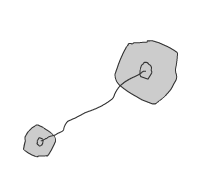
Well… while on the topic of skinning I figured I’d post something I’ve been meaning to post for awhile. Currently, joint skinning leaves something to be desired in QuickBox2D. This is because I haven’t had the need to skin many joints … and also because with joints like pulley, prismatic, revolute etc… I’m not entirely sure what the best skinning solution even is… For instance, on a pulley you probably don’t want three duplicate MovieClips used for the skin. Anyway, early on in my Box2D experimentation I needed distance joint skins so that feature has been around since maybe alpha 108…

It’s pretty simple, Check out the demo and code below:

import com.actionsnippet.qbox.*;
 
[SWF(width = 800, height = 600, backgroundColor = 0xFFFFFF, frameRate=60)]

var sim:QuickBox2D = new QuickBox2D(this, {debug:false});

sim.createStageWalls({fillColor:0xFFFFFF});
 
var circleA:QuickObject = sim.addCircle({x:3, y:3, radius:1, skin:CircleSkin});
var circleB:QuickObject = sim.addCircle({x:6, y:6, radius:0.5, skin:CircleSkin});

sim.addJoint({type:"distance", a:circleA.body, b:circleB.body, skin:JointSkin});

sim.start();
sim.mouseDrag();


Check out the swf here…

Download the fla here…

Read snippet: QuickBox2D Joint Skinning

QuickBox2D Skinning Examples

I’ve been trying to finalize the way QuickBox2D skinning works… so that its flexible and so that I only add to the api rather than modifying it. So this post really has two main purposes… the first is to show you lots of skinning examples from complex to simple – and the second is to get feedback… I want suggestions regarding this – one of the reasons that Box2D allows you to manage skinning however you want is because there is no real general purpose solution for all cases. I designed QuickBox2D’s skinning based on my needs, but I’d like to refine it… and make it more flexible… so post your comments and complaints 😉

Bug Note

There was a bug in QuickBox2D 1.0 with skinning… I’ve updated the zip… so that this doesn’t break anyone’s projects… but I’ll also be zipping up QuickBox2D 1.1 and posting it late tonight… However in order to tweak these examples you’ll need to download this the new 1.0 zip.

Complex Skinning

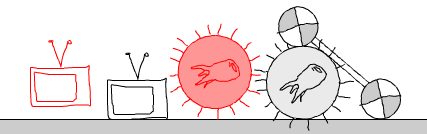
Here is a demo showing the kind of stuff I use QuickBox2D for… I use lots of polygon rigid bodies so the skins are never scaled or anything… (I used my unreleased editor to generate the polygon data)


Check out the swf…

Download the fla

Library Skinning

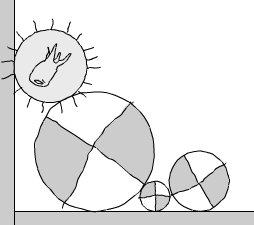
By default QuickBox2D will resize your skins to match your rigid bodies. There are times when this doesn’t make sense so I’ve added a new property to disable this. This demo shows circles that are automatically resized and one circle that has automatic skin resizing turned off (scaleSkin = false).


Here is the swf….


Below is the source… Here is the fla

import com.actionsnippet.qbox.*;
stage.frameRate = 60;
var sim:QuickBox2D = new QuickBox2D(this, {debug:false});

sim.createStageWalls();

// QuickBox2D by default scales library skins
sim.addCircle({x:3, y:3, radius:2, skin:Xcircle});
sim.addCircle({x:6, y:3, radius:0.5, skin:Xcircle});
sim.addCircle({x:18, y:3, radius:1, skin:Xcircle});

// sometimes you may not want this behavior
// here the rays of the ToothSun skin are not part of the 
// rigid body...
sim.setDefault({scaleSkin:false});
sim.addCircle({x:12, y:3, radius:73 / 60, skin:ToothSun});

sim.start();
sim.mouseDrag();

DisplayObject Skinning

This feature was requested by a few users. Basically it allows you to lay your DisplayObjects out on the stage… QuickBox2D reads their width, height, x, y and rotation values and adjusts the rigid body accordingly. If you specify width, height or radius in the params object then QuickBox2D will use that value – however currently setting x, y or angle in the params object will simply be ignored… as your basically defeating the purpose of using a DisplayObject skin. You can however set x, y and angle immediately after using one of the QuickBox2D creation methods… but really you should just use a library skin if you intend to set all the properties in ActionScript.


Have a look at the swf…

This source is a bit long so you can download the fla here…

Looking for Feedback

I think those few fla files cover most of the different ways you can do skinning in QuickBox2D. I may elaborate a bit in a future post or in the comments… I’d really appreciate any suggestions people have regarding this, so please post comments if you dislike something or find any bugs…

Read snippet: QuickBox2D Skinning Examples

QuickBox2D Contact Filtering

import com.actionsnippet.qbox.*;
import Box2D.Dynamics.*;
import Box2D.Collision.Shapes.*;
 
[SWF(width = 800, height = 600, backgroundColor = 0x222222, frameRate=60)]

var sim:QuickBox2D = new QuickBox2D(this, {debug:false});

var box:QuickObject = sim.addBox({x:12, y:16, width:3, height:3, density:0 , groupIndex:-1});
var circle:QuickObject = sim.addCircle({x:5, y:3, radius:0.5, groupIndex:-1});

// add another box to show that Box2D is still working
var littleBox:QuickObject = sim.addBox({x:12, y:3, width:1, height:1});

sim.createStageWalls();

sim.start();
sim.mouseDrag();

var filter:b2ContactFilter = new QuickContactFilter();
QuickContactFilter(filter).addGroupIndexCallback(onGroupNeg1, -1);

function onGroupNeg1(a:b2Shape, b:b2Shape):void{
	//trace("group index -1 had a collision");
	box.userData.alpha = 0.5;
	setTimeout(function():void{ box.userData.alpha = 1 }, 200);
}

sim.w.SetContactFilter(filter);

This snippet answers a question from a recent comment. The question was basically: “Can you detect a collision between two rigid bodies that have the same negative groupIndex?”. When you give QuickObjects a negative groupIndex it means that they will not collide with one another. So by default Box2D contacts will not be triggered when these two rigid bodies overlap. In order to determine if these rigid bodies overlap you need to implement a custom b2ContactFilter class. This may sound confusing but its actually very easy. You can take a look at the custom b2ContactFilter class used in this snippet here: QuickContactFilter.as – It’s important to note that QuickContactFilter.as is not yet part of QuickBox2D, so if you want to run this snippet you’ll need to download the .as file.

You can check out the swf here…

Read snippet: QuickBox2D Contact Filtering

Seamless Vector Texture

[SWF(width = 800, height = 450, backgroundColor=0xFFFFFF)]

graphics.beginFill(0xDEDEDE);
graphics.drawRect(0,0,400,400);

var container:Sprite = Sprite(addChild(new Sprite()));
draggable(rx(), ry(), 0x112233, 20);
draggable(rx(), ry(), 0x2266FF, 15);
draggable(rx(), ry(), 0x003299, 50, "rect");
draggable(rx(), ry(), 0xFFFFFF, 30);
draggable(rx(), ry(), 0x00CCFF, 15);
draggable(rx(), ry(), 0x1188CC, 50, "rect");

function rx():Number{
	return Math.random() * 200 + 100;
}
function ry():Number{
	return Math.random() * 200 + 100;
}

var guides:Shape = Shape(addChild(new Shape()));
with(guides.graphics){
       lineStyle(0, 0x666666)
       moveTo(200,0);
       lineTo(200,400);
       moveTo(0, 200);
       lineTo(400, 200);
       moveTo(400,0);
	   lineTo(400,400);
	   moveTo(0,400);
	   lineTo(800,400);
}

var canvas:BitmapData = new BitmapData(200,200,true, 0x00000000);
var tex:BitmapData = new BitmapData(800,800,false, 0xFFFFFF);

var frame:Bitmap = Bitmap(addChild(new Bitmap(tex, "auto", true)));
frame.x = 401;
frame.scaleX = frame.scaleY = 0.5;

var pnt:Point = new Point();
var m:Matrix = new Matrix();

addEventListener(Event.ENTER_FRAME, onLoop);
function onLoop(evt:Event):void {
	canvas.fillRect(canvas.rect, 0x00000000);
	canvas.draw(container);
	drawQuadrant(-200,0)
	drawQuadrant(-400,0)
	drawQuadrant(0,-200)
	drawQuadrant(-200,-200);
	tex.fillRect(tex.rect, 0xFFFFFF);
	for (var i:int = 0; i<16; i++){
		var px:Number = i % 4;
		var py:Number = int(i / 4);
		pnt.x = px * 200;
		pnt.y = py * 200;
		tex.copyPixels(canvas, canvas.rect, pnt, null, null, true);
       }
}

function drawQuadrant(x:Number, y:Number):void{
	 m.tx = x;
	 m.ty = y;
	 canvas.draw(container, m);
}

// draggable Sprite
function draggable(xp:Number, yp:Number, col:uint = 0xFF0000,
size:Number=4, type:String="circle"):Sprite {
       var s:Sprite = Sprite(container.addChild(new Sprite()));
       s.x = xp;
       s.y = yp;
       with(s.graphics){
               beginFill(col)
               if(type == "circle"){
                 drawCircle(size,size,size);
               }else if(type == "rect"){
                 drawRect(0,0,size, size);
               }
       }
       s.buttonMode = true;
       s.addEventListener(MouseEvent.MOUSE_DOWN, onDrag);
       return s;
}
function onDrag(evt:MouseEvent):void {
	var w:Number = evt.currentTarget.width;
	var h:Number = evt.currentTarget.height;
	evt.currentTarget.startDrag(false, new Rectangle(0,0,400 - w, 400 - h));
}
stage.addEventListener(MouseEvent.MOUSE_UP, onUp);
function onUp(evt:MouseEvent):void{ stopDrag() }

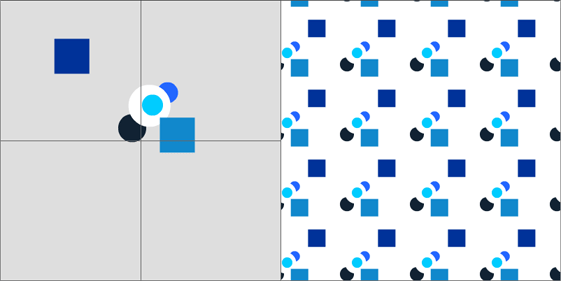
This snippet creates a seamless texture from a few draggable vector shapes. BitmapData is used to combine four quadrants into one seamless tile.


Have a look at the swf

I created this snippet as a sketch for a new feature for my command drawing project.

Read snippet: Seamless Vector Texture

QuickBox2D 3D

import com.actionsnippet.qbox.*;
[SWF(width = 800, height=600, backgroundColor=0x000000, frameRate = 60)]

var main:MovieClip = MovieClip(addChild(new MovieClip()));
main.z = 500;
main.rotationX = -40;
 
var sim:QuickBox2D = new QuickBox2D(main);

sim.createStageWalls({fillColor:0x1133CC});
sim.setDefault({lineColor:0xFFFFFF, fillColor:0x113355});

for (var i:int = 0; i<30; i++){
	var b:QuickObject = sim.addBox({x:Math.random()*10 + 3, y:Math.random()*10 + 3, 
									width:0.25 + Math.random()*2, height:0.25 + Math.random()*2});
}

sim.start();
sim.mouseDrag();

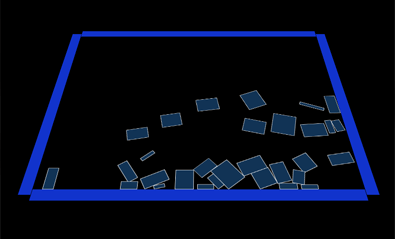
This demo shows how you can render your QuickBox2D simulation to somewhere other than the main timeline. In this case, I render to a MovieClip that has altered z and and rotationX properties.


Have a look at the swf…

Read snippet: QuickBox2D 3D

QuickBox2D Contacts Part 3

import com.actionsnippet.qbox.*;
import Box2D.Common.Math.*;

[SWF(width = 800, height = 600, backgroundColor = 0x222222, frameRate=60)]

var sim:QuickBox2D = new QuickBox2D(this, {debug:false});

sim.createStageWalls();

var cup:QuickObject = sim.addPoly({x:3, y:13, wireframe:false, density:0, 
								   points:[0,0, .5, 0, .5,3,  2,3,  2,0,  2.5,0, 2.5, 3.5, 0, 3.5, 0,0]});
var deleter:QuickObject = sim.addBox({x:4.251, y: 15.9, width:1.5, height:0.25, fillColor:0xFF0000});

// use a distance joint instead of a group since isCurrentContact 
// uses the QuickObject.body property
sim.addJoint({a:cup.body, b:deleter.body, x1:deleter.x, y1:deleter.y+0.5});

var circles:Array = [];
for (var i:int = 0; i<10; i++){
	circles[i] = sim.addCircle({x:8 + i, y:5, radius:0.5});
}
var boxes:Array = [];
for (i = 0; i<10; i++){
	boxes[i] = sim.addBox({x:8.5 + i, y:10, width:0.5, height:0.5});
}

sim.start();
sim.mouseDrag();

var shootVec:b2Vec2 = new b2Vec2(4, -30);

// when circles are dropped in the cup they are destroyed
// when boxes are droppped in the cup their linear velocity is altered
var contacts:QuickContacts = sim.addContactListener();
contacts.addEventListener(QuickContacts.ADD, onAdd);
function onAdd(evt:Event):void{
	for (var i:int = 0; i<circles.length; i++){
		var circ:QuickObject = circles[i];
		if (contacts.isCurrentContact(circ, deleter)){
			// it's ok to destroy QuickObject here because they are only actually
			// destroyed after the timeStep has finished at the end of QuickBox2D's 
			// internal loop
			circ.destroy();
		}
	 } 
	 for (i = 0; i<boxes.length; i++){
		var box:QuickObject = boxes[i];
		if (contacts.isCurrentContact(box, deleter)){
			box.body.SetLinearVelocity(shootVec);
		}
	 }
}

Note: This snippet requires QuickBox2D 1.0 or greater

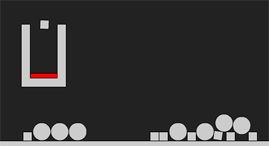
Here is another example of using QuickBox2D style contacts. In this example there is a cup with a small red box inside of it. When circles are placed inside the cup they are destroyed. When boxes are placed inside the cup they are shot upward.


Have a look at the swf…

A Note About Creation and Destruction

It’s worth noting that in Box2D your not supposed to destroy or create rigid bodies within the listener function for any contact events. QuickBox2D gets around this restriction by flagging the rigid body for destruction and destroying it at the end of QuickBox2D’s internal loop. This is not the case with creation of rigid bodies – if you attempt to create a rigid body within one of these listener functions you will get an error. See QuickBox2D Contacts Part 1 for an example of creating rigid bodies when there is a collision.

Read snippet: QuickBox2D Contacts Part 3

QuickBox2D 1.0 Features

Here is a quick list of the new features in QuickBox2D along with links to the docs.

1) The QuickBox2D.STEP event:
A few releases ago, frim (frame rate independent motion) was added to QuickBox2D. However, there was no way to execute calls to b2Body.ApplyImpulse() b2Body.SetLinearVelocity() etc… along with the b2World.Step() method. This meant that you couldn’t call these methods in a way that would truly maintain frim. As you’ll see in upcoming demos, rather than doing key controls or additional simulation logic in an enterframe event, I’ll be listening for the QuickBox2D.STEP event. This is executed every time a timeStep occurs. If frim is on, this the STEP event will be executed independently of frameRate.

2) Some features were added to help trigger events at specific times in the simulation. See:

QuickBox2D.totalTimeSteps
QuickBox2D.addTimeStepSequence

…for an example of addTimeStepSequence() check out this recent post.

3) Some additional control was added to mouse dragging for QuickBox2D. There is a new property in the QuickBox2D params object called customMouse. When set to true, this enables you to pass in mouse coordinates rather than having QuickBox2D automatically use the coordinates of the DisplayObject that all the rigid bodies are being drawn to. This feature is useful if you are rendering using a 3D engine. See:

QuickBox2D customMouse
QuickBox2D.setMouse()

4) A few features were added to make contact points easy to work with. See:

QuickBox2D.addContactListener()
QuickContacts

…I’ll be posting a few demos showing how to use QuickContacts – here are the first two (more to come in the next few days):
part 1
part 2

Read snippet: QuickBox2D 1.0 Features

QuickBox2D Contacts Part 2

import com.actionsnippet.qbox.*;

[SWF(width = 800, height = 600, backgroundColor = 0x000000, frameRate=60)]

var sim:QuickBox2D = new QuickBox2D(this);

sim.createStageWalls();

var boxA:QuickObject = sim.addBox({x:3, y:3, width:2, height:2});
var boxB:QuickObject = sim.addBox({x:3, y:6, width:2, height:2});

// add a few extra circles to show that there are other contacts
// occuring
for (var i:int = 0; i<10; i++){
	sim.addCircle({x:5 + i, y:4, radius:0.1 + Math.random()});
}

sim.start();
sim.mouseDrag();

// when boxA touches boxB change their alpha values to 50%
var contacts:QuickContacts = sim.addContactListener();
contacts.addEventListener(QuickContacts.ADD, onAdd);
contacts.addEventListener(QuickContacts.PERSIST, onPersist);
contacts.addEventListener(QuickContacts.REMOVE, onRemove);
function onAdd(evt:Event):void{
	if(contacts.isCurrentContact(boxA, boxB)){
		boxA.userData.alpha = 0.5;
		boxB.userData.alpha = 0.5;
	}
}
function onPersist(evt:Event):void{
	if(contacts.isCurrentContact(boxA, boxB)){
		boxA.userData.alpha = 0.5;
		boxB.userData.alpha = 0.5;
	}
}
function onRemove(evt:Event):void{
	if(contacts.isCurrentContact(boxA, boxB)){
		boxA.userData.alpha = 1;
		boxB.userData.alpha = 1;
	}
}

Note: This snippet requires QuickBox2D 1.0 or greater

This is another example showing how to make use of QuickBox2D contacts. In this example three contact events are used ADD, PERSIST and REMOVE. When the two boxes are touching their alpha values are set to 50% – otherwise their alpha values are at 100%.


Have a look at the swf…

A Little Detail About the Events

The ADD event is dispatched when a new b2ContactPoint is generated. The PERSIST event is dispatched as long as the b2ContactPoint exists for more than one timeStep – and from what I can tell, is dispatched until the rigid bodies it is associated with go to sleep. The REMOVE event is called when the b2ContactPoint is removed, meaning the rigid bodies that caused the creating of the b2ContactPoint are no longer touching.

You need to be careful with the code that you place inside the listener functions for these events. The reason being that these events are called many many times for every contact point in the simulation.

Read snippet: QuickBox2D Contacts Part 2

QuickBox2D Contacts Part 1

import com.actionsnippet.qbox.*;
import Box2D.Common.Math.*;

[SWF(width = 800, height = 600, backgroundColor = 0x000000, frameRate=60)]

var sim:QuickBox2D = new QuickBox2D(this, {debug:false, frim:true});

sim.createStageWalls();

var boxA:QuickObject = sim.addBox({x:3, y:3, width:2, height:2, fillColor:0xFF0000});
var boxB:QuickObject = sim.addBox({x:3, y:6, width:2, height:2, fillColor:0xFF0000});

sim.start();
sim.mouseDrag();

// when boxA touches boxB a circle QuickObject is created
var contacts:QuickContacts = sim.addContactListener();
// listen for contact points being added
contacts.addEventListener(QuickContacts.ADD, onAdd);
function onAdd(evt:Event):void{
	// see if this contact event is associated with boxA and boxB
	if(contacts.isCurrentContact(boxA, boxB)){
		// get the location of the collision in world space
		var loc:b2Vec2 = contacts.currentPoint.position;
		// you cannot create new QuickObjects inside this listener function
		// so we just give a 5 ms delay
		setTimeout(sim.addCircle, 5, {x:loc.x, y:loc.y});
	}
}

Note: This snippet requires QuickBox2D 1.0 or greater

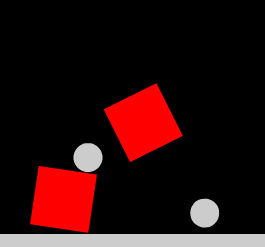
I’ve created a few simple examples to show how to use QuickBox2D contact listeners. This is the first one. When two boxes collide circles are added to the simulation at the point of collision.


Have a look at the swf…

Read snippet: QuickBox2D Contacts Part 1