By Zevan | February 23, 2009
Actionscript:
-
g=graphics;
-
mt=g.moveTo;
-
lt=g.lineTo;
-
ls=g.lineStyle;
-
m=Math;
-
r=m.random;
-
s=m.sin;
-
i=0;
-
o={};
-
function f(e){
-
s=150,x=y=s,z=-s,c=(!i)?addChild(new Bitmap(new BitmapData(s,s))).bitmapData:c;while(i<22500)i++,c.setPixel(i%s,i/s,(i%s|i/s)*mouseX);i=1;
-
}
-
addEventListener("enterFrame",f);
Have to link to this very fun new contest:
http://tweetcoding.machine501.com/
http://gskinner.com/playpen/tweetcoding.html
I may just have to get a twitter account...
Posted in misc | Also tagged actionscript |
By Zevan | February 23, 2009
Actionscript:
-
var clock:Sprite = Sprite(addChild(new Sprite()));
-
clock.x = clock.y = 150;
-
-
var bg:Shape = Shape(clock.addChild(new Shape()));
-
with (bg.graphics) lineStyle(2, 0x666666), beginFill(0xEFEFEF), drawCircle(0,0,110);
-
-
var hHand:Shape = clockHand(6, 50);
-
var mHand:Shape = clockHand(2, 80);
-
var sHand:Shape = clockHand(1, 90);
-
-
var center:Shape = Shape(clock.addChild(new Shape()));
-
with (center.graphics) beginFill(0x000000), drawCircle(0,0,5);
-
-
var hInc:Number = 360/24;
-
var msInc:Number = 360/60 ;
-
var nOff:Number = 6;
-
var verdana:TextFormat = new TextFormat("Verdana", 8);
-
// add numbers to clock
-
for (var i:int = 0; i<24; i++){
-
var ang:Number = (i * hInc - 90) * Math.PI/180;
-
createNumber(70,ang, i.toString());
-
var ms:Number = i * 2.5;
-
if (ms % 5 == 0){
-
createNumber(95, ang, ms.toString());
-
}
-
}
-
-
addEventListener(Event.ENTER_FRAME, onLoop);
-
function onLoop(evt:Event):void {
-
var date:Date = new Date();
-
hHand.rotation = hInc * date.getHours();
-
mHand.rotation = msInc * date.getMinutes();
-
sHand.rotation = msInc * date.getSeconds();
-
}
-
-
function clockHand(thickness:Number, leng:Number):Shape{
-
var hand:Shape = Shape(clock.addChild(new Shape()));
-
with (hand.graphics) {
-
lineStyle(thickness, 0x000000, 1, true, LineScaleMode.NORMAL, CapsStyle.SQUARE);
-
lineTo(0,-leng);
-
}
-
return hand;
-
}
-
-
function createNumber(radius:Number, theta:Number, str:String):void{
-
var t:TextField = TextField(clock.addChild(new TextField()));
-
with (t) defaultTextFormat = verdana, t.autoSize = "left";
-
t.text = str;
-
t.x = radius * Math.cos(theta) - nOff;
-
t.y = radius* Math.sin(theta) - nOff;
-
}
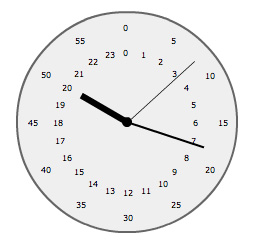
I was watching a movie the other day and I saw a 24 hour clock in the background of one of the shots. After the movie I coded this snippet. It draws a very basic clock with an hour hand that takes 24 hours to go full circle...
Posted in misc | Also tagged actionscript |
By Zevan | February 22, 2009
Actionscript:
-
addChild(new TextField());
-
getChildAt(0)["text"] = "Hello World";
Notice that square bracket syntax makes it so we don't need to typecast. Take a look at the other way:
Actionscript:
-
addChild(new TextField());
-
TextField(getChildAt(0)).text = "Hello World";
Typecasting is the way to go.... the square bracket technique is just an interesting trick.
I wrote this after somehow stumbling on this very entertaining page - it shows hello world written in approximately 200 different languages...
Posted in dynamic, misc | Also tagged actionscript |
By Zevan | February 21, 2009
Actionscript:
-
[SWF(width = 600, height = 400)]
-
-
// draw the same grid as yesterday
-
var tileSize:int = 40;
-
var cols:int = stage.stageWidth / tileSize;
-
var rows:int = stage.stageHeight / tileSize;
-
var grid:Sprite = Sprite(addChild(new Sprite()));
-
grid.graphics.lineStyle(0,0x000000);
-
var i:int = 0;
-
for (i = 1; i<cols; i++){
-
var posX:Number = i * tileSize
-
grid.graphics.moveTo(posX, 0);
-
grid.graphics.lineTo(posX, stage.stageHeight);
-
}
-
for (i = 1; i<rows; i++){
-
var posY:Number = i * tileSize
-
grid.graphics.moveTo(0, posY);
-
grid.graphics.lineTo(stage.stageWidth, posY);
-
}
-
-
//
-
// -- add a circle that snaps to the grid when dragged
-
//
-
var circle:Sprite = Sprite(addChild(new Sprite()));
-
with (circle.graphics) beginFill(0xFF0000), drawCircle(0,0,10);
-
circle.x = circle.y = tileSize * 3;
-
circle.buttonMode = true;
-
-
circle.addEventListener(MouseEvent.MOUSE_DOWN, onDown);
-
function onDown(evt:MouseEvent):void {
-
addEventListener(Event.ENTER_FRAME, onRunSnapping);
-
}
-
-
function onRunSnapping(evt:Event):void {
-
circle.x = Math.round(mouseX / tileSize) * tileSize;
-
circle.y = Math.round(mouseY / tileSize) * tileSize;
-
}
-
-
stage.addEventListener(MouseEvent.MOUSE_UP, onUp);
-
function onUp(evt:MouseEvent):void {
-
removeEventListener(Event.ENTER_FRAME, onRunSnapping);
-
}
This builds on yesterdays post by adding a draggable red circle that snaps to the grid. This is the real trick:
Actionscript:
-
circle.x = Math.round(mouseX / tileSize) * tileSize;
-
circle.y = Math.round(mouseY / tileSize) * tileSize;
Posted in Graphics, UI, motion | Also tagged actionscript |