Well… while on the topic of skinning I figured I’d post something I’ve been meaning to post for awhile. Currently, joint skinning leaves something to be desired in QuickBox2D. This is because I haven’t had the need to skin many joints … and also because with joints like pulley, prismatic, revolute etc… I’m not entirely sure what the best skinning solution even is… For instance, on a pulley you probably don’t want three duplicate MovieClips used for the skin. Anyway, early on in my Box2D experimentation I needed distance joint skins so that feature has been around since maybe alpha 108…
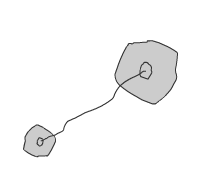
It’s pretty simple, Check out the demo and code below:
import com.actionsnippet.qbox.*;

[SWF(width = 800, height = 600, backgroundColor = 0xFFFFFF, frameRate=60)]

var sim:QuickBox2D = new QuickBox2D(this, {debug:false});

sim.createStageWalls({fillColor:0xFFFFFF});

var circleA:QuickObject = sim.addCircle({x:3, y:3, radius:1, skin:CircleSkin});
var circleB:QuickObject = sim.addCircle({x:6, y:6, radius:0.5, skin:CircleSkin});

sim.addJoint({type:"distance", a:circleA.body, b:circleB.body, skin:JointSkin});

sim.start();
sim.mouseDrag();
Nice new additions, I’ll be sure to update to 1.1.
I’ve been meaning to ask this (probably silly) question but is there a way to make a solid sleep at runtime? like if it triggers a contact make it so that it doesnt trigger another one next.
Its just that I have this silly bug in one of my games that makes a solid trigger 2 events when it collides even though the second collision is with a solid that it never touches.
Thanks, keep it up!
yeah… you don’t want to make it sleep though exactly… you should look into contact filtering… its a little confusing, but I created this demo and you can read the Box2D manual blurb about it… Making it sleep won’t work because collisions will “wake up” a sleeping rigid body:
https://actionsnippet.com/?p=2218
… and the Box2D manual section on contact filtering
http://www.box2d.org/manual.html#d0e1359
Very nice work here 🙂
Thank you for sharing. I am just starting to play around with Box2D for fun and found this in one of their forums. Glad I did cause this simplyfy stuffs.
Though I would like to suggest a feature if it’s possible the one similar to
Box2DConcaveArc
Thank you.
Yeah… Box2DConcaveArc is cool – but its super buggy. Writing custom shapes for Box2D is pretty tricky. For now you can use polygons:
https://actionsnippet.com/?p=1471
I may getting around to doing some real Box2D patches like that, but as of now I’m focusing on more simple features for QuickBox2D 😉
True… it’s buggy… sometimes it slows down the processor 🙁
I think the idea is to get an inverted circle collision instead of listening for the poly to collide with the arc, it should draw a circle from the arc’s surface and listens when the item falls out from the circle (into the arc)… hmm.
I am still looking through your examples. Maybe it’s already in there somewhere. Thanks again 🙂
I just started playing around with this and I love it! Thanks so much for posting so many easy to understand examples. You need a donate button. 🙂 Here’s my first shot at skinning: http://designxcore.com/stock/flash/box2dCar/carTest2.html
Hey Lance,
Very nice skinning example. I’ve been meaning to do a donate button, but haven’t gotten around to it yet 🙂
I can’t seem to get my distance joints to rotate. Instead they just scale. For example, if point A is at 0,0 and point B is a 1,1, the joint will be a square that’s 1×1 (top left and bottom right corners are where point A and B are) rather than staying at its normal scale and rotating 45 degrees. Does that make sense? Thanks!
Hey Lance… yeah that’s the way its setup… since the distance between the rigid bodies can vary, the joint skin is scaled in accordance with that…. if you post a link to your file I’d be glad to give you a suggestion regarding how to deal with your specific skinning needs… I’m sure there is a way to get what you want… may just not be the most intuitive thing 🙂
Hi, if my object has small dimensions like 1×1, or radius:0.5 for example, if I drag object to the left corner of the screen it’s skin starts to flicker, and break apart, can you please take a look at this, http://megaswf.com/view/d83a5aa016048987a7000915902f66a5.html Go on level 2 and drag those squares to the left part of the window, though If I zoom in skin is clearly visible.