Browse the notebook

Category: dynamic

Loop Through All Properties of a Class

package {
	
	import flash.display.Sprite;
	import flash.utils.describeType;
	
	public class Main extends Sprite {
		
		public function Main(){
		    var test:Test = new Test();
			var desc:XML= describeType(test);
			// public vars
			for each (var v:XML in desc.variable){
				trace(v.@name, test[v.@name]);
			}
			// getters
			for each (v in desc.accessor){
				trace(v.@name, test[v.@name]);
			}
		}
		
	}
}

class Test{
	public var a:Number = 123;
	public var b:Number = 100;	 
	private var _getterVal:Boolean = false;
	public function get getter():Boolean{
		return _getterVal;
	}
}
/*
outputs:
b 100
a 123
getter false
*/

I’m working on a few libraries, QuickBox2D and a library for auto-generated UI stuff… this technique just came in handy. It shows how to use describeType() to loop through public vars and getters of a given class.

The title of this post should really be Loop Through All PUBLIC properties of a class…. but it was long enough as it is….
Note: this should be run as document class

Read snippet: Loop Through All Properties of a Class

Command Draw Source

[SWF(width = 600, height = 500, frameRate=30, background = 0xFFFFFF)]

var cmd:String = "1000 small orange circles, 9000 black lines,3 large white circles"
// try some of these commands:
//"300 small red triangles and 2 big orange circle 3 big black lines";
//"100 big black triangles, ten small white rectangles 1 big white circle and 1 big gray poly";
// "300 small red triangles and 2 big orange circle 3 big black lines";
//"10 big black circles 1000 big white lines 100 small white rects 1 big red circle and 1 green poly"
stage.align = "TL"
var msk:Shape = new Shape();
with(msk.graphics) beginFill(0x00FF00), drawRect(0,0,600, 400);
this.mask = msk;
var amount:Number;
var color:uint = 0;
var shape:String;

var hexLookup:Object = {red:0xFF0000, green:0x00FF00, blue:0x0000FF, yellow:0xFFFF00, orange:0xFFCC00, white:0xFFFFFF, gray:0xCCCCCC, grey:0xCCCCCC, black:0x000001};
var sizeLookup:Object = {large:true, big:true, small:true, tiny:true};
var defaultSize:Number = 50;
var size:Number = defaultSize;
var halfSize:Number = size / 2;
var circles:Function = circle;
var ovals:Function = oval, ellipse:Function = oval;
var rects:Function = rect, rectangle:Function = rect, rectangles:Function = rect;
var lines:Function = line;
var triangles:Function = triangle;
var polygon:Function = poly, polygons:Function = poly;
var large:Function = big;
var tiny:Function = small;

parse();
function parse():void {
	amount = 1;
	color = 0x000000;
	shape = "circle";
	var words:Array = cmd.split(/[W]+/g)
	for (var i:int = 0; i<words.length; i++){
		var w:* = words[i];
		if (isNaN(Number(w))){
			if (hexLookup[w]){
				color = hexLookup[w];
				trace(w, "color");
			}else
			if (sizeLookup[w]){
				this[w]();
			}else
			if (this[w]){
				for (var j:int = 0; j<amount; j++){
				   this[w]();
				}
				color = 0x000000;
				size = defaultSize;
				trace(w, "command");
			}
		}else{
			trace(w, "number");
			amount = w;
		}
	}
}
function makeShape(p:Array):void{
		var s:Shape = Shape(addChild(new Shape()));
		 for (var i:int = 0; i<p.length; i++) {
		    s.graphics[p[i][0]].apply(graphics,p[i].splice(1));
	     }
		s.rotation = Math.random() * 360;
		s.x = Math.random() * stage.stageWidth;
		s.y = Math.random() * stage.stageHeight;
}

function circle():void{
	  makeShape([["beginFill",color], ["drawCircle",0,0,Math.random() * halfSize + halfSize]]);
}
function oval():void{
	  makeShape([["beginFill",color],["drawEllipse", 0,0,Math.random() * size + halfSize]]);  
}
function square():void{
		var s:Number = Math.random() * halfSize + halfSize;
		var p:Number = -s/2;
		makeShape([["beginFill",color],["drawRect", p, p, s, s]]);  
}
function rect():void{
		var w:Number = Math.random() * halfSize + halfSize;
		var h:Number = Math.random() * halfSize + halfSize;
		makeShape([["beginFill",color],["drawRect", -w/2, -h/2, w, h]]);
}
function line():void{
	var s:Number = size * 2;
	makeShape([["lineStyle",Math.random()*3, color],["lineTo", Math.random()*s - size, Math.random()*s - size]])
}
function triangle():void {
	 var s:Number = size * 2;
	 makeShape([["beginFill",color],["lineTo", Math.random()*s - size, Math.random()*s - size], ["lineTo", Math.random()*s - size, Math.random()*s - size]]);
}
function poly():void {
	 var s:Number = size * 2;
	 var cmds:Array = [["beginFill",color]]
	 var num:Number = int(Math.random()*8) + 2;
	 for (var i:int = 0; i<num; i++){
		  cmds.push(["lineTo", Math.random()*s - size, Math.random()*s - size]);
	 }
	 makeShape(cmds);
}
function big():void{
	size = 100 + Math.random() * 40;
	halfSize = size / 2;
}
function small():void {
	size = 3 + Math.random() * 20;
	halfSize = size / 2;
}

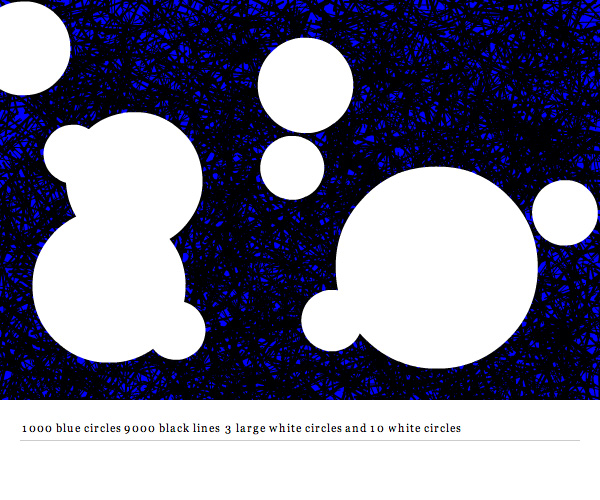
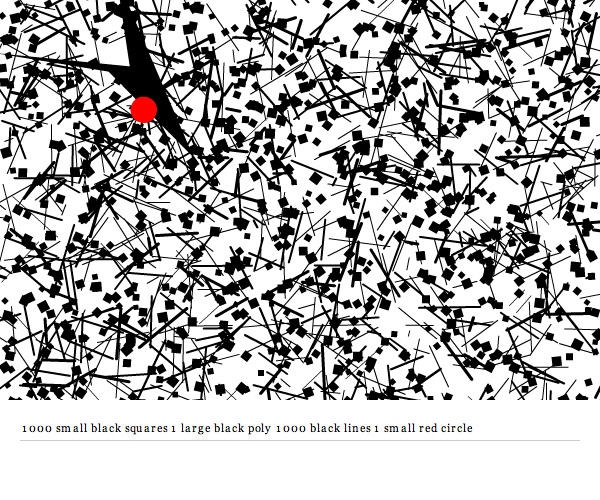
I’ve been meaning to post this source for a long time. It’s a project I created for shapevent called Command Draw. It allows you to use simple sentence structure to create textures and patterns.

See it in action here (this one has some minimal UI and uses flashvars for the command string).


As a side note, this is the 200th post on ActionSnippet.com

Read snippet: Command Draw Source

Object Parsing (object from string #2)

var str:String = '{numA:100, numB:100, stringA:"hi there", object:{red:155, green:155, blue: 255}, array1D:[1, 2, 3, 4, 5, "six"], array2D:[[1,0,0], [0,1,0], [0,0,"z"]], color:0xFF0000}'

var obj:Object = toObject(str);//, true); // comment the "true" in for some debug info

// acess every value in the object for testing purposes
trace(obj.numA);
trace(obj.numB);
trace(obj.stringA);
trace(obj.object.red, obj.object.green, obj.object.blue);
trace(obj.array1D +" testing access: " + obj.array1D[3]);
trace(obj.array2D + " testing access: " + obj.array2D[1] + "  -  " + obj.array2D[2][2]);
trace(obj.color);

/*outputs:
100
100
hi there
155 155 255
1,2,3,4,5,six testing access: 4
1,0,0,0,1,0,0,0,z testing access: 0,1,0  -  z
16711680
*/
 
function toObject(str:String, debug:Boolean=false):Object{
	var cmds:Array = new Array();
	var stack:String = "";
	// skip first {
	str = str.replace(/^s+{|^{/, "");
	var obj:Object = new Object();
	for (var i:int = 0; i<str.length; i++){
		var char:String = str.charAt(i);
		if (char == ":"){
			cmds.push(["name:", stack])
			stack = "";
			char = "";
		}else
		if (char == "," || char == "}"){
			if (stack != ""){
			  cmds.push(["value:", stack]);
			}
			stack = "";
			char = "";
		}else
		if (char == '"'){
			stack = '"';
			for (j = i + 1; j <str.length; j++){
				char = str.charAt(j);
				stack+=char;
				i++;
				if (char == '"'){
					 break;
				}
			}
			cmds.push(["value:", stack]);
			stack = "";
			char = "";
		}else
		if (char == "{"){
			cmds.push(["object:", stack]);
			for (var j:int = i; j <str.length; j++){
				char = str.charAt(j);
				stack+=char;
				i++;
				if (char == "}"){
					 break;
				}
			}
			cmds.push(["value:", stack]);
			stack = "";
			char = "";
		}else
		if (char == "["){
			cmds.push(["array:", stack]);
			stack = "";
			char = "";
		}else if (char == "]"){
			if (stack != ""){
				cmds.push(["value:", stack]);
			}
			stack = "";
			char = "";
			i++;
		}
		stack += char;
	}
	// show some debug info
	if (debug){
		for (i = 0; i<cmds.length; i++) trace(cmds[i]);
	}
	// build the object
	var prop:String;
	var arrayMode:Boolean = false;
	var nest:int = 0;
	for (i = 0; i<cmds.length; i++){
		if (cmds[i][0] == "name:"){
			prop = cmds[i][1].replace(/s/g, "");
			arrayMode = false;
			nest = 0;
		}else if (cmds[i][0] == "value:"){
			if (arrayMode == false){
			  obj[prop] = valueType(cmds[i][1]);
			}else{
				// populate array
				if (nest == 1){
				  obj[prop].push(valueType(cmds[i][1]))
				}else{
				  obj[prop][nest - 2].push(valueType(cmds[i][1]))
				}
			}
		}else if (cmds[i][0] == "object:"){
			i++;
			obj[prop] = toObject(cmds[i][1], debug);
		}else if (cmds[i][0] == "array:"){
			arrayMode = true;
			nest++;
			if (nest == 1){
				// create array
				obj[prop] = new Array()
			}else{
				// nested array
				obj[prop].push(new Array());
			}
		}
	}
	return obj;
}
 
function valueType(val:*):* {
	if (isNaN(Number(val))) {
		   // remove leading and trailing white
		   // remove "" around strings
		   val = val.replace(/^s+|s+$/g,"").replace(/^"|"$/g,"");
		   //  see if it's a boolean
		   if (val == "true"){
			   val = true;
		   }else if (val == "false"){
			   val = false
		   }
	} else {
		val = Number(val);
	}
	return val;
}

This rather large code snippet parses ActionScript style Object syntax. While this is by no means a complete parser – it was easy to write and saved me a great deal of time on a project recently….

I specifically needed support for 1D and 2D arrays as Object properties. If that weren’t the case I would have used something simple like yesterdays method. The array support won’t work with anything higher than a 2D array (for now… may fix that soon). For fun I also added nested Object support – this doesn’t have any dimensional limitation so you can nest as many objects as you want. For instance.. this works just fine:

var gameUser:Object = toObject('{name:"Mr.S", alive:true, stats:{lives:100, points:1200, data:[100,12,40,12,90], plant:{branch:{leaves:["red, "green", "blue"]}}}');

trace(gameUser.stats.plant.branch.leaves[0]);
trace(gameUser.stats.lives);
// boolean support
trace("not true is false: ", !gameUser.alive);
/*outputs:
red
100
not true is false:  false
*/

You’ll also notice the added boolean support in the above example. Which was suggested by katopz in the comments of yesterdays post.

Definitely need to add a word of warning here… I wouldn’t be surprised if there were a bug or two lurking in this code. The Objects I’ve been parsing with it are all quite similar… so use at your own risk.

UPDATEs – Known Issues:
1) fixed a bug where if a String property contains a ,{}[] or : character the parser failed.
Read snippet: Object Parsing (object from string #2)

Object from String

var str:String='{x: 10, y:10, width:100, heigth:100, name:"myClip", type:"clip"}';

var obj:Object=toObject(str);

trace(obj.x + obj.width, obj.name, obj.type);

function toObject(str:String):Object {
	str=str.replace(/{|}/g,"");
	// to an array of name value pairs [0] = name, [1] = value etc...
	var pairs:Array=str.split(/:|,s+/);
	var obj:Object = new Object();
	for (var i:int = 0; i<pairs.length; i+=2) {
		obj[pairs[i]]=numOrString(pairs[i+1]);
	}
	return obj;
}
function numOrString(val:*):* {
	if (isNaN(Number(val))) {
		if (val.charAt(0) == '"' && val.charAt(val.length - 1) == '"'){
			val = val.substr(1, val.length - 2);
		}
	} else {
		val=Number(val);
	}
	return val;
}

A very limited way to parse an object from a string… Tomorrow I’ll post a better version of this that’s a good deal more complex and doesn’t really use regular expressions… This works nicely if you don’t have arrays as Object properties…

Read snippet: Object from String

Object Argument w/ Defaults

var boxDefaults:Object = {x:10, y:10, width:100, height:100, lineThickness:0, lineColor:0x000000, lineAlpha:1, fillColor:0xCCCCCC, fillAlpha:1}
function drawBox(params:Object=null):void {
	var p:Object=setDefaults(boxDefaults, params);
	graphics.lineStyle(p.lineThickness, p.lineColor, p.lineAlpha);
	graphics.beginFill(p.fillColor, p.fillAlpha);
	graphics.drawRect(p.x, p.y, p.width, p.height);
}

function setDefaults(defaults:Object, params:Object=null):Object {
	if (params==null) {
		params = new Object();
	}
	for (var key:String in defaults) {
		if (params[key]==null) {
			params[key]=defaults[key];
		}
	}
	return params;
}

// test it out... notice that all object properties are optional and have default values										  
drawBox();

drawBox({x:200, y:200, lineColor:0xFF0000, lineThickness:2, fillColor:0xCCCC00});

drawBox({x:200, y:320, width:50, height:150, lineAlpha:0, fillColor:0x416CCF});

This is a technique I’ve been using recently… inspired by tweening engines. I find this to be suitable when a function or object constructor has lots and lots of arguments (80% of the time if I have a function or object constructor with too many arguments I re-think my design, but every now and then I use this technique).

Basically, the function or object constructor takes one argument of type Object – once passed into the function this Object argument is passed to the setDefault() function which populates it with any properties that it’s missing – each property has a default value. As a result you end up with an easy to read function call with a variable number of arguments and well thought out default values.

This snippet just draws a box (not very interesting or usefull) – I wanted to showcase the technique using a simple function. As a real world example… I recently used this technique in a mini-library I created for use with Box2D… will be posting the library in the next few days…. it’s a library for fast prototyping and custom rendering.

Read snippet: Object Argument w/ Defaults

Flashvars

// variable is passed into the swf via Javascript (most likely swfObject)
// myswf.swf?myFlashVar="a new value"

var myFlashVar:String = "Some Default Value";
if (root.loaderInfo.parameters.myFlashVar){
   myFlashVar = root.loaderInfo.parameters.myFlashVar;
}

Getting at flashvars in AS3 requires a bit more typing than it did in AS2. Above is a technique I find myself using from time to time. Usually for paths to xml or dynamic callouts (large buttons with text, an image and a link that change frequently).

Read snippet: Flashvars

Object.constructor()

var Box:Function = {
	constructor : function(color:uint, w:Number, h:Number):void {
		this.color = color;
		this.s = new Shape();
		with(this.s.graphics) beginFill(this.color), drawRect(0,0,w,h);
		addChild(this.s);
		
		this.setLoc = function(x:Number, y:Number):void{
			this.s.x = x;
			this.s.y = y;
	   }
	}
}.constructor;

var box0:Object = new Box(0xFF0000, 100, 100);

box0.setLoc(100, 10);

var box1:Object = new Box(0x000000, 50, 50);

box1.setLoc(210, 10);

This snippet makes use of Object.constructor() to allow creation of Object instances using the new keyword. This is for fun only, I don’t recommend this over actual Classes.

Read snippet: Object.constructor()

Square Bracket Syntax & Typecasting

addChild(new TextField());
getChildAt(0)["text"] = "Hello World";

Notice that square bracket syntax makes it so we don’t need to typecast. Take a look at the other way:

addChild(new TextField());
TextField(getChildAt(0)).text = "Hello World";

Typecasting is the way to go…. the square bracket technique is just an interesting trick.

I wrote this after somehow stumbling on this very entertaining page – it shows hello world written in approximately 200 different languages…

Read snippet: Square Bracket Syntax & Typecasting

“in” Operator

var obj:Object = {name: "Joe", hobby: "Guitar", age:"80"};

if ("name" in obj){
	trace(obj, " has a name property");
}

if ("x" in obj == false){
	trace(obj, " doesn't have an x property");
}


var mySprite:Sprite = new Sprite();

if ("currentFrame" in mySprite == false){
	trace(mySprite, "does not have a currentFrame property");
}

The “in” operator can be used to check if an object has a specific property. In the above example I test a standard Object instance and a Sprite instance for a few different properties.

I could see this operator being used when dealing with * (wildcard) datatypes and dynamic style code….

Read snippet: “in” Operator

Graphics Class Methods in XML

// for simplicity I left this XML inline, this will work exactly the same if it were external
var program:XML=<body>
				<draw>
				  <![CDATA[
				   beginFill(0xFF0000);
				   drawCircle(100,100,50);
				   endFill();
				   lineStyle(0, 0x666666);
				   moveTo(100, 100);
				   lineTo(200, 200);
				   moveTo(300, 200);
				   curveTo(350, 300, 400, 200);
				   lineStyle(0, 0x0000FF);
				   drawRect(200, 50,100,100) ;
					]]>
				</draw>
</body>;

// parse and run the Graphics class commands from the XML
render(parseFunctions(program.draw.toString()));

function parseFunctions(dat:String):Array{
	var a:Array = dat.split(";") ;
	for (var i:int = 0; i<a.length-1; i++){
		a[i] = a[i].split(/()|(|)/g);
		var f:String = a[i][0] = a[i][0].replace(/s/g,"");
		a[i] = a[i].splice(0, a[i].length - 1);
		if (a[i].length> 1){
		 a[i] = a[i][1].split(",");
		 a[i].unshift(f);
		}
	}
	return a.splice(0,a.length - 1);
}
function render(p:Array):void {
	for (var i:int = 0; i<p.length; i++) {
		graphics[p[i][0]].apply(graphics,p[i].splice(1));
	}
}

The above code builds on yesterdays post by showing how one could potentially store graphics class method calls in XML using a few regular expressions and Function.apply().

The parseFunctions() function reads through the CDATA string and formats it in a 2D array that looks like this:

[[beginFill, 0xFF0000], [drawCircle, 100, 100, 50], etc...]

The render() function reads through this 2D array, using the first value of each nested array as the function and the remaining values as arguments…

As is this won’t really work with most of the new fp10 graphics methods…

Read snippet: Graphics Class Methods in XML