Actionscript:
-
var circs:Array = []
-
var circNum:int = 600;
-
addEventListener(Event.ENTER_FRAME, onAdd);
-
function onAdd(evt:Event):void {
-
if (circs.length <circNum){
-
makeGrowable();
-
}
-
}
-
-
function makeGrowable(){
-
-
var s:MovieClip = MovieClip(addChild(new MovieClip()));
-
s.x = Math.random() * stage.stageWidth;
-
s.y = Math.random() * stage.stageHeight;
-
with(s.graphics){
-
lineStyle(0,0);
-
drawCircle(0,0,10);
-
}
-
s.scaleX = s.scaleY = 0;
-
circs.push(s);
-
s.addEventListener(Event.ENTER_FRAME, onScaleUp);
-
}
-
-
function onScaleUp(evt:Event):void {
-
var c:MovieClip = MovieClip(evt.currentTarget);
-
c.scaleX = c.scaleY += 0.05;
-
for (var i:int = 0; i<circs.length; i++){
-
var circ:MovieClip = circs[i];
-
if (circ != c){
-
var amt:Number = circ.width/2 + c.width/2;
-
var dx:Number = circ.x - c.x;
-
var dy:Number = circ.y - c.y;
-
var dist:Number = Math.sqrt(dx * dx + dy * dy);
-
if (amt> dist){
-
c.removeEventListener(Event.ENTER_FRAME, onScaleUp);
-
if (c.scaleX <0.1){
-
if (contains(c)){
-
removeChild(c);
-
}
-
}
-
}
-
}
-
-
}
-
}
Circle fitting is one of those things I've never bothered to do... today I figured I'd give it a try and this is what I came up with. I posted it on wonderfl:
Actionscript:
-
var story:String = "Fill in the _____.";
-
-
-
var txt:TextField = new TextField();
-
txt.defaultTextFormat = new TextFormat("Georgia", 20);
-
txt.width = stage.stageWidth;
-
txt.multiline = true;
-
txt.wordWrap = true;
-
txt.text = story;
-
addChild(txt);
-
-
var alph:Array = "abcdefghijklmnopqrstuvwxyz".split("");
-
var keys:Object = {};
-
for (var i:int = 0; i<alph.length; i++){
-
keys[65 + i] = alph[i];
-
}
-
stage.addEventListener(KeyboardEvent.KEY_DOWN, onKeyPressed);
-
function onKeyPressed(evt:KeyboardEvent):void{
-
-
if (evt.keyCode == Keyboard.ENTER){
-
story = "Fill in the _____.";
-
txt.text = story;
-
}
-
-
for (var i:int = 0; i<story.length; i++){
-
if (story.charAt(i) == "_"){
-
var head:String = story.substr(0, i);
-
var tail:String = story.substr(i + 1);
-
var letter:String = keys[evt.keyCode];
-
if (!letter) return;
-
story = head + letter + tail;
-
-
txt.text = story;
-
-
break;
-
}
-
}
-
}
I needed to do a fill in the blank for a personal project that I'm working on and this is what I came up with. Have a look at the swf here:
(you need to click first so you can type with the keyboard):
Fill in the blank
Posted in TextField, UI | Also tagged actionscript, flash |
Actionscript:
-
var xp:Number = 0;
-
var yp:Number = 0;
-
var t:Number = 0;
-
var a:Number = 100;
-
var b:Number = 10;
-
x = stage.stageWidth / 2;
-
y = stage.stageHeight / 2;
-
-
graphics.lineStyle(0,0x000000);
-
addEventListener(Event.ENTER_FRAME, onRun);
-
function onRun(evt:Event):void {
-
var p:Number = ((a + b)/b)*t
-
xp = (a + b) * Math.cos(t) - b * Math.cos(p);
-
yp = (a + b) * Math.sin(t) - b * Math.sin(p);
-
if (t == 0){
-
graphics.moveTo(xp, yp);
-
}else{
-
graphics.lineTo(xp, yp);
-
}
-
t += 0.05;
-
}
I've messed with Epicycloids in the past - browsing mathworld I decided to create this snippet. It will draw a curve like this:

Actionscript:
-
var xp:Number = 0;
-
var yp:Number = 0;
-
var t:Number = 0;
-
var a:Number = 200;
-
x = stage.stageWidth / 2;
-
y = stage.stageHeight / 2;
-
-
graphics.lineStyle(0,0x000000);
-
addEventListener(Event.ENTER_FRAME, onRun);
-
function onRun(evt:Event):void {
-
xp = a * Math.cos(t) - (a * Math.pow(Math.sin(t),2))/Math.sqrt(2);
-
yp = a * Math.cos(t) * Math.sin(t);
-
if (t == 0){
-
graphics.moveTo(xp, yp);
-
}else{
-
graphics.lineTo(xp, yp);
-
}
-
t += 0.05;
-
}
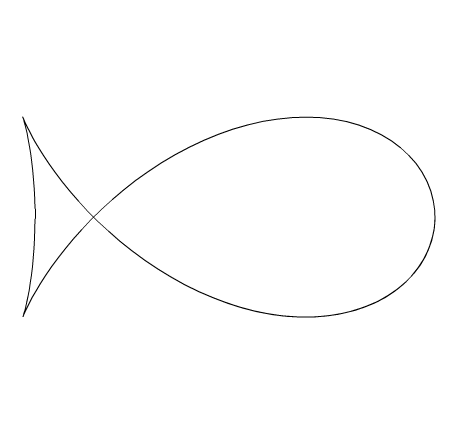
While surfing mathworld I stumbled upon the equation for something called the Fish Curve. This snippet will draw something like this:

Posted in Math, misc | Also tagged actionscript, flash |
Actionscript:
-
var xp:Number = 0;
-
var yp:Number = 0;
-
var t:Number = 0;
-
var r:Number = 200;
-
x = stage.stageWidth / 2;
-
y = stage.stageHeight / 2;
-
-
graphics.lineStyle(0,0x000000);
-
addEventListener(Event.ENTER_FRAME, onRun);
-
function onRun(evt:Event):void {
-
r = 200 * Math.cos(t / 10);
-
xp = r * Math.pow(Math.cos(t), 3);
-
yp = r * Math.pow(Math.sin(t), 3);
-
if (t == 0){
-
graphics.moveTo(xp, yp);
-
}else{
-
graphics.lineTo(xp, yp);
-
}
-
t += 0.1;
-
}
While browsing mathworld I decided to do a variation on this curve . The above snippet will draw something like this:

Posted in Math, misc | Also tagged actionscript, flash |
Actionscript:
-
[SWF(width = 500, height=500)]
-
var ring:MovieClip = createRing();
-
ring.x = stage.stageWidth / 2;
-
ring.y = stage.stageHeight / 2;
-
addChild(ring);
-
-
function createRing(sectionNum:int = 30):MovieClip{
-
var container:MovieClip = new MovieClip();
-
container.circles = [];
-
container.theta = 0;
-
container.thetaDest = 0;
-
var step:Number = (Math.PI * 2) / sectionNum;
-
for (var i:int = 0; i<sectionNum; i++){
-
var c:MovieClip = new MovieClip();
-
with (c.graphics){
-
lineStyle(0,0x000000);
-
beginFill(0xCCCCCC);
-
drawCircle(0,0,20);
-
}
-
c.thetaOffset = step * i;
-
container.addChild(c);
-
container.circles.push(c);
-
}
-
container.addEventListener(Event.ENTER_FRAME, onRun);
-
return container;
-
}
-
function onRun(evt:Event):void {
-
var container:MovieClip = MovieClip(evt.currentTarget);
-
var num:int = container.circles.length;
-
for (var i:int = 0; i<num; i++){
-
var c:MovieClip = container.circles[i];
-
var angle:Number = container.theta + c.thetaOffset;
-
c.x = 200 * Math.cos(angle);
-
c.y = 100 * Math.sin(angle);
-
c.scaleX = (100 + c.y) / 120 + 0.2;
-
c.scaleY = c.scaleX;
-
}
-
container.circles.sortOn("y", Array.NUMERIC);
-
for (i = 0; i<num; i++){
-
container.addChild(container.circles[i]);
-
}
-
if (container.mouseX <-100){
-
container.thetaDest -= 0.05;
-
}
-
if (container.mouseX> 100){
-
container.thetaDest += 0.05;
-
}
-
container.theta += (container.thetaDest - container.theta) / 12;
-
-
}
This snippet shows how to create a 3D ring navigation using sine and cosine. Have a look:
Actionscript:
-
makeFlyer();
-
-
function makeFlyer():void{
-
var thing:MovieClip = new MovieClip();
-
thing.x = 200;
-
thing.y = 200;
-
-
addChild(thing);
-
-
var prop:Shape = new Shape();
-
with (prop.graphics){
-
lineStyle(0,0x000000);
-
beginFill(0x000000);
-
moveTo(-100,0);
-
curveTo(-100, -30, 0, 0);
-
curveTo(100, 30, 100, 0);
-
curveTo(100, -30, 0, 0);
-
curveTo(-100, 30, -100, 0);
-
}
-
prop.scaleX = prop.scaleY = 0.5;
-
var container:MovieClip = new MovieClip();
-
//container.x = -50;
-
container.addChild(prop);
-
container.scaleY = 0.6;
-
thing.addChild(container);
-
-
var body:Shape = new Shape();
-
with (body.graphics){
-
lineStyle(0, 0x000000);
-
beginFill(0x000000);
-
lineTo(0,80);
-
drawCircle(0,80,10);
-
}
-
thing.addChild(body);
-
thing.velX = 0;
-
thing.velY = 0;
-
thing.posX = thing.x;
-
thing.posY = thing.y;
-
thing.theta = 0;
-
thing.prop = prop;
-
thing.addEventListener(Event.ENTER_FRAME, onRun);
-
}
-
function onRun(evt:Event):void{
-
var t:MovieClip = MovieClip(evt.currentTarget);
-
t.prop.rotation += 10
-
t.velY = 3 * Math.cos(t.theta);
-
t.velX = 3 * Math.sin(t.theta / 2);
-
t.theta += 0.05
-
t.posX += t.velX;
-
t.posY += t.velY;
-
-
t.x = t.posX;
-
t.y = t.posY;
-
}
This snippet creates a small flying object that moves with sine and cosine.
Have a look at the swf...

Posted in motion | Also tagged actionscript, flash |
By Zevan | April 30, 2010
So there are 434 posts on this site to date. I hope to keep posting but it isn't always easy to come up with new ideas. Another project I've been working on is a series of drawings and interactive animations over at my other website (shapevent). I've been creating entries for this part of shapevent pretty regularly - go have a look:
http://www.shapevent.com/log/
By Zevan | April 24, 2010
Actionscript:
-
var circles:Array = [];
-
for (var i:int = 0; i<30; i++){
-
var c:Sprite = makeCircle();
-
c.x = stage.stageWidth / 2;
-
c.y = stage.stageHeight / 2;
-
c.scaleX = 1 + i/2;
-
c.scaleY = 0.5 + i/4;
-
addChild(c);
-
circles.push(c);
-
}
-
addEventListener(Event.ENTER_FRAME, onLoop);
-
function onLoop(evt:Event):void {
-
circles[0].y += (mouseY - circles[0].y) / 4;
-
for (var i:int = 1; i<circles.length; i++){
-
var pre:Sprite = circles[i - 1];
-
circles[i].y += (pre.y - circles[i].y) / 4;
-
}
-
}
-
function makeCircle():Sprite{
-
var s:Sprite = new Sprite();
-
with(s.graphics){
-
lineStyle(0,0x000000);
-
drawCircle(0,0,10);
-
}
-
return s;
-
}
This morning I woke up with a vision of this simple mouse toy in my head. I decided I might as well code it up... I may do more simple things like this in the next few days, it's relaxing.
By Zevan | April 23, 2010
Actionscript:
-
var word:String = "TextLineMetrics are useful";
-
var letters:Array = word.split("");
-
-
var pre:TextField;
-
for (var i:int = 0; i<letters.length; i++){
-
var t:TextField = new TextField();
-
t.defaultTextFormat = new TextFormat("Arial", 40);
-
t.autoSize = TextFieldAutoSize.LEFT;
-
t.textColor = int(Math.random() * 0xFFFFFF);
-
t.text = letters[i];
-
if (pre){
-
var metrics:TextLineMetrics = pre.getLineMetrics(0);
-
t.x = metrics.width + pre.x;
-
}
-
pre = t;
-
addChild(t);
-
}
Sometimes you need to do something to a TextField one letter at a time. One way to do this is to create a separate TextField for each letter and position them based on the TextLineMetrics object. This snippet creates textFields for a string and colors each TextField randomly.