Actionscript:
-
import com.actionsnippet.qbox.*;
-
import Box2D.Common.Math.*;
-
-
[SWF(width = 800, height = 600, backgroundColor = 0x000000, frameRate=60)]
-
-
var sim:QuickBox2D = new QuickBox2D(this, {debug:false, frim:true});
-
-
sim.createStageWalls();
-
-
var boxA:QuickObject = sim.addBox({x:3, y:3, width:2, height:2, fillColor:0xFF0000});
-
var boxB:QuickObject = sim.addBox({x:3, y:6, width:2, height:2, fillColor:0xFF0000});
-
-
sim.start();
-
sim.mouseDrag();
-
-
// when boxA touches boxB a circle QuickObject is created
-
var contacts:QuickContacts = sim.addContactListener();
-
// listen for contact points being added
-
contacts.addEventListener(QuickContacts.ADD, onAdd);
-
function onAdd(evt:Event):void{
-
// see if this contact event is associated with boxA and boxB
-
if(contacts.isCurrentContact(boxA, boxB)){
-
// get the location of the collision in world space
-
var loc:b2Vec2 = contacts.currentPoint.position;
-
// you cannot create new QuickObjects inside this listener function
-
// so we just give a 5 ms delay
-
setTimeout(sim.addCircle, 5, {x:loc.x, y:loc.y});
-
}
-
}
Note: This snippet requires QuickBox2D 1.0 or greater
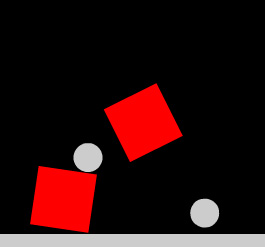
I've created a few simple examples to show how to use QuickBox2D contact listeners. This is the first one. When two boxes collide circles are added to the simulation at the point of collision.
9 Comments
Very nice work my mate. I think I’ll do some tests with it.
Still I don’t understand why you use the method(object) pattern. It’s the most unintuitive way to do it. There is no way to see what parameters it takes from outside the class. Without reading the documentation all the time
Why not write the methods like addBox(x:int = 0, y:int = 0, width:Number = 1…
With ‘fast to use’ -defaults. Or at least use the ValueObject class like this:
addBox(new BoxVO(x:int = 0, y:int = 0, width:Number = 1…
It might be that the method(object) is best for creating the api, but what comes to usability it’s no go. Anyway it’s your API and you do what you like and I should go bitching somewhere else or build my own
Hey Simppa - thanks for the feedback, I don’t think your bitching at all - I like to hear suggestions like the one you propose here. First off, you CAN do exactly
what you describe. You would just need to create a little patch containing the BoxVO, PolyVO etc classes… I created BoxVO and tested it and it works fine…
since addBox takes an Object if you pass a class to it that has all the correct properties it works just fine… Still, I think there are more usability issues with that
then the way it currently works…
The reason I chose this style of API was because I really liked the flow of working with engines like TweenLite (which work in a similar way) - I’ve found that I now have that same kind of flow when I work with QuickBox2D.
With Box2D there are SO many different params you can set up just for one rigid body - so doing method/constructors calls with defaults would be cumbersome because you would potentially end up having to type a lot of default values in order to get to a specific argument that is 10 arguments in… that is near the end of the function call:
addBox(x:Number = 0, y:Number = 0, width:Number = 0, height:Number = 0, angle:Number, draggable:Boolean, density:Number, friction:Number, restitution:Number, linearDamping:Number, angularDamping:Number etc… etc…
It’s nice to be able to do:
addBox({x:100, y:3, width:1, height:1, groupIndex:-1});
and not have to worry about typing a bunch of defaults to get to the groupIndex argument…
here are all params for box, just so you see how many there are:
http://actionsnippet.com/qb2d/docs/html/com_actionsnippet_qbox_QuickBox2D.html#addBox
After playing with Box2D for a few hours it was easy for me to remember things like, angle, density, friction, restitution, linearDamping, angularDamping, isBullet, allowSleep, isSleeping, fixedRotation, mass, groupIndex. In the end I think it’s a matter of taste, I don’t find myself going back to the documentation very much unless I’m using something obscure like categoryBits or maskBits and in that case, I’m also going back to the Box2D manual…
Thanks again for your comments…
Also, if you do decide to create that patch, save yourself time by finding all the common object params and putting them in a superclass- then BoxVO would just have width and height , CircleVO would just have radius etc… Also, if you decide to create that patch - let me know, I’d be interested to see how it works out…
Hi,
i have a question.i would like to know how to remove( destroy) a rigid body via mouseclick.For example i have 6 circles on the stage and each one should disappear if the mouse button was clicked.
Could you provide an example on how to do this?
Kind regards,
John
Hey John,
You can use the QuickObject.destroy() method. So anything you want to get rid of, just call the destroy() method on it. Here is a slightly advanced example I created to test for memory leaks: http://actionsnippet.com/?p=2359
Hi Zevan,
using contact listeners for removing rigid bodies via mouseclick doesn’t make sense to me.I think the best way is to use an array full of rigid bodies and then check for clicks and remove each one apart.
Not so easy for me at the moment.I am new in the actionscript world.
Kind regards,
John
var circles:Array = [];
for (var i:int = 0; i<6; i++)
{
circles[i] = sim.addCircle({x:6 + i,y:5,radius:0.5});
}
circles.addEventListener(MouseEvent.CLICK, onClick);
function onClick(evt:Event):void
{
trace(evt.target);
}
here is my attempt but it fails.i get an error message.A little help is much appreciated.
I didn’t mean to imply you need contact listeners to destroy a QuickObject - you just need to use the destroy() method. There area few things wrong with your code. First,
circles.addEventListener…
circles is an Array so you can’t use addEventListener with it.
second… to addEvents to QuickObjects you need to use the userData property. I’ve uploaded an example to wonderfl.net … have a look:
http://wonderfl.net/c/lm5I
Thank you very much,Zevan.
One Trackback
[...] QuickBox2Dによる衝突判定1 – QuickBox2D Contacts Part 1 [...]