Latest snippets

Funny Parameterized Factory

package{

	import flash.utils.getDefinitionByName;
	
	public class Creator{
		
		public function Creator():void{
			// classes we can create
			 ClassA;
			 ClassB;
		}

		public function create(type:String):ISomeInterface{
			 var ClassRef:Class = getDefinitionByName(type) as Class;
			 return ISomeInterface(new ClassRef());
		}
	}
}
package{
	public interface ISomeInterface{
		function sayHi():void;
	}
}
 package{
	
	public class ClassA implements ISomeInterface{
		
		public function ClassA(){
			trace("new ClassA()");
		}
		
		public function sayHi():void{
			trace("hello I am a ClassA instance");
		}
	}
	 
}
 package{
	
	public class ClassB implements ISomeInterface{
		
		public function ClassB(){
			trace("new ClassB()");
		}
		
		public function sayHi():void{
			trace("hello I am a ClassB instance");
		}
	}
	 
}

… and lastly on the timeline:

var creator:Creator = new Creator();

var a:ISomeInterface = creator.create("ClassA");
a.sayHi();

var b:ISomeInterface = creator.create("ClassB");
b.sayHi();

/*outputs

new ClassA()
hello I am a ClassA instance
new ClassB()
hello I am a ClassB instance

*/

Unfortunately this has some downsides compared to a switch or if statement parameterized factory. Still fun though…

XML to ActionScript #2

var script:XML=<code>
  
   <make reference="blur" class="flash.filters.BlurFilter">
     <set blurX="10" blurY="10" />
   </make>
   
   <make reference="filts" class="Array">
     <call method="push">
	   <arg reference="blur" />
	 </call>
   </make>
   
   <make reference="mat" class="flash.geom.Matrix">
	 <call method="rotate" args="1" />
	 <set tx="100" ty="100" />
   </make>
   
   <make reference="box" class="flash.display.Sprite" >
	   <setRef filters="filts" transform.matrix="mat"/>
	   <call method="graphics.beginFill" args="0x000000" />
	   <call method="graphics.drawRect" args="-50,-50,100,100" />
   </make>
   
   <call method="addChild">
     <arg reference="box"/>
   </call>
   
   <make reference="tf" class="flash.text.TextFormat">
    <set font="_sans" size="12" color="0xFFFFFF" />
   </make>
  
   <make reference="txt" class="flash.text.TextField" >
     <setRef defaultTextFormat="tf" />
     <set autoSize="center" text="XML to AS3" />
   </make>
  
   <make reference="circle" class="flash.display.Sprite" >
	   <set x="300" y="300" />
	   <call method="graphics.beginFill" args="0xFF0000" />
	   <call method="graphics.drawCircle" args="0,0,100" />
	   <call method="addChild">
         <arg reference="txt" />
       </call>
   </make>
   
   <call method="addChild">
     <arg reference="circle"/>
   </call>
  
</code>

// parse and run
runCode(this, script);

function runCode(target:*, code:XML):void{
	var children:XMLList = code.children();
	for (var i:int = 0; i<children.length(); i++){
		var child:XML = children[i];
		var type:String = child.name();
		if (type == "call"){
			runMethod(target, child);
		}else if (type == "set"){
			setProp(target, child);
		}else if (type == "setRef"){
			setRefProp(target, child);
		}else if (type == "make"){
			makeInstance(child);
		}
	}
}

function makeInstance(code:XML):void{
	var ClassRef:Class = getDefinitionByName(code.@["class"]) as Class;
	// nothing can be passed to the class constructor
	// its not possible with function.apply
	var instance:* = this[code.@reference] = new ClassRef();
	runCode(instance, code);
}

// set a property to a reference
function setRefProp(target:*, code:XML):void{
	var attributes:XMLList = code.attributes();	
	for (var i:int = 0; i<attributes.length(); i++){
		var prop:String = attributes[i].name();
		var o:Object = dotSyntax(target, prop, 1)
		if (prop.indexOf(".") != -1){
		  o.obj[o.prop] = dotSyntax(this, attributes[i]);
		}else{
		  o.obj[o.prop] = this[attributes[i]];
		}
	}
}

// set a property to a value such as a Number, Boolean, String etc...
function setProp(target:*, code:XML):void{
	var attributes:XMLList = code.attributes();	
	for (var i:int = 0; i<attributes.length(); i++){
		var prop:String = attributes[i].name();
		var o:Object = dotSyntax(target, prop, 1)
		o.obj[o.prop] = valueType(attributes[i]);
	}
}

function runMethod(target:*, code:XML):void{
	var i:int = 0;
	// get a reference to the function
	var method:Function = dotSyntax(target, code.@method);
	// call the function if there are no arguments
	var attributeArgsLength:int = code.@args.toXMLString().length;
	var childArgsLength:int = code.arg.length()
	if (attributeArgsLength == 0 && childArgsLength == 0){
		method();
	}else{
	 
	 var args:Array;
	 if (attributeArgsLength > 0){
		 args = code.@args.toString().split(",");
	 } else {
		args = []; 
	 }
	
	 for (i = 0; i<childArgsLength; i++){
		  var val:String = code.arg[i].@value;
		  if (val){
		    args.push(val); 
		  }
	  }
	  for (i = 0; i<args.length; i++){
		  if (args[i] != ""){
		    args[i] = valueType(args[i]); 
		  }
	  }
	  for (i = 0; i<code.arg.length(); i++){
		 var rs:String = code.arg[i].@reference;
		 if (rs){
			 args.push(dotSyntax(this, rs));  
		 }
	  }
	 
	  // run the function
	  method.apply(null,args);
	}
}

// parse dot syntax and return the last property or method
function dotSyntax(target:*, str:String, offset:int = 0):*{
	var path:Array = str.split(".");
	var curr:* = target;
	for (var i:int = 0; i<path.length - offset; i++){
		curr = curr[path[i]]
	}
	if (offset != 0){
		return {obj:curr, prop:path[i]}
	}
	return curr;
}

function valueType(val:*):* {
    if (isNaN(Number(val))) {
           // remove leading and trailing white
           // remove "" around strings
           val = val.replace(/^s+|s+$/g,"").replace(/^"|"$/g,"");
           //  see if it's a boolean
           if (val == "true"){
               val = true;
           }else if (val == "false"){
               val = false
           }
    } else {
        val = Number(val);
    }
	return val;
}

WARNING: There area few small bugs in this snippet. If you’d like to use this, check out the AsXML mini-library

This is the next version of yesterdays snippet. As you can see it isn’t really a snippet anymore… This code parses a specifically formatted xml file to allow the following features to be achieved from XML at runtime:

1) call methods of the main timeline
2) read and write properties on the main timeline
3) instantiate classes on the main timeline
4) call methods on these classes
5) read and write properties on these classes

By implement those five feature a great deal becomes possible. The above XML creates this somewhat crappy looking thing:
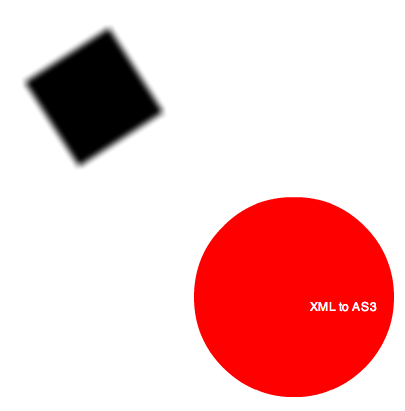
While that doesn’t look like much, it’s actually doing quite a bit… It has a BlurFilter, an Array (for the filters property), two Sprites, a TextFormat and a TextField. addChild() is called on the main timeline and on one of the sprites (to nest the TextField in the circle).

Uses For This

You could use this to create levels for a simple game.

You could generate this XML based on user input to create e-cards and mini-apps.

If you have a medium sized app you could use it to create a sort of advanced config file that helps to ease your pain as the client decides they need 10 subtly different versions of the app. Every time the client decides they need a subtly different version you’d just need to create a different config file. THIS is probably the thing that I’ll be using it for – could be a huge time saver…

Uses With Libraries

This could be used with TweenLite and/or Papervision. You could just add a bunch of import statements to the timeline or to a dynamic document class. Then you’d be able to do some basic authoring from the XML. I think I’ll post an example of this either tonight or tomorrow.

I did originally start writing this thinking about QuickBox2D – but I already have an editor for QuickBox2D that just needs some UI (currently its key controlled). So I don’t really need it. The QuickBox2D editor generates an ActionScript file – which makes sense because usually you need to go in and manually do a bunch of logic that couldn’t really be done easily with an editor. That said, this will work with Box2D or QuickBox2D as an XML format.

The Downside

The downside is that this is dynamic and is therefore untyped. All class instances created by reading the XML will be dynamically typed. For something where your only adding 10 classes this way, its no big deal – but for a game editor it could be a problem – at the very least there are interesting advanced techniques implemented in this snippet that could be repurposed for lots of different things.

More Examples

Tonight or tomorrow I’ll upload a few examples – it would be fun to do a TweenLite/Papervision example… would also be good to show what I mean by an advanced config for a medium sized app.
XML to ActionScript

// this xml is inline but could easily be in an external file
var script:XML=<code>

  <!-- // call some methods of the main timeline graphics property -->
  <call method="graphics.beginFill" args="0xFF0000" />
    
  <call method="graphics.drawRect" args="0, 0" >
     <!-- // use this to access properties of the main movie --> 
	 <!-- // and use them as arguments -->
     <arg reference="stage.stageWidth" />
	 <arg reference="stage.stageHeight" />
  </call>
  
  <call method="graphics.endFill" args=""/>
  
  <call method="graphics.beginFill" args="0x0000FF" >
     <!-- //regular non-reference arguments can be passed like this -->
     <arg value="0.5" />
  </call>
  
  <call method="graphics.drawCircle" args="100,100,20" />
  
  <call method="customFunction" args="hello" >
     <arg reference="root.loaderInfo.bytesTotal" />
  </call>
  
</code>

function customFunction(a:String, b:String):void{
	trace("I am a custom function called from xml");
	trace("Here is an argument: " + a);
	trace("Here is another argument, (total bytes of this swf): " + b);
}

// parse and run
runCode(script);

function runCode(code:XML):void{
	var children:XMLList = code.children();
	for (var i:int = 0; i<children.length(); i++){
		var child:XML = children[i];
		var type:String = child.name();
		if (type == "call"){
			runMethod(child);
		}
	}
}

function runMethod(code:XML):void{
	var i:int = 0;
	// get a reference to the function
	var method:Function = dotSyntax(code.@method);
	// call the function if there are no arguments
	if (code.@args.toXMLString().length == 0 && code.arg.length() == 0){
		method();
	}else{
	 
	 var args:Array = code.@args.split(",");
	 var childArgsLength:int = code.arg.length()
	 for (i = 0; i<childArgsLength; i++){
		  // add another one with dot syntax
		  var val:String = code.arg[i].@value;
		  if (val){
		    args.push(val); 
		  }
	  }
	  for (i = 0; i<args.length; i++){
		  if (args[i] != ""){
		    args[i] = valueType(args[i]); 
		  }
	  }
	  for (i = 0; i<code.arg.length(); i++){
		 var rs:String = code.arg[i].@reference;
		 if (rs){
			 var ref:* = dotSyntax(rs);
			 args.push(ref);  
		 }
	  }
	  // run the function
	  method.apply(null,args);
	}
}

// parse dot syntax and return the last property or method
function dotSyntax(str:String):*{
	var path:Array = str.split(".");
	var curr:* = this;
	for (var i:int = 0; i<path.length; i++){
		curr = curr[path[i]]
	}
	return curr;
}

function valueType(val:*):* {
    if (isNaN(Number(val))) {
           // remove leading and trailing white
           // remove "" around strings
           val = val.replace(/^s+|s+$/g,"").replace(/^"|"$/g,"");
           //  see if it's a boolean
           if (val == "true"){
               val = true;
           }else if (val == "false"){
               val = false
           }
    } else {
        val = Number(val);
    }
    return val;
}

WARNING: There area few small bugs in this snippet. If you’d like to use this, check out the AsXML mini-library

A few days ago I had the idea to write some code that would parse ActionScript from XML. The features that I realized would be possible are:

1) call methods of the main timeline
2) read and write properties on the main timeline
3) instantiate classes on the main timeline
4) call methods on these classes
5) read and write properties on these classes

So this morning I wrote the first part. This snippet has the ability to read an XML file and call methods accordingly. It also has the ability to read properties of the main timeline and pass them to these methods.

The XML in this snippet draws a box using the stageWidth and stageHeight. It draws a transparent circle and then calls a custom function. The custom function gets passed the root.loaderInfo.bytesTotal property.

I’ve done something similar a few times where I specifically targeted the Graphics API. This takes that to the next level by potentially working with any ActionScript classes (excluding Vector maybe… need to think about that).

I’ll post another version with more features tomorrow. At the very least it will have class instantiation.

Random Guitar Tablature

// number of notes in chord
var noteNum:int = 3;
var lowNote:Number = 0;
var highNote:Number = 4;
// delay between chords
var delay:int = 2000;
////////////////////////////////////////
var chord:String = "";
highNote += 1;
var tab:TextField = TextField(addChild(new TextField()));
tab.x = tab.y = 20;
tab.defaultTextFormat = new TextFormat("Courier", 12);
tab.multiline = true;
tab.width = 200;

changeChord();
setInterval(changeChord, delay);

function changeChord():void{
	var strings:Array = [];
	strings[0] = "e|---------------n"
	strings[1] = "B|---------------n"
	strings[2] = "G|---------------n"
	strings[3] = "D|---------------n"
	strings[4] = "A|---------------n"
	strings[5] = "E|---------------n"
	
	for (var i:int = 0; i<3; i++){
		var place:int = 5 + i * 4;
		var choices:Array = [0,1,2,3,4,5];
		for (var j:int = 0; j<noteNum; j++){
			var ii:int = int(Math.random()*choices.length);
			var index:int = choices[ii];
			strings[index] = strings[index].slice(0, place) + (int(Math.random()*highNote)+lowNote) +  strings[index].substring(place+1);
			choices.splice(ii, 1);
		}
	}
	chord = strings.join("");
	tab.text = chord;
}

I’m working on a small program to help me practice guitar. It randomly generates guitar tabs. The idea for the program is similar to a program that helps you learn to type (like Mavis Beacon).

I wrote this snippet today as a proof of concept – just to help me start thinking about what kind of features I want the program to have. There are settings at the top so that you can tweak the number of notes in the chord and the delay between chords etc….

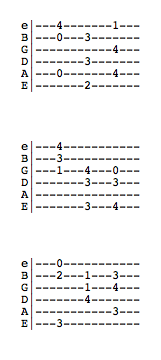
It generates three chords at a time… here are some stills:

Random Negative or Positive

for (var i:int = 0; i<10; i++){
  // randomly set a variable to -1 or positive 1
  trace(int(Math.random()*2) - 1 | 1);
}

/* outputs something like this
1
1
-1
1
-1
-1
1
1
-1
-1
*/

The past few days I found myself using this one-liner a few times. Just a quick way to randomly get -1 or 1.

I was brainstorming today and wrote a weird/bad inline version of an old post:

var rand:Number = [-3, 2, 1, 1, 1, 0.5][int(Math.random() * 6)];

I need to install a related posts plugin for WordPress – would be nice if this post were related to my old post about Tausworthe random seeds.

Been posting medium/large snippets and snippets the relate to QuickBox2D – so today I figured I’d get back to basics…

QuickBox2D FRIM

import com.actionsnippet.qbox.*;
import Box2D.Common.Math.*;

// try altering your frame rate
[SWF(backgroundColor=0x000000, width=700, height=600, frameRate=30)]
// try setting frim to false
var sim:QuickBox2D = new QuickBox2D(this, {iterations:20, timeStep:1 / 60, frim:true});

sim.setDefault({fillColor:0x003366, lineAlpha:0});
sim.createStageWalls();

sim.addBox({x:10, y:18, height:3, density:0});

sim.setDefault({fillColor:0x004466, lineColor:0x2B80F5});

var cVel:b2Vec2 = new b2Vec2();

for (var i:int = 0; i<32; i++){
	var c:QuickObject = sim.addCircle({x:13 + i % 8, y:10 + int(i / 8), friction:0.01, radius:0.2 + Math.random()*0.3, angularDamping:1});
	cVel.x = Math.random() * 4 - 2;
	cVel.y = Math.random() * 4 - 2;
	c.body.SetLinearVelocity(cVel);
}

var box:QuickObject = sim.addBox({x:3, y:16, width:2, height: 2});
var boxVel:b2Vec2 = new b2Vec2(15, -25);

sim.start();

// shoot the box from left to right
setTimeout(positionBox, 200);
function positionBox():void{
	// reset box position
	box.x = 3, box.y = 16;
	setTimeout(shootBox, 500);
}
function shootBox():void{
	box.body.SetLinearVelocity(boxVel);
	box.body.SetAngularVelocity(10);
	// shoot the box again
	setTimeout(positionBox, 4000);
}

You’ll need to download the latest version of QuickBox2D in order to run this snippet (alpha 107 as of this post). I recommend checking out the demo below first though…

The most notable feature of this release is FRIM (frame rate independent motion). FRIM is used to attempt to keep the speed of the Box2D simulation constant no matter what frame rate the swf is running at. This is good because frame rates will vary from browser to browser and from computer to computer.

Mr.Doob suggested that I implement this feature in QuickBox2D. If you haven’t seen his site I highly recommend checking it out – really great stuff there.

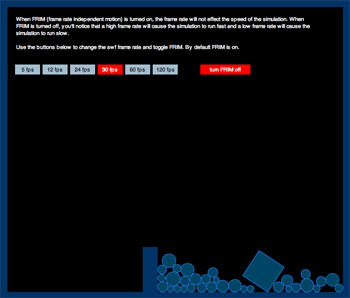
I created a demo to illustrate the FRIM feature… this demo is basically the same as the above snippet with a few extra buttons added to control frame rate and toggle FRIM.


Take a look at the demo here…

While this new feature seems to be working, I believe there still may be room for improvement. Please let me know if the demo doesn’t work correctly on your machine. As of now, I’ve only tested it on my 2.5 Ghz Intel Core 2 Duo.

Also, any suggestions to improve the clarity of this demo are appreciated… I found it kind of hard to think of a good demo to show FRIM in action. The original demo really didn’t make much sense… so I gave Rich Shupe a call and he helped me come up with the idea for the current demo.

UPDATE:
I just updated the demo so that the simulation restarts when you change the frame rate (as per Mr.doob’s suggestion below)

QuickBox2D w/ Key Controls

import com.actionsnippet.qbox.*;
import Box2D.Common.Math.*

[SWF(backgroundColor=0xEFEFEF, width=700, height=600, frameRate=60)]

var sim:QuickBox2D = new QuickBox2D(this);

sim.setDefault({lineColor:0xCC0000, fillColor:0xCC0000});

// create compound shape (two circles and a box for the character)
var charParts:Array = [];
// x and y position are now relative to center of compound shape
charParts[0] = sim.addBox({x:0, y:0, width:1, height:2});
charParts[1] = sim.addCircle({x:0, y:-1, radius:0.5});
charParts[2] = sim.addCircle({x:0, y:1, radius:0.5});
var char:QuickObject = sim.addGroup({objects:charParts, x:2, y:2.5, allowSleep:false, angularDamping:0.8, linearDamping:1.5});

// vector for linear velocity of character
var charVel:b2Vec2 = new b2Vec2();

// angular velocity of character
var charVelAng:Number = 1;
char.body.SetAngularVelocity(charVelAng);

// world/platforms
sim.setDefault({lineColor:0x666666, fillColor:0x666666, height:0.5, density:0});
sim.createStageWalls();
sim.addBox({x:3, y:5, width:5});
sim.addBox({x:11, y:5, width:5});
sim.addBox({x:8, y:9, width:8});
sim.addBox({x:4, y:13, width:8});
sim.addCircle({x:16, y:8, radius:2});
sim.addCircle({x:12, y:15, radius:2});

// falling circles
sim.setDefault({lineColor:0x2870B5, fillColor:0x2870B5});
for (var i:int = 0; i<15; i++){
	sim.addCircle({x:5 + i, y:2, radius:0.25 ,density:1});
}

sim.start();

// key controls
addEventListener(Event.ENTER_FRAME, onLoop);
function onLoop(evt:Event):void {
	charVel = char.body.GetLinearVelocity();
	charVelAng =  char.body.GetAngularVelocity();
	
	if (key[Keyboard.RIGHT]){
		charVel.x += 1
		char.body.SetLinearVelocity(charVel);
		
		charVelAng += 1;
		char.body.SetAngularVelocity(charVelAng);
	}
	if (key[Keyboard.LEFT]){
		charVel.x -=1;
		char.body.SetLinearVelocity(charVel);
		
		charVelAng -= 1;
		char.body.SetAngularVelocity(charVelAng);
	}
	if (key[Keyboard.UP]){
		 charVel.y = -10;
	     char.body.SetLinearVelocity(charVel);
			
		 charVelAng *= 0.8;
		 char.body.SetAngularVelocity(charVelAng);
	} 
}
// basic key setup
var key:Object = new Object();
stage.addEventListener(KeyboardEvent.KEY_DOWN, onKeyPressed);
stage.addEventListener(KeyboardEvent.KEY_UP, onKeyReleased);
function onKeyPressed(evt:KeyboardEvent):void {
	key[evt.keyCode] = true;
	key.keyCode = evt.keyCode;
}
function onKeyReleased(evt:KeyboardEvent):void { key[evt.keyCode] = false}

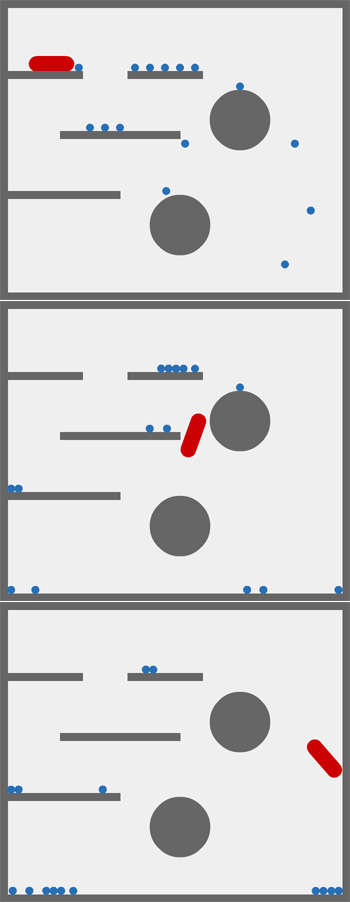
This snippet shows one way to go about doing key controls using QuickBox2D

Take a look at the swf here…

This works with the current version of QuickBox2D…. tomorrow I’ll be uploading the new version of QuickBox2D which supports FRIM (frame rate independent motion) and contains a few additional minor tweaks and fixes.

x and y Coordinates in 1D Array / Vector

var canvas:BitmapData=new BitmapData(400,400,false,0x000000);
addChild(new Bitmap(canvas));
var pix:Vector.<uint>=canvas.getVector(canvas.rect);

canvas.lock();
for (var i:int = 0; i<300; i++) {
	var xp:int=50+i;
	var yp:int=50+i/2;
	// target x and y coords in 1D array
	pix[xp+yp*400]=0xFFFFFF;
}
canvas.setVector(canvas.rect, pix);
canvas.unlock();

This snippet shows how to target x and y coordinates in a 1D Array / Vector. This can be useful sometimes when working with setVector().

This is sort of like re-inventing setPixel()…. and for that reason is kind of pointless – that said, it’s interesting to know. I first learned about this technique from using processing.

IGraphicsData Example

// note the high framerate for testing purposes
[SWF(width = 800, height = 600, frameRate=60)]
// red, yellow, blue
var fills:Vector.<IGraphicsData> = Vector.<IGraphicsData>([new GraphicsSolidFill(0xFF0000),  new GraphicsSolidFill(0xFFCC00), new GraphicsSolidFill(0x0033FF)]);

var stroke:IGraphicsData = new GraphicsStroke();

var cmds:Vector.<int> = new Vector.<int>();
var ci:int = 0;
var dat:Vector.<Number> = new Vector.<Number>();
var di:int = 0;
var igraph:Vector.<IGraphicsData> = new Vector.<IGraphicsData>();
var ig:int  = 0;
var path:Vector.<GraphicsPath> = new Vector.<GraphicsPath>();
var boxNum:int = 1500;
var locX:Vector.<Number> = new Vector.<Number>(boxNum);
var locY:Vector.<Number> = new Vector.<Number>(boxNum);
var velX:Vector.<Number> = new Vector.<Number>(boxNum);
var velY:Vector.<Number> = new Vector.<Number>(boxNum);
var cols:int = 50;
for (var i:int = 0; i<boxNum; i++){
	path[i] = new GraphicsPath(new Vector.<int>(), new Vector.<Number>());
	path[i].winding = GraphicsPathWinding.NON_ZERO;
	var theta:Number = i * Math.PI/180;
	var sin:Number = Math.cos(theta);
	var cos:Number =  Math.sin(theta);
	var r:Number = Math.random()*100;
	var vr:Number = r * 0.05;
	velX[i] = vr * cos;
	velY[i] = vr * sin;
	locX[i] = 400 + r * cos;
    locY[i] = 300 + r * sin;
}

// box vars
var xp:Number, yp:Number, size:Number, hs:Number;
// corners
var x0:Number, y0:Number, x1:Number, y1:Number;

addEventListener(Event.ENTER_FRAME, onLoop);
function onLoop(evt:Event):void {
	graphics.clear();
	ig = 0;
	for (i= 0; i<boxNum; i++){
		// inline function:
		locX[i] += velX[i];
		locY[i] += velY[i];
		xp = locX[i];
		yp = locY[i];
		if (xp < 0 || xp > 800){
			velX[i] *= -1;
		}
		if (yp < 0 || yp > 600){
			velY[i] *= -1;
		}
		size = 10 + i % 10;
		hs = size * 0.5;
		x0 = xp - hs, y0 = yp - hs;
		x1 = xp + hs, y1 = yp + hs;
		ci = 0;
		di = 0;
		cmds = path[i].commands;
		dat = path[i].data;
		// GraphicsPathCommand.MOVE_TO
		cmds[ci++] = 1;
		dat[di++] = x0 , dat[di++] = y0;
		// GraphicsPathCommand.LINE_TO
		cmds[ci++] = 2;
		dat[di++] = x1 , dat[di++] = y0;
		// GraphicsPathCommand.LINE_TO
		cmds[ci++] = 2;
		dat[di++] = x1 , dat[di++] = y1;
		// GraphicsPathCommand.LINE_TO
		cmds[ci++] = 2;
		dat[di++] = x0 , dat[di++] = y1;
		// end inline function
		 
		path[i].commands = cmds;
		path[i].data = dat;
		igraph[ig++] = fills[i % 3];
		igraph[ig++] = path[i];
	}
	// everything is drawn with one function call
    graphics.drawGraphicsData(igraph);
}

I haven’t spent much time with IGraphicsData. It’s a very cool feature and I think its going to take me awhile to realize its full potential. Since I have to start somewhere I decided to write this snippet to show that it is rather fast. I also recalled reading some benchmark info for the new fp10 graphics stuff over at bytearray.org…. pretty nice info there…

This snippet is pretty optimized, there are a few areas (such as the recurring population of the cmds Vector) that could be optimized more but are left this way for SOME flexibility.

Vectorpark Style Cylinder

const TWO_PI:Number = Math.PI * 2;
const PI_HALF_PI:Number = Math.PI + Math.PI / 2;
x = stage.stageWidth / 2;
y = stage.stageHeight / 2;
var runCylinder:Function = makeCylinder(0,0, 100, 300, 0xFF0000, 0xFFCC00);
var dx:Number = 0;
var dy:Number = 0;
addEventListener(Event.ENTER_FRAME, onLoop);
function onLoop(evt:Event):void {
	dx += (mouseX / 50 - dx) / 4;
	dy += (mouseY - dy) / 4;
	runCylinder(dx, dy);
}
function makeCylinder(x:Number, y:Number, size:Number, length:Number, colA:uint, colB:uint):Function{
	var s:Sprite = Sprite(addChild(new Sprite()));
	s.x = x;
	s.y = y;
	var acol:uint = colB;
	var bcol:uint = colB;
	var halfLength:Number = length / 2;
	var capA:Sprite = Sprite(s.addChild(new Sprite()));
	var box:Sprite = Sprite(s.addChild(new Sprite()));
	var w:Number = size * 2;
	var h:Number = length;
	with (box.graphics)  beginFill(colA), drawRect(-w/2, -h/2, w,h);
	var capB:Sprite = Sprite(s.addChild(new Sprite()));
	return function(theta:Number, rot:Number){
		theta %= TWO_PI;
		if (theta <0){
			theta = TWO_PI - -theta;
		}
		var scale:Number = Math.cos(theta);
		if (theta> 1.57){
			acol = colA;
			s.addChild(capB);
			bcol = colB;
		} else {
			acol = colB;
			bcol = colA;
			s.addChild(capA);
		}
		if (theta> PI_HALF_PI){
			acol = colB;
			bcol = colA;
			s.addChild(capA);
		}
		
		var sin:Number = Math.sin(theta);
		box.scaleY = sin;
		capA.y = halfLength * sin;
		capB.y = -capA.y;
		with(capA.graphics) clear(), beginFill(acol), scaleYcircle(capA.graphics,size, scale);
		with(capB.graphics) clear(), beginFill(bcol), scaleYcircle(capB.graphics,size, scale);
		s.rotation = rot;
	}
}
// original circle function by senocular (www.senocular.com) from here http://www.actionscript.org/forums/showthread.php3?s=&threadid=30328
// circle that can be scaled on the y axis
function scaleYcircle(g:Graphics, r:Number, s:Number = 1):void {
	var c1:Number = r * (Math.SQRT2 - 1);
	var c2:Number = r * Math.SQRT2 / 2;
	var rs:Number = r * s, c1s:Number = c1 * s, c2s:Number = c2 * s;
	var x_r:Number =  -r, y_r:Number = -rs, x_c2:Number =  -c2;
	var y_c2:Number =  -c2s, x_c1:Number =  -c1, y_c1:Number =  -c1s
	g.moveTo(r, 0), g.curveTo(r, c1s, c2, c2s);
	g.curveTo(c1, rs, 0, rs), g.curveTo(x_c1,rs, x_c2, c2s);
	g.curveTo(x_r, c1s, x_r, 0), g.curveTo(x_r,y_c1,x_c2,y_c2);
	g.curveTo(x_c1,y_r,0,y_r), g.curveTo(c1,y_r,c2,y_c2);
	g.curveTo(r,y_c1,r,0);
}

This is similar to the last post I did…. inspired by some of the great stuff over at VectorPark.com… this snippet creates a 3D cylinder out of two circles and a box…