Browse the notebook

Category: keys

3D Key Controls

[SWF(backgroundColor=0x000000, width=500, height=500)]
var hsw:Number = stage.stageWidth / 2;
var hsh:Number = stage.stageHeight / 2;
var pointNum:int = 300;
var points3D:Vector.<Number> = new Vector.<Number>();
var points2D:Vector.<Number> = new Vector.<Number>();
var uvts:Vector.<Number> = new Vector.<Number>();
var sorted:Array = [];
var pnt:Point = new Point();
var m:Matrix3D = new Matrix3D();
var v:Vector3D = new Vector3D();
for (var i:int = 0; i<pointNum; i++){
	v.x = 300;
	v.y = v.z = 0;
	m.identity();
	m.appendRotation(Math.random()*360, Vector3D.X_AXIS);
	m.appendRotation(Math.random()*360, Vector3D.Y_AXIS);
	m.appendRotation(Math.random()*360, Vector3D.Z_AXIS);
	v = m.transformVector(v);
	points3D.push(v.x, v.y, v.z);
	points2D.push(0,0);
	uvts.push(0,0,0);
	sorted.push(new Vector3D());
}
points3D.fixed = true;
points2D.fixed = true;
uvts.fixed = true;
var p:PerspectiveProjection = new PerspectiveProjection();
var proj:Matrix3D = p.toMatrix3D();
var rx:Number = 0, ry:Number = 0;
addEventListener(Event.ENTER_FRAME, onLoop);
function onLoop(evt:Event):void {
	var i:int, j:int;
	m.identity();
	if (key[Keyboard.RIGHT]){
		rx+=3
	}else
	if (key[Keyboard.LEFT]){
		rx-=3
	}else
	if (key[Keyboard.UP]){
		ry-=3
	}else
	if (key[Keyboard.DOWN]){
		ry+=3
	}
	m.appendRotation(rx, Vector3D.Y_AXIS);
	m.appendRotation(ry, Vector3D.X_AXIS);
	m.appendTranslation(0, 0, 1000);
	m.append(proj);
	Utils3D.projectVectors(m, points3D, points2D, uvts);
	for (i = 0, j = 0; i<points2D.length; i+=2, j++){
		sorted[j].x = points2D[i] + hsw;
		sorted[j].y = points2D[i + 1] + hsh;
		sorted[j].z = uvts[j * 3 + 2];
	}
	sorted.sortOn("z", Array.NUMERIC);
	graphics.clear();
	graphics.lineStyle(2, 0x000000, 0.1);
	for(i = 0; i<sorted.length; i++){
		var zpos:Number = sorted[i].z * 12000;
		var c:int = zpos * 14;
		c = (c > 255) ? 255 : c;
		graphics.beginFill(100<<16 | 100 << 8 |c);
		graphics.drawCircle(sorted[i].x, sorted[i].y,zpos);
		graphics.endFill();
	}
}

// permanently applies the matrix to the points3D vector
function applyTransform():void{
	m.identity();
	m.appendRotation(rx, Vector3D.Y_AXIS);
	m.appendRotation(ry, Vector3D.X_AXIS);
	var temp:Vector.<Number> = new Vector.<Number>();
	m.transformVectors(points3D, temp);
	points3D = temp;
	points3D.fixed = true;
	rx = 0, ry = 0;
}

// basic key setup
var key:Object = new Object();
stage.addEventListener(KeyboardEvent.KEY_DOWN, onKeyPressed);
stage.addEventListener(KeyboardEvent.KEY_UP, onKeyReleased);
function onKeyPressed(evt:KeyboardEvent):void {
	key[evt.keyCode] = true;
	key.keyCode = evt.keyCode;
}
function onKeyReleased(evt:KeyboardEvent):void { 
  applyTransform();
  key[evt.keyCode] = false;
}

In response to Thomas Francis’s question, this snippet takes the Simple z-sorting snippet and shows how one might go about adding some basic key controls to it. It works by permanently applying x and y rotation transformations to the set of 3D points every time a key is released.
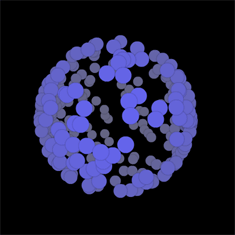
Check out the swf…

If you need to be able to rotate on both the x and y axis at the same time – and just need more flexibility… one way to do it would be to use quaternions – which may be tricky – but there are plenty of examples out there in java, processing and C/C++ just waiting to be ported (been on the todo list for some time actually).

Haven’t been posting every day because I’ve been out of the country and away from my computer… have a backlog of snippets that need to be cleaned up and put in the pipeline…
Read snippet: 3D Key Controls

HSV Color Type

[SWF(width=560,height=300,backgroundColor=0x000000,frameRate=30)]

var key:Object = new Object();
var alphabet:Array = "abcdefghijklmnopqrstuvwxyz".split("");

var num:Number = alphabet.length;
var step:Number = 360 / num;

var colors:Object = new Object();
for (var i:int  = 0; i<num; i++){
	var index:String = alphabet[i];
     key[index] = 65 + i;
	 var c:Array = hsv(i * step, 1, 1);
	 colors[index] = c[0] <<16 | c[1] <<8 | c[2];
}
alphabet.push("32");
num++;
key["32"] = 32;
colors["32"]  = 0x333333;
x = y = 10;
var count:int = 0;
var size:int = 20;
stage.addEventListener(KeyboardEvent.KEY_DOWN, onKeyPressed);
function onKeyPressed(evt:KeyboardEvent):void{
	for (var i:int= 0; i<num; i++){
		var index:String = alphabet[i];
		 if (index == "32"){
			trace("hi", evt.keyCode, key[index]); 
		 }
		if (evt.keyCode == key[index]){
			graphics.beginFill(colors[index]);
			var xp:int = count % num * size;
			var yp:int = int(count / num) * size;
			graphics.drawRect(xp, yp, size, size);
			count++;
		}
	}
}
// ported from here:
//http://www.cs.rit.edu/~ncs/color/t_convert.html
function hsv(h:Number, s:Number, v:Number):Array{
	var r:Number, g:Number, b:Number;
	var i:int;
	var f:Number, p:Number, q:Number, t:Number;
	if (s == 0){
		r = g = b = v;
		return [Math.round(r * 255), Math.round(g * 255), Math.round(b * 255)];
	}
	h /= 60;
	i  = Math.floor(h);
	f = h - i;
	p = v *  (1 - s);
	q = v * (1 - s * f);
	t = v * (1 - s * (1 - f));
	switch( i ) {
		case 0:
			r = v, g = t, b = p;
			break;
		case 1:
			r = q, g = v, b = p;
			break;
		case 2:
			r = p, g = v, b = t;
			break;
		case 3:
			r = p, g = q, b = v;
			break;
		case 4:
			r = t, g = p, b = v;
			break;
		default:		// case 5:
			r = v, g = p, b = q;
			break;
	}
	return [Math.round(r * 255), Math.round(g * 255), Math.round(b * 255)];
}

This snippet is a typing experiment – for every letter, you type a box filled with a specific color is drawn to the stage. The color associated with each letter is determined by moving through hsv color space – so typing an alphabet will end up with something resembling a spectrum.

Read snippet: HSV Color Type

QuickBox2D w/ Key Controls

import com.actionsnippet.qbox.*;
import Box2D.Common.Math.*

[SWF(backgroundColor=0xEFEFEF, width=700, height=600, frameRate=60)]

var sim:QuickBox2D = new QuickBox2D(this);

sim.setDefault({lineColor:0xCC0000, fillColor:0xCC0000});

// create compound shape (two circles and a box for the character)
var charParts:Array = [];
// x and y position are now relative to center of compound shape
charParts[0] = sim.addBox({x:0, y:0, width:1, height:2});
charParts[1] = sim.addCircle({x:0, y:-1, radius:0.5});
charParts[2] = sim.addCircle({x:0, y:1, radius:0.5});
var char:QuickObject = sim.addGroup({objects:charParts, x:2, y:2.5, allowSleep:false, angularDamping:0.8, linearDamping:1.5});

// vector for linear velocity of character
var charVel:b2Vec2 = new b2Vec2();

// angular velocity of character
var charVelAng:Number = 1;
char.body.SetAngularVelocity(charVelAng);

// world/platforms
sim.setDefault({lineColor:0x666666, fillColor:0x666666, height:0.5, density:0});
sim.createStageWalls();
sim.addBox({x:3, y:5, width:5});
sim.addBox({x:11, y:5, width:5});
sim.addBox({x:8, y:9, width:8});
sim.addBox({x:4, y:13, width:8});
sim.addCircle({x:16, y:8, radius:2});
sim.addCircle({x:12, y:15, radius:2});

// falling circles
sim.setDefault({lineColor:0x2870B5, fillColor:0x2870B5});
for (var i:int = 0; i<15; i++){
	sim.addCircle({x:5 + i, y:2, radius:0.25 ,density:1});
}

sim.start();

// key controls
addEventListener(Event.ENTER_FRAME, onLoop);
function onLoop(evt:Event):void {
	charVel = char.body.GetLinearVelocity();
	charVelAng =  char.body.GetAngularVelocity();
	
	if (key[Keyboard.RIGHT]){
		charVel.x += 1
		char.body.SetLinearVelocity(charVel);
		
		charVelAng += 1;
		char.body.SetAngularVelocity(charVelAng);
	}
	if (key[Keyboard.LEFT]){
		charVel.x -=1;
		char.body.SetLinearVelocity(charVel);
		
		charVelAng -= 1;
		char.body.SetAngularVelocity(charVelAng);
	}
	if (key[Keyboard.UP]){
		 charVel.y = -10;
	     char.body.SetLinearVelocity(charVel);
			
		 charVelAng *= 0.8;
		 char.body.SetAngularVelocity(charVelAng);
	} 
}
// basic key setup
var key:Object = new Object();
stage.addEventListener(KeyboardEvent.KEY_DOWN, onKeyPressed);
stage.addEventListener(KeyboardEvent.KEY_UP, onKeyReleased);
function onKeyPressed(evt:KeyboardEvent):void {
	key[evt.keyCode] = true;
	key.keyCode = evt.keyCode;
}
function onKeyReleased(evt:KeyboardEvent):void { key[evt.keyCode] = false}

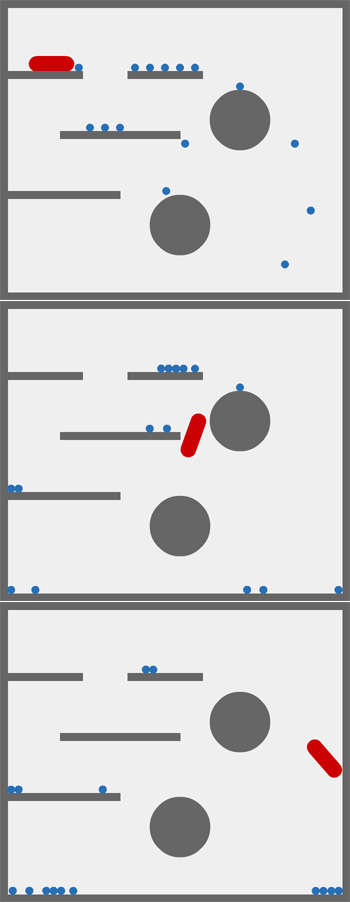
This snippet shows one way to go about doing key controls using QuickBox2D

Take a look at the swf here…

This works with the current version of QuickBox2D…. tomorrow I’ll be uploading the new version of QuickBox2D which supports FRIM (frame rate independent motion) and contains a few additional minor tweaks and fixes.

Read snippet: QuickBox2D w/ Key Controls

Multiple Keys

var key:Object = new Object();
stage.addEventListener(KeyboardEvent.KEY_DOWN, onKeyPressed);
stage.addEventListener(KeyboardEvent.KEY_UP, onKeyReleased);
function onKeyPressed(evt:KeyboardEvent):void {
	key[evt.keyCode] = true;
	key.keyCode = evt.keyCode;
}
function onKeyReleased(evt:KeyboardEvent):void {
	key[evt.keyCode] = false
}

// example

addEventListener(Event.ENTER_FRAME, onLoop);
function onLoop(evt:Event):void {
	
	//trace(key.keyCode);
	 
	if (key[Keyboard.LEFT]){
		trace("left");
	}
	
	if (key[Keyboard.RIGHT]){
		trace("right");
	}
	
	// keys #1, #2 and #3 are down
	if (key[49] && key[50] && key[51]){
		trace("one two thee");
	}
	
	// keys #6, #7, #8 and #9 keys are down
	if (key[54] && key[55] && key[56] && key[57]){
		trace("six seven eight nine");
	}
}

The first 10 lines of code make up this snippet. This is an easy way to keep track of multiple key presses. For games, this is the only key technique I use … wrapped up in a Singleton.

Read snippet: Multiple Keys

KeyCode Variables

// create constants for all letter and number keys:
var alphabet:Array = "ABCDEFGHIJKLMNOPQRSTUVWXYZ".split("");
var nums:Array = ["ZERO","ONE","TWO","THREE","FOUR","FIVE","SIX","SEVEN","EIGHT","NINE"];

var key:Object = new Object();
for (var i:int  = 0; i<alphabet.length; i++)
	 key[alphabet[i]] = 65 + i;
	 
for (i = 0; i<nums.length; i++){
	 var code:int = 48 + i;
     key[nums[i]]= code;
	 key[i] = code;
}
	 

// test them out
stage.addEventListener(KeyboardEvent.KEY_DOWN, onKeyPressed);
function onKeyPressed(evt:KeyboardEvent):void {
	if (evt.keyCode == key.A){
		trace("the a was pressed");
	}
	if (evt.keyCode == key.B){
		trace("the b was pressed");
	}
	if (evt.keyCode == key.NINE){
		trace("the 9 key was pressed");
	}
	if (evt.keyCode == key["0"]){
		trace("the 0 key was pressed");
	}
}

This is an easy way to store values for alphanumeric keys in variables that make sense… instead of having to do things like this:

// hit the zero key
if (evt.keyCode == 48){
   trace("the zero key was hit");
}
Read snippet: KeyCode Variables