var rand:Number = Math.random() * Math.random() * Math.random();
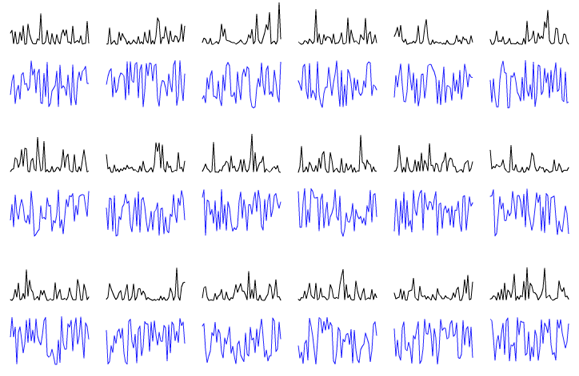
This is a trick I use when I need more contrast in my random numbers. In this case, the variable rand will get closer to the number 1 significantly less frequently than if you just used Math.random() once.
To illustrate this I created this snippet:
[SWF(width=800, height=600)]

var r:Number = Math.random() * Math.random() * Math.random();
var inc:int = 0;
var xp:Number = 10;
var yp:Number = 10;
var count:int = 1;

var compare:Shape = Shape(addChild(new Shape()));
compare.graphics.lineStyle(0,0x2222FF);

graphics.lineStyle(0,0x00000);
scaleX = scaleY = 2;

addEventListener(Event.ENTER_FRAME, onLoop);
function onLoop(evt:Event):void {

     r =  Math.random() * Math.random() * Math.random();

	 if (inc == 0){
		 graphics.moveTo(xp + inc, yp + 30 - r * 30);
	 }else{
		 graphics.lineTo(xp + inc, yp + 30 - r * 30);
	 }

	 r = Math.random();
	  if (inc == 0){
		 compare.graphics.moveTo(xp + inc, yp + 70 - r * 30);
	 }else{
		 compare.graphics.lineTo(xp + inc, yp + 70 - r * 30);
	 }
	 inc++;
	 if (inc == 50){
		 inc = 0;
		 xp = 10 + count % 6 * 60;
		 yp = 10 + int(count / 6) * 80;
		 r = Math.random()*Math.random();
		 count++;
	 }
}
The blue lines plots normal Math.random() and the black lines plots Math.random()*Math.random()*Math.random()