Latest snippets

Vectorpark Style Hemisphere

const TWO_PI:Number = Math.PI * 2;
const PI_HALF_PI:Number = Math.PI + Math.PI / 2;
x = stage.stageWidth / 2;
y = stage.stageHeight / 2;

var runHemisphere:Function = makeHemisphere(0,0, 100,0xFF0000, 0xFFCC00);
var dx:Number = 0;
var dy:Number = 0;

addEventListener(Event.ENTER_FRAME, onLoop);
function onLoop(evt:Event):void {
	dx += (mouseX / 50 - dx) / 4;
	dy += (mouseY - dy) / 4;
	runHemisphere(dx, dy);
}
function makeHemisphere(x:Number, y:Number, size:Number, colA:uint, colB:uint):Function{
	var s:Sprite = Sprite(addChild(new Sprite()));
	s.x = x;
	s.y = y;
	var bg:Sprite = Sprite(s.addChild(new Sprite()));
	
	with (bg.graphics) clear(), beginFill(colA), halfCircle(bg.graphics, 0,0 , size);
	var scol:uint = colB;
	var slice:Sprite = Sprite(s.addChild(new Sprite()));
	return function(theta:Number, rot:Number){
		 theta %= TWO_PI;
		if (theta < 0){
			theta = TWO_PI - -theta;
		}
		var scale:Number = Math.cos(theta);
		if (theta > 1.57){
			scol = colA;
		} else {
			scol = colB;
		}
		if (theta > Math.PI){
			bg.rotation = 180;
		}else{
			bg.rotation = 0;
		}
		if (theta > PI_HALF_PI){
			scol = colB;
		}
		with(slice.graphics) clear(), beginFill(scol), scaleYcircle(slice.graphics,size, scale);
		s.rotation = rot;
	}
}
// original circle function by senocular (www.senocular.com) from here http://www.actionscript.org/forums/showthread.php3?s=&threadid=30328
function halfCircle(g:Graphics, x:Number,y:Number,r:Number):void {
	var c1:Number = r * (Math.SQRT2 - 1);
	var c2:Number = r * Math.SQRT2 / 2;
	var xr:Number = x + r, yr:Number = y + r;
	var x_r:Number = x - r, yc1:Number = y + c1;
	var yc2:Number = y + c2, xc1:Number = x + c1, xc2:Number = x + c2;
	var x_c1:Number = x - c1;
	g.moveTo(xr, y);
	g.curveTo(xr, yc1, xc2, yc2);
	g.curveTo(xc1, yr, x, yr);
	g.curveTo(x - c1,yr, x - c2, yc2);
	g.curveTo(x_r, yc1, x_r, y);
}
// circle that can be scaled on the y axis
function scaleYcircle(g:Graphics, r:Number, s:Number = 1):void {
	var c1:Number = r * (Math.SQRT2 - 1);
	var c2:Number = r * Math.SQRT2 / 2;
	var rs:Number = r * s, c1s:Number = c1 * s, c2s:Number = c2 * s;
	var x_r:Number =  -r, y_r:Number = -rs, x_c2:Number =  -c2;
	var y_c2:Number =  -c2s, x_c1:Number =  -c1, y_c1:Number =  -c1s
	g.moveTo(r, 0), g.curveTo(r, c1s, c2, c2s);
	g.curveTo(c1, rs, 0, rs), g.curveTo(x_c1,rs, x_c2, c2s);
	g.curveTo(x_r, c1s, x_r, 0), g.curveTo(x_r,y_c1,x_c2,y_c2);
	g.curveTo(x_c1,y_r,0,y_r), g.curveTo(c1,y_r,c2,y_c2);
	g.curveTo(r,y_c1,r,0);
}

The above snippet draws a 3D hemisphere using a technique I first saw at vectorpark.com. Vectorpark.com has been around for years and it’s an amazing site… if you’ve never seen it before I highly recommend spending some time there…

When I decided to post the half-circle snippet yesterday… I knew I would be writing this today. It’s one of those things I’ve always thought about doing, but never gotten around to. I show vectorpark.com to my animation class (almost no coding in that class) and we emulate some of the 3D techniques for simple primitives with pure timeline animation. The above is the first time I’ve tried to emulate one of these techniques with code.

I was pleasantly surprised when visiting vectorpark.com this morning… Patrick Smith has posted some new work there. Really excellent stuff…

UPDATE:
Katopz converted this to a doc class and put it up on wonderfl…
Drawing a Half-Circle

graphics.beginFill(0xFF0000);
halfCircle(graphics, 200,200, 100);
// original circle function by senocular (www.senocular.com) from here http://www.actionscript.org/forums/showthread.php3?s=&threadid=30328
function halfCircle(g:Graphics, x:Number,y:Number,r:Number):void {
	var c1:Number=r * (Math.SQRT2 - 1);
	var c2:Number=r * Math.SQRT2 / 2;
	g.moveTo(x+r,y);
	g.curveTo(x+r,y+c1,x+c2,y+c2);
	g.curveTo(x+c1,y+r,x,y+r);
	g.curveTo(x-c1,y+r,x-c2,y+c2);
	g.curveTo(x-r,y+c1,x-r,y);
	// comment in for full circle
	/*g.curveTo(x-r,y-c1,x-c2,y-c2);
	g.curveTo(x-c1,y-r,x,y-r);
	g.curveTo(x+c1,y-r,x+c2,y-c2);
	g.curveTo(x+r,y-c1,x+r,y);*/
};

A quick way to draw a half-circle… I used to use this to draw circles in flash before the Graphics.drawCircle() method.

Strange BitmapData Drawing Instructions

// instructions
var ins:Array = [0,
-1, 100, 200, 3, 100, 0, 50, 1, 100, -1, 100, 150, 0, 50,
-1, 160, 200, 0, 50, 3, 50, 2, 50, 3, 50, 0, 50,
-1, 220, 200, 0, 50, 3, 50, 2, 50, -1, 270, 150, 3, 50, 2, 50];

var canvas:BitmapData = new BitmapData(400,400,false, 0xCCCCCC);
addChild(new Bitmap(canvas));

var index:int = 0;
var penX:int = 0;
var penY:int = 0;

read();

function read():void{
	var i:int, xp:int, yp:int;
	if (ins[index+1] == -1){
		 index++;
		xp = ins[++index];
		yp = ins[++index];
	}else{
		xp = penX;
		yp = penY;
	}
	var dir:int = ins[index];
	var leng:int = ins[++index];
	for (i = 0; i<leng; i++){
		if (dir == 0){
			xp += 1;
		}else if (dir == 1){
			yp += 1;
		}else if (dir == 2){
			xp -= 1;
		}else if (dir == 3){
			yp -= 1;
		}
	    canvas.setPixel(xp, yp, 0x000000);
     }
	 penX = xp;
	 penY = yp;
	if (index < ins.length){
		read();
	}
}

I was thinking today about alternative ways to represent drawings and I wrote this snippet while brainstorming. The function read() looks through an array of instructions (ins[]) and draws an image. In this case the letters AS3 are drawn to a Bitmap using setPixel().

The instructions work like this:

The first value of the array is ignored – it can be set to 0, or used to store some other info.
If the next value is a -1, the following two values in the array are used as a sort of moveTo().
This is followed by a direction value 0 = right, 1 = down, 2 = left, 3 = up.
Lastly there is a length value in pixels.

If no -1 is found, the read() function assumes that the value is for a direction.

So to draw a line from (100, 100) to (150, 100) you would write:
[0, -1, 100, 100, 0, 50]

To then draw a line down 50 pixels from the endpoint of the previous line you would add 1 (move down), 50 (length 50)… so you to end up with:
[0, -1, 100, 100, 0, 50, 1, 50]

and so on…

I’m not sure really where I was going with this, but it was fun to write…

QuickBox2D Tetris Pieces

import com.actionsnippet.qbox.*;

[SWF(backgroundColor=0x000000, width=700, height=600, frameRate=60)]

var sim:QuickBox2D = new QuickBox2D(this);

sim.setDefault({fillColor:0x003366, lineColor:0x2B80D5, isBullet:true});
sim.createStageWalls();

var shapes:Array = [];
shapes[0] = [[1,1,1,1]];
shapes[1] = [[1, 0, 0], [1, 1, 1]];
shapes[2] = [[0, 0, 1], [1, 1, 1]];
shapes[3] = [[1, 1], [1, 1]];
shapes[4] = [[0, 1, 1], [1, 1, 0]];
shapes[5] = [[0, 1, 0], [1, 1, 1]];
shapes[6] = [[1, 1, 0], [0, 1, 1]];
var cols:Array = [0xFF0000,  0xFFFF00, 0xFF00FF, 0x0000FF, 0x00FF00,0x00FFFF, 0x00FF00,0xFAA703];
var angs:Array =  [0, Math.PI / 2, Math.PI, Math.PI + Math.PI / 2];
var bev:BevelFilter = new BevelFilter();
with (bev) blurX = 10, blurY = 10, strength = 0.5;

var inc:int = 9;
for (var i:int = 0; i<shapes.length; i++){
	sim.setDefault({fillColor:cols[inc % cols.length]});
	inc++
	makePiece(shapes[i], 3 + i * 3, 3);
	sim.setDefault({fillColor:cols[inc % cols.length]});
	inc++
	makePiece(shapes[i], 3 + i * 3, 8);
}

function makePiece(pattern:Array, xp:Number, yp:Number, scale:Number = 0.7):QuickObject{
	var parts:Array = [];
	for (var i:int = 0; i<pattern.length; i++){
		for (var j:int = 0; j<pattern[i].length; j++){
			if (pattern[i][j] == 1){
				parts.push(sim.addBox({x:j * scale, y:i * scale, width:scale, height:scale, restitution:0, friction:1, isBullet:true}));
			}
		}
	}
	var ang:Number = angs[int(Math.random()*angs.length)];
	var piece:QuickObject =  sim.addGroup({objects:parts, x:xp, y:yp, angle:ang});
	
	piece.userData.filters = [bev];
	return piece;
}

sim.start();
sim.mouseDrag();

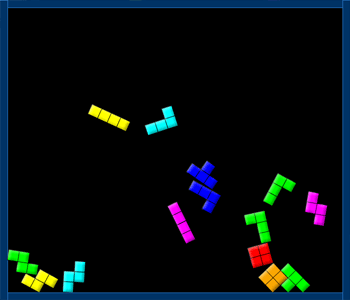
This snippet uses the QuickBox2D library to create some Tetris pieces.


Have a look at the swf here…

Tetris Sand CA

stage.frameRate = 30;
scaleX = scaleY = 2.5;
var canvas:BitmapData = new BitmapData(200,200,false, 0x000000);
addChild(new Bitmap(canvas));
var w:int = canvas.width;
var size:int = canvas.width * canvas.height;
var read:Vector.<uint> = new Vector.<uint>(size);
var write:Vector.<uint> = new Vector.<uint>(size);

read = canvas.getVector(canvas.rect);
var loc:int = 199*w;
for(var i:int = 0; i <= 200; i++){
       read[loc+i]=0xFFFFFFFF;
}
write = read.concat();

var shapes:Array = [];
shapes[0] = [[1,1],[1,1]];
shapes[1] = [[1,1,1,1]];
shapes[2] = [[1],[1],[1],[1]];
shapes[3] = [[1,1,1],[0,1,0]];
shapes[4] = [[1,0],[1,1],[1,1],[0,1]];
shapes[5] = [[1,0,0],[1,1,1]];
shapes[6] = [[1,1,0], [0,1,1]];
shapes[7] = [[1,1], [1,0],[1,0]];
function drawShape(xp:int, yp:int, pattern:Array, col:uint):void{
	var i:int = 0;
	var loc:int = xp + yp * w;
	if (int(Math.random()*2) == 1){
		pattern.reverse();
	}
	if (int(Math.random()*2)){
		for (i= 0; i<pattern.length; i++){
			pattern[i].reverse();
		}
	}
	for (i = 0; i<pattern.length; i++){
		 for (var j:int = 0; j<pattern[i].length; j++){
			 if (pattern[i][j] == 1){
				write[loc + i * w + j] = col;
			 }
		}
	}
}

var counter:int = 0;
addEventListener(Event.ENTER_FRAME, onLoop);
function onLoop(evt:Event):void {
	 var i:int;
     canvas.lock();
	 if (counter % 20 == 1){
		for ( i= 0; i<20; i++){
			 drawShape(5+  i * 10, 10, shapes[int(Math.random() * shapes.length)], Math.random()*0xFFFFFF);
		}
	 }
	 counter++;
	 read = write.concat();
	 for (i = 0; i<size; i++){
		 var curr:uint = read[i];
		 if (curr != 0xFF000000 && curr != 0xFFFFFFFF){
			var below:uint = read[i + w];
			if (below == 0xFF000000 || below == curr){
			  var above:uint = read[i - w];
			  if (above == 0xFF000000){
				 write[i] = 0xFF000000;
			  }
			  write[i + w] = curr;
			}else{
				var index:uint;
				if (int(Math.random()*2) == 1){
					index = i + w - 1;
				}else{
					index = i + w + 1;
				}
				if (read[index] == 0xFF000000){
					write[index] = curr;
				}
			}
		 }
	 }
	 canvas.setVector(canvas.rect, write);
	 canvas.unlock();
}

Quickly thrown together sand cellular automata – with some tetris shapes.

Distance Line Gradient

[SWF(width=600,height=500,frameRate=30)]
var canvas:BitmapData=new BitmapData(400,400,false,0x000000);
addChild(new Bitmap(canvas));

var size:Number=canvas.width*canvas.height;
var w:Number=canvas.width;
var pix:Vector.<uint> = new Vector.<uint>(size);
 
addEventListener(Event.ENTER_FRAME, onLoop);
function onLoop(evt:Event):void {
	canvas.lock();
		
 	var i:int = size;
	var x1:Number=mouseX;
	var y1:Number=mouseY;
	var x2:Number=250;
	var y2:Number=250;
	var dx:Number=x2-x1;
	var dy:Number=y2-y1;
	var denom:Number =  1/(dx * dx + dy * dy);
	if (dx==0&&dy==0) {
			x2+=1;
			y2+=1;
			dx=dy=1;
	}

	while( --i > -1 ){
		var xp:int= i % w;
		var yp:int = i / w;
		var u:Number = ((xp - x1) * dx + (yp - y1) * dy) * denom;

		var closestX:Number;
		var closestY:Number;
		if (u<0) {
			closestX=x1;
			closestY=y1;
		} else if (u > 1) {
			closestX=x2;
			closestY=y2;
		} else {
			closestX=x1+u*dx;
			closestY=y1+u*dy;
		}
		var dfx:Number=closestX-xp;
		var dfy:Number=closestY-yp;
		var d:Number=255-Math.sqrt(dfx*dfx+dfy*dfy);
		if (d<0) d=0;
		 pix[i]=uint(d);
	}
	canvas.setVector(canvas.rect, pix);
	canvas.unlock();
}

This didn’t come out as interesting as I thought it would for some reason – just used the technique from the last two posts to draw a gradient. Event though it’s visually boring, it does show how I went about inlining the function from yesterday… so I figured I’d post it.

Distance Between Point and Line (optimized)


/**
Original function by Pieter Iserbyt:
http://local.wasp.uwa.edu.au/~pbourke/geometry/pointline/DistancePoint.java
from Paul Bourke's website:
http://local.wasp.uwa.edu.au/~pbourke/geometry/pointline/
*/
function pointToLineDist(x1:Number, y1:Number, x2:Number, y2:Number,x3:Number, y3:Number):Number {
	var dx:Number=x2-x1;
	var dy:Number=y2-y1;
	if (dx==0&&dy==0) {
		x2+=1;
		y2+=1;
		dx=dy=1;
	}
	var u:Number = ((x3 - x1) * dx + (y3 - y1) * dy) / (dx * dx + dy * dy);

	var closestX:Number;
	var closestY:Number;
	if (u<0) {
		closestX=x1;
		closestY=y1;
	} else if (u > 1) {
		closestX=x2;
		closestY=y2;
	} else {
		closestX=x1+u*dx;
		closestY=y1+u*dy;
	}
	dx=closestX-x3;
	dy=closestY-y3;
	return Math.sqrt(dx * dx +  dy * dy);
}

/**
Test out the function
*/

var dotA:Sprite = dot(100, 100);
var dotB:Sprite = dot(200, 200);
var dotC:Sprite = dot(150, 100, 0x0000FF);
var txt:TextField = TextField(dotC.addChild(new TextField()));
with(txt) x = 5, y = 5, autoSize = "left", selectable = false, mouseEnabled = false;

addEventListener(Event.ENTER_FRAME, onLoop);
function onLoop(evt:Event):void {
	graphics.clear();
	graphics.lineStyle(0,0x000000);
	graphics.moveTo(dotA.x, dotA.y);
    graphics.lineTo(dotB.x, dotB.y);
	txt.text = pointToLineDist(dotA.x, dotA.y, dotB.x, dotB.y, dotC.x, dotC.y).toFixed(2);
}

// draggable dot
function dot(xp:Number, yp:Number, col:uint = 0xFF0000, rad:Number=4):Sprite {
    var s:Sprite = Sprite(addChild(new Sprite));
    s.x = xp;
    s.y = yp;
    with(s.graphics) beginFill(col), drawCircle(0,0,rad);
    s.buttonMode = true;
    s.addEventListener(MouseEvent.MOUSE_DOWN, onDrag);
    return s;
}
function onDrag(evt:MouseEvent):void { evt.currentTarget.startDrag() }
stage.addEventListener(MouseEvent.MOUSE_UP, onUp);
function onUp(evt:MouseEvent):void{stopDrag() }

This is the same as yesterdays post about the distance between a point and a line segment. I just took a few minutes to optimize the function – it runs close to 3X faster now. For more info see yesterdays post.

Distance Between Point and Line Segment

/**
Original function by Pieter Iserbyt:
http://local.wasp.uwa.edu.au/~pbourke/geometry/pointline/DistancePoint.java
from Paul Bourke's website:
http://local.wasp.uwa.edu.au/~pbourke/geometry/pointline/
*/
function pointToLineDistance(p1:Sprite, p2:Sprite, p3:Sprite):Number {
	var xDelta:Number = p2.x - p1.x;
	var yDelta:Number = p2.y - p1.y;
	if ((xDelta == 0) && (yDelta == 0)) {
		// p1 and p2 cannot be the same point
		p2.x += 1;
		p2.y += 1;
		xDelta = 1;
	        yDelta = 1;
	}
	var u:Number = ((p3.x - p1.x) * xDelta + (p3.y - p1.y) * yDelta) / (xDelta * xDelta + yDelta * yDelta);
	var closestPoint:Point;
	if (u < 0) {
	    closestPoint = new Point(p1.x, p1.y);
	} else if (u > 1) {
	    closestPoint = new Point(p2.x, p2.y);
	} else {
	    closestPoint = new Point(p1.x + u * xDelta, p1.y + u * yDelta);
	}
	return Point.distance(closestPoint, new Point(p3.x, p3.y));
}

/**
Test out the function
*/

var dotA:Sprite = dot(100, 100);
var dotB:Sprite = dot(200, 200);
var dotC:Sprite = dot(150, 100, 0x0000FF);
var txt:TextField = TextField(dotC.addChild(new TextField()));
with(txt) x = 5, y = 5, autoSize = "left", selectable = false, mouseEnabled = false;

addEventListener(Event.ENTER_FRAME, onLoop);
function onLoop(evt:Event):void {
	graphics.clear();
	graphics.lineStyle(0,0x000000);
	graphics.moveTo(dotA.x, dotA.y);
    graphics.lineTo(dotB.x, dotB.y);
	txt.text = pointToLineDistance(dotA, dotB, dotC).toFixed(2);
}

// draggable dot
function dot(xp:Number, yp:Number, col:uint = 0xFF0000, rad:Number=4):Sprite {
    var s:Sprite = Sprite(addChild(new Sprite));
    s.x = xp;
    s.y = yp;
    with(s.graphics) beginFill(col), drawCircle(0,0,rad);
    s.buttonMode = true;
    s.addEventListener(MouseEvent.MOUSE_DOWN, onDrag);
    return s;
}
function onDrag(evt:MouseEvent):void { evt.currentTarget.startDrag() }
stage.addEventListener(MouseEvent.MOUSE_UP, onUp);
function onUp(evt:MouseEvent):void{stopDrag() }

Last night I was working late and found myself in need of a way to calculate the distance between a point and a line. After a quick google search I found myself once again on Paul Bourke’s extremely useful website. I was in a rush, so I just quickly ported the java code (by Pieter Iserbyt) and wrote this test snippet to make sure it works.

This code could be optimized a bit, but it works nicely.

I needed this for a commercial project, but as I was porting the code I thought of an interesting way to use this code to draw a gradient – may write and post that tomorrow.

Calculate Slope of a Line

// calculate the slope of a line
function calculateSlope(x1:Number, y1:Number, x2:Number, y2:Number):Number {
        // rise over run
	var s:Number = (y1 - y2) / (x1 - x2);
	/*if (x1==x2) {
		// slope is Infinity or -Infinity
	}*/
	return s;
}

/**
 Test it out
*/
function draw(x1:Number, y1:Number, x2:Number, y2:Number):void {
	graphics.moveTo(x1, y1);
	graphics.lineTo(x2, y2)
	var txt:TextField =TextField(addChild(new TextField()));
	txt.text = calculateSlope(x1, y1, x2, y2).toFixed(2);
	txt.x = x2, txt.y = y2;
}

graphics.lineStyle(0,0xFF0000);
draw (100, 100, 200, 200);

draw(100, 100, 200, 150);

draw(100, 100, 200, 100);

draw(100, 100, 99, 200);

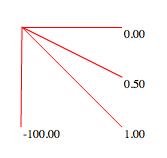
This snippet shows how to calculate the slope of a line … It demos the function by drawing a few lines and showing the corresponding slope of each.

It will draw this:

If (x1 == x2), the slope will be -Infinity or Infinity… depending on where you’re using this calculation you may want to reset the s variable to something else, return null etc… I commented it out for simplicity.