Latest snippets

BitmapData Frame Animation (w/ linked list)

[SWF(width = 100, height = 100)]
var circle:Shape = new Shape();
with(circle.graphics) beginFill(0x000000), drawCircle(20,20,20);

var currFrame:Frame;

// populate the linked list
generateAnimation();

var canvas:BitmapData = new BitmapData(stage.stageWidth,stage.stageHeight,false, 0x000000);
addChild(new Bitmap(canvas));
var loc:Point = new Point(20, 20);

addEventListener(Event.ENTER_FRAME, onLoop);
function onLoop(evt:Event):void {
	// clear the canvas
	canvas.fillRect(canvas.rect, 0x000000);
	// draw the current frame
	canvas.copyPixels(currFrame.bitmap, currFrame.bitmap.rect, loc, null, null, true);
	// get the next frame of the animation
	currFrame = currFrame.next;
}

// generate and capture 40 bitmaps by altering the colorTransform of the circle shape
function generateAnimation():void{
	var channel:uint = 0;
	var ct:ColorTransform = new ColorTransform();
	var increase:Boolean = true;
	var firstFrame:Frame;
    var pFrame:Frame;
	for (var i:int = 0; i<40; i++){
		if (increase){
		   channel += 10;
		   if (channel == 200){
			  increase = false;   
		   }
		}else{
		   channel -= 10;
		}
		ct.color = channel << 16 | channel << 8 | channel;
		circle.transform.colorTransform = ct;
		// populate linked list
		currFrame = capture(circle); 
		if (pFrame){
		   pFrame.next = currFrame;
		}
		if (i == 0){
		   firstFrame = currFrame;
		}
		pFrame = currFrame;
	}
	// close the list
	currFrame.next = firstFrame;
	currFrame = firstFrame;
}

// create the Frame instance and draw the circle to it
// preserving the colorTransform information
function capture(target:Shape):Frame{
	var frame:Frame = new Frame();
	frame.bitmap = new BitmapData(target.width, target.height, true, 0x00000000);
	frame.bitmap.draw(target, null, target.transform.colorTransform);
	return frame;
}

Requires this little Frame class

package {
	import flash.display.*;
	final public class Frame{
		public var bitmap:BitmapData;
		public var next:Frame;
	}
}

This is a small test I did today to see how easy it would be to use a circular linked list to loop an animation of bitmaps. I did this because I was thinking about using some animated sprites in conjunction with Utils3D.projectVectors() to do an orthographic 3D demo with lots of animating sprites. In the past I’ve had up to 7,000 animated sprites running nicely using arrays and copyPixels… figured it would be interesting to try and do the same with a circular linked list.

When compiled, this test simply draws a circle that fades from black to gray and back again… Pretty boring, but I threw it up over at wonderfl anyway… check it out.

I recently saw a few tweets (forget who from) about using the final keyword on linked list nodes… haven’t tested it myself but it’s supposed to be faster…

Three Color Triangle

/*
*       Petri Leskinen, Finland
*       25 October 2009
*       pixelero.wordpress.com
*
*       Actionscript 3.0, Flash CS3, Flash Player 10
*
*       threeColorTriangle
*       draws a triangle with a gradient fill of three colors for each vertex
*       using graphics.drawTriangles and a BitmapData of size 2x2
*/
function threeColorTriangle(
      point0:Point, color0:uint,
      point1:Point, color1:uint,
      point2:Point, color2:uint):void {

      //      create a  bitmap of size 2x2 pixels
      var bmd:BitmapData = new BitmapData(2,2,true);
      //      copy colors to bitmap
      //      the fourth color is average of color1 and color2
      bmd.setVector(bmd.rect,
              Vector.<uint>([color0,color1,color2,
                                         (color1+color2)>>1
                                         ]));

      //      draw triangle
      this.graphics.beginBitmapFill(bmd,null,false,true /* =smooth */ );
      this.graphics.drawTriangles(
              // x,y -coordinates
              Vector.<Number>([
                      point0.x,point0.y,
                      point1.x,point1.y,
                      point2.x,point2.y]),
              // indices
              Vector.<int>([0,1,2]),
              // texture coordinates
              Vector.<Number>([0,0, 1,0, 0,1])
              );
}


// demo, let's draw some of these on the stage
randomize();
function randomize():void {
      this.graphics.clear();

      for (var i:int = 0;i<128;i++) {
              //      pick some random colors
              var color0:uint = 0xFFFFFFFF;
              var color1:uint = 0xFFFFFF*Math.random() | 0xFF000000;
              var color2:uint = 0xFFFFFF*Math.random() | 0xFF000000;

              //      random points 
var point0:Point = new Point(Math.random()*stage.stageWidth,
            Math.random()*stage.stageHeight);
var point1:Point = new Point(point0.x+200*(Math.random()-Math.random()),
            point0.y+200*(Math.random()-Math.random()));
var point2:Point = new Point(point0.x+200*(Math.random()-Math.random()),
            point0.y+200*(Math.random()-Math.random()));

        threeColorTriangle(point0, color0, point1, color1, point2,  color2);
      }
}

This snippet is by Petri Leskinen (pixelero). It draws a triangle with a gradient fill of three colors for each vertex using Graphics.drawTriangles and a BitmapData of size 2×2. This is the simplest case, it can easily be extended to four colors or maybe to use a larger 3×3, 4×4 etc… bitmap.

Here’s a still…

Triangular Numbers

[SWF(width = 500, height = 500)]
 
var txt:TextField = TextField(addChild(new TextField()));
txt.defaultTextFormat = new TextFormat("_sans", 4);
txt.width = stage.stageWidth;
txt.height = stage.stageHeight+4;
txt.z = -1;
txt.x = stage.stageWidth
txt.rotation = 90;
var count:int = 0;
addEventListener(Event.ENTER_FRAME, onLoop);
function onLoop(evt:Event):void{
     count++;
	 txt.appendText(triangular(count).toString(2) + "n");
	 txt.scrollV= txt.maxScrollV;
}
function triangular(n:int):int{
       return (n * (n + 1)) / 2;
}

Calculate some triangular numbers… (n * (n + 1)) / 2….

Check out the swf on wonderfl

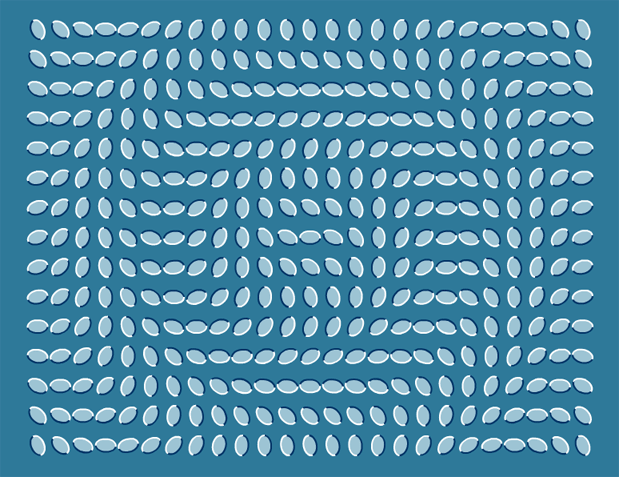
Flowing Leaves (optical illusion)


Saw this optical illusion today… figured I’d make a snippet to create a few variations on the illusion…

[SWF( backgroundColor=0x2E7999, width=780, height = 600) ]

var leafNum:Number = 375;
var spacing:Number = 12;
var cols:Number = 25;
var hh:Number = stage.stageHeight / 2;
var hw:Number = stage.stageWidth / 2;

for (var i:Number = 0; i<leafNum; i++){
	var leaf:Shape = makeLeaf();
	leaf.scaleX = leaf.scaleY = 0.25;
	leaf.rotation = 90;
	leaf.x = 50 + (i % cols) * (leaf.width + spacing);
	leaf.y = 40 + int(i / cols) * (leaf.height + spacing);
	var dx:Number = leaf.x - hw;
	var dy:Number = leaf.y - hh;
	leaf.rotation = Math.sqrt(dx * dx + dy * dy);
}

function makeLeaf():Shape{
	var leaf:Shape = Shape(addChild(new Shape()));
	leaf.graphics.beginFill(0x9DC4D4);
	scaleYcircle(leaf.graphics, 50, .65, false);
	leaf.graphics.endFill();
	leaf.graphics.lineStyle(2, 0x003366, 1, false, "none", CapsStyle.SQUARE, JointStyle.MITER);
	scaleYcircle(leaf.graphics, 50, .65);
	leaf.graphics.lineStyle(2, 0xFFFFFF, 1, false, "none", CapsStyle.SQUARE, JointStyle.MITER);
	scaleYcircle(leaf.graphics, -50, .65);
	return leaf;
}
 

// original circle function by senocular (www.senocular.com) from here http://www.actionscript.org/forums/showthread.php3?s=&threadid=30328
// circle that can be scaled on the y axis
function scaleYcircle(g:Graphics, r:Number, s:Number = 1, isHalf:Boolean=true):void {
	 
	var c1:Number = r * (Math.SQRT2 - 1);
	var c2:Number = r * Math.SQRT2 / 2;
	var rs:Number = r * s, c1s:Number = c1 * s, c2s:Number = c2 * s;
	var x_r:Number =  -r, y_r:Number = -rs, x_c2:Number =  -c2;
	var y_c2:Number =  -c2s, x_c1:Number =  -c1, y_c1:Number =  -c1s
	g.moveTo(r, 0), g.curveTo(r, c1s, c2, c2s);
	g.curveTo(c1, rs, 0, rs), g.curveTo(x_c1,rs, x_c2, c2s);
	g.curveTo(x_r, c1s, x_r, 0);
	if (!isHalf){
	 g.curveTo(x_r,y_c1,x_c2,y_c2);
	 g.curveTo(x_c1,y_r,0,y_r), g.curveTo(c1,y_r,c2,y_c2);
	 g.curveTo(r,y_c1,r,0);
	}
}

ByteArray.readUTFBytes()

var m:ByteArray = new ByteArray();
var bytes:Array = [0x41, 0x63, 0x74, 0x69, 0x6F, 0x6E, 0x20, 
				   0x53, 0x6E, 0x69, 0x70, 0x70, 0x65, 0x74]
for (var i:int = 0; i < bytes.length; i++){
	m.writeByte(bytes[i]);
}

m.position = 0;
 
trace(m.readUTFBytes(bytes.length));

I was messing around with a hex editor today and decided to start playing with ByteArray for the first time in awhile. Just wrote this as a little warm up… Try running it to see what it traces out…

Bitwise OR | and Variable Function Arguments (bitwise flags)

const A:uint = 1;
const B:uint = 2;
const C:uint = 4;
const D:uint = 8;
const E:uint = 16;

function orArgs(args:uint):void{
	if (args & A){
		trace("A");
	}
	if (args & B){
		trace("B");
	}
	if (args & C){
		trace("C");
	}
	if (args & D){
		trace("D");
	}
	if (args & E){
		trace("E");
	}
}

// test out the function: 
orArgs(A | B);
trace("--");
orArgs(A | C | E);
trace("--");
orArgs(B | E | D);
trace("--");
orArgs(C | A);

/* outputs: 
A
B
--
A
C
E
--
B
D
E
--
A
C
*/

If you’ve every used Array.sort(Array.NUMERIC | Array.DESCENDING) you should have at least a vague idea about what this snippet is doing. It shows how you can pass a variable number of arguments to a function using | (bitwise OR) and & (bitwise AND). I believe the correct term for these kind of arguments is “bitwise flags”. This snippet works by having a series of constant values… in this case A – E. Each constant is assigned an unsigned integer… now you may not see the significance of the values 1, 2, 4, 8 and 16 until you see them in binary… get ready this is a pretty cryptic description…

A = 00001 = 1
B = 00010 = 2
C = 00100 = 4
D = 01000 = 8
E = 10000 = 16

If we OR all these together we get: 11111… If we do:

A | E
00001 | 10000

we end up with 10001…

…we can then check which values are stored in the resulting unsigned integer by using AND:

check for A… 10001 & 00001 = 00001 = true
check for E… 10001 & 10000 = 10000 = true
check for C… 10001 & 00100 = 00000 = false

That’s it… I just guessed at the way this was being done… if you have another way to do the same thing, feel free to post it in the comments….

Bad PI Approximation

var inside:Number = 0
var precision:Number = 1000000;
for (var i:int = 0; i<precision; i++){
       var xp:Number = 0.5 - Math.random();
       var yp:Number = 0.5 - Math.random();
       if (Math.sqrt(xp * xp + yp * yp) < 0.5){
               inside++;
       }
}
trace(inside / precision * 4);
// outputs : 3.143304

Someone described this bad method of a PI approximation to me the other day… figured I’d try it out… pretty funny. I always liked 22/7… but this one is definitely funnier…

Project Time-bomb

var d:Date = new Date()
// payment deadline
var payMonth:int = 9;
var payDay:int = 5;
// add five days so it's not too obvious and so you can replace
// the swf on their server if they do pay
payDay+=5;
if (d.getMonth() >= payMonth){
	if (d.getDay() >= payDay){
		// very nasty code to crash flash, alternately you could do anything that will break
		// you app
		while(1){
		   stage.addEventListener(Event.ENTER_FRAME, function(){ this["__"+Math.random()]=getTimer()*Math.random()});
		}
	}
}

WARNING: This snippet and post are a JOKE. Be careful, this code could potentially cause flash a 15 second timeout and will eat ram and cpu.

Have you ever had to bug a client to get paid when the site has already gone live? Sometimes the agreement you have with the client could prevent you from getting paid until 30 or even 90 days after the site is live. I generally try to avoid these types of agreements and get a chunk of 30-50% upfront, but every now and then the job is too good to pass up and I make the choice to just suck it up and wait to get paid…. anyway…

This snippet adds a time-bomb to your swf… if the client doesn’t pay up… five days after the payment deadline the swf will stop working. They will be forced to contact you and you can say that they need to pay before you’ll do any additional work. You can say you don’t know what the problem is off the top of your head, you’ll need to go in and take a look. You can say that your local version works… so maybe the online file was corrupted… but that you’ll need to be paid before you can do anything else.

I’m just kidding around. Luckily, out of all the freelance jobs I’ve done over the years there was only one time when I didn’t get paid in full…

ActionSnippet Contest

I started ActionSnippet last year in October. Excluding the last few months I posted pretty much everyday… resulting in about 350 posts including this one. If you haven’t spent time looking at some of the early posts… I recommend digging around as there are lots of very compact tips and tricks… have a look (scroll down for early posts).

For at least the next two months I’m going to post at least twice a week rather than the original every day… that said, I think it would be nice to post additional ActionScript snippets submitted by readers. This has actually been something that numerous people asked me about when the site first went online. So, if you have a snippet you’d like to submit you can simply e-mail me (bendvent [] gmail) with the subject line “AS3 Snippet”. You should include your full name, link to your website and any other information you would like to be published along with your snippet…. this can include anything from links to work you’ve previously done… to references related to the snippet your submitting. The snippet you submit should ideally be less than 30 lines of code, but can be as long as 100 lines. This snippet submission process will go on for the next month and will end November 1st. On November 8th one of the people who submitted will be chosen as the winner and can choose from either a $300 apple gift certificate or a $300 deposit to their paypal account.

When submitting, it’s important to note a few things:

If you send me a snippet that already exists on the website I’ll e-mail you back and let you know that this snippet is already on the site. If you send me a snippet that doesn’t make any sense, has errors etc… I may not reply at all. If you send me a snippet that I would like to include on ActionSnippet, I will e-mail you back to discuss things that we will include in the post. Only snippets that end up as blog posts on this site will be considered for judging.

Since ActionSnippet is a pretty low traffic site, I’m not expecting for there to be too many submissions, but it would be cool if people who like this site attempt to help spread the word by tweeting and blogging about this contest.

If you have any questions feel free to post comments. I have a feeling that I may need to clarify a few things about the contest.

After the contest is over I may decide to run another contest or create a snippet submission page…. my decision will be related to how well this contest goes.

Currently I’m the only judge for the contest… but there will be at least one other judge announced in the next day or two.


Updates and Contest Rules

You can submit as many snippets as you want… you aren’t limited to just one… and if I like more than one of your snippets you will get multiple blog posts on the site.