Latest snippets

Functions Returning Functions

var connect:Function = function(xp:Number, yp:Number, col:uint=0):Function{
	graphics.lineStyle(0,col);
	graphics.moveTo(xp, yp);
	var line:Function = function(xp:Number, yp:Number):Function{
		graphics.lineTo(xp, yp);
		return line;
	}
	return line;
}

// draw a triangle
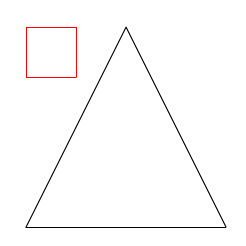
connect(200,100)(300,300)(100,300)(200, 100);

// draw a box
connect(100,100, 0xFF0000)(150,100)(150,150)(100, 150)(100,100);

This is one of those techniques that I never really get tired of. It’s pretty useless, but fun to play around with every now and then. This draws the somewhat boring looking picture below:
[EDIT]
A few people pointed out that this could be simplified with arguments.callee… So here is an example… it does the same thing as the original code…

var connect:Function = function(xp:Number, yp:Number, col:uint=0):Function{
	graphics.lineStyle(0,col);
	graphics.moveTo(xp, yp);
	return function(xp:Number, yp:Number):Function{
		graphics.lineTo(xp, yp);
		return arguments.callee;
	}
}
QuickBox2D Custom Debug Draw

import com.actionsnippet.qbox.*;
import Box2D.Dynamics.*

stage.frameRate = 60;

var sim:QuickBox2D = new QuickBox2D(this, {debug:true});

// get at the b2DebugDraw instance
var debug:b2DebugDraw = sim.w.m_debugDraw;
debug.m_drawScale = 30.0;
debug.m_fillAlpha = 0.5;
debug.m_alpha = 0.5;
debug.m_lineThickness = 1.0;
debug.m_drawFlags = 0xFF;

sim.createStageWalls();  

for (var i:int = 0; i<10; i++){
  sim.addBox({x:3 + i, y:3 + i, width:2, height:0.5});
}
sim.addCircle({x:12, y:5, radius:2});

sim.start();
sim.mouseDrag();

Note: This snippet requires the QuickBox2D library

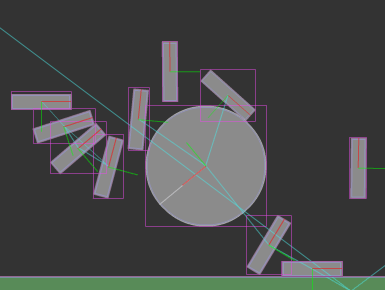
This snippet shows an easy way to get at the settings for Box2D’s debug renderer.


Have a look at the swf…

Obfuscated Slider

var slider:MovieClip = makeSlider();
slider.addEventListener(Event.CHANGE, function(evt:Event):void{
	trace(evt.currentTarget.percent);									
});

function makeSlider():MovieClip{
	var slider:MovieClip = MovieClip(addChild(new MovieClip()));
	var circle:Sprite = Sprite(slider.addChild(new Sprite()));
	with (circle.graphics) beginFill(0x000000), drawCircle(0,0,10);
	var line:Shape = Shape(slider.addChild(new Shape()));
	with (line.graphics) lineStyle(0,0x000000), lineTo(0, 100);
	slider.x = slider.y = 100;
	circle.addEventListener(MouseEvent.MOUSE_DOWN, function(evt:Event):void{ evt.currentTarget.startDrag(false, new Rectangle(0,0,0,100)), slider.addEventListener(Event.ENTER_FRAME, onChange) });
	var stopIt:Function = function(){ stopDrag(), slider.removeEventListener(Event.ENTER_FRAME, onChange) };
	stage.addEventListener(Event.MOUSE_LEAVE, stopIt);
	stage.addEventListener(MouseEvent.MOUSE_UP, stopIt);
	return slider;
}
function onChange(evt:Event):void { evt.currentTarget.percent = evt.currentTarget.getChildAt(0).y / 100, evt.currentTarget.dispatchEvent(new Event(Event.CHANGE)) }

This is a pretty nasty implementation of a basic slider. Just felt like writing some obfuscated code today… It could probably be made even more confusing with some additional tweaks…

Have a look at the swf over at wonderfl…

ActionSnippet Contest Winner

The other judge for the contest was Rich Shupe. We just reviewed the entries together and have decided on a winner….

The winner is Petri Leskinen (piXelero)

Have a look at the winning snippet if you haven’t seen it already.

Rich and I thought that Kyle Phillips deserved honorable mention for his google analytics snippet.

Thanks to everyone who sent in snippets. Even though there were only a handful of submissions I had a good deal of fun reviewing and judging. I still have two more entries that I have yet to publish… so stay tuned…

Bounce Ball Inside a Circle

package  {
	import flash.display.Shape;
	import flash.display.Sprite;
	import flash.geom.Point;

	/**
	 * Re: http://board.flashkit.com/board/showthread.php?t=797453
	 * @author makc
	 * @license WTFPLv2
	 */
	public class BouncingBall extends Sprite{
		public function BouncingBall () {
			r = 10;
			ball = new Shape;
			ball.graphics.beginFill (0);
			ball.graphics.drawCircle (0, 0, r);
			addChild (ball);
			v = new Point;
			v.x = Math.random ();
			v.y = Math.random ();
			V = 1 + 20 * Math.random ();
			v.normalize (V);
			R = 200; X = 465 / 2; Y = 465 / 2;
			graphics.lineStyle (0);
			graphics.drawCircle (X, Y, R);
			ball.x = X + 100;
			ball.y = Y - 100;
			addEventListener ("enterFrame", loop);
		}
		private var r:Number;
		private var ball:Shape;
		private var v:Point;
		private var V:Number;
		private var R:Number;
		private var X:Number;
		private var Y:Number;
		private function loop (e:*):void {
			ball.x += v.x;
			ball.y += v.y;
			// R-r vector
			var P:Point = new Point (X - ball.x, Y - ball.y);
			if (P.length > Math.sqrt ((R - r) * (R - r))) {
				// normalize R-r vector
				P.normalize (1);
				// project v onto it
				var vp:Number = v.x * P.x + v.y * P.y;
				// subtract projection
				v.x -= 2 * vp * P.x;
				v.y -= 2 * vp * P.y;
				v.normalize (V);
				// move away from bounding circle
				P = new Point (X - ball.x, Y - ball.y);
				while (P.length > Math.sqrt ((R - r) * (R - r))) {
					ball.x += v.x;
					ball.y += v.y;
					P = new Point (X - ball.x, Y - ball.y);
				}
			}
		}
	}
}

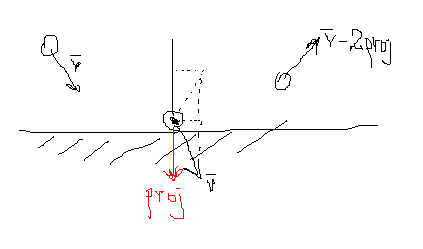
Makc3d said I could choose one of his excellent wonderfl.net pieces and submit it to the contest. This snippet creates a ball that bounces off the inside of a circle. I thought this was a pretty unique way to go about doing this – and found it easy to add gravity and other cool features to it.

Have a look at the swf over at wonderfl….

Some Makc3d links:
>> http://makc3d.wordpress.com/
>>http://code.google.com/p/makc/
>> http://wonderfl.net/user/makc3d

Makc3d elaborated on his code a bit via e-mail. He said that his technique sacrifices accuracy for simplicity… and that if you simplify too much it would be easy to break the code. “e.g. comment out piece of code where it says “move away from bounding circle””…

Here is a picture that Makc3d drew explaining why you need to multiply by 2:

Google Analytics Utility

package com.hapticdata.utils
{
	import flash.external.ExternalInterface;
	/**
	 * Simplifies posting to Google's Analytics Tracker, allows easily disabling for development phase
	 * and uses ExternalInterface rather than navigateToURL
	 * @class Urchin 
	 * @author Kyle Phillips - <a href="http://www.haptic-data.com">http://www.haptic-data.com</a>
	 * @created October 28, 2008
	 * @example Analytics.post("section");
	 */
	
	
	public class Analytics
	{
		
		public static var enabled:Boolean = true;
		//appended as a directory to all trackings
		public static var swfID:String="/flashevent/";
		//correct for default snippet. Change this if you have a custom-wrapped analytics method
		public static var functionToCall:String = "pageTracker._trackPageview";
		
		/**
		 * Will invoke the set javascript function
		 * @param location:String - a string identifying where the user is in the site
		 */
		public static function post(location:String):void
		{
			if(enabled && ExternalInterface.available)
			{
				ExternalInterface.call(functionToCall,swfID+location);
			}
		}
	}
}

This contest entry by Kyle Phillips is a utility class for dealing with google analytics. If you haven’t messed with google analytics I suggest you give it a try.

Kyle Phillips links:
>> http://workofkylephillips.com
>> http://labs.hapticdata.com

I usually find myself adding google analytics code in a very hacky way… usually because the client asks for it at the 11th hour. Using a class like Kyle’s would enable you to simply add the tracking code from the start and then if the client doesn’t ask for it… you can just keep the class disabled… or charge more when you offer google analytics tracking for “phase 2” of the project 😉

Hide Browser Scrollbars

/*
This snippet is by Mels le Noble
www.melslenoble.nl
It will hide the browser scrollbars.
*/

// see if we are testing locally
if (stage.loaderInfo.url.split("/")[2])
{
 ExternalInterface.call("function(){document.body.style.overflow='hidden';document.html.style.overflow = 'hidden';}");
}

This snippet by Mels le Noble will hide the browser scrollbars. The bulk of the snippet is the javascript inside the ExternalInterface.call() method. I like the trick that Mels uses to check if the swf is local…. snippet-worthy in itself.

QuickBox2D 1.1 (2 major bug fixes)

Since the release of QuickBox2D 1.0 two bugs were discovered by numerous developers. The first bug was the inability to properly destroy group objects. The second bug was a small memory leak that caused most QuickObjects to remain in memory. Both of these bugs are now resolved.

Download QuickBox2D 1.1

Testing the memory leak. In QuickBox2D 1.0 if you created and destroyed 100s of rigid bodies, the ram would very slowly rise… Sometimes it would get garbage collected, but the memory would never fully be released. I created a simple test to make sure this is fixed in 1.1:

import com.actionsnippet.qbox.*;

var sim:QuickBox2D = new QuickBox2D(this, {debug:false});

sim.createStageWalls();

var levelParts:Array = [];
const TWO_PI:Number = Math.PI * 2;

// destroys and then creates a bunch of rigid bodies
// called every second 
buildRandomLevel();
setInterval(buildRandomLevel, 1000);

var txt:TextField = TextField(addChild(new TextField()));
txt.x = txt.y = 30;
txt.backgroundColor = 0xFFFFFF;
sim.start();

// display amount of ram used, to make sure garbage collection is working
sim.addEventListener(QuickBox2D.STEP, onStep);
function onStep(evt:Event):void{
	txt.text = (System.totalMemory / 100000).toFixed(2) + "mb";
}

function buildRandomLevel():void{
	// destroy all rigid bodies
	for (var i:int = 0; i<levelParts.length; i++){
		levelParts[i].destroy();
	}
	levelParts = [];
	// create a bunch of circles and boxes
	for (i = 0; i<16; i++){
		var rad:Number = 0.4 ;
		levelParts.push(sim.addCircle({x:1 + i * rad * 4, y : 2, radius:rad - Math.random()*0.3}));
		
		var rot:Number = Math.random() * TWO_PI;
		levelParts.push(sim.addBox({x:4+Math.random() * i * 2, y:4+Math.random()*i, 
				    width:3, height:0.25, angle:rot, density:0}));
	}
}

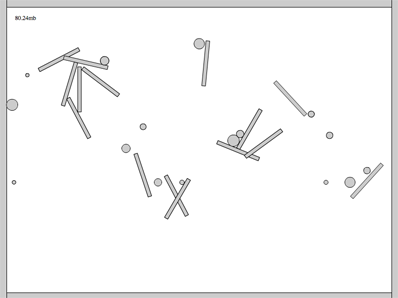
This snippet creates and destroys a bunch of rigid bodies again and again…. On my macbook 2.6 Ghz intel core duo… the ram runs between 79mb and 112mb. I let it run for 40 minutes and this did not change – it always eventually returned down to 79mb.


Have a look at the swf…

Thanks to all the people who gave feedback that lead to the discover of these bugs.

Paste Your Interface

Are you working on something right now that makes use of interfaces? Copy and paste an interface into the comments of this post (no need for code tags or anything)….

package app{
	
	import flash.events.IEventDispatcher;
	
	public interface IBaseModel extends IEventDispatcher{
		
		function set decimal(val:int):void;
	
		function get decimal():int ;
		
		function get stringValue():String; 
		
		function get errorMessage():String;
		
		function set base(val:int):void;
		
		function get base():int;
		
		function startCounting(interval:Number, changeBy:Number):void;
		 
		function stopCounting():void;
	}
}

BitmapData Frame Texture

[SWF(width = 800, height = 600)]
var circle:Shape = new Shape();
var radius:Number = 4;
var diameter:Number = radius * 2;
var diam4:Number = diameter * 4;
with(circle.graphics) beginFill(0x000000), drawCircle(diameter,diameter,radius);
circle.filters = [new BlurFilter(5, 5, 2)];

var currFrame:Frame;

// populate the linked list
generateAnimation();

var animationNum:int = 8000;
var animation:Vector.<Frame> = new Vector.<Frame>();
var locs:Vector.<Point> = new Vector.<Point>();
// populate locs and animation
while(animation.length < animationNum){
       currFrame = currFrame.next;
       animation.push(currFrame);
       locs.push(new Point(Math.random() * stage.stageWidth - radius,
                           Math.random() * (stage.stageHeight+diam4) - diam4));
}

var rect:Rectangle = animation[0].bitmap.rect;
var bottom:Number = stage.stageHeight + rect.height;
var top:Number = -rect.height;

var canvas:BitmapData = new
BitmapData(stage.stageWidth,stage.stageHeight,false, 0x000000);
addChild(new Bitmap(canvas));

addEventListener(Event.ENTER_FRAME, onLoop);
function onLoop(evt:Event):void {
       // clear the canvas
       canvas.fillRect(canvas.rect, 0x222222);
       // draw the current frame
       for (var i:int = 0; i<animationNum; i++){
               var ani:Frame = animation[i];
			   var pnt:Point = locs[i];
               canvas.copyPixels(ani.bitmap, rect, pnt, null, null, true);
               // get the next frame of the animation
			   pnt.y += 1;
			   if (pnt.y > bottom){
				   pnt.y = top;
			   }
               animation[i] = ani.next;
       }

}

// generate and capture 40 bitmaps by altering the colorTransform of
 
function generateAnimation():void{
       var channel:uint = 0;
       var ct:ColorTransform = new ColorTransform();
       var increase:Boolean = true;
       var firstFrame:Frame;
       var pFrame:Frame;
       for (var i:int = 0; i<40; i++){
               if (increase){
                  channel += 10.25;
                  if (channel > 200){
                         increase = false;
                  }
               }else{
                  channel -= 10;
               }
               ct.color = channel << 16 | channel << 8 | channel;
               circle.transform.colorTransform = ct;
			   
               // populate linked list
               currFrame = capture(circle);
               if (pFrame){
                  pFrame.next = currFrame;
               }
               if (i == 0){
                  firstFrame = currFrame;
               }
               pFrame = currFrame;
       }
       // close the list
       currFrame.next = firstFrame;
       currFrame = firstFrame;
}

// create the Frame instance and draw the circle to it
// preserving the colorTransform information
function capture(target:Shape):Frame{
       var frame:Frame = new Frame();
       frame.bitmap = new BitmapData(target.width*2, target.height*2, true, 0x000000000);
       frame.bitmap.draw(target, target.transform.matrix, target.transform.colorTransform);
       return frame;
}

This is a variation on the last post. It captures 40 small bitmaps of a blurred circle fading in and out and then draws 8000 of them to the stage.


Have a look at the swf…