Latest snippets

Rotation Property Weirdness

var boxA:Shape = Shape(addChild(new Shape()));
with (boxA.graphics) beginFill(0), drawRect(-10,-10,20,20);

var boxB:Shape = Shape(addChild(new Shape()));
with (boxB.graphics) beginFill(0), drawRect(-10,-10,20,20);

boxA.x = 100; 
boxA.y = 100;

boxB.x = 200; 
boxB.y = 100;

var rot:Number = 32750;

addEventListener(Event.ENTER_FRAME, onLoop);
function onLoop(evt:Event):void {
  rot += 1
  // will stop rotating 
  boxA.rotation = rot
  // will keep rotating
  boxB.rotation = rot % 360;
}

I recently became aware of a strange aspect of the rotation property on DisplayObjects. For some reason, once it’s value goes a little beyond ~32750 the DisplayObject will simply stop rotating. If you read the rotation property it is still changing, but there is no visual update – a quick check on the DisplayObject.transform.matrix property will show that the value has stopped.

The easy fix is to use mod before applying the value to the rotation property. Surprised I’ve never come across this one before. Maybe someone can shed some light on this.


// for people searching google for solutions to this problem I’ll add the following key words:
MovieClip stops rotating, DisplayObject stops rotating, rotation property broken, not rotating
Graphics Class and Twitter

[SWF(width = 700, height=700, frameRate=12)]
var cmds:Array = [];

var loader:URLLoader = new URLLoader();
var req:URLRequest = new URLRequest("http://search.twitter.com/search.atom");
var vars:URLVariables = new URLVariables();
vars.q = "#asgraph";
// results per page
vars.rpp = "100";
vars.page = 1;

req.data = vars;
req.method = URLRequestMethod.GET;

loader.addEventListener(Event.COMPLETE, onLoaded);
loader.load(req);

var txt:TextField = TextField(addChild(new TextField()));
txt.defaultTextFormat = new TextFormat("_sans", 12);
with (txt){ x=10, y=10, autoSize="left"; }
txt.htmlText = "loading...";

function onLoaded(evt:Event):void{
       removeChild(txt);
   var searchData:XML = new XML(loader.data);
   var atom:Namespace = searchData.namespace("");

   var leng:int = searchData.atom::entry.length() -1;
  for (var i:int = leng; i>=0; i--){
       var cmd:String =
searchData.atom::entry[i].atom::title.toString().replace(/#asgraph/g,
"");
      // added this to ignore words starting with @
      cmd = cmd.replace(/@(w+)/g, "");
       cmds.push(cmd);
   }

       var time:Timer = new Timer(100, cmds.length);
       time.addEventListener(TimerEvent.TIMER, onTick);
   time.start();
}
function onTick(evt:TimerEvent):void{
       render(parseFunctions(cmds[evt.target.currentCount - 1]));
       graphics.endFill();
       graphics.lineStyle();
}

// parse and run Graphics class commands
function parseFunctions(dat:String):Array{
   var a:Array = dat.split(";") ;
   for (var i:int = 0; i<a.length-1; i++){
       a[i] = a[i].split(/()|(|)/g);
       var f:String = a[i][0] = a[i][0].replace(/s/g,"");
       a[i] = a[i].splice(0, a[i].length - 1);
       if (a[i].length> 1){
        a[i] = a[i][1].split(",");
        a[i].unshift(f);
       }
   }
   return a.splice(0,a.length - 1);
}
function render(p:Array):void {
   for (var i:int = 0; i<p.length; i++) {
       try{
       graphics[p[i][0]].apply(graphics,p[i].splice(1));
       }catch(e:Error){};
   }
}

This is a simple idea I had awhile back… This snippet searches twitter for the #asgraph hashtag and if it finds standard Graphics class method calls it renders them.

So if you tweet something likethis :

#asgraph beginFill(0xFF); drawCircle(200,200,10); 

it will get rendered into the below swf (you’ll need to refresh to see your tweet get rendered):

[SWF]https://actionsnippet.com/wp-content/asgraph.swf, 700, 700[/SWF]

Here is a direct link to the swf

Paste an Arbitrary Piece of Code

...
// loop through until we find the root note
	// grab the third and the fifth and exit the loop
	for (var i:int = 0; i<leng; i++){
		if (cMajor[i] == note){
			third = cMajor[(i + 2) % leng];
			fifth = cMajor[(i + 4) % leng];
			break;
		}
	}
	
	// we may need a double sharp on the middle note
	var sharpFlatDouble:String = sharpFlat;
	
	// check if this is a sharp, check if it is A or D
	// if it is add the symbol for double sharp
	if (sharpFlat == "#"){
		if (note == "D" || note == "A"){
			sharpFlatDouble = "x";
		}
	}
...

If your working on some code… just randomly copy a piece of it and paste it in the comments… This code is from a program that generates any major scale (it’s still not finished). Feel free to post code chunks in any language…

[EDIT] the code doesn’t need to work on its own… you can just randomly copy from something your working on…

QuickBox2D Mini-Poly Editor

[SWF(width = 800, height = 600, frameRate = 60)]
import com.actionsnippet.qbox.*;
stage.frameRate = 60;

var sim:QuickBox2D = new QuickBox2D(this);

sim.createStageWalls();

sim.start();

var output:TextField = new TextField();
output.text = "Click anywhere to add points to a polygon. Hit any key to test.nn";
output.x = output.y = 50;
with(output) width = 300, height = 400, border = true, selectable = true, wordWrap = true, multiline = true;
addChild(output);

function display(str:*):void{
	output.appendText(str.toString() + "n");
}
								
var points:Array = [];
var poly:Shape = new Shape();
addChild(poly);

stage.addEventListener(MouseEvent.CLICK, onClick);
stage.addEventListener(KeyboardEvent.KEY_DOWN, onKeyPressed);

function onClick(evt:MouseEvent):void {
	if (points.length == 0){
		poly.graphics.beginFill(0xCCCCCC);
		poly.graphics.lineStyle(1, 0xFF0000);
		poly.graphics.moveTo(mouseX, mouseY);
	}else{
		poly.graphics.lineTo(mouseX, mouseY);
	}
	poly.graphics.drawCircle(mouseX, mouseY, 2);
	 
	points.push(mouseX / 30.0, mouseY / 30.0);
}

function onKeyPressed(evt:KeyboardEvent):void {
	 // average all points
	 var avgX:Number=0
	 var avgY:Number = 0;
	 
	 for (var i:int = 0; i<points.length; i+=2){
	     avgX += points[i];
		 avgY += points[i + 1];
	 }
	
	 avgX /= points.length/2;
	 avgY /=  points.length/2;
	 avgX = avgX;
	 avgY = avgY;
	 
	 // subtract averages and fix decimal place
	  for (i = 0; i<points.length; i+=2){
		  var yp:int = i + 1;
	      points[i] -= avgX;
		  points[yp] -= avgY;
		  points[i] = Number(points[i].toFixed(2));
		  points[yp] = Number(points[yp].toFixed(2));
	 }
	 
	 display("points array:");
	 display(points);
	 
	 try{
		 var p:QuickObject = sim.addPoly({x:avgX, y:avgY, points:points});
		 p.userData.graphics.beginFill(0xFF0000);
		 p.userData.graphics.drawCircle(0,0,5);
	 }catch(e:*){
		display("Invalid polygon data!"); 
	 }
	 
	 poly.graphics.clear();
	 points = [];
}

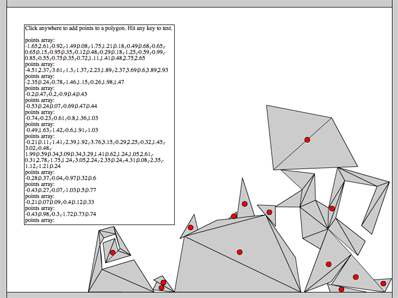
This snippet shows the basic concepts needed to go about creating a polygon editor for QuickBox2D. I have an unreleased editor that I use for my QuickBox2D projects, at some point I may release it… but for now I figured I’d post this extremely simplified version for people to expand on.


Have a look at the swf here…

Float as a Fraction

// print some floats as fractions
printFraction(0.5);
printFraction(0.75);
printFraction(0.48);

// try something a little more complex
var float:Number = 0.98765432;
trace("na more complex example:");
printFraction(float);
var frac:Array = asFraction(float);
trace("double check it:");
trace(frac[0] + "/" + frac[1] +" = " + frac[0] / frac[1]);

/* outputs:
0.5 = 1/2
0.75 = 3/4
0.48 = 12/25

a more complex example:
0.98765432 = 12345679/12500000
double check it:
12345679/12500000 = 0.98765432
*/


function printFraction(n:Number):void{
	var frac:Array = asFraction(n);
	trace(n + " = " + frac[0] + "/" + frac[1]);
}

// takes any value less than one and returns an array 
// with the numerator at index 0 and the denominator at index 1
function asFraction(num:Number):Array{
    var decimalPlaces:int = num.toString().split(".")[1].length;
	var denom:Number = Math.pow(10, decimalPlaces);
	return reduceFraction(num * denom, denom);
}

// divide the numerator and denominator by the GCF
function reduceFraction(numerator:int, denominator:Number):Array{
	// divide by the greatest common factor
	var divisor:int = gcf(numerator, denominator);
	if (divisor){
		numerator /= divisor;
		denominator /= divisor;
	}
	return [numerator, denominator];
}
					
// get the greatest common factor of two integers
function gcf(a:int, b:int):int{
	var remainder:int;
	var factor:Number = 0;
	var maxIter:int = 100;
	var i:int = 0;
	while (1){
		if (b > a){
		   var swap:int = a;
		   a = b;
		   b = swap;
		}
		remainder = a % b;
		a = b;
		b = remainder
		if (remainder == 0){
			factor = a;
			break;
		}else if (remainder==1){
			break;
		}else if (i > maxIter){
			trace("failed to calculate gcf");
			break;
		}
		i++;
	}
	return factor;
}

This snippet contains a few functions for calculating fractions based on float values. Writing this brought back some memories from grade school math.

Greatest Common Factor (divisor)

trace(gcf(75,145));

// outputs 5

function gcf(a:int, b:int):int{
	var remainder:int;
	var factor:Number = 0;
	while (1){
		if (b > a){
		   var swap:int = a;
		   a = b;
		   b = swap;
		}
		remainder = a % b;
		a = b;
		b = remainder
		if (remainder == 0){
			factor = a;
			break;
		}else if (remainder==1){
          
			break;
		}
	}
	return factor;
}

I was messing around with Egyptian Fractions and found myself in need of some interesting functions. The first function I realized I would be needing was for a greatest common factor (GCF or GCD).

The above snippet is a quick implementation of Euclid’s algorithm. It will return 0 if no GCF is found…

I wrote a few helper functions while working with Egyptian fractions… will post them over the next few days.

Ancient Egyptian Multiplication

egyptianMultiply(12, 99);

// trace(12 * 99) // test to make sure it works

/* outputs:
/64 768
/32 384
 16 192
 8 96
 4 48
/2 24
/1 12
---
1188
*/
 

function egyptianMultiply(valueA:Number, valueB:Number):void {
	
	var left:Array = [];
	var right:Array = []
	
	// swap if valueB is smaller than value A
	if (valueB < valueA){
		var swap:int = valueB;
		valueB = valueA;
		valueA = swap; 
	}
	
	// create left and right columns
	var currentLeft:int = 1;
	var currentRight:int = valueA;
	
	while (currentLeft < valueB){
		left.push(currentLeft);
		right.push(currentRight);
		currentRight += currentRight;
		currentLeft += currentLeft; 
	}
	
	
	// add up the right column based on the left
	currentLeft = 0;
	var rightSum:int;
	var leftSum:int;
	var i:int = left.length - 1;
	
	while (currentLeft != valueB){
	 
	  leftSum = currentLeft + left[i];
	  // if the next number causes the sum
	  // to go above valueB, skip it
	  if (leftSum <= valueB){
		currentLeft = leftSum;
		rightSum += right[i];
		trace("/" + left[i]  + " " + right[i]);
	  } else {
		trace(" " + left[i]  + " " + right[i]);
	  }
	  i--;
	}
	trace("---");
	trace(rightSum);
}

Someone mentioned egyptian multiplication to me yesterday… So read a little about it here and whipped up this example. For some reason I decided to do it in processing … once it worked I ported it to ActionScript.

The above link describing the technique I used is from http://www.jimloy.com/… I haven’t spent much time digging around the site, but it appears to have some pretty nice stuff on it…

If you’re curious, here is the original processing version:

Vector left = new Vector();
Vector right = new Vector();

int valueA = 10;
int valueB = 8;

if (valueB < valueA){
    int swap = valueB;
    valueB = valueA;
    valueA = swap; 
}

int currentLeft = 1;
int currentRight = valueA;
while (currentLeft < valueB){
    left.add(currentLeft);
    right.add(currentRight);
    currentRight += currentRight;
    currentLeft += currentLeft; 
}
 
currentLeft = 0;
 
int result = 0;
int i = left.size() - 1;
while (currentLeft != valueB){
 
  int temp = currentLeft + (Integer) left.get(i);
  if (temp <= valueB){
    
    currentLeft = temp;
    result += (Integer) right.get(i);
    println("/" + left.get(i) + " " + right.get(i));
  } else {
    println(" " + left.get(i)  + " " + right.get(i));
  }
    
  i--;
}
println("---");
println(result);

After writing, this I took a look at the wikipedia entry… I also found myself on this short page about a scribe called Ahmes. (I recommend reading this if you are interested in PI)

Fp10 3d Logo

var container:Sprite = new Sprite();
container.x = stage.stageWidth / 2;
container.y = stage.stageHeight / 2;
addChild(container);

var redBox:Sprite = new Sprite();
redBox.graphics.beginFill(0xFF0000);
redBox.graphics.drawRect(-50,-250,100,500);
redBox.rotationZ = 10;
container.addChild(redBox);

var logos:Array = []
var elements:Array = [];
elements.push({element:redBox, z:0});

// add the logos
for (var i:int = 0; i<6; i++){
	var logoContainer:MovieClip = new MovieClip();
	var logoText:TextField = new TextField();
	logoText.defaultTextFormat = new TextFormat("_sans", 50);
	logoText.text = "LOGO";
	logoText.autoSize = "left";
	logoText.selectable= false;
	
	logoText.x = -logoText.width / 2;
	logoText.y = -logoText.height / 2;
	logoContainer.addChild(logoText);
	logoText.backgroundColor = 0xFFFFFF;
	
	container.addChild(logoContainer);
	logos.push(logoContainer);
	elements.push({element:logoContainer, z:0});
}

var ang:Number = -Math.PI / 2;
var rotationSpeed:Number = 0.05;
addEventListener(Event.ENTER_FRAME, onLoop);
function onLoop(evt:Event):void {
	
	 var dx:Number = (mouseY - stage.stageHeight / 2) / 10;
	 var dy:Number = (mouseX - stage.stageWidth / 2) / 10;
	 container.rotationX += (dx - container.rotationX) / 4;
	 container.rotationY += (dy - container.rotationY) / 4;
	 
	 ang += rotationSpeed;
     for (var i:int = 0; i<logos.length; i++){
		 var logo:Sprite = logos[i];
		 logo.x = 150 * Math.cos(ang + i);
	     logo.z = 150 * Math.sin(ang + i);
		 logo.alpha = 1 - logo.z / 200;
		 logo.rotationY = -Math.atan2(logo.z, logo.x)  / Math.PI * 180  - 90;
	 }
	 
	 // z-sort
	 for (i = 0; i<elements.length; i++){
		  elements[i].z = elements[i].element.transform.getRelativeMatrix3D(this).position.z;
	 }
	 
	elements.sortOn("z", Array.NUMERIC | Array.DESCENDING);
	for (i = 0; i<elements.length; i++) {
		container.addChild(elements[i].element);
	}
}

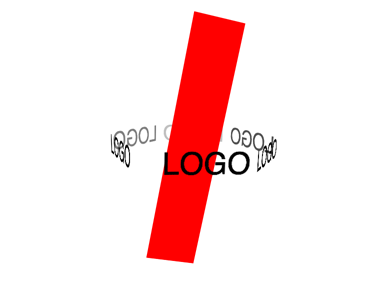
A student of mine was having trouble creating a 3D logo for a client. I created this snippet to help explain how some of the fp10 3D stuff works…. z-sorting etc… The code could be optimized a bit… but it works nicely…


Have a look at the swf…