import com.actionsnippet.qbox.*;
import Box2D.Dynamics.*

stage.frameRate = 60;

var sim:QuickBox2D = new QuickBox2D(this, {debug:true});

// get at the b2DebugDraw instance
var debug:b2DebugDraw = sim.w.m_debugDraw;
debug.m_drawScale = 30.0;
debug.m_fillAlpha = 0.5;
debug.m_alpha = 0.5;
debug.m_lineThickness = 1.0;
debug.m_drawFlags = 0xFF;

sim.createStageWalls();

for (var i:int = 0; i<10; i++){
  sim.addBox({x:3 + i, y:3 + i, width:2, height:0.5});
}
sim.addCircle({x:12, y:5, radius:2});

sim.start();
sim.mouseDrag();
Note: This snippet requires the QuickBox2D library
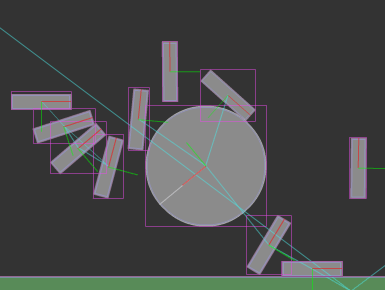
This snippet shows an easy way to get at the settings for Box2D’s debug renderer.
zevan
i tested this with one of the plys you had posted somewhere and its got a weird result.this one:
sim.addPoly({x:13, y:5, verts:[[1,0,2,2,1,1.33],[1,0,1,1.33,0,2]], angle: .4, density:1});
but how do you get the vertices for the polygons?
you should check out the points param instead of verts… it’s easier to understand. I’m almost done with a tutorial that explains both points and verts… will post it here when I’m done with it.