Latest snippets

Graphics Class Methods in XML

// for simplicity I left this XML inline, this will work exactly the same if it were external
var program:XML=<body>
				<draw>
				  <![CDATA[
				   beginFill(0xFF0000);
				   drawCircle(100,100,50);
				   endFill();
				   lineStyle(0, 0x666666);
				   moveTo(100, 100);
				   lineTo(200, 200);
				   moveTo(300, 200);
				   curveTo(350, 300, 400, 200);
				   lineStyle(0, 0x0000FF);
				   drawRect(200, 50,100,100) ;
					]]>
				</draw>
</body>;

// parse and run the Graphics class commands from the XML
render(parseFunctions(program.draw.toString()));

function parseFunctions(dat:String):Array{
	var a:Array = dat.split(";") ;
	for (var i:int = 0; i<a.length-1; i++){
		a[i] = a[i].split(/()|(|)/g);
		var f:String = a[i][0] = a[i][0].replace(/s/g,"");
		a[i] = a[i].splice(0, a[i].length - 1);
		if (a[i].length> 1){
		 a[i] = a[i][1].split(",");
		 a[i].unshift(f);
		}
	}
	return a.splice(0,a.length - 1);
}
function render(p:Array):void {
	for (var i:int = 0; i<p.length; i++) {
		graphics[p[i][0]].apply(graphics,p[i].splice(1));
	}
}

The above code builds on yesterdays post by showing how one could potentially store graphics class method calls in XML using a few regular expressions and Function.apply().

The parseFunctions() function reads through the CDATA string and formats it in a 2D array that looks like this:

[[beginFill, 0xFF0000], [drawCircle, 100, 100, 50], etc...]

The render() function reads through this 2D array, using the first value of each nested array as the function and the remaining values as arguments…

As is this won’t really work with most of the new fp10 graphics methods…
Dynamic Graphics and Function.apply()

var cmds:Array = [["lineStyle", 0, 0xFF0000], ["drawCircle",100, 100, 50], ["drawRect", 50, 50, 100, 100]];
cmds.push(["drawCircle", 100, 100, 70]);
cmds.push(["beginFill",  0x555555]);
cmds.push(["drawRoundRect", 80, 80, 40, 40, 10, 10]);
cmds.push(["endFill"]);

render(cmds);

function render(p:Array):void {
	for (var i:int = 0; i<p.length; i++) {
		graphics[p[i][0]].apply(graphics,p[i].splice(1));
	}
}

The above creates a function called render() that takes a 2D array of Graphics class methods and then runs them. This is a very interesting technique, specifically if you’d like to write Graphics class method calls in an XML or txt file and then have them run on a given DisplayObject in flash.

I’ve been thinking about the best way to do this for awhile… I started off doing something very convoluted and then realized that I could use Function.apply()….

Tomorrow I’ll post a snippet showing how to use this function in conjunction with XML.

Visualizing Binary Numbers Part 2

[SWF(width=900,height=390,backgroundColor=0x000000,frameRate=30)]

var canvas:BitmapData=new BitmapData(4,8,false,0xFFFFFFFF);
var pixNum:int = canvas.width * canvas.height;

var frame:Bitmap = Bitmap(addChild(new Bitmap(canvas)));
frame.scaleX = frame.scaleY = canvas.width * 10;
frame.x = stage.stageWidth / 2 - frame.width / 2;
frame.y =20;

var txt:TextField = TextField(addChild(new TextField()));
txt.autoSize = TextFieldAutoSize.LEFT;
txt.defaultTextFormat = new TextFormat("Verdana", 8, 0xFFFFFF);
txt.x = frame.x - 3;
txt.y = frame.y + frame.height + 10;

var s:String, a:Number = 0, d:Number = 0;
var r:Number = 0xFFFFFFFF / (stage.stageWidth-20) ;

addEventListener(Event.ENTER_FRAME, onLoop);
function onLoop(evt:Event):void {
	 a  += (d - a) / 8;
	  
	 d = (mouseX-10) * r;
	 
	 s = Math.max(0,Math.min(0xFFFFFFFF, a)).toString(2);
	
	 if (s.length < pixNum){
		while(s.length-1 < pixNum){
			s = "0" + s;
		}
	 }
	 
	 txt.text = s;
	
	canvas.lock();
	canvas.fillRect(canvas.rect, 0xFFFFFF);
	for (var i:int = 0; i<pixNum; i++){
		if (s.charAt(i) == "0"){
			canvas.setPixel(i % 4,  i / 4, 0x000000);
		}
	}
	canvas.unlock();
}

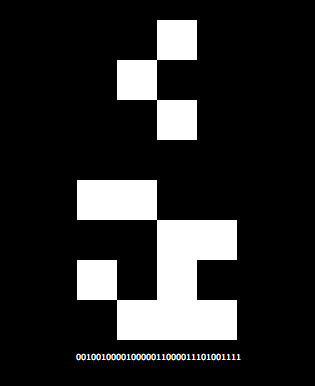
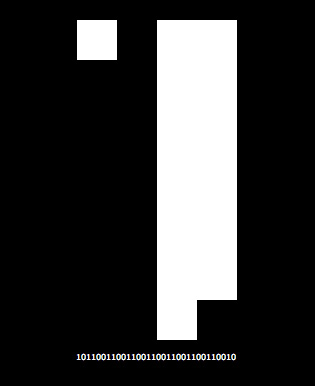
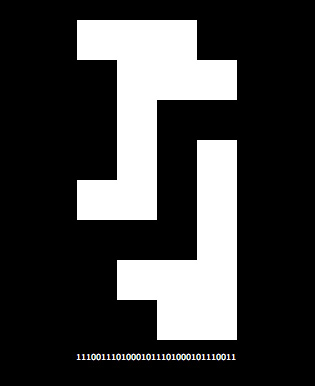
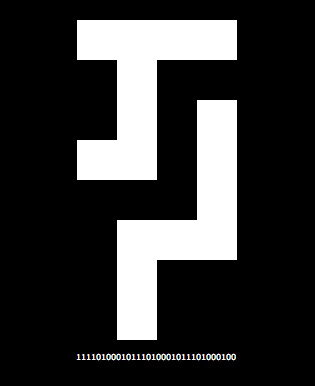
Similar to yesterdays post… this snippet visualizes binary numbers. Move your mouse left and right to change the value of the number that’s being displayed.

Here are a few stills:

This code uses the mouse position to choose which binary number to display. Going all the way to the left of the screen will set this number to 0 and going all the way to the right will set it to 4294967295… that number may look arbitrary unless you see it in in binary 11111111111111111111111111111111 or in hexadecimal 0xFFFFFFFF.

Visualizing Binary Numbers

[SWF(width=320,height=512,backgroundColor=0x000000,frameRate=30)]

var canvas:BitmapData=new BitmapData(32,512,false,0xFFFFFF);
addChild(new Bitmap(canvas)).scaleX = 10;
 
var a:uint ;
var s:String;
var m:Number = 0;
var d:Number = 0;
var mi:int ;
var r:Number = 0xFFFFFF / stage.stageWidth;

addEventListener(Event.ENTER_FRAME, onLoop);

function onLoop(evt:Event):void {
	
	d = mouseX * r;
	m += (d - m) / 30;
	
	mi = int(m);

    canvas.lock();
	canvas.fillRect(canvas.rect, 0xFFFFFF);

    a = 0xFFFFFFFF;
	for (var i:int = 0; i<512; i++) {
		s = (a -= mi).toString(2);
		for (var j:int = 0; j<s.length; j++) {
			if (s.charAt(j)=="0") {
				canvas.setPixel(j, i, 0x000000);
			}
		}
	}
	canvas.unlock();
}

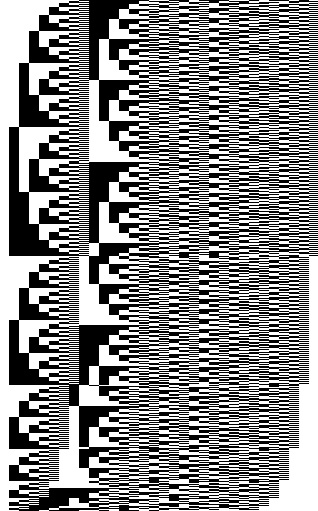
The above uses setPixel() to visualize numbers in binary format. You can move your mouse left and right to change an incremental counting value….

Here’s a still generated by this snippet:

Snippet Template (imports)

package {
	import adobe.utils.*;
	import flash.accessibility.*;
	import flash.display.*;
    import flash.errors.*;
    import flash.events.*;
    import flash.external.*;
    import flash.filters.*;
    import flash.geom.*;
    import flash.media.*;
    import flash.net.*;
    import flash.printing.*;
    import flash.profiler.*;
    import flash.sampler.*;
    import flash.system.*;
    import flash.text.*;
    import flash.ui.*;
    import flash.utils.*;
    import flash.xml.*;
    
	dynamic public class Snippet extends MovieClip {
		public function Snippet() {
			 // paste your snippet here (functions and all)
		}
	}
}

This snippet imports all flash packages and is dynamic… you can copy actionsnippet code into the constructor of this file if you use Flex, FlashDevelop, TextMate etc… I tested it with a bunch of snippets and it seems to work nicely.

When I first teach classes in AS3 this is the template I use:

package{
	import flash.display.*;
	import flash.events.*;
	 
	public class Main extends Sprite{
		// etc...
	}
}

Display and events cover a lot of ground….. next one I find myself adding is flash.geom, followed by flash.net… I’d say those are my top 4 most frequently used packages…. I do lots of text layout in the Flash IDE, otherwise flash.text would be in there….

Static Stage and More…

package {
	import flash.display.*;

	public class Main extends MovieClip{
	
	    private static var _display:MovieClip;
	    private static var _stage:Stage;
	    
	    // use getters instead of public static vars so they 
	    // cannot be reset outside of Main
	    public static function get display():MovieClip{
	    	return _display;
	    }
	    
	    public static function get stage():Stage{
	    	return _stage;
	    }
	    
		public function Main(){
		   Main._display = this;
		   Main._stage = stage;
		   
		   // test out the static references
		   var t:Test = new Test();
		}
	}
}

class Test{
	public function Test(){
		// test out the static references
		with(Main.display.graphics){
			lineStyle(1, 0xFF0000);
			for (var i:int = 0; i<100; i++){
				lineTo(Math.random() * Main.stage.stageWidth, 
				       Math.random() * Main.stage.stageHeight);
			}
		}
	}
}

This snippet creates two private static variables that reference the stage and the main timeline/document class. It then uses getters to regulate the use of these static vars so that they cannot be reset from outside the Main class.

Sometimes the amount of extra coding you need to do to maintain a valid stage reference can be cumbersome… similarly, passing references of the document class all around your app can be annoying. If you don’t mind using two global vars in your app… this trick can come in handy.

What’s nice about using getters here is that if someone tries to do this:

Main.display = new MovieClip();

they’ll get an error… in flex, you even see that little red ex pop up next to this line of code if you write it 🙂 … that wouldn’t happen with a public static var….

Not a Snippet (wandering robots)

package {
	import flash.display.Sprite;
    
    [SWF(width=500, height=500, backgroundColor=0xEFEFEF, frameRate=30)]
	public class Main extends Sprite{
		private var _robotManager:RobotManager;
		public function Main(){
		  _robotManager = new RobotManager(this, 12);
		}
	}
}

class RobotManager{
	
	private var _robots:Array;
	private var _top:Sprite;
	private var _robotNum:int;
	
    public function RobotManager(top:Sprite, robotNum:int){
    	_top = top;
    	_robotNum = robotNum;
    	_robots = new Array();
    	setupRobots();
    	top.addEventListener(Event.ENTER_FRAME, onRun);
    }
    
    private function setupRobots():void{
    	for (var i:int = 0; i<_robotNum; i++){
    		_robots[i] = new Robot();
    		_robots[i].x = 100+(i % 3) * 150;
    		_robots[i].y = 100+int(i / 3) * 100;
    		_robots[i].addEventListener("death", onRobotDie);
    		_top.addChild(_robots[i]);
    	}
    }
    private function onRobotDie(evt:Event):void{
    	for (var i:int = 0; i<_robotNum; i++){
    		if (_robots[i] == evt.currentTarget){
    			_robots.splice(i, 1);
    		}
    	}
    	_robotNum--;
    }
    
    private function onRun(evt:Event):void{
    	collisions();
    }
    
    private function collisions():void{
    	var currBot:Robot;
    	for (var i:int = 0; i<_robotNum; i++){
    		currBot = _robots[i];
    		for (var j:int = 0; j<_robotNum; j++){
    			if (currBot != _robots[j]){
    				var dx:Number = currBot.x - _robots[j].x;
    				var dy:Number = currBot.y - _robots[j].y;
    				if (Math.sqrt((dx * dx) + (dy * dy)) < 40){
    					currBot.die();
    				}
    			}
    		}
    	}
    }
}

import flash.display.*
import flash.events.*;

class Robot extends Sprite{
	private var _inc:Number
	private var _td:Number;
	private var _theta:Number;
	private var _rad:Number;
	
	public function Robot(){
		_theta = Math.random() * (Math.PI * 2);
		_td = _theta;
		_inc = Math.random() * .2 + .05;
		_rad = _inc * 10;
		with(graphics){
			beginFill(0x666666);
			drawRect(-10,-10,20,20);
			endFill();
			beginFill(0x333333);
			drawRect(-5, -5, 20, 10);
			lineStyle(0,0xAAAAAA);
			endFill();
			drawCircle(0,0,20);
		}
		addEventListener(Event.ENTER_FRAME, onRun);
	}
	
	private function onRun(evt:Event):void{
		_td  += _inc;
		_theta += _inc * Math.cos(_td);
		if (x < 0 || y < 0 || x > 500 || y > 500){
			_theta += Math.PI;
		}
		x += _rad * Math.cos(_theta);
		y += _rad * Math.sin(_theta);
		rotation = _theta / Math.PI * 180;
	}
	
	public function die():void{
		removeEventListener(Event.ENTER_FRAME, onRun);
		addEventListener(Event.ENTER_FRAME, onDie);
	}
	
	private function onDie(evt:Event):void{
		scaleX = scaleY += .1;
		alpha -= .1;
		if (scaleX > 2){
			removeEventListener(Event.ENTER_FRAME, onDie);
			if (parent){
				parent.removeChild(this);
				dispatchEvent(new Event("death"));
			}
		}
	}
}

This code should be placed in a document class… not the timeline (hopefully you already know that)

The above creates 12 wandering robots that die when they collide with one another.

This is not a snippet really… but it’s only slightly over 100 lines and it contains a few tricks I find myself using from time to time.

You can view the swf here.

Canonical Representation of XOR

// xor
trace(0 ^ 0);
trace(0 ^ 1);
trace(1 ^ 0);
trace(1 ^ 1);

trace("canonical representation of xor");
trace(xor(0, 0));
trace(xor(0, 1));
trace(xor(1, 0));
trace(xor(1, 1));

function xor(a:int, b:int):int{
	//1-a   is the same as   int(!a)
	return 1-a & b | a & 1-b;
}

/*
outputs:
0
1
1
0
canonical representation of xor
0
1
1
0
*/

I learned about this from reading The Elements of Computing Systems: Building a Modern Computer from First Principles By Noam Nisan and Shimon Schocken

Check out chapter 1 from the above link for an easy to understand description of the canonical representation of a boolean function.

Just a side note… this happens to be the 100th post on actionsnippet.com

NAND

var a:int, b:int;

a = 0;
b = 0;

trace(int(!(a & b)));

a = 0;
b = 1;

trace(int(!(a & b)));

a = 1;
b = 0;

trace(int(!(a & b)));

a = 1;
b = 1;

trace(int(!(a & b)));

/*
outputs:
1
1
1
0
*/

/*
NAND
00    1
01    1
10    1
11    0
*/

I started reading “The Elements of Computing Systems: Building a Modern Computer from First Principles” By Noam Nisan and Shimon Schocken. So far it’s a very fun read. They talk about the power of NAND in the first chapter….

Variable Swap

//
// swap some variables
// all techniques except the first are from http://cpptruths.blogspot.com/2006/04/swapping-two-integers-in-one-liner.html
//
var a:Number = 1.1;
var b:Number= 2.2;

trace(a, b);

// best, fastest, easiest to read way
var t:Number= a;
a = b;
b = t;

trace(a, b);

// not recommended slower ways:

b=a+b-(a=b);

trace(a, b);

// xor versions will only work with ints and uints
trace("nxor kills decimals:");

// easy to understand xor version
a^=b;
b^=a;
a^=b;

trace(a, b);

// one line xor version

a=(b=(a=b^a)^b)^a;

trace(a, b);

/* outputs:
1.1 2.2
2.2 1.1
1.1 2.2

xor kills decimals:
2 1
1 2
*/

The above swaps variables a and b in a few different ways. The first way (using a temp variable) is the best and fastest way… the rest of the ways are just interesting and fun.

I was coding and something reminded me that there are obscure variable swapping techniques out there… so I figured I’d google for a bit…. there are tons of examples of these online – with lots of good explanations…. I got the above from this link.