Latest snippets

Functional Pseudo-Objects

var moverNum:int = 40;
var movers:Array = new Array();

for (var i:int = 0; i<moverNum; i++){
	movers.push(makeMover());
}

addEventListener(Event.ENTER_FRAME, onLoop);
function onLoop(evt:Event):void {
	for (var i:int = 0; i<moverNum; i++){
		movers[i]();
	}
}

function makeMover():Function{
	// mover vars & setup
	var xVel:Number = Math.random() * 5 + 1;
	var right:Number = stage.stageWidth + 30;
	var s:Shape = Shape(addChild(new Shape()));
	with(s.graphics) beginFill(0xFF0000), drawCircle(0,0,5);
	s.x = Math.random() * stage.stageWidth;
	s.y = Math.random() * stage.stageHeight;
	// return a "run" function
	return function():void {
		 s.x += xVel;
		 if (s.x > right){
			s.x = -30; 
		 }
	}
}

This snippet creates 40 shapes that move to the right at a random velocity. When they animate off the right hand side of the stage they return from the left.

The makeMover() function has a series of variable definitions related to the x velocity and position of a Shape. The makeMover() function then returns an anonymous function that contains some logic to move the Shape “s”. The anonymous function has access to the makeMover() functions temporary variables…

On the main loop we run all of the anonymous functions – animating all the shapes by their random x velocities.

It would be interesting to write the same program using classes and test the for speed differences. My assumption is that anonymous functions are expensive, but it would still be interesting to see…
Bezier Intersections (not a snippet)

var resolution:Number = .03;
var pointNum:int = Math.ceil(1 / resolution);

var bezA:Array = new Array();
populateArray(bezA);
var a:Sprite = dot(100, 200);
var b:Sprite = dot(200, 100);
var c:Sprite = dot(300, 200);

var bezB:Array = new Array();
populateArray(bezB);
var d:Sprite = dot(300, 100, 0xCCCC00);
var e:Sprite = dot(120, 130, 0xCCCC00);
var f:Sprite = dot(200, 300, 0xCCCC00);

addEventListener(Event.ENTER_FRAME, onLoop);
function onLoop(evt:Event):void {
      with(graphics){
		  clear();
		  lineStyle(0, 0x000000);
	   
	      // calc and draw bezier points
		  drawBezier(bezA, a, b, c);
		  drawBezier(bezB, d, e, f);
		  
		  // calc collisions
		  var intersections:Array = calculateIntersection(bezA, bezB);
		  
		   // draw collisions
		   beginFill(0xFF0000);
		   if (intersections.length > 0){
				for (var i:int = 0; i< intersections.length; i++){
					drawCircle(intersections[i].x, intersections[i].y, 3);
				}
		   }
		   endFill();
	 }
}

function populateArray(a:Array):void {
	for (var i:int = 0; i<pointNum; i++){
		a.push(new Point());
	}
}

function drawBezier(bez:Array, a:Sprite, b:Sprite, c:Sprite):void{
	 with(graphics){
		 bezier(bez, a.x, a.y, b.x, b.y, c.x, c.y);
		 var leng:Number = bez.length; 
		 moveTo(bez[0].x, bez[0].y);
		 for (var i:int = 1; i<leng; i++){
			 lineTo(bez[i].x, bez[i].y);
		 }
	 }
}

function bezier(bez:Array, x1:Number, y1:Number, x2:Number, y2:Number, x3:Number, y3:Number):void {
			var b:Number, a2:Number, ab2:Number, b2:Number;
			var pnt:Point;
			var inc:int = 0;
			for (var a:Number = 0; a <=1; a+=resolution) {
				b= 1 - a;
				a2 = a * a;
				ab2 = a * b * 2;
				b2 = b * b;
				pnt = bez[inc];
				pnt.x = a2 * x1 + ab2 * x2  + b2 * x3;
				pnt.y = a2 * y1 + ab2 * y2 + b2 * y3;      
				inc++;
			}
}

function calculateIntersection(bezA:Array, bezB:Array):Array {
	var intersections:Array = new Array();
	var ip:Point;
	var aLength:int = bezA.length;
	var bLength:int = bezB.length;
	var p1:Point, p2:Point, p3:Point, p4:Point;
	
	// compare all line segments and check for 
	// intersections
	for (var i:int = 1; i<aLength; i++){
		p1 = bezA[i - 1];
		p2 = bezA[i];
		for (var j:int = 1; j<bLength; j++){
			p3 = bezB[j - 1];
		    p4 = bezB[j];
			ip = intersection(p1, p2, p3, p4);
			if (ip){
				intersections.push(ip.clone());
			}
		}
	}
	return intersections;
}

var ip:Point = new Point();

function intersection(p1:Point, p2:Point, p3:Point, p4:Point):Point {
	 
	var nx:Number, ny:Number, dn:Number;
	var x4_x3:Number = p4.x - p3.x;
	var pre2:Number = p4.y - p3.y;
	var pre3:Number = p2.x - p1.x;
	var pre4:Number = p2.y - p1.y;
	var pre5:Number = p1.y - p3.y;
	var pre6:Number = p1.x - p3.x;
	
	nx = x4_x3 * pre5 - pre2 * pre6;
	ny = pre3 * pre5 - pre4 * pre6;
	dn = pre2 * pre3 - x4_x3 * pre4;
	
	if (dn == 0){
		return null
	}
	nx /= dn;
	ny /= dn;
    // has intersection
	if(nx >= 0 && nx <= 1 && ny >= 0 && ny <= 1){
		ny = p1.y + nx * pre4;
		nx = p1.x + nx * pre3;
		ip.x = nx;
		ip.y = ny;
    }else{
		 return null;
	}
	return ip
}

// draggable dot
function dot(xp:Number, yp:Number, col:uint = 0x507399, noDrag:Boolean = false):Sprite {
	var s:Sprite = Sprite(addChild(new Sprite));
	s.x = xp;
	s.y = yp;
	with(s.graphics) beginFill(col), drawCircle(0,0,5);
	if (!noDrag){
		s.buttonMode = true;
	   s.addEventListener(MouseEvent.MOUSE_DOWN, onDrag);
	}
	return s;
}
function onDrag(evt:MouseEvent):void {
	evt.currentTarget.startDrag()
}

stage.addEventListener(MouseEvent.MOUSE_UP, onUp);
function onUp(evt:MouseEvent):void{
	stopDrag();
}

This is not a snippet, but it uses some functions that could be considered snippets on their own. Take a look at the swf here:

Bezier Intersection Demo

This demo show a brute force method for getting the coordinates of all intersections between two given quadtratic bezier curves. The approach is pretty simple, each bezier is actually made up of a series of line segments. The resolution variable determines how many line segments make up one bezier curve. By default I use a resolution of 0.03 (~34 lines)… the higher the resolution decimal value, the fewer the number of line segments. I then use a slight variation on yesterdays line segment intersection function to test all existing line segments for intersections.

This is a brute for approach with lots of room for improvement. But in the scenario that you only need to check a few bezier curves for intersection this approach works quite nicely. I don’t recommend this approach if your trying to create a complex vector drawing tool with boolean vector operations etc…

It’s easy to get an idea of the different approaches to this problem with a little googling. One example I found is from Graphics Gems:

http://tog.acm.org/GraphicsGems/gemsiv/curve_isect/

it’s been awhile, but I believe this website also contains information related to this topic:

http://algorithmist.wordpress.com/

Line Intersection Part 2 (optimized)

// optimized line to line intersection test:
// from wikipedia: http://en.wikipedia.org/wiki/Line-line_intersection
// and http://local.wasp.uwa.edu.au/~pbourke/geometry/lineline2d/
var ip:Point = new Point();

function intersection(p1:Sprite, p2:Sprite, p3:Sprite, p4:Sprite):Point {
	var nx:Number, ny:Number, dn:Number;
	var x4_x3:Number = p4.x - p3.x;
	var y4_y3:Number = p4.y - p3.y;
	var x2_x1:Number = p2.x - p1.x;
	var y2_y1:Number = p2.y - p1.y;
	var x1_x3:Number = p1.x - p3.x;
	var y1_y3:Number = p1.y - p3.y;
	
	nx = x4_x3 * y1_y3 - y4_y3 * x1_x3;
	ny = x2_x1 * y1_y3 - y2_y1 * x1_x3;
	dn = y4_y3 * x2_x1 - x4_x3 * y2_y1;
	
	nx /= dn;
	ny /= dn;
	
    // has intersection
	if(nx >= 0 && nx <= 1 && ny >= 0 && ny <= 1){
		ny = p1.y + nx * y2_y1;
		nx = p1.x + nx * x2_x1;
		ip.x = nx;
		ip.y = ny;
    }else{
		// no intersection
		ip.x = ip.y = -1000;
	}
	return ip
}


//
// test out the function:
//

stage.frameRate = 30;
var a:Sprite = dot();
a.x = a.y = 100;

var b:Sprite = dot();
b.x = b.y = 200;

var c:Sprite = dot();
c.x = 200
c.y = 100;

var d:Sprite = dot();
d.x = 100
d.y = 200;

var inter:Sprite = dot(0xFF0000,true);

addEventListener(Event.ENTER_FRAME, onLoop);
function onLoop(evt:Event):void {
    var p:Point = intersection(a, b, c, d);
	inter.x = p.x;
	inter.y = p.y
	
	with(graphics){
		clear();
		lineStyle(0,0x000000);
		moveTo(a.x, a.y);
		lineTo(b.x, b.y);
		moveTo(c.x, c.y);
		lineTo(d.x,d.y);
	}
}

// draggable dot
function dot(col:uint = 0x507399, noDrag:Boolean = false):Sprite {
	var s:Sprite = Sprite(addChild(new Sprite));
	with(s.graphics) beginFill(col), drawCircle(0,0,5);
	if (!noDrag){
		s.buttonMode = true;
	   s.addEventListener(MouseEvent.MOUSE_DOWN, onDrag);
	}
	return s;
}
function onDrag(evt:MouseEvent):void {
	evt.currentTarget.startDrag()
}

stage.addEventListener(MouseEvent.MOUSE_UP, onUp);
function onUp(evt:MouseEvent):void{
	stopDrag();
}

This is a significantly optimized version of yesterdays post. The function intersection() takes four sprites as its arguments. The four arguments could be considered starting points and ending points for two line segments.

The bottleneck in yesterdays post looked something like this;

nx = (p1.x * p2.y – p1.y * p2.x) * (p3.x – p4.x) – (p1.x – p2.x) * (p3.x * p4.y – p3.y * p4.x);
dn = (p1.x – p2.x) * (p3.y – p4.y) – (p1.y – p2.y) * (p3.x – p4.x);
ny = (p1.x * p2.y – p1.y * p2.x) * (p3.y – p4.y) – (p1.y – p2.y) * (p3.x * p4.y – p3.y * p4.x);
return new Point(nx /dn, ny / dn);

nx and ny are the numerators for two fractions both with dn as their denominator…. after taking a look at this page:

http://local.wasp.uwa.edu.au/~pbourke/geometry/lineline2d/

We can simplify things a bit before we start wrapping repetitive math operations up in variables:

nx = (p4.x - p3.x) * (p1.y - p3.y) - (p4.y - p3.y) * (p1.x - p3.x);
// ny = (p2.x - p1.x) * (p1.y - p3.y) - (p2.y - p1.y) * (p1.x - p3.x);
dn = (p4.y - p3.y) * (p2.x - p1.x) - (p4.x - p3.x) * (p2.y - p1.y);
nx /= dn;
// ny /= dn
ny = p1.y + nx * (p2.y - p1.y);
nx = p1.x + nx * (p2.x - p1.x);
return new Point(nx, ny);

It’s important to note here that if we didn’t intend to calculate line segments we could exclude the initial calculation of ny.

At this point we’re ready to get rid of duplicate math operations by wrapping them in variables. In this case this only includes subtraction:

var x4_x3:Number=p4.x-p3.x;
var y4_y3:Number=p4.y-p3.y;
var x2_x1:Number=p2.x-p1.x;
var y2_y1:Number=p2.y-p1.y;
var x1_x3:Number=p1.x-p3.x;
var y1_y3:Number=p1.y-p3.y;

nx=x4_x3*y1_y3-y4_y3*x1_x3;
ny=x2_x1*y1_y3-y2_y1*x1_x3;
dn=y4_y3*x2_x1-x4_x3*y2_y1;

nx/=dn;
ny/=dn;

ny=p1.y+nx*y2_y1;
nx=p1.x+nx*x2_x1;

return new Point(nx, ny);

After wrapping repetitive math into variables the only optimization left to be made is related to the instantiation of a new Point(). Instantiation of objects is an expensive process, so it’s better to define the point once outside of the intersection() function definition.

In the end our function looks like this:

var ip:Point = new Point();

function intersection(p1:Sprite, p2:Sprite, p3:Sprite, p4:Sprite):Point {
	var nx:Number, ny:Number, dn:Number;
	var x4_x3:Number = p4.x - p3.x;
	var pre2:Number = p4.y - p3.y;
	var pre3:Number = p2.x - p1.x;
	var pre4:Number = p2.y - p1.y;
	var pre5:Number = p1.y - p3.y;
	var pre6:Number = p1.x - p3.x;
	nx = x4_x3 * pre5 - pre2 * pre6;
	ny = pre3 * pre5 - pre4 * pre6;
	dn = pre2 * pre3 - x4_x3 * pre4;
	nx /= dn;
	ny /= dn;
    // has intersection
	if(nx >= 0 && nx <= 1 && ny >= 0 && ny <= 1){
		ny = p1.y + nx * pre4;
		nx = p1.x + nx * pre3;
		ip.x = nx;
		ip.y = ny;
    }else{
		// no intersection
		ip.x = ip.y = -1000;
	}
	return ip
}

The final version contains a conditional that checks the end values of nx and ny, if they are between 0 and 1 then we know that there is an intersection between the segments.

Note: Optimized code usually breaks some best practices… as best practices are usually geared toward code flexibility and readability… and not speed.

Line Intersection Part 1 (unoptimized)

// completely unoptimized line to line intersection test:
// from wikipedia: http://en.wikipedia.org/wiki/Line-line_intersection
function intersection(p1:Sprite, p2:Sprite, p3:Sprite, p4:Sprite):Point {
	var nx:Number, ny:Number, dn:Number;
	nx = (p1.x * p2.y - p1.y * p2.x) * (p3.x - p4.x) - (p1.x - p2.x) * (p3.x * p4.y - p3.y * p4.x);
	dn = (p1.x - p2.x) * (p3.y - p4.y) - (p1.y - p2.y) * (p3.x - p4.x);
	ny = (p1.x * p2.y - p1.y * p2.x) * (p3.y - p4.y) - (p1.y - p2.y) * (p3.x * p4.y - p3.y * p4.x);
	return new Point(nx / dn, ny / dn);
}

//
// test out the function:
//

stage.frameRate = 30;
var a:Sprite = dot();
a.x = a.y = 100;

var b:Sprite = dot();
b.x = b.y = 200;

var c:Sprite = dot();
c.x = 200
c.y = 100;

var d:Sprite = dot();
d.x = 100
d.y = 200;

var inter:Sprite = dot(0xFF0000,true);

addEventListener(Event.ENTER_FRAME, onLoop);
function onLoop(evt:Event):void {
    var p:Point = intersection(a, b, c, d);
	inter.x = p.x;
	inter.y = p.y
	
	with(graphics){
		clear();
		lineStyle(0,0x000000);
		moveTo(a.x, a.y);
		lineTo(b.x, b.y);
		moveTo(c.x, c.y);
		lineTo(d.x,d.y);
	}
}

// draggable dot
function dot(col:uint = 0x507399, noDrag:Boolean = false):Sprite {
	var s:Sprite = Sprite(addChild(new Sprite));
	with(s.graphics) beginFill(col), drawCircle(0,0,5);
	if (!noDrag){
		s.buttonMode = true;
	   s.addEventListener(MouseEvent.MOUSE_DOWN, onDrag);
	}
	return s;
}
function onDrag(evt:MouseEvent):void {
	evt.currentTarget.startDrag()
}

stage.addEventListener(MouseEvent.MOUSE_UP, onUp);
function onUp(evt:MouseEvent):void{
	stopDrag();
}

This snippet shows the first step toward a usable line to line intersection test. While this demo is fully functional, there is some room for optimization within the intersection() function itself…

From Equations to Code

When I go directly from an equation to code I like to try to make the code resemble the equation… test to make sure it works and then add optimizations. I do this to keep things clear for myself and also so that I have a step by step process to show my students.

The optimizations and additional features that I’ll add to this function tomorrow will make it look very different from the original equation from wikipedia. Some things that I’ll do:

1) tweak the equation to use fewer operators (it has 12 multiplications right now)
2) wrap duplicate mathmatical operations in variables
3) add the ability to test for line segments rather than infinite lines
4) move any object instantiation outside the function
etc…

Slow Line Drawing

var canvas:BitmapData = Bitmap(addChild(new Bitmap(new BitmapData(400, 400, false, 0x000000)))).bitmapData;

function line(x1:Number, y1:Number, x2:Number, y2:Number, res:int=10):void{
	var dx:Number = x2 - x1;
	var dy:Number = y2 - y1;
	var dist:Number = Math.sqrt((dx * dx) + (dy * dy));
	var step:Number = 1 / (dist / res);
	for (var i:Number = 0; i<=1; i+= step){
		// lerp : a  + (b - a) * f
		canvas.setPixel(x1 + dx * i, y1 + dy * i, 0xFFFFFF);
	}
}

addEventListener(Event.ENTER_FRAME, onLoop);
function onLoop(evt:Event):void {
   canvas.fillRect(canvas.rect, 0x000000);
  line(100 , 100, mouseX, mouseY,1);
  line(100 + 50, 100, mouseX+ 50, mouseY,5);
}

Yesterday I posted an implementation of the Bresenham Line Algorithm. Today I’m posting a comparatively slow way to draw a line with setPixel(). This snippet uses lerp and the Pythagorean theorem. It works nicely for small numbers of lines, its easy to draw dotted lines with it and its easy to explain. In a real app where you needed to use setPixel() to draw a line you should use one of the fast algorithms like Wu or Bresenham.

I didn’t originally write this snippet to use set pixel… a few weeks ago I wrote something very similar to calculate a set of x y coords between two given points. In the program I used it in speed wasn’t an issue (as I only needed to run the function one time). I’ve needed this kind of function many times before in games and small apps…

This was the original:

function calculatePoints(x1:Number, y1:Number, x2:Number, y2:Number, res:int=10):Array{
	var points:Array = new Array();
	var dx:Number = x2 - x1;
	var dy:Number = y2 - y1;
	var dist:Number = Math.sqrt((dx * dx) + (dy * dy));
	var step:Number = 1 / (dist / res);
	for (var i:Number = 0; i<=1; i+= step){
		points.push(new Point(x1 + dx * i, y1 + dy * i));
	}
	return points;
}

trace(calculatePoints(0,0,100,0,10));
/* outputs:
(x=0, y=0),(x=10, y=0),(x=20, y=0),(x=30.000000000000004, y=0),(x=40, y=0),(x=50, y=0),(x=60, y=0),(x=70, y=0),(x=80, y=0),(x=89.99999999999999, y=0),(x=99.99999999999999, y=0)
*/

…and another version to allow you to specify the number of points to calculate rather than the pixel interval at which they should be calculated:

function calculatePoints(x1:Number, y1:Number, x2:Number, y2:Number, pointNum:int=10):Array{
	var points:Array = new Array();
	var step:Number = 1 / (pointNum + 1);
	for (var i:Number = 0; i<=1; i+= step){
		points.push(new Point(x1 + (x2 - x1) * i, y1 + (y2 - y1) * i));
	}
	return points;
}

trace(calculatePoints(0,30,30,0,1));
/* outputs:
(x=0, y=30),(x=15, y=15),(x=30, y=0)
*/

This last version isn’t perfect, sometimes the pointNum will be off by 1, I may fix that in a future post.

Bresenham line

var canvas:BitmapData = Bitmap(addChild(new Bitmap(new BitmapData(400,400, false, 0x000000)))).bitmapData;

drawLine(10,10,100,90, 0xFF0000);
drawLine(100,90,60,80, 0xFF0000);
drawLine(100,90,95,60, 0xFF0000);
	
for (var i:int = 0; i<100; i+=1){
    drawLine(i *4, 100 + i, 200, 390);
}
// code ported from here:
// http://www.edepot.com/linebenchmark.html
function drawLine(x1:int, y1:int, x2:int, y2:int, col:uint = 0xFFFFFF){
	var x:int, y:int;
    var dx:int, dy:int;
	var incx:int , incy:int
	var balance:int;

	if (x2 >= x1){
		dx = x2 - x1;
		incx = 1;
	}else{
		dx = x1 - x2;
		incx = -1;
	}

	if (y2 >= y1){
		dy = y2 - y1;
		incy = 1;
	}else{
		dy = y1 - y2;
		incy = -1;
	}

	x = x1;
	y = y1;

	if (dx >= dy){
		dy <<= 1;
		balance = dy - dx;
		dx <<= 1;

		while (x != x2){
			canvas.setPixel(x, y, col);
			if (balance >= 0){
				y += incy;
				balance -= dx;
			}
			balance += dy;
			x += incx;
		} 
		canvas.setPixel(x, y, col);
	}else{
		dx <<= 1;
		balance = dx - dy;
		dy <<= 1;

		while (y != y2){
			canvas.setPixel(x, y, col);
			if (balance >= 0){
				x += incx;
				balance -= dy;
			}
			balance += dx;
			y += incy;
		} 
		canvas.setPixel(x, y, col);
	}
}

This snippet shows Brensenham’s line drawing algorithm. I ported this implementation from here… all the line algorithms in that link are easy to port to actionscript. I’ve messed with them all at some point.

Tomorrow I’m going to post a super slow line drawing algorithm… so I figured I’d post a fast line drawing algorithm today.

Harmonic Series

var harmonic:Number = 0;
var k:Number = 1;
addEventListener(Event.ENTER_FRAME, onLoop);
function onLoop(evt:Event):void {
	 harmonic += 1 / k;
	 trace("+");
	 trace("1 / " + k + "              =              " + harmonic);
	 k+=1;
}

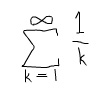
Read more about the harmonic series at wikipedia.


1 / 1 = 1
+
1 / 2 = 1.5
+
1 / 3 = 1.8333333333333333
+
1 / 4 = 2.083333333333333
+
…

Formating Numbers with Commas

trace(formatNum(1000));
trace(formatNum(10000000));
trace(formatNum(1000000.39485));

function formatNum(num:Number):String {
	var newStr:String = "";
	var str:String = num.toString();
	
	var parts:Array = str.split(".");
	str = parts[0];
	var end:String = (parts[1]) ? "." + parts[1] : "";
	
	var i:int = str.length;
	while(i-- > 0){
		 var char:String = str.charAt(i);
		 if ((str.length - i) % 3 == 0){
			newStr = "," + char +newStr;
		 }else{
			newStr = char +  newStr; 
		 }
	}
	return newStr + end;
}
/*
outputs:
1,000
10,000,000
1,000,000.39485
*/

The function formatNum() returns a string given a number argument … it adds commas where appropriate and takes into account decimal values. This is useful anywhere you need to display numbers over 1,000, in a game, in a calculator app etc…

Gumowski / Mira

[SWF(width = 600, height = 600)]
var a:Number = 0.02;
var b:Number = .9998;

var xn1:Number = 5;
var yn1:Number = 0;
var xn:Number, yn:Number;

var scale:Number = 10;
var iterations:Number = 20000;

function f(x:Number):Number{
	var x2:Number = x * x;
	return a * x + (2 * (1 - a) * x2) / (1 + x2);
}
 
var canvas:BitmapData = Bitmap(addChild(new Bitmap(new BitmapData(600,600,false,0xEFEFEF)))).bitmapData;
																	   
addEventListener(Event.ENTER_FRAME, onLoop);
function onLoop(evt:Event):void {
	
    canvas.fillRect(canvas.rect, 0xEFEFEF);
	a = mouseY / 1000;
	xn1 = mouseX / 30;
	yn1 = 0;
	for (var i:int = 0; i<iterations; i++){
		  xn = xn1;
		  yn = yn1;
		  
          xn1 = b * yn + f(xn);
          yn1 =  -xn + f(xn1);
		  canvas.setPixel( 280 + xn1 * scale, 300 + yn1 * scale, 0x000000);
	}
}

Notice the setup for this is very similar to yesterdays flames attractor post.

Back in october of last year I stumbled upon the excellent subblue website by Tom Beddard. I was REALLY impressed by a blog post about Gumowski / Mira patterns. If you haven’t seen it you should go take a look.

I’d never heard of Gumowski / Mira patterns before and made a mental note to go and try to read about them and maybe find an equation to port to actionscript or processing. Anyway, a few days ago I decided to go ahead and look up the math and… this is the result.

I got equation over at mathworld…

For simplicity I intentionally made the actionscript code look as much like the mathworld equation as possible. Using f for my function name and using xn1, yn1 etc… There are a few speed optimizations that could be made but I wanted this snippet to be very readable.

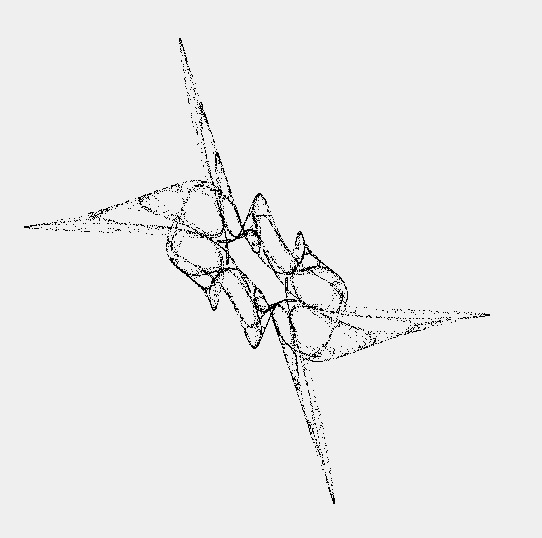
Here are a few examples of what this code will generate:

setPixel() Flames Attractor

[SWF(width = 600, height = 600)]
var a:Number = 0.02;

var xn:Object = new Object();

var scale:Number = 20;
var iterations:Number = 10000;
 
var canvas:BitmapData = Bitmap(addChild(new Bitmap(new BitmapData(600,600,false,0xEFEFEF)))).bitmapData;

addEventListener(Event.ENTER_FRAME, onLoop);
function onLoop(evt:Event):void {
	
    canvas.fillRect(canvas.rect, 0xEFEFEF);
	a = mouseX / 100;
	
	// equations from here: http://www.discretedynamics.net/Attractors/Flames.htm
	// i used object syntax so that I could really reflect the math notation, changing these to
	// 3 variables will significantly improve performance:
	xn["n-1"] =  mouseX / 200;
	xn["n"] =   mouseY / 200;
	xn["n+1"] = 0;
	
	for (var i:int = 0; i<iterations; i++){
		 
		  xn["n+1"] = ((a * xn["n"]) / (1 + (xn["n-1"] * xn["n-1"]))) - ((xn["n-1"]) / (1 + (xn["n"] * xn["n"])));
		  
		  canvas.setPixel( 280 + xn["n-1"] * scale, 300 + xn["n"] * scale, 0x000000);
		  
		  xn["n-1"] = xn["n"];
		  xn["n"] = xn["n+1"];
	}
}

This is an attractor that vaguely resembles flames, I wrote this code so that it would be very similar to the math notation to help anyone who wonders how to go from notation to code. You could replace the Object syntax with 3 separate variables for increased performance.

See the equation here:
http://www.discretedynamics.net/Attractors/Flames.htm


This snippet will create something that looks like this and is reactive to the mouse location