Latest snippets

sinh & cosh

function sinh(x:Number):Number{
	return (Math.pow(Math.E, x) - Math.pow(Math.E, -x)) * 0.5;
}

function cosh(x:Number):Number{
	return (Math.pow(Math.E, x) + Math.pow(Math.E, -x)) * 0.5;
}

Needed sinh and cosh today. Easy enough to create with existing math functions. If you needed more speed you could inline these and replace Math.E with 2.71828183.

Got the math over at wikipedia (as usual).

Utils3D.projectVectors() & 100,000 pixels

var matrix:Matrix3D = new Matrix3D();

const PARTICLE_NUM:int = 100000;
var verts:Vector.<Number> = new Vector.<Number>();
var pVerts:Vector.<Number> = new Vector.<Number>();
var uvts:Vector.<Number> = new Vector.<Number>();

for (var i:int = 0; i<PARTICLE_NUM; i++){
	verts.push(Math.random()*250 - 125);
	verts.push(Math.random()*250 - 125);
	verts.push(Math.random()*250 - 125);
	
	pVerts.push(0), pVerts.push(0);
	uvts.push(0), uvts.push(0), uvts.push(0);
}

var canvas:BitmapData = new BitmapData(400,400,false, 0x000000);
addChild(new Bitmap(canvas));
var dx:Number=0;
var dy:Number=0;

addEventListener(Event.ENTER_FRAME, onLoop);
function onLoop(evt:Event):void {

	dx += (mouseX - dx)/4;
	dy += (mouseY - dy)/4;
	
	matrix.identity();
	matrix.appendRotation(dy,Vector3D.X_AXIS);
	matrix.appendRotation(dx,Vector3D.Y_AXIS);
	matrix.appendTranslation(200, 200, 0);
	
	Utils3D.projectVectors(matrix, verts, pVerts, uvts);
	
	canvas.lock();
	canvas.fillRect(canvas.rect, 0x000000);
        var leng:int = pVerts.length;
	for (var i:int = 0; i<leng; i+=2){
		canvas.setPixel( pVerts[i], pVerts[i + 1], 0xFFFFFF);
	}
	canvas.unlock();
}

The above shows an easy way to use Utils3D.projectVectors() to move some pixels around in 3D. Since the 3D math is done behind the scenes by the flash player it runs quite fast…

Vector.sortOn()

var a:Vector.<Sprite> = new Vector.<Sprite>();

trace("unsorted");
for (var i:int = 0; i<10; i++){
	var s:Sprite = new Sprite();
	s.x = int(Math.random()*100);
	a.push(s);
	trace(s.x);
}

quickSortOn(a, "x", 0, a.length-1);

trace("sorted");
for (i= 0; i<10; i++){
	trace(a[i].x);
}

// modified code from kirupa.com
// http://www.kirupa.com/developer/actionscript/quickSort.htm
function quickSortOn(a:Vector.<Sprite>, prop:String, left:int, right:int):void {
    var i:int = 0, j:int = 0, pivot:Sprite, tmp:Sprite;
	i=left;
	j=right;
	pivot = a[Math.round((left+right)*.5)];
	while (i<=j) {
		while (a[i][prop]<pivot[prop]) i++;
		while (a[j][prop]>pivot[prop]) j--;
		if (i<=j) {
			tmp=a[i];
			a[i]=a[j];
			i++;
			a[j]=tmp;
			j--;
		}
	}
	if (left<j)  quickSortOn(a, prop, left, j);
	if (i<right) quickSortOn(a, prop, i, right);
}
/* outputs something like:
unsorted
26
33
20
63
7
68
75
39
67
53
sorted
7
20
26
33
39
53
63
67
68
75
*/

This demo is my first quick stab at using at a sortOn() function for the Vector class. It sorts a Vector of Sprites by their x property.

Recently there were a few times when I was prototyping ideas and suddenly realized that I needed to change my Vector to an Array because I needed to use sortOn().(If you don’t already know, there is no built in sortOn() method for the Vector class). In the past I spent some time with sorting algorithms, bubble, insertion etc… so I knew I could pretty easily write my own sortOn(), but I also realized that a generic implementation wouldn’t be easy/possible without loosing the type of the Vector. What I mean is, if you have a Vector of Sprites, you need a sorting method that takes a Vector.< Sprite > type as an argument (as seen above), if you have a Vector of TextFields you need a Vector.< TextField > type as an argument. You could of course use a generic type, but this kind of defeats the purpose of using a vector in the first place…

I will likely post a revised version of this in the near future with a slightly improved implementation of QuickSort. I haven’t spent that much time with this, but If I recall correctly this is not the ideal implementation. I ported this code from a nice Kirupa tutorial and modified it to sort based on a property…

Babylonian Method for Square Root

var xn:Number = 1;
var xn1:Number = 0
var square:Number =39;

trace("find the sqrt of ", square);
trace("Math.sqrt: ", Math.sqrt(square))

// no starting approximation, just try up to 35 iterations
for(var i:int = 0; i<35; i++){
	xn1 = .5 * (xn  + square / xn);
	if (xn1== xn){
		trace("other sqrt: ", xn1);
		break;
	}
	xn = xn1;
}
/*outputs
find the sqrt of  39
Math.sqrt:  6.244997998398398
other sqrt:  6.244997998398398
*/

I was reading about calculating square roots – not for speed optimization purposes, just to see some of the different ways to go about it. The above snippet uses the Babylonian method to find the square root of a number. I left out the first step of guessing at the square root… so this snippet is by no means efficient…

Supershapes / Superformula

// Superformula (equations from):
// http://www.geniaal.be/downloads/AMJBOT.pdf
// http://en.wikipedia.org/wiki/Superformula
const TWO_PI:Number = Math.PI * 2;
function superShape(a:Number, b:Number, m:Number, n1:Number, n2:Number, n3:Number, pnt:Point, scale:Number):void{
	var r:Number = 0
	var p:Number = 0;
	var xp:Number = 0, yp:Number = 0;
	while(p <= TWO_PI){
		var ang:Number = m * p / 4;
		with(Math){
			r = pow(pow(abs(cos(ang) / a), n2) + pow(abs(sin(ang) / b), n3),-1/n1);
			xp = r * cos(p);
			yp = r * sin(p);
		}
		p += .01;
		canvas.setPixel(pnt.x + xp *scale, pnt.y + yp * scale,  0xFFFFFF);
	 }
}
// test it out:
var canvas:BitmapData = new BitmapData(700,600,false, 0x000000);
addChild(new Bitmap(canvas, "auto", true));
 
superShape(1, 1, 5, 23, 23, 23, new Point(100,80), 30);
superShape(1, 1, 5, 13, 13, 3, new Point(200,80), 30);
superShape(1, 1, 8, 3, 13, 3, new Point(300,80), 30);
superShape(10,8, 16, 30, 13, 3, new Point(450,80), 30);
superShape(1,1, 1, .5, .5, .5, new Point(100,190), 100);

for (var i:int = 0; i <150; i++){
  superShape(1,1, 2, 1+i/800, 4, 8-i * .1, new Point(550,350), 50);
}
for (i = 0; i <20; i++){
  superShape(1.1,1.2, 6, 2 + i , 4, 9 - i, new Point(200,350), 50);
}

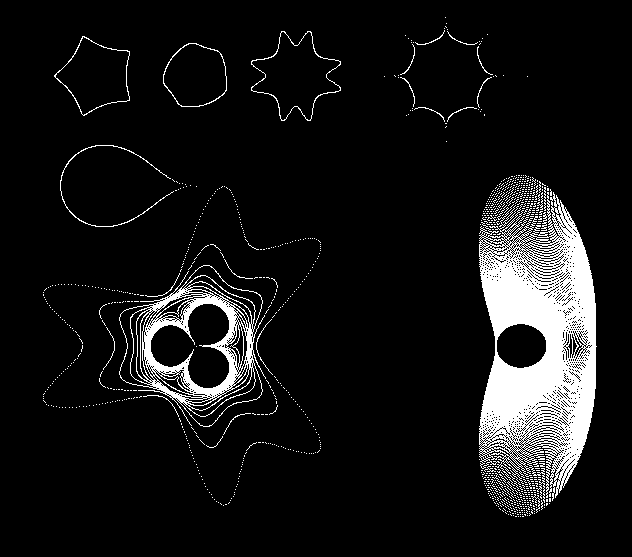
The above snippet demos a function that will draw Supershapes using the Superformula…

From wikipedia:
The Superformula appeared in a work by Johan Gielis. It was obtained by generalizing the superellipse, named and popularized by Piet Hein…

Here is the result of the above code:

You can read more about the Superformula here in the original paper by Gielis.

wikipedia entry…

3d Supershapes by Paul Bourke
Fracture a Number

var target:Number = 1024;
var slices:Array = [target];
var leng:int = 11;

for (var i:int = 0; i<leng-1; i++){
	 var index:int = int(Math.random()*slices.length);
	 var val:Number = slices[index];
	 var rand:Number = Math.random() * val/2;
	 slices[index] = val - rand;
	 slices.push(rand);
}

trace(slices);

// test that they all add up
var sum:Number = 0;
for (i = 0; i<slices.length; i++){
	sum += slices[i];
}
trace("test that they all add up: ", sum);

The above snippet creates an array of a specified length whose elements all add up to the variable target. Here is some example output:


165.31133050055192,322.23456030456015,
257.47582363389245,26.9984893942173,1.96283924962002,
5.466277873168191,21.362282634705164,62.68168197512457,
76.63028224500404,36.27274381401516,12.558309228795265,35.04537914634583
test that they all add up: 1024

Random Walk to Target

var target:Number = 360;
var steps:Array = new Array();
for (var step:Number = 0; step < target; step += int(Math.random() * 36 + 36)){
	steps.push(Math.min(target,step));
}
steps.push(target);
trace(steps);
/* outputs something similar to:
0,46,99,144,189,259,330,360
*/

This is something I’ve had to do a few times recently…. it randomly steps a number toward a given target…

Tooth Curve (modified Bicuspid)

var canvas:BitmapData=new BitmapData(400,400,false,0xCCCCCC);
addChild(new Bitmap(canvas));

var a:Number=-1.21;
var r:Rectangle=new Rectangle(0,0,3,5);
var halfWidth:Number=canvas.width/2;
var halfHeight:Number=canvas.height/2;

render();

function render():void{
	for (var x:Number = -2; x<=2; x+=.05) {
		for (var y:Number = -2; y<=2; y+=.05) {
	
			// equation from : http://en.wikipedia.org/wiki/Bicuspid_curve
			//(x^2 - a^2) * (x - a)^2 + (y^2 - a^2) * (y^2 - a^2) = 0
	
			// unpoptimized:
			// var e:Number = (x*x - a*a) * (x-a)*(x-a) + (y*y-a*a) * (y*y-a*a);  
			// optimized:
			var x_a:Number=x-a;
			// factoring: x^2 - a^2 = (x + a) * (x - a)
			var y2_a2:Number =  (y + a) * (y - a);
			var e:Number = (x + a) * x_a * x_a * x_a +  y2_a2 * y2_a2;
	
			// tolerance beetween .7 & -.1;
			if (e<.7&&e>-.1) {
				r.x=halfWidth+y*50;
				r.y=halfHeight-x*100;
				canvas.fillRect(r, 0x000000);
			}
		}
	}
}

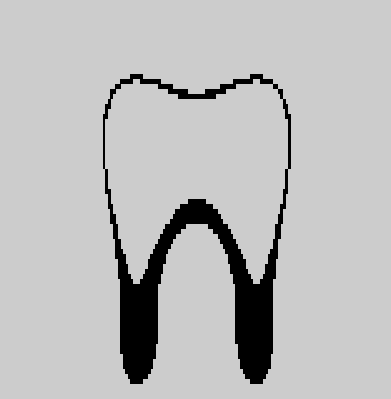
I’ve been looking for a single math equation to draw a tooth for sometime…. today I stumbled upon this… and realized it could probably be changed to look more like a tooth.

This snippet will draw this:

I’m using a graphing method here that allows me to use the Cartesian form of the equation and not the parameteric… I’ll explain a bit more about this in a later post.

Slider Navigation

var thumbNum:Number = 20;
var spacing:Number = 10;
var thumbs:MovieClip = new MovieClip();
addChild(thumbs);
for (var i:int = 0; i<thumbNum; i++){
	var t:MovieClip = new MovieClip();
	with(t.graphics) beginFill(0x666666), drawRect(0,0,100,50);
	t.x = i * (t.width + spacing);
	t.y = 5;
    t.buttonMode = true;
	thumbs.addChild(t);
}
var minX:Number = stage.stageWidth - thumbs.width - spacing;
var destX:Number = thumbs.x = spacing;
var velX:Number = 10;
var stageThird:Number =  stage.stageWidth / 3;
var right:Number = stageThird * 2;
var left:Number  = stageThird;
addEventListener(Event.ENTER_FRAME, onLoop);
function onLoop(evt:Event):void {
	if (mouseX > right){
	   destX -= velX;
	}
	if (mouseX < left){
		destX += velX;
	}
	if (destX < minX){
		destX = minX;
	}
	if (destX > spacing){
		destX = spacing;
	}
	thumbs.x += (destX - thumbs.x) /4;
}

This snippet shows a technique for a common type of navigation.

BitmapData Snapshot Grid

[SWF(width=600,height=650)]
var canvas:BitmapData=Bitmap(addChild(new Bitmap(new BitmapData(600,300,false,0xCCCCCC),"auto",true))).bitmapData;
var stills:BitmapData=Bitmap(addChild(new Bitmap(new BitmapData(600,380,false,0xAAAAAA),"auto",true))).bitmapData;
getChildAt(1).y=300;

var c:Shape = new Shape();
var m:Matrix = new Matrix();
m.createGradientBox(40, 40, 0, 0, 0);
c.graphics.beginGradientFill(GradientType.RADIAL, [0xCC0000, 0xCC0000],  [1, 0], [0, 255], m);
c.graphics.drawCircle(20,20,20);

addEventListener(Event.ENTER_FRAME, onLoop);
function onLoop(evt:Event):void {
	c.x=mouseX-c.width/2;
	c.y=mouseY-c.height/2;
	canvas.draw(c, c.transform.matrix);
}

var spacing:Number = 10;
var cols:Number = 4;
var max:Number = cols * cols;
var size:Number = 1/(canvas.width/((canvas.width / cols) - spacing));
var st:Matrix = new Matrix();
st.scale(size, size);
var w:Number = canvas.width * st.d  + spacing;
var h:Number = canvas.height * st.d + spacing;
var timer:Timer=new Timer(500);
timer.start();
timer.addEventListener(TimerEvent.TIMER, onCapture);
function onCapture(evt:TimerEvent):void {
	var inc:int = timer.currentCount - 1;
	st.tx = (inc% cols) * w+ spacing / 2;
	st.ty = int(inc / cols) * h + spacing;
	stills.draw(canvas, st);
	if (timer.currentCount==max) {
		timer.reset();
		timer.start();
	}
}

Take snapshots of a given BitmapData and arrange them in a grid. I wrote this snippet quickly in response to a question so it could probably use a little clean up…

You’ll need to move your mouse over the large canvas bitmap (drawing to it) to see anything…