[SWF(width = 500, height=500, backgroundColor = 0x000000)]
x = stage.stageWidth / 2;
y = stage.stageHeight / 2;
var quadNum:int = 2200;
// standard Vectors for using drawTriangles
var verts:Vector.<Number> = new Vector.<Number>();
var pVerts:Vector.<Number>;
var uvts:Vector.<Number> = new Vector.<Number>();
var indices:Vector.<int> = new Vector.<int>();
// needed for z-sorting
var sortedIndices:Vector.<int>;
var faces:Array = [];
// we'll use this for tranforming points
// and as the transformation matrix for our render
var m:Matrix3D = new Matrix3D();
// plot a quad
var quad:Vector.<Number>;
quad = Vector.<Number>([-10, -10, 0,
						10, -10, 0,
						-10, 10, 0,
						10, 10, 0]);
// temp vect for any transformed quads
var transQuad:Vector.<Number> = new Vector.<Number>();
var i:int;
var inc:int = 0;
for (i = 0; i<quadNum; i++){
	m.identity();
	var s:Number = (int(Math.random()*50) == 1) ? 2 + Math.random()*2 : .1 + Math.random() * 2;
	m.appendScale(s, s, 1);
	m.appendRotation(90, Vector3D.Y_AXIS);
	var mult:Number = 100 + Math.random()*200;
	m.appendTranslation(mult, 0, 0);
	m.appendRotation(Math.random()*360, Vector3D.X_AXIS);
	m.appendRotation(Math.random()*360, Vector3D.Y_AXIS);
	m.appendRotation(Math.random()*360, Vector3D.Z_AXIS);
	m.transformVectors(quad, transQuad);
	verts = verts.concat(transQuad);
	faces.push(new Vector3D());
	faces.push(new Vector3D());
	var i4:int = i * 4;
	indices.push(0 + i4, 1 + i4, 2 + i4,
				 1 + i4, 3 + i4, 2 + i4);
	mult /= 300;
	uvts.push(mult,mult,0,
			  mult+.1,mult,0,
			  mult,mult - .1,0,
			  mult + .1,mult + .1,0);
}
sortedIndices = new Vector.<int>(indices.length, true);
// create texture
var tex:BitmapData = new BitmapData(400,400,false, 0x000000);
var grad:Shape = new Shape();
var mat:Matrix = new Matrix();
mat.createGradientBox(400,400,0,0,0);
with (grad.graphics){
	beginGradientFill(GradientType.LINEAR, [0xFFFFFF,0x002244], [1, 1], [100, 255], mat);
	drawRect(0,0,400,400);
}
tex.draw(grad);
// create background
mat.createGradientBox(1600,1200,0,-550, 0);
with (grad.graphics){
	beginGradientFill(GradientType.RADIAL, [0x000000, 0x001133], [1, 1], [0, 255], mat);
	drawRect(0,0,500,500);
}
grad.x = -stage.stageWidth/2
grad.y = -stage.stageHeight/2;
addChild(grad);
// triangles will be drawn to this
var render:Shape = Shape(addChild(new Shape()));
// fix all vector lengths
verts.fixed = true, uvts.fixed = true, indices.fixed = true
pVerts = new Vector.<Number>(verts.length/3 * 2, true);
// we need these if we want perspective
var persp:PerspectiveProjection = new PerspectiveProjection();
persp.fieldOfView = 45;
// projection matrix
var proj:Matrix3D = persp.toMatrix3D();
var dx:Number = 0, dy:Number = 0;
addEventListener(Event.ENTER_FRAME, onLoop);
function onLoop(evt:Event):void {
	dx += (mouseX - dx) / 4;
	dy += (mouseY - dy) / 4;
	m.identity();
	m.appendRotation(dy, Vector3D.X_AXIS);
	m.appendRotation(dx, Vector3D.Y_AXIS);
	m.appendTranslation(0,0,800);
	m.append(proj);
	Utils3D.projectVectors(m, verts, pVerts, uvts);
	var face:Vector3D;
	inc = 0;
	for (var i:int = 0; i<indices.length; i+=3){
		face = faces[inc];
		face.x = indices[i];
		face.y = indices[int(i + 1)];
		face.z = indices[int(i + 2)];
		var i3:int = i * 3;
		face.w = (uvts[int(face.x*3 + 2)] + uvts[int(face.y*3 + 2)] + uvts[int(face.z*3 + 2)]) * 0.333333;
		inc++;
	}
	faces.sortOn("w", Array.NUMERIC);
	inc = 0;
	for each (face in faces){
		sortedIndices[inc++] = face.x;
		sortedIndices[inc++] = face.y;
		sortedIndices[inc++] = face.z;
	}
	render.graphics.clear();
	render.graphics.beginBitmapFill(tex, null, false, false);
	render.graphics.drawTriangles(pVerts, sortedIndices, uvts, TriangleCulling.NEGATIVE);
}
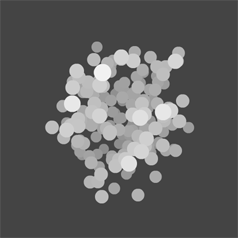
Expanding again on the z-sorting demos from the last few days – this snippet uses UV coords and a gradient to create something that vaguely resembles a light. Unlike the previous demos, the 3D cluster in this snippet is made up of quads – requiring a slight adjustment to the depth calculation.
var a:Vector.<Sprite> = new Vector.<Sprite>();

trace("unsorted");
for (var i:int = 0; i<10; i++){
	var s:Sprite = new Sprite();
	s.x = int(Math.random()*100);
	a.push(s);
	trace(s.x);
}

quickSortOn(a, "x", 0, a.length-1);

trace("sorted");
for (i= 0; i<10; i++){
	trace(a[i].x);
}

// modified code from kirupa.com
// http://www.kirupa.com/developer/actionscript/quickSort.htm
function quickSortOn(a:Vector.<Sprite>, prop:String, left:int, right:int):void {
    var i:int = 0, j:int = 0, pivot:Sprite, tmp:Sprite;
	i=left;
	j=right;
	pivot = a[Math.round((left+right)*.5)];
	while (i<=j) {
		while (a[i][prop]<pivot[prop]) i++;
		while (a[j][prop]>pivot[prop]) j--;
		if (i<=j) {
			tmp=a[i];
			a[i]=a[j];
			i++;
			a[j]=tmp;
			j--;
		}
	}
	if (left<j)  quickSortOn(a, prop, left, j);
	if (i<right) quickSortOn(a, prop, i, right);
}
/* outputs something like:
unsorted
26
33
20
63
7
68
75
39
67
53
sorted
7
20
26
33
39
53
63
67
68
75
*/
This demo is my first quick stab at using at a sortOn() function for the Vector class. It sorts a Vector of Sprites by their x property.
Recently there were a few times when I was prototyping ideas and suddenly realized that I needed to change my Vector to an Array because I needed to use sortOn().(If you don’t already know, there is no built in sortOn() method for the Vector class). In the past I spent some time with sorting algorithms, bubble, insertion etc… so I knew I could pretty easily write my own sortOn(), but I also realized that a generic implementation wouldn’t be easy/possible without loosing the type of the Vector. What I mean is, if you have a Vector of Sprites, you need a sorting method that takes a Vector.< Sprite > type as an argument (as seen above), if you have a Vector of TextFields you need a Vector.< TextField > type as an argument. You could of course use a generic type, but this kind of defeats the purpose of using a vector in the first place…
I will likely post a revised version of this in the near future with a slightly improved implementation of QuickSort. I haven’t spent that much time with this, but If I recall correctly this is not the ideal implementation. I ported this code from a nice Kirupa tutorial and modified it to sort based on a property…
var shapes:Array = new Array();

for (var i:int = 0; i<300; i++){
	var s:Shape = new Shape();
	s.x = Math.random()* stage.stageWidth;
	s.y = Math.random()* stage.stageHeight;
	s.graphics.lineStyle(0,0x000000);
	s.graphics.beginFill(0xCCCCCC);
	s.graphics.drawCircle(0,0, Math.random()*s.y / 5);
	shapes.push(s);
}

// comment this out to remove sorting
shapes.sortOn("width", Array.NUMERIC);

for (i = 0; i<shapes.length; i++){
	addChild(shapes[i]);
}
This uses Array.sortOn() to do some basic z-sorting based on the width property of some circle shapes.