import com.actionsnippet.qbox.*;

[SWF(backgroundColor=0x000000, width=700, height=600)]

var sim:QuickBox2D = new QuickBox2D(this);

sim.setDefault({fillColor:0x003366, lineColor:0x2B80D5});
sim.createStageWalls();

var i:int = 0;
for (i= 0; i<10; i++){
  sim.addCircle({x:5 + i, y:7, radius:0.3, linearDamping:1, angularDamping:1, fillColor:0x78B4C2, isBullet:true});
}

for (i= 0; i<2; i++){
	var poly:Array = [];
	var r:Number = 3;
	var step:Number = Math.PI / 6;
	for (var t:Number = 0; t<=Math.PI; t+=step){
		poly.push(r * Math.cos(t));
		poly.push(r * Math.sin(t));
	}
	r = 2;
	for (t = Math.PI; t >= -step; t-=step){
		poly.push(r * Math.cos(t));
		poly.push(r * Math.sin(t));
	}
	// using points instead of verts causes QuickBox2D to triangulate the polygon
	// the wireframe boolean changes rendering style for polys
	sim.addPoly({x:4 + i *7, y:16, points:poly, wireframe:Boolean(i), linearDamping:1.5, angularDamping:1});
}

sim.start();
sim.mouseDrag();
I just uploaded QuickBox2D Alpha 106 which includes a few bug fixes and support for compound shapes and easier polys. I used the algorithm from yesterdays post to significantly simplify the way QuickBox2D handles the description of polygons.
You’ll need QuickBox2D Alpha 106 or greater, if you want to test this….
or just have a look at the demo here.
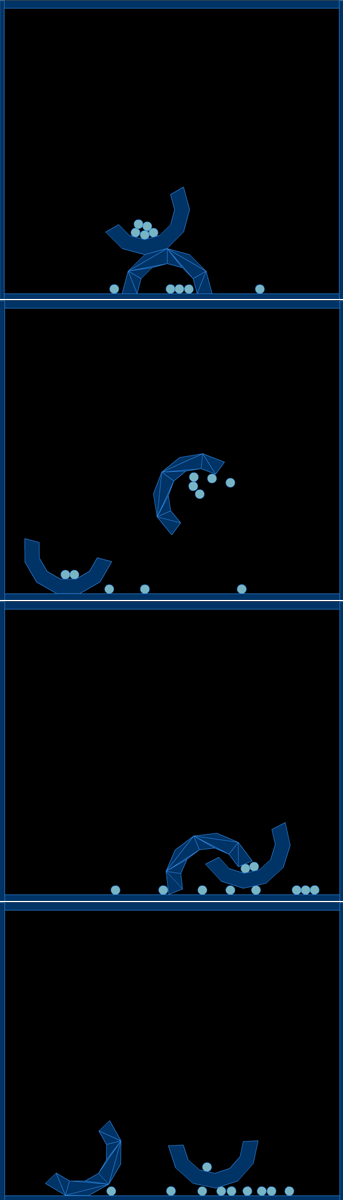
This triangulation is really better suited for 3D stuff – Box2D supports multiple convex polygons in one rigid body… this algorithm makes more shapes (triangles) than Box2D needs – I’ll probably swap out the algorithm in the near future.
Tomorrow I’ll be posting a demo about the way QuickBox2D simplifies compound shapes. I have yet to update the docs to include the new features of Alpha 106. That will happen along with tomorrows post.
Hello Zevan, I found little bug to try move objects. I do not know exactly how to reproduce it, it happens when you try to move an object against each other at some point the objects are caught in something invisible ..
Sorry for my english
Hey ponce – this is a box2D thing… and you can probably fix it by turning on CCD or setting the isBullet property = true in the params object….
thanks!! =)
hi zevan
is there a way to add the vertice just like the ordinary box2d way?
like [[1,1],[1,-1],[-1,-1],[-1,1]]
thanks