import com.actionsnippet.qbox.*;

[SWF (backgroundColor=0xAA0000, width=700, height=600, frameRate=60)]

var sim:QuickBox2D = new QuickBox2D(this);

sim.createStageWalls();

/**
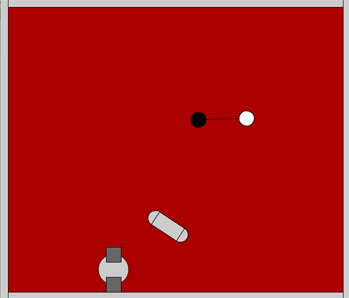
create a dancing pill
*/
// all x and y coords are relative to the center of the group
var partA:QuickObject = sim.addCircle({x:-1, y:0, radius:0.5, restitution:.9});
var partB:QuickObject = sim.addCircle({x:1, y:0, radius:0.5, restitution:.9});
var partC:QuickObject = sim.addBox({x:0, y:0, width:2, height:1});
// all the parts are passed into the objects array
// addGroup() groups the parts together into one rigid body
var pill:QuickObject = sim.addGroup({objects:[partA, partB, partC], x:3, y:3, angle:0.3});

/**
create another group
*/
partA = sim.addCircle({x:0, y:0, radius:1});
partB = sim.addBox({x:0, y:1, width:1, height:1, fillColor:0x666666});
partC = sim.addBox({x:0, y:-1, width:1, height:1, fillColor:0x666666});
sim.addGroup({objects:[partA, partB, partC], x:8, y:3, angle:0.3});

/**
create two circles linked together by a stretchy joint
*/
partA = sim.addCircle({x:15, y:3, fillColor:0x000000, anglularDamping:1});
partB = sim.addCircle({x:17, y:3, fillColor:0xFFFFFF, anglularDamping:1});
// if x1, y1, x2 and y2 properties are not set, the joint is automatically placed
// at the b2Body's center
sim.addJoint({a:partA.body, b:partB.body, frequencyHz:1});

sim.start();
sim.mouseDrag();
You’ll need QuickBox2D Alpha 106 to run this… This snippet demo’s the addGroup() method, which allows for easy grouping of shapes. I updated the docs today to feature a simple explanation of how this works.
Hello.
I’m trying to use this methods (addGroup) but i’m wondering how many quickobject can we put in it.
I’ve tried to make a bridge with a lot of box and joint and it don’t works.
Really thank you for QuickBox2D. It’s awesome. Sorry for my english.