Browse the notebook

Category: Graphics

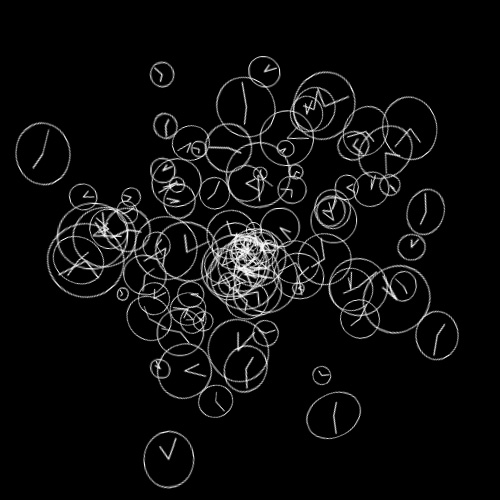
Nonsense Clocks

[SWF(width = 500, height=500, backgroundColor=0x000000)]

var clockNum:int = 100;
var clocks:Vector.<Function> = new Vector.<Function>(clockNum, true);

var clockContainer:Sprite = Sprite(addChild(new Sprite()));
clockContainer.x = stage.stageWidth / 2;
clockContainer.y = stage.stageHeight / 2;
buildClocks();
runClocks();

function buildClocks():void{
	for (var i:int = 0; i<clockNum; i++){
		var theta:Number = Math.random() * Math.PI * 2;
		var radius:Number = Math.random() * 200;
		var xp:Number = radius * Math.cos(theta);
		var yp:Number = radius * Math.sin(theta);
		clocks[i] = makeClock(xp,yp,Math.random() * Math.PI * 2);
	}
}
function runClocks():void{
	addEventListener(Event.ENTER_FRAME, onRunClocks);
}
function onRunClocks(evt:Event):void{
	for (var i:int = 0; i<clockNum; i++){
		clocks[i]();
	}
	clockContainer.rotationX = clockContainer.mouseY / 30;
	clockContainer.rotationY = -clockContainer.mouseX / 30;
}
function makeClock(x:Number, y:Number, time:Number=0):Function{
	var radius:Number = Math.random() * 20 + 5;
	var border:Number = radius * 0.2;
	var smallRadius:Number = radius - radius * 0.3;
	
	var clock:Sprite = Sprite(clockContainer.addChild(new Sprite()));
	clock.x = x;
	clock.y = y;
	clock.z = 100 - Math.random() * 200;
	clock.rotationX = Math.random() * 40 - 20;
	clock.rotationY = Math.random() * 40 - 20;
	clock.rotationZ = Math.random() * 360;
	return function():void{
		with (clock.graphics){
			clear(); 
			lineStyle(1,0xFFFFFF); 
			drawCircle(0,0,radius + border);
			var xp:Number = smallRadius * Math.cos(time/2);
			var yp:Number = smallRadius * Math.sin(time/2);
			moveTo(0,0);
			lineTo(xp, yp);
			xp = radius * Math.cos(time);
			yp = radius * Math.sin(time);
			moveTo(0,0);
			lineTo(xp, yp);
		}
		time+=0.1;
	}
}


You can go check the swf out at wonderfl.net…
Read snippet: Nonsense Clocks

Polar Coordinates Distribution

If you’re at all interested in watching me free from code. I recorded a video of me coding this snippet (which is about 11 minutes long or so).

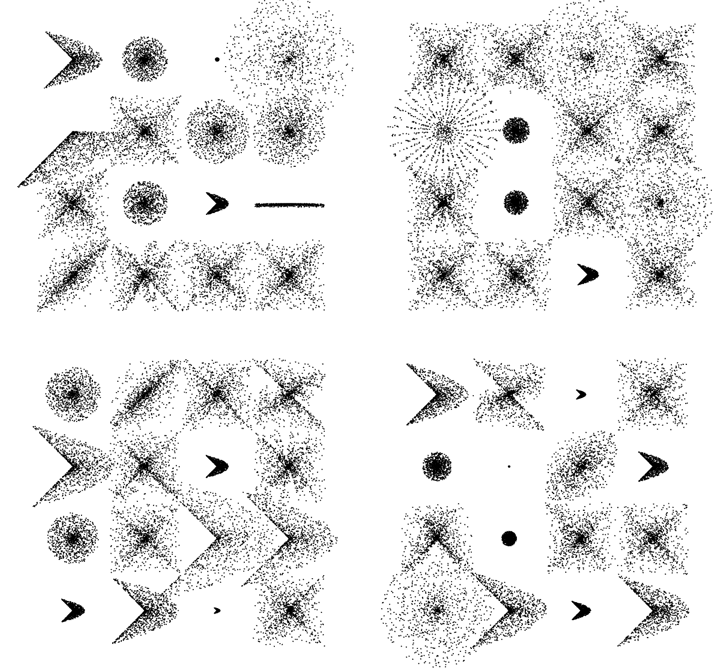
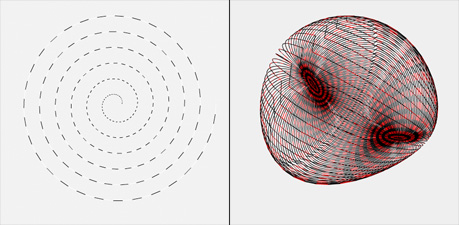
In the video I create a few functions that allow you to draw shapes like these:

Mathematically this stuff is really simple … the free form nature of the video takes a less technical perspective as you’ll see (I even made a few funny mistakes).


[SWF(width = 600, height = 600)]
var dotNum:int = 1000;
var dotRad:Number = 0.5;

x = 120
y = 100;

// extra stuff to display what the functions can do
stage.addEventListener(MouseEvent.CLICK, onDrawAll);

function onDrawAll(evt:Event):void{
	graphics.clear();
	for (var i:int = 0; i<16; i++){
		var m:Number;
	
		var rad:Number = 120;
		var xp:Number = i % 4 * rad
		var yp:Number = int(i / 4) * rad
	
		var type:int = int(Math.random() * 4);
		if (type == 0){
		  makeShape(xp, yp, rad-60, Math.random() , 1);
		}else if (type == 1){
		   makeShape(xp, yp, rad-60, 1,  Math.random());
		}
		else if (type == 2){
		   m = Math.random() * 2;
		   makeShape(xp, yp, rad-Math.random()*120, m, m);
		}
		else if (type == 3){
		   m = Math.random() * 2;
		   makeShape(xp, yp, rad-Math.random()*120, m, m/2);
		}
	}
}

// main part from the video 
function makeShape(xp:Number, yp:Number, 
				   maxRad:Number = 100,m0:Number=1, 
				   m1:Number=1):void{
	var polarX:Number;
	var polarY:Number;
	var radius:Number;
	graphics.lineStyle(0, 0);
	var theta:Number = Math.random() * Math.PI * 2;
	for (var i:int = 0; i<dotNum; i++){
		radius = Math.random() * maxRad
		polarX = xp + radius * Math.cos(theta * m0);
		polarY = yp + radius * Math.sin(theta * m1);
		theta += 0.1;
		 
		makeDot(polarX, polarY);
		
	}
}

function makeDot(xp:Number, yp:Number, fillColor:uint = 0x000000):void{
	graphics.beginFill(fillColor);
	graphics.drawCircle(xp, yp, dotRad);
	graphics.endFill();
}

Here it is over at wonderf:

Polar Distribution – wonderfl build flash online
Read snippet: Polar Coordinates Distribution

AS Quiz #8

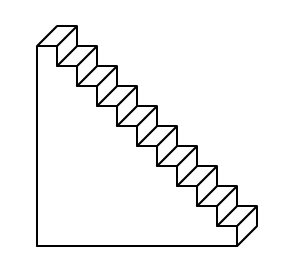
Today’s quiz is not multiple choice. Instead, your task is to write a function that draws stairs that look like this:

Your function should have the following arguments:

drawStairs(graphics, stairNum);
// you may include additional arguments for size, depth etc.. 

Feel free to post your solution in the comments.

I’ll post my solution for this in the comments tomorrow. There is also another multiple choice quiz in the pipeline for tomorrow…

BONUS: Try to use as few Graphics class method calls as possible.

You can see my solutions here.

Read snippet: AS Quiz #8

Graphics Class and Twitter

[SWF(width = 700, height=700, frameRate=12)]
var cmds:Array = [];

var loader:URLLoader = new URLLoader();
var req:URLRequest = new URLRequest("http://search.twitter.com/search.atom");
var vars:URLVariables = new URLVariables();
vars.q = "#asgraph";
// results per page
vars.rpp = "100";
vars.page = 1;

req.data = vars;
req.method = URLRequestMethod.GET;

loader.addEventListener(Event.COMPLETE, onLoaded);
loader.load(req);

var txt:TextField = TextField(addChild(new TextField()));
txt.defaultTextFormat = new TextFormat("_sans", 12);
with (txt){ x=10, y=10, autoSize="left"; }
txt.htmlText = "loading...";

function onLoaded(evt:Event):void{
       removeChild(txt);
   var searchData:XML = new XML(loader.data);
   var atom:Namespace = searchData.namespace("");

   var leng:int = searchData.atom::entry.length() -1;
  for (var i:int = leng; i>=0; i--){
       var cmd:String =
searchData.atom::entry[i].atom::title.toString().replace(/#asgraph/g,
"");
      // added this to ignore words starting with @
      cmd = cmd.replace(/@(w+)/g, "");
       cmds.push(cmd);
   }

       var time:Timer = new Timer(100, cmds.length);
       time.addEventListener(TimerEvent.TIMER, onTick);
   time.start();
}
function onTick(evt:TimerEvent):void{
       render(parseFunctions(cmds[evt.target.currentCount - 1]));
       graphics.endFill();
       graphics.lineStyle();
}

// parse and run Graphics class commands
function parseFunctions(dat:String):Array{
   var a:Array = dat.split(";") ;
   for (var i:int = 0; i<a.length-1; i++){
       a[i] = a[i].split(/()|(|)/g);
       var f:String = a[i][0] = a[i][0].replace(/s/g,"");
       a[i] = a[i].splice(0, a[i].length - 1);
       if (a[i].length> 1){
        a[i] = a[i][1].split(",");
        a[i].unshift(f);
       }
   }
   return a.splice(0,a.length - 1);
}
function render(p:Array):void {
   for (var i:int = 0; i<p.length; i++) {
       try{
       graphics[p[i][0]].apply(graphics,p[i].splice(1));
       }catch(e:Error){};
   }
}

This is a simple idea I had awhile back… This snippet searches twitter for the #asgraph hashtag and if it finds standard Graphics class method calls it renders them.

So if you tweet something likethis :

#asgraph beginFill(0xFF); drawCircle(200,200,10); 

it will get rendered into the below swf (you’ll need to refresh to see your tweet get rendered):

[SWF]https://actionsnippet.com/wp-content/asgraph.swf, 700, 700[/SWF]

Here is a direct link to the swf

Read snippet: Graphics Class and Twitter

Three Color Triangle

/*
*       Petri Leskinen, Finland
*       25 October 2009
*       pixelero.wordpress.com
*
*       Actionscript 3.0, Flash CS3, Flash Player 10
*
*       threeColorTriangle
*       draws a triangle with a gradient fill of three colors for each vertex
*       using graphics.drawTriangles and a BitmapData of size 2x2
*/
function threeColorTriangle(
      point0:Point, color0:uint,
      point1:Point, color1:uint,
      point2:Point, color2:uint):void {

      //      create a  bitmap of size 2x2 pixels
      var bmd:BitmapData = new BitmapData(2,2,true);
      //      copy colors to bitmap
      //      the fourth color is average of color1 and color2
      bmd.setVector(bmd.rect,
              Vector.<uint>([color0,color1,color2,
                                         (color1+color2)>>1
                                         ]));

      //      draw triangle
      this.graphics.beginBitmapFill(bmd,null,false,true /* =smooth */ );
      this.graphics.drawTriangles(
              // x,y -coordinates
              Vector.<Number>([
                      point0.x,point0.y,
                      point1.x,point1.y,
                      point2.x,point2.y]),
              // indices
              Vector.<int>([0,1,2]),
              // texture coordinates
              Vector.<Number>([0,0, 1,0, 0,1])
              );
}


// demo, let's draw some of these on the stage
randomize();
function randomize():void {
      this.graphics.clear();

      for (var i:int = 0;i<128;i++) {
              //      pick some random colors
              var color0:uint = 0xFFFFFFFF;
              var color1:uint = 0xFFFFFF*Math.random() | 0xFF000000;
              var color2:uint = 0xFFFFFF*Math.random() | 0xFF000000;

              //      random points 
var point0:Point = new Point(Math.random()*stage.stageWidth,
            Math.random()*stage.stageHeight);
var point1:Point = new Point(point0.x+200*(Math.random()-Math.random()),
            point0.y+200*(Math.random()-Math.random()));
var point2:Point = new Point(point0.x+200*(Math.random()-Math.random()),
            point0.y+200*(Math.random()-Math.random()));

        threeColorTriangle(point0, color0, point1, color1, point2,  color2);
      }
}

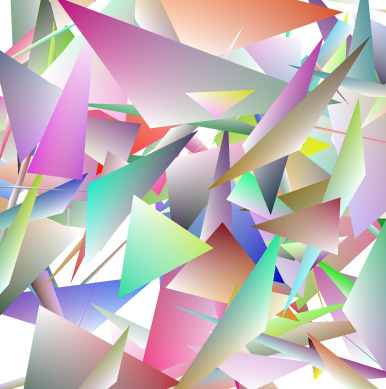
This snippet is by Petri Leskinen (pixelero). It draws a triangle with a gradient fill of three colors for each vertex using Graphics.drawTriangles and a BitmapData of size 2×2. This is the simplest case, it can easily be extended to four colors or maybe to use a larger 3×3, 4×4 etc… bitmap.

Here’s a still…

Read snippet: Three Color Triangle

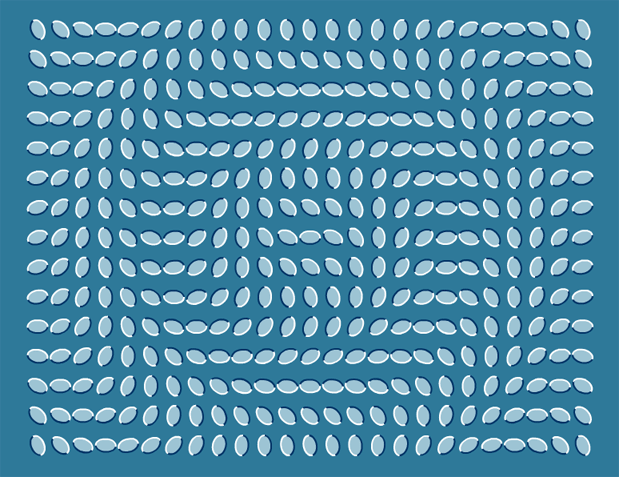
Flowing Leaves (optical illusion)


Saw this optical illusion today… figured I’d make a snippet to create a few variations on the illusion…

[SWF( backgroundColor=0x2E7999, width=780, height = 600) ]

var leafNum:Number = 375;
var spacing:Number = 12;
var cols:Number = 25;
var hh:Number = stage.stageHeight / 2;
var hw:Number = stage.stageWidth / 2;

for (var i:Number = 0; i<leafNum; i++){
	var leaf:Shape = makeLeaf();
	leaf.scaleX = leaf.scaleY = 0.25;
	leaf.rotation = 90;
	leaf.x = 50 + (i % cols) * (leaf.width + spacing);
	leaf.y = 40 + int(i / cols) * (leaf.height + spacing);
	var dx:Number = leaf.x - hw;
	var dy:Number = leaf.y - hh;
	leaf.rotation = Math.sqrt(dx * dx + dy * dy);
}

function makeLeaf():Shape{
	var leaf:Shape = Shape(addChild(new Shape()));
	leaf.graphics.beginFill(0x9DC4D4);
	scaleYcircle(leaf.graphics, 50, .65, false);
	leaf.graphics.endFill();
	leaf.graphics.lineStyle(2, 0x003366, 1, false, "none", CapsStyle.SQUARE, JointStyle.MITER);
	scaleYcircle(leaf.graphics, 50, .65);
	leaf.graphics.lineStyle(2, 0xFFFFFF, 1, false, "none", CapsStyle.SQUARE, JointStyle.MITER);
	scaleYcircle(leaf.graphics, -50, .65);
	return leaf;
}
 

// original circle function by senocular (www.senocular.com) from here http://www.actionscript.org/forums/showthread.php3?s=&threadid=30328
// circle that can be scaled on the y axis
function scaleYcircle(g:Graphics, r:Number, s:Number = 1, isHalf:Boolean=true):void {
	 
	var c1:Number = r * (Math.SQRT2 - 1);
	var c2:Number = r * Math.SQRT2 / 2;
	var rs:Number = r * s, c1s:Number = c1 * s, c2s:Number = c2 * s;
	var x_r:Number =  -r, y_r:Number = -rs, x_c2:Number =  -c2;
	var y_c2:Number =  -c2s, x_c1:Number =  -c1, y_c1:Number =  -c1s
	g.moveTo(r, 0), g.curveTo(r, c1s, c2, c2s);
	g.curveTo(c1, rs, 0, rs), g.curveTo(x_c1,rs, x_c2, c2s);
	g.curveTo(x_r, c1s, x_r, 0);
	if (!isHalf){
	 g.curveTo(x_r,y_c1,x_c2,y_c2);
	 g.curveTo(x_c1,y_r,0,y_r), g.curveTo(c1,y_r,c2,y_c2);
	 g.curveTo(r,y_c1,r,0);
	}
}
Read snippet: Flowing Leaves (optical illusion)

JS Sketch Experiment

[SWF(width=950, height=600)]
with (graphics) beginFill(0xefefef), drawRect(0,0,stage.stageWidth, stage.stageHeight);
var btn:Sprite = Sprite(addChild(new Sprite()));
with (btn.graphics) beginFill(0x666666), drawRect(0,0,100,20);
with(btn)  x=320, y=430, buttonMode = true;
btn.addEventListener(MouseEvent.ROLL_OVER, function():void{
  with(btn.graphics) clear(), beginFill(0x222222), drawRect(0,0,100,20);
});
btn.addEventListener(MouseEvent.ROLL_OUT, function():void{
  with(btn.graphics) clear(), beginFill(0x666666), drawRect(0,0,100,20);
});
btn.addEventListener(MouseEvent.CLICK, function():void{
    var res:*= ExternalInterface.call("function(){ plot=[]; colors=[]; " + txt.text + " return {plot:plot, colors:colors};}");
    render((res == null) ? {plot:[], colors:[]} : res);
});

var v:Shape = Shape(addChild(new Shape()));
v.x = 700;
v.y = 220;
function render(obj:Object):void{
	var plot:Array = obj.plot;
	var colors:Array = obj.colors;
	var leng:int = plot.length;
	v.graphics.clear();
	var inc:int = 0;
	v.graphics.moveTo(plot[0], plot[1]);
	for (var i:int = 2; i<leng; i+=2){
		v.graphics.lineStyle(0,colors[inc++]);
		v.graphics.lineTo(plot[i], plot[i + 1]);
	}
}


var submit:TextField = TextField(btn.addChild(new TextField()));
submit.defaultTextFormat = new TextFormat("_sans", 12);
with(submit) textColor=0xFFFFFF, width=100, autoSize="center";
with(submit) mouseEnabled = false,  text="submit";

var txt:TextField = TextField(addChild(new TextField()));
with(txt) x = y = 20, type = "input", multiline=true;
with(txt) width = 400, height = 400, border = true, background = 0xFFFFFF;
txt.defaultTextFormat = new TextFormat("Monaco", 12);
txt.text = "enter text"; 
txt.addEventListener(MouseEvent.MOUSE_DOWN, onDown);
function onDown(evt:MouseEvent):void{
	txt.text = "";
	txt.removeEventListener(MouseEvent.MOUSE_DOWN, onDown);
}

This snippet is a mini code editor that allows the user to write javascript into a textfield – the javascript is then run using external interface. Optionally the javascript code can populate two arrays (plot and colors). If these arrays are populated flash, will render the data in each array using the Graphics class.

Have a look at the demo:

If you do something nice with this… post your javascript snippet as a comment and I’ll add it to the JS Sketch page…

Read snippet: JS Sketch Experiment

Seamless Vector Texture

[SWF(width = 800, height = 450, backgroundColor=0xFFFFFF)]

graphics.beginFill(0xDEDEDE);
graphics.drawRect(0,0,400,400);

var container:Sprite = Sprite(addChild(new Sprite()));
draggable(rx(), ry(), 0x112233, 20);
draggable(rx(), ry(), 0x2266FF, 15);
draggable(rx(), ry(), 0x003299, 50, "rect");
draggable(rx(), ry(), 0xFFFFFF, 30);
draggable(rx(), ry(), 0x00CCFF, 15);
draggable(rx(), ry(), 0x1188CC, 50, "rect");

function rx():Number{
	return Math.random() * 200 + 100;
}
function ry():Number{
	return Math.random() * 200 + 100;
}

var guides:Shape = Shape(addChild(new Shape()));
with(guides.graphics){
       lineStyle(0, 0x666666)
       moveTo(200,0);
       lineTo(200,400);
       moveTo(0, 200);
       lineTo(400, 200);
       moveTo(400,0);
	   lineTo(400,400);
	   moveTo(0,400);
	   lineTo(800,400);
}

var canvas:BitmapData = new BitmapData(200,200,true, 0x00000000);
var tex:BitmapData = new BitmapData(800,800,false, 0xFFFFFF);

var frame:Bitmap = Bitmap(addChild(new Bitmap(tex, "auto", true)));
frame.x = 401;
frame.scaleX = frame.scaleY = 0.5;

var pnt:Point = new Point();
var m:Matrix = new Matrix();

addEventListener(Event.ENTER_FRAME, onLoop);
function onLoop(evt:Event):void {
	canvas.fillRect(canvas.rect, 0x00000000);
	canvas.draw(container);
	drawQuadrant(-200,0)
	drawQuadrant(-400,0)
	drawQuadrant(0,-200)
	drawQuadrant(-200,-200);
	tex.fillRect(tex.rect, 0xFFFFFF);
	for (var i:int = 0; i<16; i++){
		var px:Number = i % 4;
		var py:Number = int(i / 4);
		pnt.x = px * 200;
		pnt.y = py * 200;
		tex.copyPixels(canvas, canvas.rect, pnt, null, null, true);
       }
}

function drawQuadrant(x:Number, y:Number):void{
	 m.tx = x;
	 m.ty = y;
	 canvas.draw(container, m);
}

// draggable Sprite
function draggable(xp:Number, yp:Number, col:uint = 0xFF0000,
size:Number=4, type:String="circle"):Sprite {
       var s:Sprite = Sprite(container.addChild(new Sprite()));
       s.x = xp;
       s.y = yp;
       with(s.graphics){
               beginFill(col)
               if(type == "circle"){
                 drawCircle(size,size,size);
               }else if(type == "rect"){
                 drawRect(0,0,size, size);
               }
       }
       s.buttonMode = true;
       s.addEventListener(MouseEvent.MOUSE_DOWN, onDrag);
       return s;
}
function onDrag(evt:MouseEvent):void {
	var w:Number = evt.currentTarget.width;
	var h:Number = evt.currentTarget.height;
	evt.currentTarget.startDrag(false, new Rectangle(0,0,400 - w, 400 - h));
}
stage.addEventListener(MouseEvent.MOUSE_UP, onUp);
function onUp(evt:MouseEvent):void{ stopDrag() }

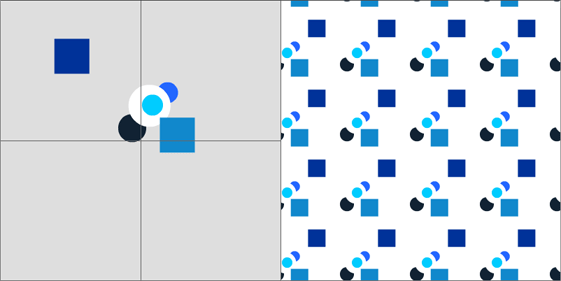
This snippet creates a seamless texture from a few draggable vector shapes. BitmapData is used to combine four quadrants into one seamless tile.


Have a look at the swf

I created this snippet as a sketch for a new feature for my command drawing project.

Read snippet: Seamless Vector Texture

drawTriangles() Cubes

private function addCube(xp:Number, yp:Number, zp:Number, w:Number, h:Number, leng:Number):void{
			var hw:Number = w * 0.5;
			var hh:Number = h * 0.5;
			var hl:Number = leng * 0.5;
			var xA:Number = xp - hw;
			var xB:Number = hw + xp;
			var yA:Number = yp - hh;
			var yB:Number = hh + yp;
			var zA:Number = zp - hl;
			var zB:Number = hl + zp;
        	_verts.push(xA, yA, zA,
				        xB, yA, zA,
				        xA, yB, zA,
				        xB, yB, zA,
						xA, yA, zB,
				        xB, yA, zB,
				        xA, yB, zB,
				        xB, yB, zB);
			
			var index:int = _boxIndex * 8;
			var i0:int = index, i1:int = index + 1, i2:int = index + 2;
			var i3:int = index + 3,  i4:int = index + 4, i5:int = index + 5;
			var i6:int = index + 6, i7:int = index + 7;
	        _indices.push(i0, i1, i2,
				          i1, i3, i2,
						  i6, i7, i4, 
				          i7, i5, i4, 
						  i1, i5, i3,
						  i7, i3, i5,
						  i4, i5, i0,
						  i1, i0, i5,
						  i2, i6, i0,
						  i0, i6, i4,
						  i2, i3, i6,
						  i3, i7, i6);
						  
			_faces.push(new Face(), new Face(), new Face(), 
					    new Face(),  new Face(), new Face(), 
						new Face(), new Face(), new Face(),
						new Face(), new Face(), new Face());
			_uvts.push(Math.random(), Math.random(), 0, 
					   Math.random(), Math.random(), 0, 
					   Math.random(), Math.random(), 0,
					   Math.random(), Math.random(), 0, 
					   Math.random(), Math.random(), 0, 
					   Math.random(), Math.random(), 0,
					   Math.random(), Math.random(), 0, 
					   Math.random(), Math.random(), 0);
			_boxIndex++;
		}

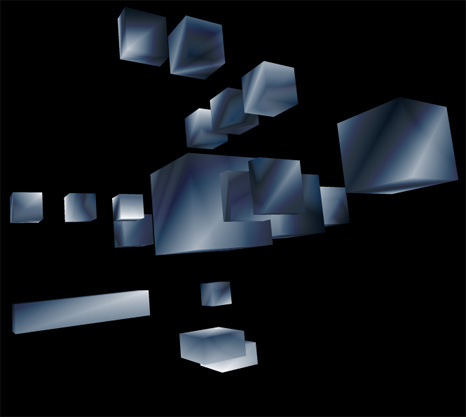
Lately I’ve been posting large code snippets… so today I’m highlighting part of a larger snippet – The above code is the heart of a small experiment I created this morning. It sets up a cube for use with drawTraingles().

The rest of the code can be read here:
Cubes3D.as

Have a look at the swf here…


I also put it on wonderfl…

Read snippet: drawTriangles() Cubes

Matrix Zoom and Pan

[SWF(width=600, height=600, frameRate=30)]
var sw:Number = stage.stageWidth;
var sh:Number = stage.stageHeight;

var s:Shape = Shape(addChild(new Shape()));

var scale:Number = 1;
var scaleDest:Number = 1;
var down:Boolean = false;
var dx:Number = 0, dy:Number = 0, time:Number = 0;

buttonMode = true;

addInstructions();
vectorTexture();

stage.addEventListener(MouseEvent.MOUSE_DOWN, onDown);
stage.addEventListener(MouseEvent.MOUSE_UP, onUp);
addEventListener(Event.ENTER_FRAME, onLoop);

function addInstructions():void{
	var instruct:Sprite = Sprite(addChild(new Sprite()));
	with (instruct.graphics) beginFill(0x666666), drawRect(0,0,270, 30);
	instruct.x = instruct.y = 20;
	var txt:TextField = TextField(instruct.addChild(new TextField()));
	txt.defaultTextFormat = new TextFormat("Verdana", 11);
	txt.x = txt.y = 5;
	txt.selectable = false;
	with (txt) textColor = 0xFFFFFF, autoSize = "left", text = "Click and hold to zoom, move mouse to pan";
}

function vectorTexture():void{
	var cols:Vector.<uint> = Vector.<uint>([0xFFFFFF, 0x000000]);
	var rnd:Vector.<Number> = new Vector.<Number>(6, true);
	
	for(var i:int = 0 ; i<50; i++){
		with(s.graphics){
			lineStyle(Math.random() * 50 + 2, cols[int(Math.random()*cols.length)]);
			drawCircle(Math.random() * sw, Math.random() * sh, 10 + Math.random() * Math.random() * 400);
		}
	}
	s.graphics.lineStyle(20, 0xCCCCCC);
	s.graphics.drawRect(0, 0,sw, sh);
}

function onDown(evt:MouseEvent):void{ down = true; }
function onUp(evt:MouseEvent):void{ down = false; }
function onLoop(evt:Event):void {
   if (down){
	 scaleDest *= 1.05;  
	 time = 0;
   }else{
	 time++;
	 // zoom out after 30 iterations
	 if (time == 30){
		 scaleDest = 1;  
	 }
   }
   scale += (scaleDest - scale) / 4;
   if (scale > 10) scale = scaleDest = 10;
   
   dx += (mouseX - dx) / 4;
   dy += (mouseY - dy) / 4;
   if (dx < 0) dx = 0;
   if (dy < 0) dy = 0;
   if (dx > sw) dx = sw;
   if (dy > sh) dy = sh;
   
   // matrix zoom/pan
   var m:Matrix = s.transform.matrix;
   m.identity();
   m.translate(-dx,-dy);
   m.scale(scale, scale);
   m.translate(dx,dy);
   s.transform.matrix = m;
}

I haven’t been by the computer much these last two weeks – been traveling. Going back to nyc tomorrow so I’ll go back to posting once a day.

This snippet uses a transformation matrix to zoom in and pan a Sprite instance. For demo purposes I filled the sprite with a few circles – but you’d likely be using this with a vector image of a map, a floor plan or some other graphic that warrants zooming and panning.

Back around flash 7 (I think) before the Matrix class was introduced we used to have to use MovieClip nesting to achieve this effect.


Have a look at the swf…


Read snippet: Matrix Zoom and Pan