If you’re at all interested in watching me free from code. I recorded a video of me coding this snippet (which is about 11 minutes long or so).
In the video I create a few functions that allow you to draw shapes like these:
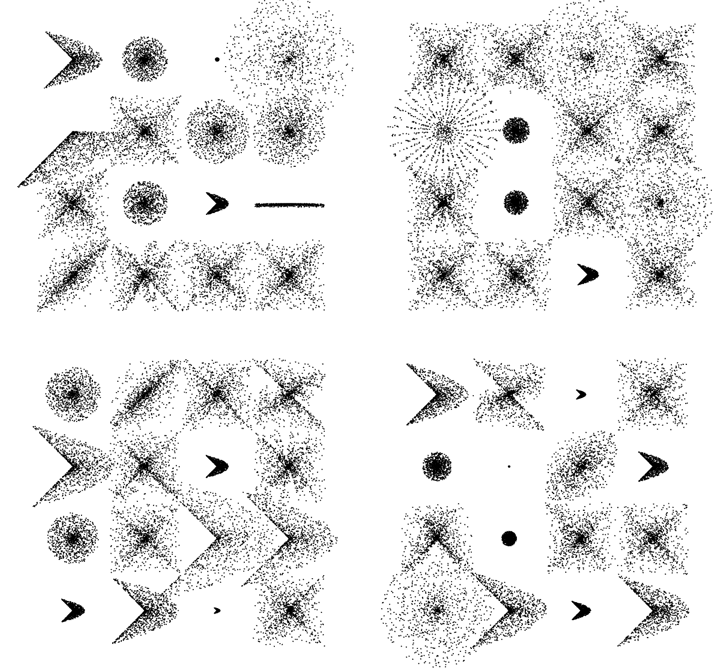
Mathematically this stuff is really simple … the free form nature of the video takes a less technical perspective as you’ll see (I even made a few funny mistakes).
[SWF(width = 600, height = 600)]
var dotNum:int = 1000;
var dotRad:Number = 0.5;

x = 120
y = 100;

// extra stuff to display what the functions can do
stage.addEventListener(MouseEvent.CLICK, onDrawAll);

function onDrawAll(evt:Event):void{
	graphics.clear();
	for (var i:int = 0; i<16; i++){
		var m:Number;

		var rad:Number = 120;
		var xp:Number = i % 4 * rad
		var yp:Number = int(i / 4) * rad

		var type:int = int(Math.random() * 4);
		if (type == 0){
		  makeShape(xp, yp, rad-60, Math.random() , 1);
		}else if (type == 1){
		   makeShape(xp, yp, rad-60, 1,  Math.random());
		}
		else if (type == 2){
		   m = Math.random() * 2;
		   makeShape(xp, yp, rad-Math.random()*120, m, m);
		}
		else if (type == 3){
		   m = Math.random() * 2;
		   makeShape(xp, yp, rad-Math.random()*120, m, m/2);
		}
	}
}

// main part from the video
function makeShape(xp:Number, yp:Number,
				   maxRad:Number = 100,m0:Number=1,
				   m1:Number=1):void{
	var polarX:Number;
	var polarY:Number;
	var radius:Number;
	graphics.lineStyle(0, 0);
	var theta:Number = Math.random() * Math.PI * 2;
	for (var i:int = 0; i<dotNum; i++){
		radius = Math.random() * maxRad
		polarX = xp + radius * Math.cos(theta * m0);
		polarY = yp + radius * Math.sin(theta * m1);
		theta += 0.1;

		makeDot(polarX, polarY);

	}
}

function makeDot(xp:Number, yp:Number, fillColor:uint = 0x000000):void{
	graphics.beginFill(fillColor);
	graphics.drawCircle(xp, yp, dotRad);
	graphics.endFill();
}
Here it is over at wonderf:
I don’t see a link to the creation video. I do see the wonderfl for the actual app though, and it’s pretty cool.
Nice!
Jackson, the link is up there, just above the snippet. https://actionsnippet.com/vids/polar_vid.html
Always fun to see somebody else code 🙂
What program did you use to record the tutorial?
I like this a lot, it got me thinking to how one might use perlin noise interference with alpha blending to make that stuff look even cooler, especially with those galaxy like patterns!!