Browse the notebook

Category: motion

Nonsense Clocks

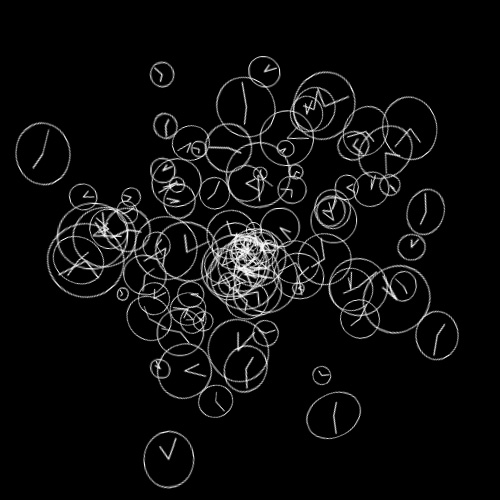
[SWF(width = 500, height=500, backgroundColor=0x000000)]

var clockNum:int = 100;
var clocks:Vector.<Function> = new Vector.<Function>(clockNum, true);

var clockContainer:Sprite = Sprite(addChild(new Sprite()));
clockContainer.x = stage.stageWidth / 2;
clockContainer.y = stage.stageHeight / 2;
buildClocks();
runClocks();

function buildClocks():void{
	for (var i:int = 0; i<clockNum; i++){
		var theta:Number = Math.random() * Math.PI * 2;
		var radius:Number = Math.random() * 200;
		var xp:Number = radius * Math.cos(theta);
		var yp:Number = radius * Math.sin(theta);
		clocks[i] = makeClock(xp,yp,Math.random() * Math.PI * 2);
	}
}
function runClocks():void{
	addEventListener(Event.ENTER_FRAME, onRunClocks);
}
function onRunClocks(evt:Event):void{
	for (var i:int = 0; i<clockNum; i++){
		clocks[i]();
	}
	clockContainer.rotationX = clockContainer.mouseY / 30;
	clockContainer.rotationY = -clockContainer.mouseX / 30;
}
function makeClock(x:Number, y:Number, time:Number=0):Function{
	var radius:Number = Math.random() * 20 + 5;
	var border:Number = radius * 0.2;
	var smallRadius:Number = radius - radius * 0.3;
	
	var clock:Sprite = Sprite(clockContainer.addChild(new Sprite()));
	clock.x = x;
	clock.y = y;
	clock.z = 100 - Math.random() * 200;
	clock.rotationX = Math.random() * 40 - 20;
	clock.rotationY = Math.random() * 40 - 20;
	clock.rotationZ = Math.random() * 360;
	return function():void{
		with (clock.graphics){
			clear(); 
			lineStyle(1,0xFFFFFF); 
			drawCircle(0,0,radius + border);
			var xp:Number = smallRadius * Math.cos(time/2);
			var yp:Number = smallRadius * Math.sin(time/2);
			moveTo(0,0);
			lineTo(xp, yp);
			xp = radius * Math.cos(time);
			yp = radius * Math.sin(time);
			moveTo(0,0);
			lineTo(xp, yp);
		}
		time+=0.1;
	}
}


You can go check the swf out at wonderfl.net…
Read snippet: Nonsense Clocks

Rotation Property Weirdness

var boxA:Shape = Shape(addChild(new Shape()));
with (boxA.graphics) beginFill(0), drawRect(-10,-10,20,20);

var boxB:Shape = Shape(addChild(new Shape()));
with (boxB.graphics) beginFill(0), drawRect(-10,-10,20,20);

boxA.x = 100; 
boxA.y = 100;

boxB.x = 200; 
boxB.y = 100;

var rot:Number = 32750;

addEventListener(Event.ENTER_FRAME, onLoop);
function onLoop(evt:Event):void {
  rot += 1
  // will stop rotating 
  boxA.rotation = rot
  // will keep rotating
  boxB.rotation = rot % 360;
}

I recently became aware of a strange aspect of the rotation property on DisplayObjects. For some reason, once it’s value goes a little beyond ~32750 the DisplayObject will simply stop rotating. If you read the rotation property it is still changing, but there is no visual update – a quick check on the DisplayObject.transform.matrix property will show that the value has stopped.

The easy fix is to use mod before applying the value to the rotation property. Surprised I’ve never come across this one before. Maybe someone can shed some light on this.


// for people searching google for solutions to this problem I’ll add the following key words:
MovieClip stops rotating, DisplayObject stops rotating, rotation property broken, not rotating

Read snippet: Rotation Property Weirdness

Fp10 3d Logo

var container:Sprite = new Sprite();
container.x = stage.stageWidth / 2;
container.y = stage.stageHeight / 2;
addChild(container);

var redBox:Sprite = new Sprite();
redBox.graphics.beginFill(0xFF0000);
redBox.graphics.drawRect(-50,-250,100,500);
redBox.rotationZ = 10;
container.addChild(redBox);

var logos:Array = []
var elements:Array = [];
elements.push({element:redBox, z:0});

// add the logos
for (var i:int = 0; i<6; i++){
	var logoContainer:MovieClip = new MovieClip();
	var logoText:TextField = new TextField();
	logoText.defaultTextFormat = new TextFormat("_sans", 50);
	logoText.text = "LOGO";
	logoText.autoSize = "left";
	logoText.selectable= false;
	
	logoText.x = -logoText.width / 2;
	logoText.y = -logoText.height / 2;
	logoContainer.addChild(logoText);
	logoText.backgroundColor = 0xFFFFFF;
	
	container.addChild(logoContainer);
	logos.push(logoContainer);
	elements.push({element:logoContainer, z:0});
}

var ang:Number = -Math.PI / 2;
var rotationSpeed:Number = 0.05;
addEventListener(Event.ENTER_FRAME, onLoop);
function onLoop(evt:Event):void {
	
	 var dx:Number = (mouseY - stage.stageHeight / 2) / 10;
	 var dy:Number = (mouseX - stage.stageWidth / 2) / 10;
	 container.rotationX += (dx - container.rotationX) / 4;
	 container.rotationY += (dy - container.rotationY) / 4;
	 
	 ang += rotationSpeed;
     for (var i:int = 0; i<logos.length; i++){
		 var logo:Sprite = logos[i];
		 logo.x = 150 * Math.cos(ang + i);
	     logo.z = 150 * Math.sin(ang + i);
		 logo.alpha = 1 - logo.z / 200;
		 logo.rotationY = -Math.atan2(logo.z, logo.x)  / Math.PI * 180  - 90;
	 }
	 
	 // z-sort
	 for (i = 0; i<elements.length; i++){
		  elements[i].z = elements[i].element.transform.getRelativeMatrix3D(this).position.z;
	 }
	 
	elements.sortOn("z", Array.NUMERIC | Array.DESCENDING);
	for (i = 0; i<elements.length; i++) {
		container.addChild(elements[i].element);
	}
}

A student of mine was having trouble creating a 3D logo for a client. I created this snippet to help explain how some of the fp10 3D stuff works…. z-sorting etc… The code could be optimized a bit… but it works nicely…


Have a look at the swf…

Read snippet: Fp10 3d Logo

Bounce Ball Inside a Circle

package  {
	import flash.display.Shape;
	import flash.display.Sprite;
	import flash.geom.Point;

	/**
	 * Re: http://board.flashkit.com/board/showthread.php?t=797453
	 * @author makc
	 * @license WTFPLv2
	 */
	public class BouncingBall extends Sprite{
		public function BouncingBall () {
			r = 10;
			ball = new Shape;
			ball.graphics.beginFill (0);
			ball.graphics.drawCircle (0, 0, r);
			addChild (ball);
			v = new Point;
			v.x = Math.random ();
			v.y = Math.random ();
			V = 1 + 20 * Math.random ();
			v.normalize (V);
			R = 200; X = 465 / 2; Y = 465 / 2;
			graphics.lineStyle (0);
			graphics.drawCircle (X, Y, R);
			ball.x = X + 100;
			ball.y = Y - 100;
			addEventListener ("enterFrame", loop);
		}
		private var r:Number;
		private var ball:Shape;
		private var v:Point;
		private var V:Number;
		private var R:Number;
		private var X:Number;
		private var Y:Number;
		private function loop (e:*):void {
			ball.x += v.x;
			ball.y += v.y;
			// R-r vector
			var P:Point = new Point (X - ball.x, Y - ball.y);
			if (P.length > Math.sqrt ((R - r) * (R - r))) {
				// normalize R-r vector
				P.normalize (1);
				// project v onto it
				var vp:Number = v.x * P.x + v.y * P.y;
				// subtract projection
				v.x -= 2 * vp * P.x;
				v.y -= 2 * vp * P.y;
				v.normalize (V);
				// move away from bounding circle
				P = new Point (X - ball.x, Y - ball.y);
				while (P.length > Math.sqrt ((R - r) * (R - r))) {
					ball.x += v.x;
					ball.y += v.y;
					P = new Point (X - ball.x, Y - ball.y);
				}
			}
		}
	}
}

Makc3d said I could choose one of his excellent wonderfl.net pieces and submit it to the contest. This snippet creates a ball that bounces off the inside of a circle. I thought this was a pretty unique way to go about doing this – and found it easy to add gravity and other cool features to it.

Have a look at the swf over at wonderfl….

Some Makc3d links:
>> http://makc3d.wordpress.com/
>>http://code.google.com/p/makc/
>> http://wonderfl.net/user/makc3d

Makc3d elaborated on his code a bit via e-mail. He said that his technique sacrifices accuracy for simplicity… and that if you simplify too much it would be easy to break the code. “e.g. comment out piece of code where it says “move away from bounding circle””…

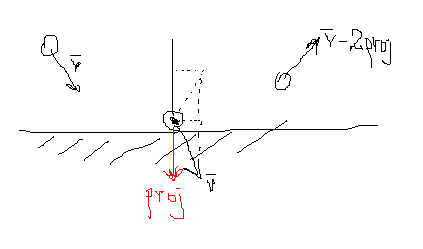
Here is a picture that Makc3d drew explaining why you need to multiply by 2:

Read snippet: Bounce Ball Inside a Circle

QuickBox2D 1.1 (2 major bug fixes)

Since the release of QuickBox2D 1.0 two bugs were discovered by numerous developers. The first bug was the inability to properly destroy group objects. The second bug was a small memory leak that caused most QuickObjects to remain in memory. Both of these bugs are now resolved.

Download QuickBox2D 1.1

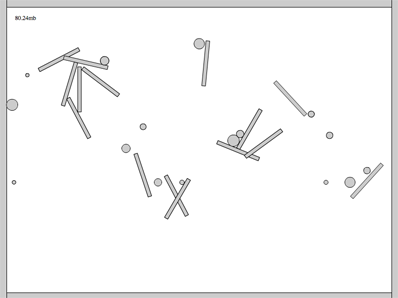
Testing the memory leak. In QuickBox2D 1.0 if you created and destroyed 100s of rigid bodies, the ram would very slowly rise… Sometimes it would get garbage collected, but the memory would never fully be released. I created a simple test to make sure this is fixed in 1.1:

import com.actionsnippet.qbox.*;

var sim:QuickBox2D = new QuickBox2D(this, {debug:false});

sim.createStageWalls();

var levelParts:Array = [];
const TWO_PI:Number = Math.PI * 2;

// destroys and then creates a bunch of rigid bodies
// called every second 
buildRandomLevel();
setInterval(buildRandomLevel, 1000);

var txt:TextField = TextField(addChild(new TextField()));
txt.x = txt.y = 30;
txt.backgroundColor = 0xFFFFFF;
sim.start();

// display amount of ram used, to make sure garbage collection is working
sim.addEventListener(QuickBox2D.STEP, onStep);
function onStep(evt:Event):void{
	txt.text = (System.totalMemory / 100000).toFixed(2) + "mb";
}

function buildRandomLevel():void{
	// destroy all rigid bodies
	for (var i:int = 0; i<levelParts.length; i++){
		levelParts[i].destroy();
	}
	levelParts = [];
	// create a bunch of circles and boxes
	for (i = 0; i<16; i++){
		var rad:Number = 0.4 ;
		levelParts.push(sim.addCircle({x:1 + i * rad * 4, y : 2, radius:rad - Math.random()*0.3}));
		
		var rot:Number = Math.random() * TWO_PI;
		levelParts.push(sim.addBox({x:4+Math.random() * i * 2, y:4+Math.random()*i, 
				    width:3, height:0.25, angle:rot, density:0}));
	}
}

This snippet creates and destroys a bunch of rigid bodies again and again…. On my macbook 2.6 Ghz intel core duo… the ram runs between 79mb and 112mb. I let it run for 40 minutes and this did not change – it always eventually returned down to 79mb.


Have a look at the swf…

Thanks to all the people who gave feedback that lead to the discover of these bugs.

Read snippet: QuickBox2D 1.1 (2 major bug fixes)

BitmapData Frame Animation (w/ linked list)

[SWF(width = 100, height = 100)]
var circle:Shape = new Shape();
with(circle.graphics) beginFill(0x000000), drawCircle(20,20,20);

var currFrame:Frame;

// populate the linked list
generateAnimation();

var canvas:BitmapData = new BitmapData(stage.stageWidth,stage.stageHeight,false, 0x000000);
addChild(new Bitmap(canvas));
var loc:Point = new Point(20, 20);

addEventListener(Event.ENTER_FRAME, onLoop);
function onLoop(evt:Event):void {
	// clear the canvas
	canvas.fillRect(canvas.rect, 0x000000);
	// draw the current frame
	canvas.copyPixels(currFrame.bitmap, currFrame.bitmap.rect, loc, null, null, true);
	// get the next frame of the animation
	currFrame = currFrame.next;
}

// generate and capture 40 bitmaps by altering the colorTransform of the circle shape
function generateAnimation():void{
	var channel:uint = 0;
	var ct:ColorTransform = new ColorTransform();
	var increase:Boolean = true;
	var firstFrame:Frame;
    var pFrame:Frame;
	for (var i:int = 0; i<40; i++){
		if (increase){
		   channel += 10;
		   if (channel == 200){
			  increase = false;   
		   }
		}else{
		   channel -= 10;
		}
		ct.color = channel << 16 | channel << 8 | channel;
		circle.transform.colorTransform = ct;
		// populate linked list
		currFrame = capture(circle); 
		if (pFrame){
		   pFrame.next = currFrame;
		}
		if (i == 0){
		   firstFrame = currFrame;
		}
		pFrame = currFrame;
	}
	// close the list
	currFrame.next = firstFrame;
	currFrame = firstFrame;
}

// create the Frame instance and draw the circle to it
// preserving the colorTransform information
function capture(target:Shape):Frame{
	var frame:Frame = new Frame();
	frame.bitmap = new BitmapData(target.width, target.height, true, 0x00000000);
	frame.bitmap.draw(target, null, target.transform.colorTransform);
	return frame;
}

Requires this little Frame class

package {
	import flash.display.*;
	final public class Frame{
		public var bitmap:BitmapData;
		public var next:Frame;
	}
}

This is a small test I did today to see how easy it would be to use a circular linked list to loop an animation of bitmaps. I did this because I was thinking about using some animated sprites in conjunction with Utils3D.projectVectors() to do an orthographic 3D demo with lots of animating sprites. In the past I’ve had up to 7,000 animated sprites running nicely using arrays and copyPixels… figured it would be interesting to try and do the same with a circular linked list.

When compiled, this test simply draws a circle that fades from black to gray and back again… Pretty boring, but I threw it up over at wonderfl anyway… check it out.

I recently saw a few tweets (forget who from) about using the final keyword on linked list nodes… haven’t tested it myself but it’s supposed to be faster…

Read snippet: BitmapData Frame Animation (w/ linked list)

Flowing Leaves (optical illusion)


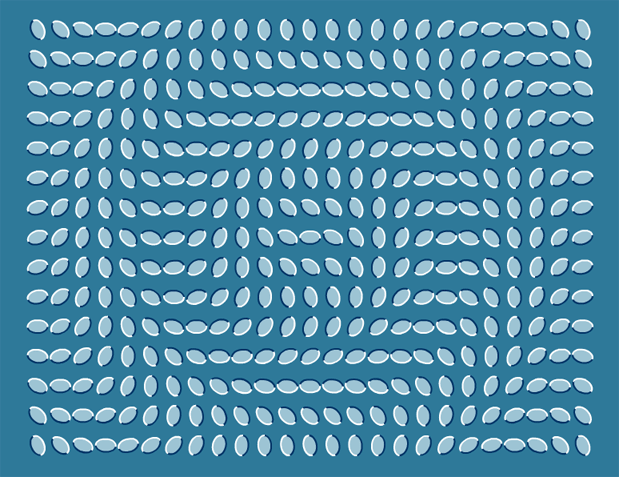
Saw this optical illusion today… figured I’d make a snippet to create a few variations on the illusion…

[SWF( backgroundColor=0x2E7999, width=780, height = 600) ]

var leafNum:Number = 375;
var spacing:Number = 12;
var cols:Number = 25;
var hh:Number = stage.stageHeight / 2;
var hw:Number = stage.stageWidth / 2;

for (var i:Number = 0; i<leafNum; i++){
	var leaf:Shape = makeLeaf();
	leaf.scaleX = leaf.scaleY = 0.25;
	leaf.rotation = 90;
	leaf.x = 50 + (i % cols) * (leaf.width + spacing);
	leaf.y = 40 + int(i / cols) * (leaf.height + spacing);
	var dx:Number = leaf.x - hw;
	var dy:Number = leaf.y - hh;
	leaf.rotation = Math.sqrt(dx * dx + dy * dy);
}

function makeLeaf():Shape{
	var leaf:Shape = Shape(addChild(new Shape()));
	leaf.graphics.beginFill(0x9DC4D4);
	scaleYcircle(leaf.graphics, 50, .65, false);
	leaf.graphics.endFill();
	leaf.graphics.lineStyle(2, 0x003366, 1, false, "none", CapsStyle.SQUARE, JointStyle.MITER);
	scaleYcircle(leaf.graphics, 50, .65);
	leaf.graphics.lineStyle(2, 0xFFFFFF, 1, false, "none", CapsStyle.SQUARE, JointStyle.MITER);
	scaleYcircle(leaf.graphics, -50, .65);
	return leaf;
}
 

// original circle function by senocular (www.senocular.com) from here http://www.actionscript.org/forums/showthread.php3?s=&threadid=30328
// circle that can be scaled on the y axis
function scaleYcircle(g:Graphics, r:Number, s:Number = 1, isHalf:Boolean=true):void {
	 
	var c1:Number = r * (Math.SQRT2 - 1);
	var c2:Number = r * Math.SQRT2 / 2;
	var rs:Number = r * s, c1s:Number = c1 * s, c2s:Number = c2 * s;
	var x_r:Number =  -r, y_r:Number = -rs, x_c2:Number =  -c2;
	var y_c2:Number =  -c2s, x_c1:Number =  -c1, y_c1:Number =  -c1s
	g.moveTo(r, 0), g.curveTo(r, c1s, c2, c2s);
	g.curveTo(c1, rs, 0, rs), g.curveTo(x_c1,rs, x_c2, c2s);
	g.curveTo(x_r, c1s, x_r, 0);
	if (!isHalf){
	 g.curveTo(x_r,y_c1,x_c2,y_c2);
	 g.curveTo(x_c1,y_r,0,y_r), g.curveTo(c1,y_r,c2,y_c2);
	 g.curveTo(r,y_c1,r,0);
	}
}
Read snippet: Flowing Leaves (optical illusion)

QuickFRIM

import com.actionsnippet.animation.*;

stage.frameRate = 60.0;

// args: main display object, Hz
var frim:QuickFRIM = new QuickFRIM(this, 60.0);

// start QuickFRIM internal loop
frim.start();

// listen for step and render
frim.addEventListener(QuickFRIM.STEP, onStep);
frim.addEventListener(QuickFRIM.RENDER, onRender);

// happes from 0 or more times per frame depending on your framerate and desired Hz
function onStep(evt:Event):void {
	 //
}

// happens once per frame after all STEP events have
// been dispatched
function onRender(evt:Event):void{
	 // number of times a step even was dispatched this frame
	 trace(frim.stepsPerFrame);
}

I have been using this QuickFRIM class for the past few days and have been pretty happy with it. Being someone who still occasionally likes to roll their own AS animation… with Zeno’s, Hooke’s, Polar Coordinates etc… Having a simple solution for frame-rate independent motion is nice… especially for small games… I used to have a more complex technique for this that was significantly harder to maintain. The above is just the basic setup for using the class.

The most important part of the class is the Hz (Hertz) argument in the QuickFRIM constructor. This should be set to how many times you want your step event to be dispatched per second. Usually this would simply be set to your target fps… so if your swf fps is 30, you should probably pass 30 to the QuickFRIM constructor. If you were to have an fps of 30 and pass 60Hz to your constructor… the step event would consistently dispatch 2 times per frame. If you had an Hz of 10 and an fps of 30, your step even would only get triggered every three frames etc…

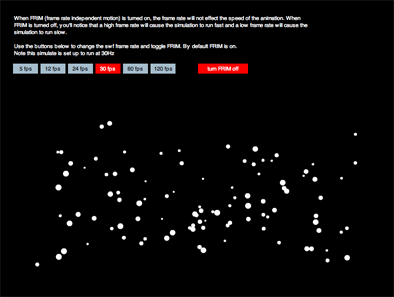
Here’s a demo…

I should note that I spent some time looking at different FRIM implementations online and in the end I found this thread https://developer.playfirst.com/node/860 which my implementation is significantly based upon.

Here’s the code for the class
Here you can download a zip of the class

… and here is some very quick documentation
QuickFRIM:

/*
@param main – the main timeline or other DisplayObject
@param hz – Hertz for he timeStep
*/
new QuickFRIM(main:DisplayObject, hz:Number = 60.0)

// dispatched every time a step even occurs
QuickFRIM.STEP

// dispatched after all step events have occurred at the end of the frame
QuickFRIM.RENDER

// start dispatching events
public function start();

// stop dispatching events
public function stop();

// 1.0 / Hertz
public var timeStep:Number;

// total number of time steps that have been dispatched
public var totalTimeSteps:Number=0;

// numer of step events dispatched this frame
public var stepsPerFrame:int=0;

// boolean to disable FRIM
public var disable:Boolean = false;

Read snippet: QuickFRIM

Timebased Animation Idea (FRIM & QuickBox2D)

import com.actionsnippet.qbox.*;

// change the frame rate and test...
stage.frameRate = 60;

[SWF(width = 800, height=600)]

var sim:QuickBox2D = new QuickBox2D(this);


var circle:Shape = Shape(addChild(new Shape()));
with(circle.graphics) beginFill(0), drawCircle(0,0,50);
circle.x = 100, circle.y = 100;


sim.start();

var startTime:Number;
// delay the start a bit
setTimeout(function():void {
  startTime = getTimer();
  sim.addEventListener(QuickBox2D.STEP, onTimeStep);
}, 500);

function onTimeStep(evt:Event):void{
	
	circle.x += (600 - circle.x) / 12;
	
	if ((600 - circle.x) < 1.5){
		trace("frameRate: ", stage.frameRate);
		trace("totalTime: ", getTimer() - startTime +" ms");
		trace("totalTimeSteps: ", sim.totalTimeSteps);
		sim.removeEventListener(QuickBox2D.STEP, onTimeStep);
	}
}

Note: This snippet requires QuickBox2D 1.0 or greater

Really not sure how I didn’t think of doing this before last night… I realized that the simple FRIM code inside of QuickBox2D can be used to make any standard frame-based style ActionScript animation time-based. In this snippet I do a simple ease out one liner:

circle.x += (600 – circle.x) / 12;

Code like that on an enterFrame would run at different speeds depending on your framerate. However, if you run it on QuickBox2D’s STEP event it runs independent of fram-erate. I’m obviously going to just wrap this up into it’s own mini-library separate from QuickBox2D and do a more in depth post about it… but for now, this snippet just traces out the results. These are my results from my macbook pro dual 2.4 intel….

frameRate: 12
totalTime: 1165 ms
totalTimeSteps: 93

frameRate: 24
totalTime: 1162 ms
totalTimeSteps: 93

frameRate: 30
totalTime: 1166 ms
totalTimeSteps: 91

frameRate: 60
totalTime: 1167 ms
totalTimeSteps: 93

frameRate: 120
totalTime: 1168 ms
totalTimeSteps: 91

Anyway… will peel the FRIM code out of QuickBox2D and wrap it up in its own library sometime soon…

Read snippet: Timebased Animation Idea (FRIM & QuickBox2D)

drawTriangles() Cubes

private function addCube(xp:Number, yp:Number, zp:Number, w:Number, h:Number, leng:Number):void{
			var hw:Number = w * 0.5;
			var hh:Number = h * 0.5;
			var hl:Number = leng * 0.5;
			var xA:Number = xp - hw;
			var xB:Number = hw + xp;
			var yA:Number = yp - hh;
			var yB:Number = hh + yp;
			var zA:Number = zp - hl;
			var zB:Number = hl + zp;
        	_verts.push(xA, yA, zA,
				        xB, yA, zA,
				        xA, yB, zA,
				        xB, yB, zA,
						xA, yA, zB,
				        xB, yA, zB,
				        xA, yB, zB,
				        xB, yB, zB);
			
			var index:int = _boxIndex * 8;
			var i0:int = index, i1:int = index + 1, i2:int = index + 2;
			var i3:int = index + 3,  i4:int = index + 4, i5:int = index + 5;
			var i6:int = index + 6, i7:int = index + 7;
	        _indices.push(i0, i1, i2,
				          i1, i3, i2,
						  i6, i7, i4, 
				          i7, i5, i4, 
						  i1, i5, i3,
						  i7, i3, i5,
						  i4, i5, i0,
						  i1, i0, i5,
						  i2, i6, i0,
						  i0, i6, i4,
						  i2, i3, i6,
						  i3, i7, i6);
						  
			_faces.push(new Face(), new Face(), new Face(), 
					    new Face(),  new Face(), new Face(), 
						new Face(), new Face(), new Face(),
						new Face(), new Face(), new Face());
			_uvts.push(Math.random(), Math.random(), 0, 
					   Math.random(), Math.random(), 0, 
					   Math.random(), Math.random(), 0,
					   Math.random(), Math.random(), 0, 
					   Math.random(), Math.random(), 0, 
					   Math.random(), Math.random(), 0,
					   Math.random(), Math.random(), 0, 
					   Math.random(), Math.random(), 0);
			_boxIndex++;
		}

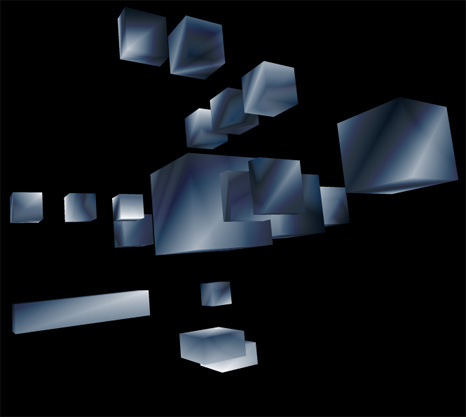
Lately I’ve been posting large code snippets… so today I’m highlighting part of a larger snippet – The above code is the heart of a small experiment I created this morning. It sets up a cube for use with drawTraingles().

The rest of the code can be read here:
Cubes3D.as

Have a look at the swf here…


I also put it on wonderfl…

Read snippet: drawTriangles() Cubes