[SWF(frameRate=60, backgroundColor=0x000000, width=500, height=500)]
stage.quality = "medium";
var frame:Sprite = Sprite(addChild(new Sprite()));
with (frame.graphics) beginFill(0xCCCCCC), drawRect(-200, -200, 400, 400), endFill();
frame.x = stage.stageWidth / 2;
frame.y = stage.stageHeight / 2;
frame.z = 100;

var canvas:Shape = Shape(frame.addChild(new Shape()));
var msk:Shape = Shape(frame.addChild(new Shape()));
with (msk.graphics) beginFill(0x00FF00), drawRect(-200, -200, 400, 400), endFill();
canvas.mask = msk

var txt:TextField = TextField(addChild(new TextField()));
txt.defaultTextFormat = new TextFormat("_sans", 12);
txt.x = txt.y = 10;
txt.textColor = 0xFFFFFF, txt.autoSize="left", txt.text = "Draw on the 3D plane...";

stage.addEventListener(MouseEvent.MOUSE_DOWN, onDown);
stage.addEventListener(MouseEvent.MOUSE_UP, onUp);
function onDown(evt:MouseEvent):void{
	canvas.graphics.lineStyle(4, 0x000000);
	var pnt:Point = frame.globalToLocal(new Point(mouseX, mouseY));
	canvas.graphics.moveTo(pnt.x, pnt.y);
	addEventListener(Event.ENTER_FRAME, onDraw);
}
function onUp(evt:MouseEvent):void{
	removeEventListener(Event.ENTER_FRAME, onDraw);
}

var t:Number = 0;
addEventListener(Event.ENTER_FRAME, onLoop);
function onLoop(evt:Event):void {
    frame.rotationY = 35 * Math.sin(t);
	frame.rotationX = 35 * Math.cos(t);
	t+=0.02;
}

function onDraw(evt:Event):void {
        var pnt:Point = frame.globalToLocal(new Point(mouseX, mouseY));
	canvas.graphics.lineTo(pnt.x, pnt.y);
}
This demo shows that globalToLocal() works with 3D – saving us the trouble of doing some extra math if we want to draw on 3D display objects…
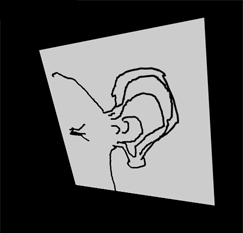
Was made aware of this trick by watching a video that kevinSuttle sent me via twitter. The video is an interview with Chris Nuuja (one of the flash player engineers).
fun to just park the mouse on it and let it draw itself –
Another excellent example 🙂
@Brendan … hadn’t noticed that – pretty funny
@dVyper thanks