import com.actionsnippet.qbox.*;
import Box2D.Dynamics.Joints.*;

[SWF (backgroundColor=0x222222, width=700, height=600)]

var sim:QuickBox2D = new QuickBox2D(this);

sim.setDefault({fillColor:0x000000, lineColor:0xCCCCCC});
sim.createStageWalls();

var legA:QuickObject = sim.addBox({x:5, y:11, width:2, height:0.2,groupIndex:-2});
var three:QuickObject = sim.addBox({x:6.8 + 1.8, y:11, width:2, height:0.2,groupIndex:-2});
var legB:QuickObject = sim.addBox({x:6.8, y:11, width:2, height:0.5,groupIndex:-2});
sim.setDefault({type:"revolute"});

var anchorX:Number = legA.x + (legB.x - legA.x) / 2;
var anchorY:Number = legA.y;
var revJointA:QuickObject = sim.addJoint({a:legA.body, b:legB.body, x1:anchorX, y1:anchorY,enableMotor:true, maxMotorTorque:80});

anchorX = legB.x + (three.x - legB.x) / 2;

var revJointB:QuickObject = sim.addJoint({a:legB.body, b:three.body, x1:anchorX, y1:anchorY, enableMotor:true, maxMotorTorque:80});

setWalkDir(6);
addEventListener(Event.ENTER_FRAME, onLoop);
function onLoop(evt:Event):void {
  if (legB.x < 4){
	setWalkDir(6);
  }else if (legB.x > 19){
	setWalkDir(-6);
  }
}
function setWalkDir(dir:Number):void{
	var j:b2RevoluteJoint;
	j = revJointA.joint as b2RevoluteJoint
	j.SetMotorSpeed(dir);
	j = revJointB.joint as b2RevoluteJoint
	j.SetMotorSpeed(dir * -1);
}

sim.start();
sim.mouseDrag();
This demo is a bit more complex than the last two – mostly because it makes use of motors…
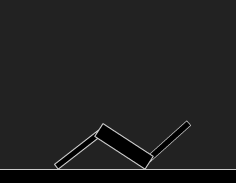
Nice
Also interesting when grabbed by leg and pulled to the middle of the stage : R.Walker showing he’s best talents as an acrobat – like a random pendulum !
Thanks… hadn’t noticed that – interesting and pretty funny looking 🙂