// from
// http://www.gamedev.net/topic/444154-closest-point-on-a-line/

function getClosestPoint(A:*, B:*, P:*, segmentClamp:Boolean=true):Point {
	var AP:Point = new Point(P.x - A.x, P.y - A.y),
	    AB:Point = new Point(B.x - A.x, B.y - A.y);
	var ab2:Number=AB.x*AB.x+AB.y*AB.y;
	var ap_ab:Number=AP.x*AB.x+AP.y*AB.y;
	var t:Number=ap_ab/ab2;
	if (segmentClamp) {
		if (t<0.0) {
			t=0.0;
		} else if (t > 1.0) {
			t=1.0;
		}

	}
	return new Point(A.x + AB.x * t, A.y + AB.y * t);
}


var point:Sprite = Sprite(addChild(new Sprite()));
point.x = 50;
point.y = 50;
with(point.graphics) beginFill(0), drawCircle(0,0, 3);

var line:MovieClip = MovieClip(addChild(new MovieClip()));
line.a = new Point(20, 100);
line.b = new Point(300, 60);
with(line.graphics) lineStyle(0), moveTo(line.a.x, line.a.y), lineTo(line.b.x, line.b.y);

var closestPoint:Point = getClosestPoint(line.a, line.b, point);

var closest:Sprite = Sprite(addChild(new Sprite()));
closest.x = closestPoint.x;
closest.y = closestPoint.y;
with(closest.graphics) beginFill(0xFF0000), drawCircle(0,0, 3);
Browse the notebook
Category: Math
Fish Curve
var xp:Number = 0;
var yp:Number = 0;
var t:Number = 0;
var a:Number = 200;
x = stage.stageWidth / 2;
y = stage.stageHeight / 2;

graphics.lineStyle(0,0x000000);
addEventListener(Event.ENTER_FRAME, onRun);
function onRun(evt:Event):void {
	xp = a * Math.cos(t) - (a * Math.pow(Math.sin(t),2))/Math.sqrt(2);
	yp = a * Math.cos(t) * Math.sin(t);
	if (t == 0){
	  graphics.moveTo(xp, yp);
	}else{
	  graphics.lineTo(xp, yp);
	}
	t += 0.05;
}
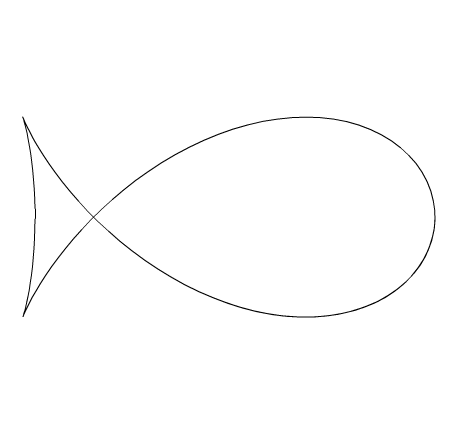
While surfing mathworld I stumbled upon the equation for something called the Fish Curve. This snippet will draw something like this:
Astroid Pedal Curve Variation
var xp:Number = 0;
var yp:Number = 0;
var t:Number = 0;
var r:Number = 200;
x = stage.stageWidth / 2;
y = stage.stageHeight / 2;

graphics.lineStyle(0,0x000000);
addEventListener(Event.ENTER_FRAME, onRun);
function onRun(evt:Event):void {
	r = 200 * Math.cos(t / 10);
	xp = r * Math.pow(Math.cos(t), 3);
	yp = r * Math.pow(Math.sin(t), 3);
	if (t == 0){
	  graphics.moveTo(xp, yp);
	}else{
	  graphics.lineTo(xp, yp);
	}
	t += 0.1;
}
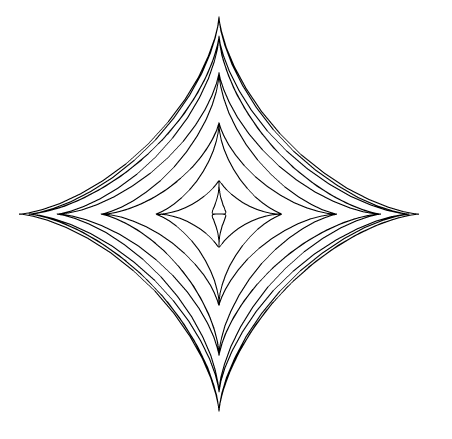
While browsing mathworld I decided to do a variation on this curve . The above snippet will draw something like this:
Logistic Map Play
var offX:Number = 100;
var offY:Number = 300;
var scalarX:Number = 6;
var scalarY:Number = 200;
addEventListener(Event.ENTER_FRAME, onLoop);
function onLoop(evt:Event):void{
	var r:Number = mouseY / 100;
	var xn:Number = (mouseX - 100) / 650;
	var xn1:Number = 0;
	graphics.clear();
	graphics.lineStyle(0,0);
	for (var i:int = 0; i<100; i++){
	  xn1 = r * xn * (1 - xn);
	  xn = xn1;
	  if (i == 0){
		graphics.moveTo(offX+i*scalarX,offY+xn1*scalarY);
	  }else{
		graphics.lineTo(offX+i*scalarX, offY+xn1*scalarY);
	  }
	}
}
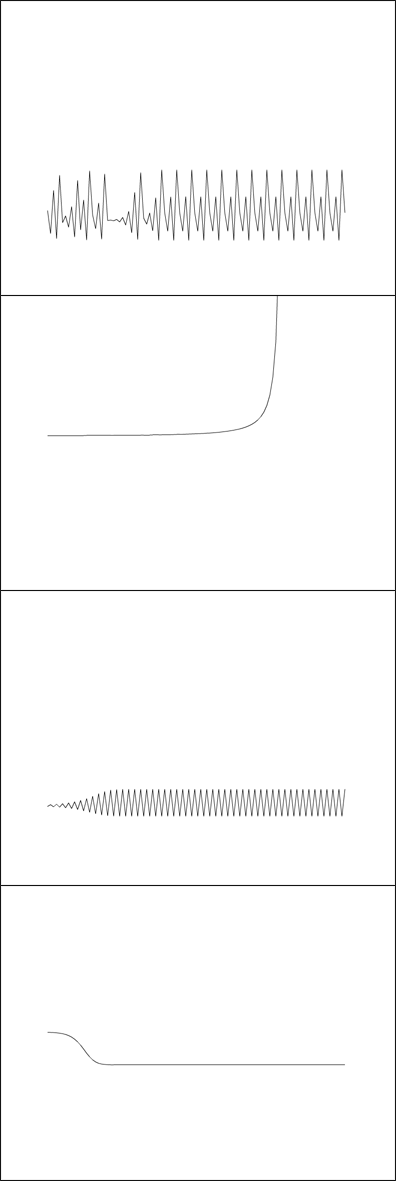
Whenever I can’t decide what kind of snippet to make, I simply go to wikipedia or mathworld for a bit and I always end up with something. I’ve messed with Logistic Maps before (when learning about strange attractors). This is a simple rendering where the x and y axis change the biotic potential (r) and the starting value for x.
Here is the link I used for reference.
Have a look at the swf (just move your mouse around).
Connect The Dots E8
[SWF(width = 500, height = 500)]
const TWO_PI:Number = Math.PI * 2;
var centerX:Number = stage.stageWidth / 2;
var centerY:Number = stage.stageHeight / 2;
addEventListener(Event.ENTER_FRAME, onLoop);
function onLoop(evt:Event):void{
	// data
	var points:Array = [];
	var i:int = 0;
	var pointNum : int = Math.max(2,int(mouseX / 12))

	var radius:Number = 200;
	var step:Number = TWO_PI / pointNum;
	var theta:Number = step / 2;
	for (i = 0; i<pointNum; i++){
		var xp:Number = centerX + radius * Math.cos(theta);
		var yp:Number = centerY + radius * Math.sin(theta);
		points[i] = new Point(xp, yp);
		theta += step;
	}
	// render
	graphics.clear();
	graphics.lineStyle(0,0);
	for ( i = 0; i<pointNum; i++){
     var a:Point = points[i];
     for (var j:int = 0; j<pointNum; j++){
        var b:Point = points[j];
        if (a != b){
		   graphics.drawCircle(a.x, a.y, 10);
		   graphics.moveTo(a.x, a.y);
	       graphics.lineTo(b.x, b.y);
        }
     }
   }
}
I’ve been using this geometric shape for lots of different things recently. Including during consulting gigs as a helpful visualization. Just move your mouse left and right… I particularly like the simpler forms you get by moving your mouse to the left (triangles squares and simple polygons):
While not entirely related this wikipedia article is interesting.
[EDIT : Thanks to martin for reminding me that I can do away with the if statement here in the above code ]
graphics.clear();
graphics.lineStyle(0,0);
for (i = 0; i<pointNum; i++) {
	var a:Point=points[i];
	for (var j:int = i+1; j<pointNum; j++) {
		var b:Point=points[j];
		graphics.drawCircle(a.x, a.y, 10);
		graphics.moveTo(a.x, a.y);
		graphics.lineTo(b.x, b.y);
	}
}
graphics.drawCircle(a.x, a.y, 10);
I implemented that change over at wonderfl and it works nicely
Polar Coordinates Distribution
If you’re at all interested in watching me free from code. I recorded a video of me coding this snippet (which is about 11 minutes long or so).
In the video I create a few functions that allow you to draw shapes like these:
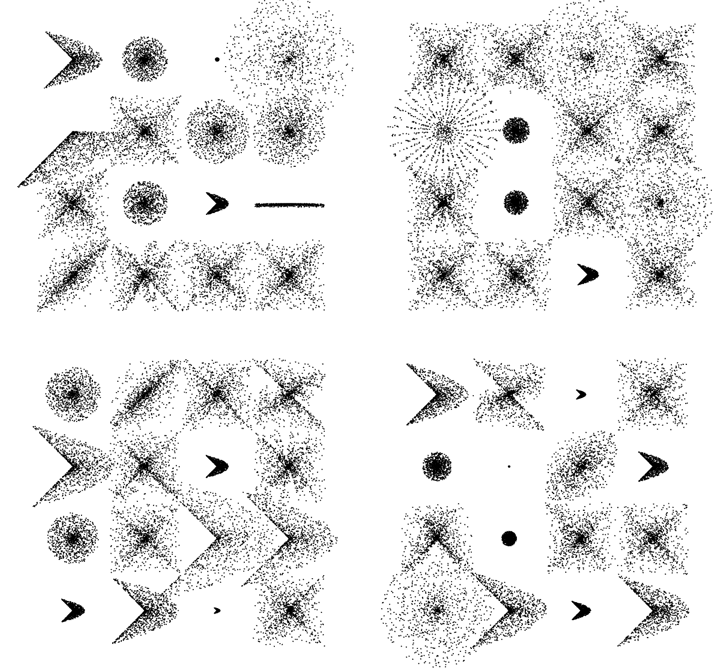
Mathematically this stuff is really simple … the free form nature of the video takes a less technical perspective as you’ll see (I even made a few funny mistakes).
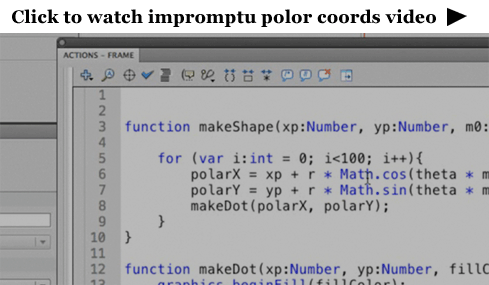
[SWF(width = 600, height = 600)]
var dotNum:int = 1000;
var dotRad:Number = 0.5;

x = 120
y = 100;

// extra stuff to display what the functions can do
stage.addEventListener(MouseEvent.CLICK, onDrawAll);

function onDrawAll(evt:Event):void{
	graphics.clear();
	for (var i:int = 0; i<16; i++){
		var m:Number;

		var rad:Number = 120;
		var xp:Number = i % 4 * rad
		var yp:Number = int(i / 4) * rad

		var type:int = int(Math.random() * 4);
		if (type == 0){
		  makeShape(xp, yp, rad-60, Math.random() , 1);
		}else if (type == 1){
		   makeShape(xp, yp, rad-60, 1,  Math.random());
		}
		else if (type == 2){
		   m = Math.random() * 2;
		   makeShape(xp, yp, rad-Math.random()*120, m, m);
		}
		else if (type == 3){
		   m = Math.random() * 2;
		   makeShape(xp, yp, rad-Math.random()*120, m, m/2);
		}
	}
}

// main part from the video
function makeShape(xp:Number, yp:Number,
				   maxRad:Number = 100,m0:Number=1,
				   m1:Number=1):void{
	var polarX:Number;
	var polarY:Number;
	var radius:Number;
	graphics.lineStyle(0, 0);
	var theta:Number = Math.random() * Math.PI * 2;
	for (var i:int = 0; i<dotNum; i++){
		radius = Math.random() * maxRad
		polarX = xp + radius * Math.cos(theta * m0);
		polarY = yp + radius * Math.sin(theta * m1);
		theta += 0.1;

		makeDot(polarX, polarY);

	}
}

function makeDot(xp:Number, yp:Number, fillColor:uint = 0x000000):void{
	graphics.beginFill(fillColor);
	graphics.drawCircle(xp, yp, dotRad);
	graphics.endFill();
}
Here it is over at wonderf:
Prefix Notation (Lisp Style)
Today’s quiz is not multiple choice. Instead, your task is to write a lisp style math parser. This may sound tricky, but it’s surprisingly simple. (well… not simple exactly, it’s just simple compared to what one might assume).
Lisp uses prefix notation… where the operator is placed before the operands:
10 * 10
becomes:
* 10 10
You could think of this as a function “*” with two arguments (10, 10). In Lisp this is enclosed with parens:
(* 10 10)
Let’s see a few more examples:
100 / 2 + 10
becomes:
(+ (/ 100 2) 10)
…
2 * 4 * 6 * 7
becomes:
(* 2 4 6 7)
…
(2 + 2) * (10 – 2) * 2
becomes
(* (+ 2 2) (- 10 2) 2)
Remember, thinking “functions” really helps. The above can be though of as:
multiply( add(2, 2), subtract(10 , 2), 2)
You should create a function called parsePrefix() that takes a string and returns a number:
Here is some code to test if your parser works properly:
trace(parsePrefix("(* 10 10)"));

trace(parsePrefix("(* 1 (+ 20 2 (* 2 7) 1) 2)"));

trace(parsePrefix("(/ 22 7)"));

trace(parsePrefix("(+ (/ 1 1) (/ 1 2) (/ 1 3) (/ 1 4))"));

/* Should trace out:
100
74
3.142857142857143
2.083333333333333
*/
I highly recommend giving this a try, it was one of those cases where I assumed it would be much trickier than it was.
I’ve posted my solution here.
Float as a Fraction
// print some floats as fractions
printFraction(0.5);
printFraction(0.75);
printFraction(0.48);

// try something a little more complex
var float:Number = 0.98765432;
trace("na more complex example:");
printFraction(float);
var frac:Array = asFraction(float);
trace("double check it:");
trace(frac[0] + "/" + frac[1] +" = " + frac[0] / frac[1]);

/* outputs:
0.5 = 1/2
0.75 = 3/4
0.48 = 12/25

a more complex example:
0.98765432 = 12345679/12500000
double check it:
12345679/12500000 = 0.98765432
*/


function printFraction(n:Number):void{
	var frac:Array = asFraction(n);
	trace(n + " = " + frac[0] + "/" + frac[1]);
}

// takes any value less than one and returns an array
// with the numerator at index 0 and the denominator at index 1
function asFraction(num:Number):Array{
    var decimalPlaces:int = num.toString().split(".")[1].length;
	var denom:Number = Math.pow(10, decimalPlaces);
	return reduceFraction(num * denom, denom);
}

// divide the numerator and denominator by the GCF
function reduceFraction(numerator:int, denominator:Number):Array{
	// divide by the greatest common factor
	var divisor:int = gcf(numerator, denominator);
	if (divisor){
		numerator /= divisor;
		denominator /= divisor;
	}
	return [numerator, denominator];
}

// get the greatest common factor of two integers
function gcf(a:int, b:int):int{
	var remainder:int;
	var factor:Number = 0;
	var maxIter:int = 100;
	var i:int = 0;
	while (1){
		if (b > a){
		   var swap:int = a;
		   a = b;
		   b = swap;
		}
		remainder = a % b;
		a = b;
		b = remainder
		if (remainder == 0){
			factor = a;
			break;
		}else if (remainder==1){
			break;
		}else if (i > maxIter){
			trace("failed to calculate gcf");
			break;
		}
		i++;
	}
	return factor;
}
This snippet contains a few functions for calculating fractions based on float values. Writing this brought back some memories from grade school math.
Greatest Common Factor (divisor)
trace(gcf(75,145));

// outputs 5

function gcf(a:int, b:int):int{
	var remainder:int;
	var factor:Number = 0;
	while (1){
		if (b > a){
		   var swap:int = a;
		   a = b;
		   b = swap;
		}
		remainder = a % b;
		a = b;
		b = remainder
		if (remainder == 0){
			factor = a;
			break;
		}else if (remainder==1){

			break;
		}
	}
	return factor;
}
I was messing around with Egyptian Fractions and found myself in need of some interesting functions. The first function I realized I would be needing was for a greatest common factor (GCF or GCD).
The above snippet is a quick implementation of Euclid’s algorithm. It will return 0 if no GCF is found…
I wrote a few helper functions while working with Egyptian fractions… will post them over the next few days.
Ancient Egyptian Multiplication
egyptianMultiply(12, 99);

// trace(12 * 99) // test to make sure it works

/* outputs:
/64 768
/32 384
 16 192
 8 96
 4 48
/2 24
/1 12
---
1188
*/


function egyptianMultiply(valueA:Number, valueB:Number):void {

	var left:Array = [];
	var right:Array = []

	// swap if valueB is smaller than value A
	if (valueB < valueA){
		var swap:int = valueB;
		valueB = valueA;
		valueA = swap;
	}

	// create left and right columns
	var currentLeft:int = 1;
	var currentRight:int = valueA;

	while (currentLeft < valueB){
		left.push(currentLeft);
		right.push(currentRight);
		currentRight += currentRight;
		currentLeft += currentLeft;
	}


	// add up the right column based on the left
	currentLeft = 0;
	var rightSum:int;
	var leftSum:int;
	var i:int = left.length - 1;

	while (currentLeft != valueB){

	  leftSum = currentLeft + left[i];
	  // if the next number causes the sum
	  // to go above valueB, skip it
	  if (leftSum <= valueB){
		currentLeft = leftSum;
		rightSum += right[i];
		trace("/" + left[i]  + " " + right[i]);
	  } else {
		trace(" " + left[i]  + " " + right[i]);
	  }
	  i--;
	}
	trace("---");
	trace(rightSum);
}
Someone mentioned egyptian multiplication to me yesterday… So read a little about it here and whipped up this example. For some reason I decided to do it in processing … once it worked I ported it to ActionScript.
The above link describing the technique I used is from http://www.jimloy.com/… I haven’t spent much time digging around the site, but it appears to have some pretty nice stuff on it…
If you’re curious, here is the original processing version:
Vector left = new Vector();
Vector right = new Vector();

int valueA = 10;
int valueB = 8;

if (valueB < valueA){
    int swap = valueB;
    valueB = valueA;
    valueA = swap;
}

int currentLeft = 1;
int currentRight = valueA;
while (currentLeft < valueB){
    left.add(currentLeft);
    right.add(currentRight);
    currentRight += currentRight;
    currentLeft += currentLeft;
}

currentLeft = 0;

int result = 0;
int i = left.size() - 1;
while (currentLeft != valueB){

  int temp = currentLeft + (Integer) left.get(i);
  if (temp <= valueB){

    currentLeft = temp;
    result += (Integer) right.get(i);
    println("/" + left.get(i) + " " + right.get(i));
  } else {
    println(" " + left.get(i)  + " " + right.get(i));
  }

  i--;
}
println("---");
println(result);
After writing, this I took a look at the wikipedia entry… I also found myself on this short page about a scribe called Ahmes. (I recommend reading this if you are interested in PI)