Today’s quiz is not multiple choice. Instead, use your choice of the Graphics class or BitmapData to write a function that generates the below image:
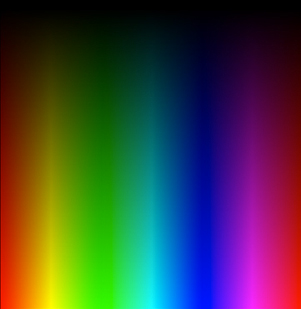
Your function need not take any arguments, it need only return a display object containing the above image.
Feel free to post your solution in the comments.
[EDIT] Solutions:
The solutions that have been posted in the comments so far are REALLY nice – they’re all worth checking out… and I think everyone posted their code to wonderfl so you can see the result without needing to open flash….
My two solutions:
The first solution is a variation on an example from the book I wrote with Rich Shupe:
First Solution
The next solution is actually in an old post from this site – it uses setPixel and HSV – RGB conversion:
Second Solution
Thanks to everyone who posted solutions so far – I’m surprised again by how many people participate in this format of quiz.
quick & dirty 🙂
var bmp:Bitmap = Bitmap( addChild( new Bitmap( new BitmapData( 6, 2, false, 0x000000 ), ‘auto’, true ) ) );
bmp.scaleY = ( bmp.scaleX = 50 ) * 2.55;
var i:int = 6;
while( i– )bmp.bitmapData.setPixel( i, 1, ( ( i 4 ) ? 1:0 ) * 0xFF < 0 && i < 4 ) ? 1:0 ) * 0xFF < 2 && i < 6 ? 1:0 ) * 0xFF ); + wonderfl link: http://wonderfl.net/code/3d1f2e017a9e9874bcc86d8874d2404bfc6eeeb9
wow very nice solution 😀
Here’s the not so quick, but exact version:
public function getColorMap( width:int = 256, height:int = 256 ):BitmapData
{
var ba:ByteArray = new ByteArray();
var i:int = width * height * 4;
while( i > 0 )
{
var hue:Number = ( ( (i >> 2) % width ) / ( width – 1 ) ) * 2 * Math.PI;
var brightness:Number = ( (i >> 2) / width ) / ( height – 1 );
ba[–i] = brightness * 127.5 * (Math.cos( hue + Math.PI * 2 / 3 ) + 1 );
ba[–i] = brightness * 127.5 * (Math.cos( hue + Math.PI * 4 / 3 ) + 1 );
ba[–i] = brightness * 127.5 * (Math.cos( hue ) + 1 );
ba[–i] = 0xff;
}
var bm:BitmapData = new BitmapData( width, height );
bm.setPixels( bm.rect, ba );
return bm;
}
on wonderfl as well: http://wonderfl.net/code/eb52c7451ca5dedadac75b173514895c0d9b52ec
very nice… both of these comments are more interesting than the two solutions I have ready to post tomorrow 😉
//for lazy guys only 🙂
addEventListener(Event.ENTER_FRAME,tick);
private function tick(e:Event):void
{
var dDay:Date = new Date(2010,0,28);
var today:Date = new Date();
if(today.getTime()>=dDay.getTime()){
removeEventListener(Event.ENTER_FRAME,tick);
navigateToURL(new URLRequest(“https://actionsnippet.com/?p=2659#comments”),”_blank”);
}
}
Funny how many different approaches are possible, I’ve done one with color math in the past but now I have just noticed it can be done even without a line of math!
I think this is the quickest and the DIRTIEST solution. Some linear interpolation artifacts, however almost the real thing.
const w:uint=301, h:uint=309, R:uint=0xFF0000, G:uint=0x00ff00, B:uint=0x0000ff;
var m:Matrix=new Matrix();
m.createGradientBox(w,h);
graphics.beginGradientFill(“linear”, [R,R|G,G,G|B,B,B|R,R], [1,1,1,1,1,1,1], [0,42,85,128,170,213,255], m);
graphics.drawRect(0,0,w,h);
m.rotate(Math.PI/2);
graphics.beginGradientFill(“linear”, [0,0], [1,0], [0,255], m);
graphics.drawRect(0,0,w,h);
On wonderFL
http://wonderfl.net/code/f2aee8b63b6e95b620cddb3790c3df98f0c48bdc
wow. amazing solutions!
@quasimondo how did you come about that solution? is this common “colour picker generation logic”?
btw… slight bug if you draw a small one, 100×100 or there abouts, you get a few incorrect pixels at the base of the graphic.
This is the way hue works – typically it is mapped on a circle and each component red/green/blue is offset by 120° (a third of a full circle) whilst blending into its neighbors. In this case the 360° are mapped to the width of the rect whilst the brightness is mapped to the height.
There might be some overflow errors cause by rounding – didn’t limit the range to 0-255.
@Panta … nicely done…
/* Did I miss some deadline, anyway, here’s my version with with graphics.beginBitmapFill :
FP10 because of .setVector
*/
var gradient:BitmapData = new BitmapData(7, 2);
gradient.setVector(gradient.rect , Vector.([
0xFF000000, 0xFF000000, 0xFF000000, 0xFF000000, 0xFF000000, 0xFF000000, 0xFF000000,
0xFFFF0000, 0xFFFFFF00, 0xFF00FF00, 0xFF00FFFF, 0xFF0000FF, 0xFFFF00FF, 0xFFFF0000 ]));
this.graphics.beginBitmapFill(gradient,
new Matrix(300 / gradient.width, 0, 0, 600 / gradient.height,0,-150), false, true);
this.graphics.drawRect(0, 0, 300, 300);
@Pixelero very nice… you didn’t miss any deadline… I just always post my answer the day after the quiz question…. people can still keep submitting their solutions…
Panta rox! Yeah.
@panta – nifty … however adding:
m.createGradientBox(h,w);
before:
m.rotate(Math.PI/2);
ensures the brightness gradient is the correct dimensions
@Rauri – yep, almost forgot the image is not perfectly square