import com.actionsnippet.qbox.*;
[SWF(width = 800, height=600, backgroundColor=0x000000, frameRate = 60)]

var main:MovieClip = MovieClip(addChild(new MovieClip()));
main.z = 500;
main.rotationX = -40;

var sim:QuickBox2D = new QuickBox2D(main);

sim.createStageWalls({fillColor:0x1133CC});
sim.setDefault({lineColor:0xFFFFFF, fillColor:0x113355});

for (var i:int = 0; i<30; i++){
	var b:QuickObject = sim.addBox({x:Math.random()*10 + 3, y:Math.random()*10 + 3,
									width:0.25 + Math.random()*2, height:0.25 + Math.random()*2});
}

sim.start();
sim.mouseDrag();
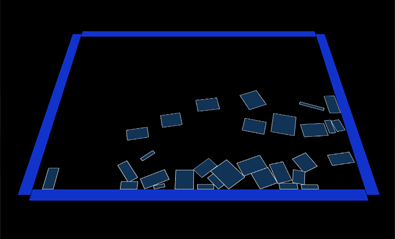
This demo shows how you can render your QuickBox2D simulation to somewhere other than the main timeline. In this case, I render to a MovieClip that has altered z and and rotationX properties.
Great! This could be turned into a game – that one you have to hit the air hovering puck using hand held circular bouncer.