var loc:Vector.<Point> = new Vector.<Point>();
var lifts:Vector.<int> = new Vector.<int>();
var index:int = 0;
var resolution:int = 1;
var down:Boolean;
stage.addEventListener(MouseEvent.MOUSE_DOWN, onDown);
stage.addEventListener(MouseEvent.MOUSE_UP, onUp);
stage.addEventListener(KeyboardEvent.KEY_UP, onKeyReleased);
addEventListener(Event.ENTER_FRAME, onLoop);
function onKeyReleased(evt:KeyboardEvent):void{
	if (evt.keyCode == Keyboard.RIGHT){
		resolution -= 1;
		if (resolution < 1) resolution = 1;
	}else
	if (evt.keyCode == Keyboard.LEFT){
		resolution += 1;
	}
}
function onDown(evt:MouseEvent):void{
	down = true;
	lifts.push(index);
}
function onUp(evt:MouseEvent):void{
	down = false;
}
function onLoop(evt:Event):void {
	if (down){
		loc[index] = new Point(mouseX, mouseY);
		index++;
	}
	graphics.clear();
	graphics.lineStyle(0,0x000000);
	var liftIndex:int = 0;
	for (var i:int = 0; i<loc.length; i++){
		if (liftIndex == lifts.length) liftIndex = 0;
		if (i == lifts[liftIndex]){
			graphics.moveTo(loc[i].x, loc[i].y);
		    liftIndex++;
		}else{
			if (i % resolution == 1 || resolution == 1){
				graphics.lineTo(loc[i].x, loc[i].y);
			}
		}
	}
}
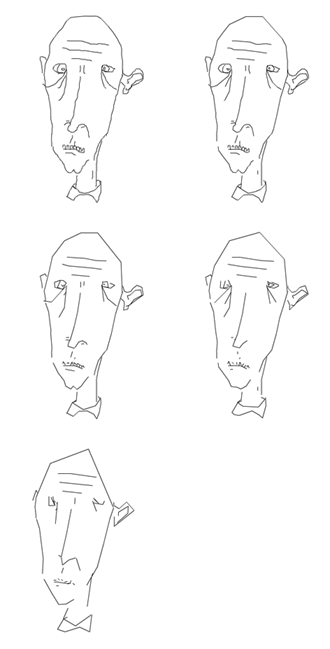
This snippet shows a simple approach to creating variable resolution graphics.
Below is a drawing done using this snippet. The left arrow key is used to decrease resolution and the right arrow key is used to increase resolution:
hi,
great blog, thanks a lot for sharing.
I simply wanted to mention another approach adressed here: http://www.motiondraw.com/blog/?p=50&cpage=1#comment-16005
atb
very cool
how can i highlight each drawn lines on click or rollover.
pls help me with this