// variable is passed into the swf via Javascript (most likely swfObject)
// myswf.swf?myFlashVar="a new value"

var myFlashVar:String = "Some Default Value";
if (root.loaderInfo.parameters.myFlashVar){
   myFlashVar = root.loaderInfo.parameters.myFlashVar;
}
Getting at flashvars in AS3 requires a bit more typing than it did in AS2. Above is a technique I find myself using from time to time. Usually for paths to xml or dynamic callouts (large buttons with text, an image and a link that change frequently).
var t:Number=0, cos:Number, sin:Number;

var canvas:BitmapData = new BitmapData(400,400,false, 0x000000);
addChild(new Bitmap(canvas));

var shape:Shape = new Shape();
with(shape.graphics) beginFill(0x568338, .2), drawCircle(0,0,10);

addEventListener(Event.ENTER_FRAME, onLoop);
function onLoop(evt:Event):void {

	     t += .1;
		// -- low precision sine/cosine
	    //always wrap input angle to -PI..PI
		if (t < -3.14159265){
			t += 6.28318531;
		}else{
		if (t >  3.14159265)
			t -= 6.28318531;
		}

		//compute sine
		if (t < 0){
			sin = 1.27323954 * t + .405284735 * t * t;
		}else{
			sin = 1.27323954 * t - 0.405284735 * t * t;
		}

		//compute cosine: sin(t + PI/2) = cos(t)
		t += 1.57079632;
		if (t >  3.14159265){
			t -= 6.28318531;
		}

		if (t < 0){
			cos = 1.27323954 * t + 0.405284735 * t * t
		}else{
			cos = 1.27323954 * t - 0.405284735 * t * t;
		}
		t -= 1.57079632;

		// move the shape
		shape.x = 200 + 100 * cos;
		shape.y = 200 + 100 * sin;

		// draw to the canvas
		canvas.draw(shape, shape.transform.matrix);
}
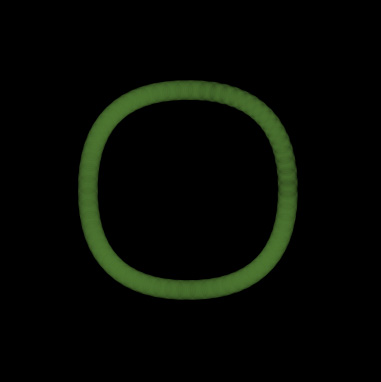
This snippet draws a circle using low precision sine and cosine… you’ll notice that its not a perfect looking circle:
Back in January I saw this blog post by Michael Baczynski over at http://lab.polygonal.de/. The blog post describes a technique for fast sine and cosine approximation – (I highly recommend giving it a read – very fun stuff).
It’s worth noting that there is a higher precision sine and cosine that will likely draw a better looking circle but will be about half as fast. According to the original post … the low precision technique is approximately 14x faster than using Math.cos()/Math.sin().
There some other really great posts over at polygonal go check them out.
function uniqueCompare(arr:Array, compare:Function):void {
	var leng:int = arr.length;
	for (var i:int = 0; i<leng; i++){
		for (var j:int = i + 1; j<leng; j++){
			compare(arr[i], arr[j]);
		}
	}
}

var numbers:Array = [1, 2, 3, 4, 5];

uniqueCompare(numbers, compareCallback);

function compareCallback(a:*, b:*):void {
	trace("compare " + a + " to " + b);
}

/*
outputs:
compare 1 to 2
compare 1 to 3
compare 1 to 4
compare 1 to 5
compare 2 to 3
compare 2 to 4
compare 2 to 5
compare 3 to 4
compare 3 to 5
compare 4 to 5
*/
This snippet shows a function called uniqueCompare() that compares all elements in an array to all other elements in an array without repeating a comparison.
var Box:Function = {
	constructor : function(color:uint, w:Number, h:Number):void {
		this.color = color;
		this.s = new Shape();
		with(this.s.graphics) beginFill(this.color), drawRect(0,0,w,h);
		addChild(this.s);

		this.setLoc = function(x:Number, y:Number):void{
			this.s.x = x;
			this.s.y = y;
	   }
	}
}.constructor;

var box0:Object = new Box(0xFF0000, 100, 100);

box0.setLoc(100, 10);

var box1:Object = new Box(0x000000, 50, 50);

box1.setLoc(210, 10);
This snippet makes use of Object.constructor() to allow creation of Object instances using the new keyword. This is for fun only, I don’t recommend this over actual Classes.
var moverNum:int = 40;
var movers:Array = new Array();

for (var i:int = 0; i<moverNum; i++){
	movers.push(makeMover());
}

addEventListener(Event.ENTER_FRAME, onLoop);
function onLoop(evt:Event):void {
	for (var i:int = 0; i<moverNum; i++){
		movers[i]();
	}
}

function makeMover():Function{
	// mover vars & setup
	var xVel:Number = Math.random() * 5 + 1;
	var right:Number = stage.stageWidth + 30;
	var s:Shape = Shape(addChild(new Shape()));
	with(s.graphics) beginFill(0xFF0000), drawCircle(0,0,5);
	s.x = Math.random() * stage.stageWidth;
	s.y = Math.random() * stage.stageHeight;
	// return a "run" function
	return function():void {
		 s.x += xVel;
		 if (s.x > right){
			s.x = -30;
		 }
	}
}
This snippet creates 40 shapes that move to the right at a random velocity. When they animate off the right hand side of the stage they return from the left.
The makeMover() function has a series of variable definitions related to the x velocity and position of a Shape. The makeMover() function then returns an anonymous function that contains some logic to move the Shape “s”. The anonymous function has access to the makeMover() functions temporary variables…
On the main loop we run all of the anonymous functions – animating all the shapes by their random x velocities.
It would be interesting to write the same program using classes and test the for speed differences. My assumption is that anonymous functions are expensive, but it would still be interesting to see…
This demo show a brute force method for getting the coordinates of all intersections between two given quadtratic bezier curves. The approach is pretty simple, each bezier is actually made up of a series of line segments. The resolution variable determines how many line segments make up one bezier curve. By default I use a resolution of 0.03 (~34 lines)… the higher the resolution decimal value, the fewer the number of line segments. I then use a slight variation on yesterdays line segment intersection function to test all existing line segments for intersections.
This is a brute for approach with lots of room for improvement. But in the scenario that you only need to check a few bezier curves for intersection this approach works quite nicely. I don’t recommend this approach if your trying to create a complex vector drawing tool with boolean vector operations etc…
It’s easy to get an idea of the different approaches to this problem with a little googling. One example I found is from Graphics Gems:
// optimized line to line intersection test:
// from wikipedia: http://en.wikipedia.org/wiki/Line-line_intersection
// and http://local.wasp.uwa.edu.au/~pbourke/geometry/lineline2d/
var ip:Point = new Point();

function intersection(p1:Sprite, p2:Sprite, p3:Sprite, p4:Sprite):Point {
	var nx:Number, ny:Number, dn:Number;
	var x4_x3:Number = p4.x - p3.x;
	var y4_y3:Number = p4.y - p3.y;
	var x2_x1:Number = p2.x - p1.x;
	var y2_y1:Number = p2.y - p1.y;
	var x1_x3:Number = p1.x - p3.x;
	var y1_y3:Number = p1.y - p3.y;

	nx = x4_x3 * y1_y3 - y4_y3 * x1_x3;
	ny = x2_x1 * y1_y3 - y2_y1 * x1_x3;
	dn = y4_y3 * x2_x1 - x4_x3 * y2_y1;

	nx /= dn;
	ny /= dn;

    // has intersection
	if(nx >= 0 && nx <= 1 && ny >= 0 && ny <= 1){
		ny = p1.y + nx * y2_y1;
		nx = p1.x + nx * x2_x1;
		ip.x = nx;
		ip.y = ny;
    }else{
		// no intersection
		ip.x = ip.y = -1000;
	}
	return ip
}


//
// test out the function:
//

stage.frameRate = 30;
var a:Sprite = dot();
a.x = a.y = 100;

var b:Sprite = dot();
b.x = b.y = 200;

var c:Sprite = dot();
c.x = 200
c.y = 100;

var d:Sprite = dot();
d.x = 100
d.y = 200;

var inter:Sprite = dot(0xFF0000,true);

addEventListener(Event.ENTER_FRAME, onLoop);
function onLoop(evt:Event):void {
    var p:Point = intersection(a, b, c, d);
	inter.x = p.x;
	inter.y = p.y

	with(graphics){
		clear();
		lineStyle(0,0x000000);
		moveTo(a.x, a.y);
		lineTo(b.x, b.y);
		moveTo(c.x, c.y);
		lineTo(d.x,d.y);
	}
}

// draggable dot
function dot(col:uint = 0x507399, noDrag:Boolean = false):Sprite {
	var s:Sprite = Sprite(addChild(new Sprite));
	with(s.graphics) beginFill(col), drawCircle(0,0,5);
	if (!noDrag){
		s.buttonMode = true;
	   s.addEventListener(MouseEvent.MOUSE_DOWN, onDrag);
	}
	return s;
}
function onDrag(evt:MouseEvent):void {
	evt.currentTarget.startDrag()
}

stage.addEventListener(MouseEvent.MOUSE_UP, onUp);
function onUp(evt:MouseEvent):void{
	stopDrag();
}
This is a significantly optimized version of yesterdays post. The function intersection() takes four sprites as its arguments. The four arguments could be considered starting points and ending points for two line segments.
The bottleneck in yesterdays post looked something like this;
It’s important to note here that if we didn’t intend to calculate line segments we could exclude the initial calculation of ny.
At this point we’re ready to get rid of duplicate math operations by wrapping them in variables. In this case this only includes subtraction:
var x4_x3:Number=p4.x-p3.x;
var y4_y3:Number=p4.y-p3.y;
var x2_x1:Number=p2.x-p1.x;
var y2_y1:Number=p2.y-p1.y;
var x1_x3:Number=p1.x-p3.x;
var y1_y3:Number=p1.y-p3.y;

nx=x4_x3*y1_y3-y4_y3*x1_x3;
ny=x2_x1*y1_y3-y2_y1*x1_x3;
dn=y4_y3*x2_x1-x4_x3*y2_y1;

nx/=dn;
ny/=dn;

ny=p1.y+nx*y2_y1;
nx=p1.x+nx*x2_x1;

return new Point(nx, ny);
After wrapping repetitive math into variables the only optimization left to be made is related to the instantiation of a new Point(). Instantiation of objects is an expensive process, so it’s better to define the point once outside of the intersection() function definition.
In the end our function looks like this:
var ip:Point = new Point();

function intersection(p1:Sprite, p2:Sprite, p3:Sprite, p4:Sprite):Point {
	var nx:Number, ny:Number, dn:Number;
	var x4_x3:Number = p4.x - p3.x;
	var pre2:Number = p4.y - p3.y;
	var pre3:Number = p2.x - p1.x;
	var pre4:Number = p2.y - p1.y;
	var pre5:Number = p1.y - p3.y;
	var pre6:Number = p1.x - p3.x;
	nx = x4_x3 * pre5 - pre2 * pre6;
	ny = pre3 * pre5 - pre4 * pre6;
	dn = pre2 * pre3 - x4_x3 * pre4;
	nx /= dn;
	ny /= dn;
    // has intersection
	if(nx >= 0 && nx <= 1 && ny >= 0 && ny <= 1){
		ny = p1.y + nx * pre4;
		nx = p1.x + nx * pre3;
		ip.x = nx;
		ip.y = ny;
    }else{
		// no intersection
		ip.x = ip.y = -1000;
	}
	return ip
}
The final version contains a conditional that checks the end values of nx and ny, if they are between 0 and 1 then we know that there is an intersection between the segments.
Note: Optimized code usually breaks some best practices… as best practices are usually geared toward code flexibility and readability… and not speed.
// completely unoptimized line to line intersection test:
// from wikipedia: http://en.wikipedia.org/wiki/Line-line_intersection
function intersection(p1:Sprite, p2:Sprite, p3:Sprite, p4:Sprite):Point {
	var nx:Number, ny:Number, dn:Number;
	nx = (p1.x * p2.y - p1.y * p2.x) * (p3.x - p4.x) - (p1.x - p2.x) * (p3.x * p4.y - p3.y * p4.x);
	dn = (p1.x - p2.x) * (p3.y - p4.y) - (p1.y - p2.y) * (p3.x - p4.x);
	ny = (p1.x * p2.y - p1.y * p2.x) * (p3.y - p4.y) - (p1.y - p2.y) * (p3.x * p4.y - p3.y * p4.x);
	return new Point(nx / dn, ny / dn);
}

//
// test out the function:
//

stage.frameRate = 30;
var a:Sprite = dot();
a.x = a.y = 100;

var b:Sprite = dot();
b.x = b.y = 200;

var c:Sprite = dot();
c.x = 200
c.y = 100;

var d:Sprite = dot();
d.x = 100
d.y = 200;

var inter:Sprite = dot(0xFF0000,true);

addEventListener(Event.ENTER_FRAME, onLoop);
function onLoop(evt:Event):void {
    var p:Point = intersection(a, b, c, d);
	inter.x = p.x;
	inter.y = p.y

	with(graphics){
		clear();
		lineStyle(0,0x000000);
		moveTo(a.x, a.y);
		lineTo(b.x, b.y);
		moveTo(c.x, c.y);
		lineTo(d.x,d.y);
	}
}

// draggable dot
function dot(col:uint = 0x507399, noDrag:Boolean = false):Sprite {
	var s:Sprite = Sprite(addChild(new Sprite));
	with(s.graphics) beginFill(col), drawCircle(0,0,5);
	if (!noDrag){
		s.buttonMode = true;
	   s.addEventListener(MouseEvent.MOUSE_DOWN, onDrag);
	}
	return s;
}
function onDrag(evt:MouseEvent):void {
	evt.currentTarget.startDrag()
}

stage.addEventListener(MouseEvent.MOUSE_UP, onUp);
function onUp(evt:MouseEvent):void{
	stopDrag();
}
This snippet shows the first step toward a usable line to line intersection test. While this demo is fully functional, there is some room for optimization within the intersection() function itself…
From Equations to Code
When I go directly from an equation to code I like to try to make the code resemble the equation… test to make sure it works and then add optimizations. I do this to keep things clear for myself and also so that I have a step by step process to show my students.
The optimizations and additional features that I’ll add to this function tomorrow will make it look very different from the original equation from wikipedia. Some things that I’ll do:
1) tweak the equation to use fewer operators (it has 12 multiplications right now)
2) wrap duplicate mathmatical operations in variables
3) add the ability to test for line segments rather than infinite lines
4) move any object instantiation outside the function
etc…