var t:Number=0, cos:Number, sin:Number;

var canvas:BitmapData = new BitmapData(400,400,false, 0x000000);
addChild(new Bitmap(canvas));

var shape:Shape = new Shape();
with(shape.graphics) beginFill(0x568338, .2), drawCircle(0,0,10);

addEventListener(Event.ENTER_FRAME, onLoop);
function onLoop(evt:Event):void {

	     t += .1;
		// -- low precision sine/cosine
	    //always wrap input angle to -PI..PI
		if (t < -3.14159265){
			t += 6.28318531;
		}else{
		if (t >  3.14159265)
			t -= 6.28318531;
		}

		//compute sine
		if (t < 0){
			sin = 1.27323954 * t + .405284735 * t * t;
		}else{
			sin = 1.27323954 * t - 0.405284735 * t * t;
		}

		//compute cosine: sin(t + PI/2) = cos(t)
		t += 1.57079632;
		if (t >  3.14159265){
			t -= 6.28318531;
		}

		if (t < 0){
			cos = 1.27323954 * t + 0.405284735 * t * t
		}else{
			cos = 1.27323954 * t - 0.405284735 * t * t;
		}
		t -= 1.57079632;

		// move the shape
		shape.x = 200 + 100 * cos;
		shape.y = 200 + 100 * sin;

		// draw to the canvas
		canvas.draw(shape, shape.transform.matrix);
}
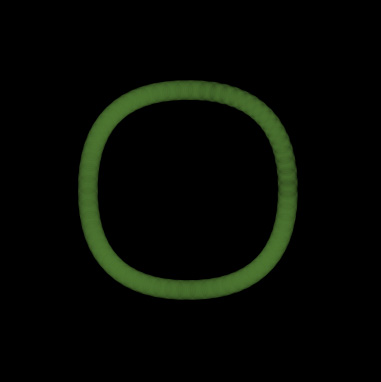
This snippet draws a circle using low precision sine and cosine… you’ll notice that its not a perfect looking circle:
Back in January I saw this blog post by Michael Baczynski over at http://lab.polygonal.de/. The blog post describes a technique for fast sine and cosine approximation – (I highly recommend giving it a read – very fun stuff).
It’s worth noting that there is a higher precision sine and cosine that will likely draw a better looking circle but will be about half as fast. According to the original post … the low precision technique is approximately 14x faster than using Math.cos()/Math.sin().
There some other really great posts over at polygonal go check them out.
Thanks for this!
I was looking into optimised sin/cos and found quite a lot of nice information in the presentation files for these talks:
http://www.research.scea.com/gdc2003/fast-math-functions.html
Thanks for the link, just skimming the first pdf… looks very interesting 🙂