Since this is a rather large snippet check out this demo first:
View Demo…
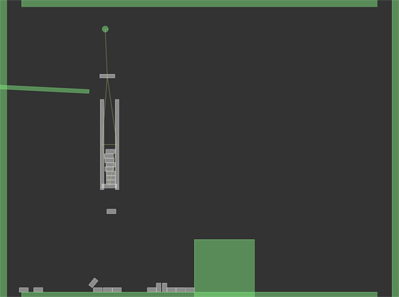
and here is the source:
import com.actionsnippet.qbox.*
import Box2D.Collision.Shapes.*;
import Box2D.Common.Math.*;

[SWF(width = 800, height = 600, backgroundColor = 0x000000, frameRate = 60)]

var sim:QuickBox2D = new QuickBox2D(this, {debug:true});

var sw:Number = stage.stageWidth / 30;
var sh:Number = stage.stageHeight / 30;

sim.addBox({x:sw / 2, y:sh, width:sw - 3, height:1,  density:.0})
sim.addBox({x:sw / 2, y:0, width:sw - 3, height:1,  density:.0 })
sim.addBox({x:0, y:sh / 2, width:1, height:sh ,  density:.0})
sim.addBox({x:sw, y:sh / 2, width:1, height:sh,  density:.0})

var slider:QuickObject = sim.addBox({x:3, y:6, width:6, height:0.25, density:0, angle:0.05});
var pusher:QuickObject = sim.addBox({x:15, y:18, width:4, height:4, density:0});

sim.setDefault({collideConnected:false, frequencyHz:10});
var anchor:QuickObject = sim.addCircle({x:3, y:2, radius:0.2, density:0});

var m0:QuickObject = sim.addBox({x:3, y:5, width:1, height:0.25, fixedRotation:true});

var j0:QuickObject = sim.addJoint({type:"distance", a:anchor.body, b:m0.body});

var m1:QuickObject = sim.addBox({x:2.5, y:9.5, width:0.25, height:6, fixedRotation:true});
var m2:QuickObject = sim.addBox({x:3.5, y:9.5, width:0.25, height:6, fixedRotation:true});

var j1:QuickObject = sim.addJoint({type:"distance", a:m0.body, b:m1.body});
var j2:QuickObject = sim.addJoint({type:"distance", a:m0.body, b:m2.body});
var j3:QuickObject = sim.addJoint({type:"distance", a:m2.body, b:m1.body});

var boxes:Array = [];
var boxNum:int = 21;
var index:int = boxNum;
var filter:b2FilterData;
var lookupQuickObject:Dictionary = new Dictionary();
for (var i:int = 0; i<boxNum; i++){
	boxes[i] = sim.addBox({x:3, y:6.3 + i * 0.3, width:0.6, height:0.3,  friction:0.0, allowSleep:false});
	lookupQuickObject[boxes[i].shape] = boxes[i];
}

var m3:QuickObject = sim.addBox({x:3, y:12.25 , width:1, height:0.25, allowSleep:false,fixedRotation:true, groupIndex:-1});

var j4:QuickObject = sim.addJoint({type:"revolute", a:m1.body, b:m3.body});
var j5:QuickObject = sim.addJoint({type:"revolute", a:m2.body, b:m3.body});

var t:Number = Math.PI;
var dropBox:int = 0;
var prevBox:QuickObject;
var resetVec:b2Vec2 = new b2Vec2(0,0);

function setGroupIndex(b:QuickObject, index:int):void{
	filter = b.shape.GetFilterData();
	filter.groupIndex = index;
	b.shape.SetFilterData(filter);
}

sim.start();
sim.addEventListener(QuickBox2D.STEP, onStep);
function onStep(evt:Event):void{
	dropBox++;

	if (dropBox % 80 == 0){
		index--;
		if (index > -1){
			if (prevBox){
				setGroupIndex(prevBox, 1);
			}
			prevBox = boxes[index]
			setGroupIndex(boxes[index], -1);
			m3.y += 0.05;
		}
	}

	if (index < 0){
		if (pusher.x > 3.5){
			pusher.x -= 0.05;
		}
	}
	for (var i:int = 0; i<boxNum; i++){
		if (boxes[i].y > 22){
			boxes[i].angle = 0;
			boxes[i].y = -2;
			boxes[i].x = 1;
			boxes[i].body.SetLinearVelocity(resetVec);
		}
	}

	if (index > 0){
	  anchor.x = 6 + 3 * Math.cos(t);
	  t += 0.01;
	}
}
That’s freaking awesome! Is it supposed to stop once the green block slides over? (I didn’t read all of the source)
yeah it stops once the thing that drops the blocks gets mostly refilled… this is unfinished… it will eventually have skinned graphics, sound a few other things…
Just wanted to thank you for making this! It makes using Box2D (and some of it’s more advance features) more accessible and easy to use, so keep up the great work! 🙂
no problem Leroy … glad you like it
Thanx for QBox2D!
One question: how can I make static bodies draggable? Is it possible?
hey flashcom… it is possible… you can do it by setting the .x and .y properties of the static QuickObject instance…. you can put a mouse event for click on the userData property of the QuickObject if you are using a skin…. if your using debug mode userData won’t be a DisplayObject…
hi Zevan,
i finished my new portfolio that i hope i will find a job with :
http://www.bertrandgaillard.com/
i used QuickBox2d to make it so big thanks to you !
Bertrand from France
nice work bertrand…. 🙂