Browse the notebook

Category: motion

Glitch Auto-asteroids

[SWF(width=600, height=400, backgroundColor=0x000000, frameRate=30)]
// make some ships
for (var i:int = 0; i<10; i++) makeShip();
//
function makeShip():void {
	// setup vars
	var char:Object ={posX:Math.random()*stage.stageWidth, posY:Math.random()*stage.stageHeight, velX:0, velY:0, rad:4, theta:Math.random()*6.28, thetaDest:Math.random()*6.28, mc: MovieClip(addChild(new MovieClip()))}
	// draw and position the char
	with(char.mc) graphics.lineStyle(0,0xFFFFFF), graphics.moveTo(-15, -5), graphics.lineTo(0, 0), graphics.lineTo(-15, 5), x=char.posX, y=char.posY;
    // loop
    addEventListener(Event.ENTER_FRAME, function(){
		// change position based on velocity, .9 friction
		with (char) posX += velX *= .9, posY += velY *= .9;
		// randomize radius and theta
		if (int(Math.random()*10) == 1) char.thetaDest += Math.random()*2-1;
		if (int(Math.random()*90) == 1) char.rad = Math.random()*4 + 4
		// apply changes to velocity
		char.theta += (char.thetaDest - char.theta) / 12;
		char.velX = char.rad * Math.cos(char.theta);
		char.velY = char.rad * Math.sin(char.theta);
		// screen bounds
		if (char.posX > 620) char.posX = -20;
		if (char.posX < -20) char.posX = 620;
		if (char.posY > 420) char.posY = -20;
		if (char.posY < -20) char.posY = 420;
		// rotation
		char.mc.rotation = (Math.abs(char.mc.y - char.posY)>.7 || Math.abs(char.mc.x - char.posX) > .7) ?  Math.atan2(char.posY - char.mc.y,char.posX -  char.mc.x) / Math.PI * 180 : char.mc.rotation;
		// shoot
		if(int(Math.random()*100) < 20) shootBullet(char, 5 * Math.cos(char.mc.rotation * Math.PI / 180)+ char.velX, 5 * Math.sin(char.mc.rotation * Math.PI / 180) + char.velY);
		// apply position
		with(char) mc.x = posX, mc.y = posY;
		});
}
// 
function shootBullet(char:Object, vx:Number, vy:Number):void{ 
    var b:MovieClip = MovieClip(addChild(new MovieClip()));
	b.life = 0;
	with(b) graphics.beginFill(0xFFFFFF), graphics.drawCircle(0,0,2), x = char.mc.x, y = char.mc.y;
	b.addEventListener(Event.ENTER_FRAME, function(){
			with (b) x += vx, y += vy, life++;
			if (b.life > 30) b.removeEventListener(Event.ENTER_FRAME, arguments.callee), removeChild(b);
	});
}

An asteroids inspired code snippet. See the swf here.
Read snippet: Glitch Auto-asteroids

Point.polar() Stars

[SWF(width=700, height=400, backgroundColor=0x000000, frameRate=30)]

var points:Array = new Array();
var index:int = -1;
function polar(thetaInc:Number, radius:Number):Point{
	index++;
	if (!points[index]) points[index] = 0;
	return Point.polar(radius, points[index] += thetaInc)
}
///////////////////////////////////////////////////
// test it out:
 
var canvas:BitmapData = new BitmapData(700, 400, false, 0xFFFFFF);
 
addChild(new Bitmap(canvas, "auto", true));

var p0:Point = new Point(200, 200);
var p1:Point = new Point(500, 200);

addEventListener(Event.ENTER_FRAME, onLoop);
function onLoop(evt:Event):void {
	
	var rad:Point = polar(.05, 4);
	 
	for (var i:int= 0; i<100; i++){
		
		// reset index;
		index = -1;
	   
	    p0 = p0.add(polar(.025, 2).add(polar(-.05,rad.x)));
	    canvas.setPixel(p0.x, p0.y, 0x000000);
		
		p1 = p1.add(polar(.025, 2).add(polar(-.05,rad.x).add(polar(.1, rad.y))));
	    canvas.setPixel(p1.x, p1.y, 0x000000);
	}
}

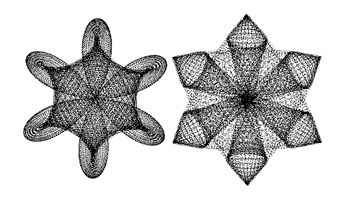
This is pretty much the same as yesterdays… I just changed the way I use the polar() function to draw two more shapes:

Read snippet: Point.polar() Stars

Playing with Curves Point.polar()

[SWF(width=600, height=500, backgroundColor=0x000000, frameRate=30)]
var points:Array = new Array();
var index:int = -1;
function polar(thetaInc:Number, radius:Number):Point{
	index++;
	if (!points[index]) points[index] = 0;
	return Point.polar(radius, points[index] += thetaInc);
}
///////////////////////////////////////////////////
// test it out:
 
var canvas:BitmapData = new BitmapData(600, 500, false, 0xFFFFFF);
 
addChild(new Bitmap(canvas, "auto", true));

var p0:Point = new Point(80, 100);
var p1:Point = new Point(270, 100);
var p2:Point = new Point(480, 40);
var p3:Point = new Point(170, 180);
var p4:Point = new Point(430, 300);

addEventListener(Event.ENTER_FRAME, onLoop);
function onLoop(evt:Event):void {
	for (var i:int= 0; i<100; i++){
		
		// reset index;
		index = -1;
		
        p0 = p0.add(polar(.2, 4).add(polar(-.4,2).add(polar(.05, 1))));
	    canvas.setPixel(p0.x, p0.y, 0x000000);
	
	    p1 = p1.add(polar(.1, 2).add(polar(-.2, 2).add(polar(.03, 1).add(polar(-.01,.5)))));
	    canvas.setPixel(p1.x, p1.y, 0x000000);
	  
	    p2 = p2.add(polar(.08, 3 ).add(polar(-.2, -12).add(polar(2, 10))));
	    canvas.setPixel(p2.x, p2.y, 0x000000);
	  
	    p3 = p3.add(polar(.08, 7).add(polar(-.2, -12).add(polar(2, 11))));
	    canvas.setPixel(p3.x, p3.y, 0x000000);
	   
	    p4 = p4.add(polar(.025, 2).add(polar(-.05,1)));
	    canvas.setPixel(p4.x, p4.y, 0x000000);
	}
}

The polar() function is the real trick here… the rest of the code just uses it to draw this:

The Point.polar() function is just a conversion from polar to cartesian coords:

x = radius * Math.cos(theta);
y = radius * Math.sin(theta);
Read snippet: Playing with Curves Point.polar()

Jumping on a 2D Circle

var circle:Shape = Shape(addChild(new Shape()));
with(circle.graphics) beginFill(0xCCCCCC), drawCircle(0,0,100);
circle.x = stage.stageWidth / 2;
circle.y = stage.stageHeight / 2;

var charWorld:MovieClip = MovieClip(addChild(new MovieClip()));
charWorld.x = circle.x ;
charWorld.y = circle.y - 100 - 10
charWorld.thetaSpeed = 0;
charWorld.theta  = -Math.PI / 2;

var char:MovieClip = MovieClip(charWorld.addChild(new MovieClip))
with(char.graphics) beginFill(0x000000), drawRect(-10,-10,10,10);
char.posY = 0;
char.velY = 0;

addEventListener(Event.ENTER_FRAME, onRunChar);
function onRunChar(evt:Event):void {
	
	char.velY += 1;
	char.posY += char.velY;
	
	charWorld.thetaSpeed *= .6;
    charWorld.theta += charWorld.thetaSpeed;
	
	if (key[Keyboard.UP]){
		if (char.y == 0){
		  char.velY = -10;
		}
	}
	
	if (key[Keyboard.RIGHT]){
		charWorld.thetaSpeed = .1;
	}
	
	if (key[Keyboard.LEFT]){
		charWorld.thetaSpeed = -.1;
	}
	
	if (char.posY > 0){
		char.posY = 0;
	}
	
	char.y = char.posY;
	
	charWorld.x = circle.x + 100 * Math.cos(charWorld.theta);
	charWorld.y = circle.y + 100 * Math.sin(charWorld.theta);
	charWorld.rotation = Math.atan2(circle.y- charWorld.y, circle.x - charWorld.x) / Math.PI * 180 - 90;
}

var key:Object = new Object();
stage.addEventListener(KeyboardEvent.KEY_DOWN, onKeyPressed);
stage.addEventListener(KeyboardEvent.KEY_UP, onKeyReleased);
function onKeyPressed(evt:KeyboardEvent):void {
	key[evt.keyCode] = true;
	key.keyCode = evt.keyCode;
}

function onKeyReleased(evt:KeyboardEvent):void {
	key[evt.keyCode] = false
}

For some reason I felt like posting the swf…. have a look here .

This is one that’s been kicking around in my head for awhile – finally got around to writing it. It creates a circle and a small black box. The box walks and jumps on the circle with key input (left arrow, right arrow and up arrow).

There’s an odd trick going on here. Basically, the box (or char) movieClip is nested inside another clip. Within this clip (charWorld) the box moves on the y axis (jumping/up key). The charWorld clip orbits around the circle and rotates toward the center of the circle – sine/cosine are used for the orbit so the left and the right keys control the speed of theta.

Read snippet: Jumping on a 2D Circle

Matrix.transformPoint()

var circle:Shape = Shape(addChild(new Shape()));
with(circle.graphics) beginFill(0x00000), drawCircle(0,0,10);

var point:Point = new Point();
var trans:Matrix = new Matrix();
trans.rotate(Math.PI);
trans.scale(.5, .5);
trans.tx = stage.stageWidth / 2;
trans.ty = stage.stageHeight / 2;

addEventListener(Event.ENTER_FRAME, onLoop);

function onLoop(evt:Event):void {
	point.x = mouseX - trans.tx;
	point.y = mouseY - trans.ty;
	
	point = trans.transformPoint(point);
	
	circle.x = point.x;
	circle.y = point.y;
}

If you don’t feel like rolling your own transformations Matrix.transformPoint() is a very powerful method. It simply applies the tranformations of a given matrix to a Point. The above example scales rotates and translates a point which is then used to position a circle Shape.

Matrix.transformPoint() is well suited for creating orbiting behavior:

var circle:Shape = Shape(addChild(new Shape()));
with(circle.graphics) beginFill(0x00000), drawCircle(0,0,10);

var point:Point = new Point(100,0);
var trans:Matrix = new Matrix();
 trans.rotate(.1);
 trans.scale(.99,.99);

addEventListener(Event.ENTER_FRAME, onLoop);

function onLoop(evt:Event):void {
	 
      point = trans.transformPoint(point);
	 
      circle.x = point.x + stage.stageWidth / 2;
      circle.y = point.y + stage.stageHeight / 2;
}

This code will cause the circle Shape to move in a spiral formation.

Read snippet: Matrix.transformPoint()

Draw Spiral

stage.frameRate = 30;
var xp:Number = 0;
var yp:Number = 0;
var counter:Number = 0;
graphics.lineStyle(0,0x999999);
graphics.moveTo(200,200);
addEventListener(Event.ENTER_FRAME, onLoop);
function onLoop(evt:Event):void {
	for (var i:int = 0; i < 20; i++) {
		counter += .05;
		xp=200 + counter * Math.cos(counter);
		yp=200 + counter * Math.sin(counter);
		graphics.lineTo(xp, yp);
	}
	if (counter > 400) {
		removeEventListener(Event.ENTER_FRAME, onLoop);
	}
}

Draws a spiral over time.

Read snippet: Draw Spiral

Random Walk

var xp:Number=Math.random() * stage.stageWidth;
var yp:Number=Math.random() * stage.stageHeight;
graphics.lineStyle(0,0x000000);
graphics.moveTo(xp, yp);
addEventListener(Event.ENTER_FRAME, onLoop);
function onLoop(evt:Event):void {
	xp+=Math.random()*10-5;
	yp+=Math.random()*10-5;
	graphics.lineTo(xp, yp);
}

Nothing special here, but its good to know that this technique has a name… and that it’s NOT Brownian Motion… more here.

Read snippet: Random Walk

Simple Particles

stage.frameRate = 30;
addEventListener(Event.ENTER_FRAME, onLoop);
function onLoop(evt:Event):void{
	if (int(Math.random()*5)==1){
	  for (var i:int= 0; i<10; i++) createParticle();
	}
}

function createParticle():void{
	var s:MovieClip = new MovieClip();
	s.graphics.beginFill(0);
	s.graphics.drawCircle(0,0,Math.random()*10 + 2);
	s.velX = Math.random()*10-5
	s.velY =  Math.random()*10-5
	s.posX = s.x = 200;
	s.posY = s.y = 200;
	addChild(s);
	s.addEventListener(Event.ENTER_FRAME, onRunParticle);
}

function onRunParticle(evt:Event):void {
	var s:MovieClip = MovieClip(evt.currentTarget);
	s.posX += s.velX;
	s.posY += s.velY;
    s.scaleX = s.scaleY -=  .04;
	if (s.scaleX < 0){
		removeChild(s);
		s.removeEventListener(Event.ENTER_FRAME, onRunParticle);
	}
	s.x = s.posX;
	s.y = s.posY;
}

Nothing special here. But my students are always asking me about this – in class I have them alter this code to make fire, water and abstract particle systems.

Read snippet: Simple Particles

10,000 Transparent Sprites

stage.frameRate = 30;

var imageNum:int = 10000;
var point:Point = new Point(0,0);
var s:Sprite = new Sprite();
s.graphics.beginFill(0xCCCCCC);
s.graphics.lineStyle(0,0x000000);
s.graphics.drawCircle(3,3,3);
s.alpha = .1;

var nested:Sprite = new Sprite();
nested.addChild(s);
var image:BitmapData = new BitmapData(s.width, s.height, true, 0x00000000);
image.draw(nested);

var canvas:BitmapData = new BitmapData(400,400, true, 0xFFFFFFFF);
addChild(new Bitmap(canvas));

var xPos:Array = new Array();
var yPos:Array = new Array();
for (var i:int = 0; i<imageNum; i++) {
	xPos.push(Math.random()*400);
	yPos.push(Math.random()*400);
}

addEventListener(Event.ENTER_FRAME, onLoop);
function onLoop(evt:Event):void {
	canvas.fillRect(new Rectangle(0,0,400,400), 0xFFFFFFFF);
	var div:Number;
	for (var i:int = 0; i<imageNum; i++) {
		div  = (i / 100)+2;
		xPos[i] += (mouseX - xPos[i])/div;
		yPos[i] += (mouseY - yPos[i])/div;
		point.x = xPos[i];
		point.y = yPos[i];
		canvas.copyPixels(image, image.rect, point, null, null, true);
	}
}

This is from my other blog but I figured it was worth posting here. It draws 10’000 transparent circles that each follow the mouse at different speeds. This is achieved using copyPixels().

Read snippet: 10,000 Transparent Sprites