Browse the notebook

Tag: flash

Babylonian Method for Square Root

var xn:Number = 1;
var xn1:Number = 0
var square:Number =39;

trace("find the sqrt of ", square);
trace("Math.sqrt: ", Math.sqrt(square))

// no starting approximation, just try up to 35 iterations
for(var i:int = 0; i<35; i++){
	xn1 = .5 * (xn  + square / xn);
	if (xn1== xn){
		trace("other sqrt: ", xn1);
		break;
	}
	xn = xn1;
}
/*outputs
find the sqrt of  39
Math.sqrt:  6.244997998398398
other sqrt:  6.244997998398398
*/

I was reading about calculating square roots – not for speed optimization purposes, just to see some of the different ways to go about it. The above snippet uses the Babylonian method to find the square root of a number. I left out the first step of guessing at the square root… so this snippet is by no means efficient…

Read snippet: Babylonian Method for Square Root

Supershapes / Superformula

// Superformula (equations from):
// http://www.geniaal.be/downloads/AMJBOT.pdf
// http://en.wikipedia.org/wiki/Superformula
const TWO_PI:Number = Math.PI * 2;
function superShape(a:Number, b:Number, m:Number, n1:Number, n2:Number, n3:Number, pnt:Point, scale:Number):void{
	var r:Number = 0
	var p:Number = 0;
	var xp:Number = 0, yp:Number = 0;
	while(p <= TWO_PI){
		var ang:Number = m * p / 4;
		with(Math){
			r = pow(pow(abs(cos(ang) / a), n2) + pow(abs(sin(ang) / b), n3),-1/n1);
			xp = r * cos(p);
			yp = r * sin(p);
		}
		p += .01;
		canvas.setPixel(pnt.x + xp *scale, pnt.y + yp * scale,  0xFFFFFF);
	 }
}
// test it out:
var canvas:BitmapData = new BitmapData(700,600,false, 0x000000);
addChild(new Bitmap(canvas, "auto", true));
 
superShape(1, 1, 5, 23, 23, 23, new Point(100,80), 30);
superShape(1, 1, 5, 13, 13, 3, new Point(200,80), 30);
superShape(1, 1, 8, 3, 13, 3, new Point(300,80), 30);
superShape(10,8, 16, 30, 13, 3, new Point(450,80), 30);
superShape(1,1, 1, .5, .5, .5, new Point(100,190), 100);

for (var i:int = 0; i <150; i++){
  superShape(1,1, 2, 1+i/800, 4, 8-i * .1, new Point(550,350), 50);
}
for (i = 0; i <20; i++){
  superShape(1.1,1.2, 6, 2 + i , 4, 9 - i, new Point(200,350), 50);
}

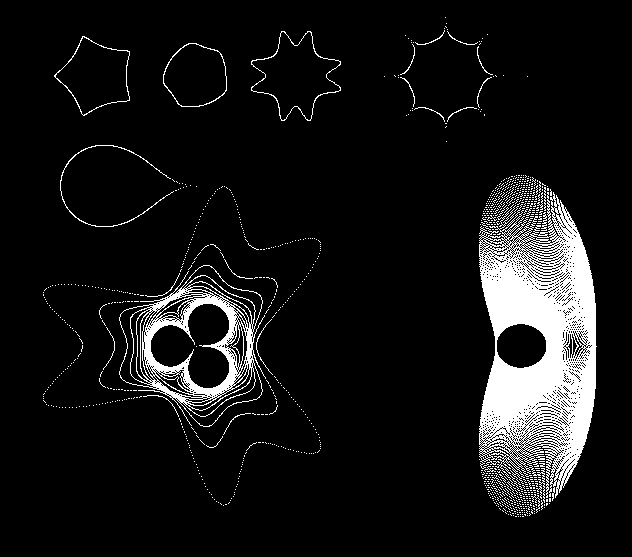
The above snippet demos a function that will draw Supershapes using the Superformula…

From wikipedia:
The Superformula appeared in a work by Johan Gielis. It was obtained by generalizing the superellipse, named and popularized by Piet Hein…

Here is the result of the above code:

You can read more about the Superformula here in the original paper by Gielis.

wikipedia entry…

3d Supershapes by Paul Bourke
Read snippet: Supershapes / Superformula

Fracture a Number

var target:Number = 1024;
var slices:Array = [target];
var leng:int = 11;

for (var i:int = 0; i<leng-1; i++){
	 var index:int = int(Math.random()*slices.length);
	 var val:Number = slices[index];
	 var rand:Number = Math.random() * val/2;
	 slices[index] = val - rand;
	 slices.push(rand);
}

trace(slices);

// test that they all add up
var sum:Number = 0;
for (i = 0; i<slices.length; i++){
	sum += slices[i];
}
trace("test that they all add up: ", sum);

The above snippet creates an array of a specified length whose elements all add up to the variable target. Here is some example output:


165.31133050055192,322.23456030456015,
257.47582363389245,26.9984893942173,1.96283924962002,
5.466277873168191,21.362282634705164,62.68168197512457,
76.63028224500404,36.27274381401516,12.558309228795265,35.04537914634583
test that they all add up: 1024

Read snippet: Fracture a Number

Random Walk to Target

var target:Number = 360;
var steps:Array = new Array();
for (var step:Number = 0; step < target; step += int(Math.random() * 36 + 36)){
	steps.push(Math.min(target,step));
}
steps.push(target);
trace(steps);
/* outputs something similar to:
0,46,99,144,189,259,330,360
*/

This is something I’ve had to do a few times recently…. it randomly steps a number toward a given target…

Read snippet: Random Walk to Target

Tooth Curve (modified Bicuspid)

var canvas:BitmapData=new BitmapData(400,400,false,0xCCCCCC);
addChild(new Bitmap(canvas));

var a:Number=-1.21;
var r:Rectangle=new Rectangle(0,0,3,5);
var halfWidth:Number=canvas.width/2;
var halfHeight:Number=canvas.height/2;

render();

function render():void{
	for (var x:Number = -2; x<=2; x+=.05) {
		for (var y:Number = -2; y<=2; y+=.05) {
	
			// equation from : http://en.wikipedia.org/wiki/Bicuspid_curve
			//(x^2 - a^2) * (x - a)^2 + (y^2 - a^2) * (y^2 - a^2) = 0
	
			// unpoptimized:
			// var e:Number = (x*x - a*a) * (x-a)*(x-a) + (y*y-a*a) * (y*y-a*a);  
			// optimized:
			var x_a:Number=x-a;
			// factoring: x^2 - a^2 = (x + a) * (x - a)
			var y2_a2:Number =  (y + a) * (y - a);
			var e:Number = (x + a) * x_a * x_a * x_a +  y2_a2 * y2_a2;
	
			// tolerance beetween .7 & -.1;
			if (e<.7&&e>-.1) {
				r.x=halfWidth+y*50;
				r.y=halfHeight-x*100;
				canvas.fillRect(r, 0x000000);
			}
		}
	}
}

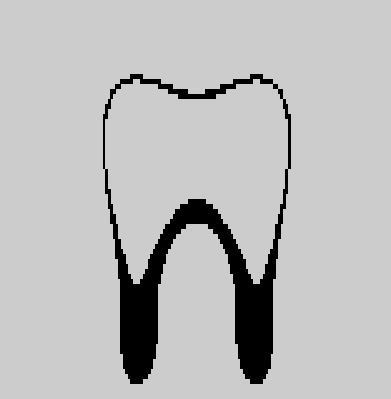
I’ve been looking for a single math equation to draw a tooth for sometime…. today I stumbled upon this… and realized it could probably be changed to look more like a tooth.

This snippet will draw this:

I’m using a graphing method here that allows me to use the Cartesian form of the equation and not the parameteric… I’ll explain a bit more about this in a later post.

Read snippet: Tooth Curve (modified Bicuspid)

Slider Navigation

var thumbNum:Number = 20;
var spacing:Number = 10;
var thumbs:MovieClip = new MovieClip();
addChild(thumbs);
for (var i:int = 0; i<thumbNum; i++){
	var t:MovieClip = new MovieClip();
	with(t.graphics) beginFill(0x666666), drawRect(0,0,100,50);
	t.x = i * (t.width + spacing);
	t.y = 5;
    t.buttonMode = true;
	thumbs.addChild(t);
}
var minX:Number = stage.stageWidth - thumbs.width - spacing;
var destX:Number = thumbs.x = spacing;
var velX:Number = 10;
var stageThird:Number =  stage.stageWidth / 3;
var right:Number = stageThird * 2;
var left:Number  = stageThird;
addEventListener(Event.ENTER_FRAME, onLoop);
function onLoop(evt:Event):void {
	if (mouseX > right){
	   destX -= velX;
	}
	if (mouseX < left){
		destX += velX;
	}
	if (destX < minX){
		destX = minX;
	}
	if (destX > spacing){
		destX = spacing;
	}
	thumbs.x += (destX - thumbs.x) /4;
}

This snippet shows a technique for a common type of navigation.

Read snippet: Slider Navigation

BitmapData Snapshot Grid

[SWF(width=600,height=650)]
var canvas:BitmapData=Bitmap(addChild(new Bitmap(new BitmapData(600,300,false,0xCCCCCC),"auto",true))).bitmapData;
var stills:BitmapData=Bitmap(addChild(new Bitmap(new BitmapData(600,380,false,0xAAAAAA),"auto",true))).bitmapData;
getChildAt(1).y=300;

var c:Shape = new Shape();
var m:Matrix = new Matrix();
m.createGradientBox(40, 40, 0, 0, 0);
c.graphics.beginGradientFill(GradientType.RADIAL, [0xCC0000, 0xCC0000],  [1, 0], [0, 255], m);
c.graphics.drawCircle(20,20,20);

addEventListener(Event.ENTER_FRAME, onLoop);
function onLoop(evt:Event):void {
	c.x=mouseX-c.width/2;
	c.y=mouseY-c.height/2;
	canvas.draw(c, c.transform.matrix);
}

var spacing:Number = 10;
var cols:Number = 4;
var max:Number = cols * cols;
var size:Number = 1/(canvas.width/((canvas.width / cols) - spacing));
var st:Matrix = new Matrix();
st.scale(size, size);
var w:Number = canvas.width * st.d  + spacing;
var h:Number = canvas.height * st.d + spacing;
var timer:Timer=new Timer(500);
timer.start();
timer.addEventListener(TimerEvent.TIMER, onCapture);
function onCapture(evt:TimerEvent):void {
	var inc:int = timer.currentCount - 1;
	st.tx = (inc% cols) * w+ spacing / 2;
	st.ty = int(inc / cols) * h + spacing;
	stills.draw(canvas, st);
	if (timer.currentCount==max) {
		timer.reset();
		timer.start();
	}
}

Take snapshots of a given BitmapData and arrange them in a grid. I wrote this snippet quickly in response to a question so it could probably use a little clean up…

You’ll need to move your mouse over the large canvas bitmap (drawing to it) to see anything…

Read snippet: BitmapData Snapshot Grid

Slow Circle Drawing

var canvas:BitmapData = new BitmapData(400,400,false, 0xCCCCCC);
addChild(new Bitmap(canvas));

addEventListener(Event.ENTER_FRAME, onLoop);
function onLoop(evt:Event):void {
	canvas.fillRect(canvas.rect, 0xCCCCCC);
	
	var r:Number = Math.abs(200 - mouseX);
	var r2:Number = r * r;
	var inc:Number = 1 / r;
	var xp:Number = .00000001;
	var yp:Number = -r;
	while(yp<r){
		  var y:Number = 200 + yp;
		  yp += xp * inc;
		  xp = Math.sqrt(r2 - yp * yp);
		  canvas.setPixel(200 + xp, y, 0x000000);
		  canvas.setPixel(200 - xp, y, 0x000000);
	 }
}

A slow way to draw circles using setPixel().

var canvas:BitmapData = new BitmapData(400,400,false, 0xCCCCCC);
addChild(new Bitmap(canvas));

addEventListener(Event.ENTER_FRAME, onLoop);
function onLoop(evt:Event):void {
	canvas.fillRect(canvas.rect, 0xCCCCCC);
	var r:Number = Math.abs(200 - mouseX);
	var r2:Number = r * r;
	var inc:Number = 1 / r;
	var xp:Number = .000001;
	var yp:Number = -r;
	while(yp <= 0){;
	     var x1:Number = 200 + xp;
		 var y1:Number = 200 + yp
		 var x2:Number = 200 - xp;
		 var y2:Number = 200 - yp;
		 canvas.setPixel(x1, y1, 0x000000);
		 canvas.setPixel(x1, y2, 0x000000);
		 canvas.setPixel(x2, y1, 0x000000);
		 canvas.setPixel(x2, y2, 0x000000);
		  yp += xp * inc;
		  xp = Math.sqrt(r2 - yp * yp);
	 }
}

Little better, still slow.

I was brainstorming about a few things today and somehow these two slow circle drawing algorithms popped out. These are pretty useless compared to some of the famous algorithms I’ve posted in the past. Kind of interesting nevertheless.

Read snippet: Slow Circle Drawing

Function Chaining & Classes

package {
    import flash.display.Sprite;
	public class Chaining extends Sprite{
		public function Chaining(){
			  print(n(100).divide(2).plus(2));
			  // outputs 52              
			  print(n(100).plus(n(10).multiply(2)));
			  // outputs 120
		}
	}
}

function print(n:Num):void{
   trace(n.getValue());
}
function n(n:Number):Num{
   return new Num(n);
}

class Num{
	private var value:Number;
	
	public function Num(n:Number):void{
       value = n;
	}
	private function convert(n:*):Number{
		if (n is Num) n = n.getValue();
		return n;
	}
	public function getValue():Number{
		return value;
	}
	public function plus(n:*):Num{
		n = convert(n);
		value += n;
		return this;
	}
	public function minus(n:*):Num{
		n = convert(n);
		value -= n;
		return this;
	}
	public function multiply(n:*):Num{
		n = convert(n);
		value *= n;
		return this;
	}
	public function divide(n:*):Num{
		n = convert(n);
		value /= n;
		return this;
	}
}

This snippet is meant to be run as a document class. It shows how one might go about designing a class to make extensive use of function chaining.

Read snippet: Function Chaining & Classes

Save BitmapData to your HD

import com.adobe.images.JPGEncoder;

var jpgEncoder:JPGEncoder = new JPGEncoder(80);
var file:FileReference = new FileReference();
var id:int = 0;

var bit:BitmapData = new BitmapData(400, 400, false, 0x000000);
addChild(new Bitmap(bit));

stage.addEventListener(MouseEvent.CLICK, onClick);
function onClick(evt:MouseEvent):void{
	// draw some perlin noise
	bit.perlinNoise(200,200, 2, Math.random()*100, true, false,0, true);
	//bit.draw(someClip);
	//bit.draw(someVideo);
	id++;
	file.save(jpgEncoder.encode(bit), "image_" +id+".jpg");
}

This snippet uses the as3corelib which you can download on this page. It uses the JPGEncoder class to save a jpeg image to a users HD. It also makes use of the flash player 10 FileReference.save() method.

I used BitmapData.perlinNoise() to quickly create an arbitrary image…. as the code comments suggest you could easily snapshot a video or other DisplayObject.

Read snippet: Save BitmapData to your HD