Browse the notebook

Category: Math

Distance Render

var verts:Vector.<Number> = new Vector.<Number>();
var pVerts:Vector.<Number> = new Vector.<Number>();
var uvts:Vector.<Number> = new Vector.<Number>();

var hs:Number = 2.3;
var step:Number = 0.04;

var tVerts:Vector.<Number> = new Vector.<Number>();
var rVerts:Vector.<Number> = new Vector.<Number>();
var matrix:Matrix3D = new Matrix3D();
matrix.identity();
matrix.appendRotation(45,Vector3D.Y_AXIS);
matrix.appendRotation(45,Vector3D.X_AXIS);
var inc:int = 0;
var i:Number, j:Number, k:Number;
i = hs;
while( i > -hs){
	j = hs;
	while(j > -hs){
		k = hs;
		while(k > -hs){
			tVerts[inc] = -i;
			inc++
			tVerts[inc] = -j;
			inc++
			tVerts[inc] = -k;
			inc++
			k -= step;
		}
		j -= step;
	}
	i -= step;
}

matrix.transformVectors(tVerts, rVerts);
 
var vinc:int = 0;
inc = 0
var R:Number = 1.5;
var r:Number = .5;
for (i= -hs; i<hs; i+=step){
	for (j = -hs; j<hs; j+=step){
		for (k = -hs; k<hs; k+=step){
			var vx:Number = rVerts[inc] ;
			inc++
			var vy:Number = rVerts[inc]  ;
			inc++
			var vz:Number=  rVerts[inc] ;
			inc++
			var s:Number = Math.pow(vx  * vx  + vy * vy + vz * vz + R*R - r * r, 2) - 4 * (R * R)*(vx * vx + vy * vy); 
			if (s <0 && s > -.5){ 
				verts[vinc] = (i * 50);
				vinc++
				verts[vinc] = (j * 50);
				vinc++
				verts[vinc] = (k * 50);
				vinc++
				  inc += int((hs - k) / step) * 3;
				  k = hs;
			 }
		}
	}
}

var canvas:BitmapData = new BitmapData(400,400,false, 0x000000);
addChild(new Bitmap(canvas));
render();
function render():void{
	matrix.identity();
    matrix.appendTranslation(200, 200, 0);
	Utils3D.projectVectors(matrix, verts, pVerts, uvts);
	canvas.lock();
	canvas.fillRect(canvas.rect, 0x000000);
	var inc:int = 2;
	var c:int = 0;
	var r:Rectangle = new Rectangle();
	r.width = r.height = 2;
	for (var i:int = 0; i<pVerts.length; i+=2){
		  r.x = pVerts[i];
		  r.y = pVerts[i + 1];
		  c = Math.max(0,100 - verts[inc]);
		  canvas.fillRect(r, c << 16 | c << 8 | c);
		  inc += 3; 
	}
	canvas.unlock();
}

This snippet uses some of the techniques from the last few posts to create a distance render – this renders the implicit equation for a torus.
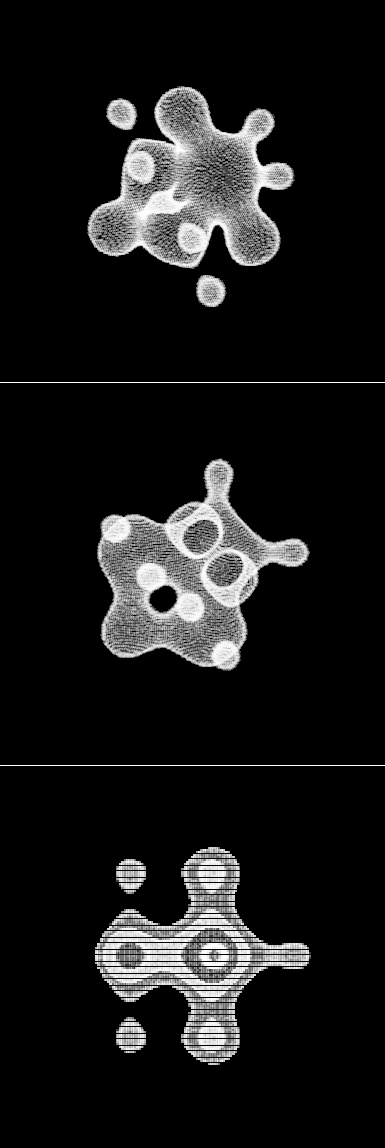
Read snippet: Distance Render

Parametric UV Surface

var matrix:Matrix3D = new Matrix3D();
var verts:Vector.<Number> = new Vector.<Number>();
var pVerts:Vector.<Number> = new Vector.<Number>();
var uvts:Vector.<Number> = new Vector.<Number>();
var sqrt2:Number = Math.sqrt(2)
var pi:Number = Math.PI;
var pi23:Number= 2 * Math.PI / 3;
var step:Number= pi / 50;
for (var u:Number = -pi; u<pi; u+=step) {
	for (var v:Number = -pi; v<pi; v+=step) {
		// from here http://local.wasp.uwa.edu.au/~pbourke/geometry/hexatorus/
		var px = Math.sin(u) / Math.abs(sqrt2+ Math.cos(v))
        var py = Math.sin(u+pi23) / Math.abs(sqrt2 +Math.cos(v + pi23))
        var pz = Math.cos(u-pi23) / Math.abs(sqrt2 +Math.cos(v - pi23))
		verts.push(px * 50);
		verts.push(py * 50);
		verts.push(pz * 50);
	}
}
var brush:BitmapData=new BitmapData(3,2,true,0x41FFFFFF);
var canvas:BitmapData=new BitmapData(400,400,false,0x000000);
addChild(new Bitmap(canvas));
var dx:Number=0;
var dy:Number=0;
addEventListener(Event.ENTER_FRAME, onLoop);
function onLoop(evt:Event):void {
	dx += (mouseX - dx)/4;
	dy += (mouseY - dy)/4;
	matrix.identity();
	matrix.appendRotation(dy,Vector3D.X_AXIS);
	matrix.appendRotation(dx,Vector3D.Y_AXIS);
	matrix.appendTranslation(200, 200, 0);
	Utils3D.projectVectors(matrix, verts, pVerts, uvts);
	canvas.lock();
	canvas.fillRect(canvas.rect, 0x000000);
	var p = new Point();
	for (var i:int = 0; i<pVerts.length; i+=2) {
		p.x = pVerts[i];
		p.y = pVerts[i+1];
		canvas.copyPixels(brush, brush.rect, p, null, null, true);
	}
	canvas.unlock();
}

More 3D shapes inspired by (taken from) Paul Bourke’s website. I figured I should probably add a parametric 3D surface to this set of posts – so I chose to plot the Triaxial Hexatorus. It’s important to note that U and V go from -PI to PI.

I googled Triaxial Hexatorus and stumbled upon a great papervision demo that creates meshes using parametric equations – it also morphs between shapes.

I also noticed that I don’t need to populate the uvts or pVerts Vectors with zeros – seems to work fine without doing that.

Read snippet: Parametric UV Surface

Wormhole

var matrix:Matrix3D = new Matrix3D();
var verts:Vector.<Number> = new Vector.<Number>();
var pVerts:Vector.<Number> = new Vector.<Number>();
var uvts:Vector.<Number> = new Vector.<Number>();
for (var i:Number = -10; i<10; i+=.04) {
	for (var j:Number = -5; j<8; j+=.04) {
		for (var k:Number = -10; k<10; k+=.04) {
			var s:Number =  i * i * j + j * k * k;
			if (s <10 && s > 9.95) {
				verts.push(i * 20);
				verts.push(j * 20);
				verts.push(k * 20);
				pVerts.push(0),pVerts.push(0);
				uvts.push(0),uvts.push(0),uvts.push(0);
			}
		}
	}
}
var brush:BitmapData=new BitmapData(3,2,true,0x41FFFFFF);
var canvas:BitmapData=new BitmapData(400,400,false,0x000000);
addChild(new Bitmap(canvas));
var dx:Number=0;
var dy:Number=0;
addEventListener(Event.ENTER_FRAME, onLoop);
function onLoop(evt:Event):void {
	dx += (mouseX - dx)/4;
	dy += (mouseY - dy)/4;
	matrix.identity();
	matrix.appendRotation(dy,Vector3D.X_AXIS);
	matrix.appendRotation(dx,Vector3D.Y_AXIS);
	matrix.appendTranslation(200, 200, 0);
	Utils3D.projectVectors(matrix, verts, pVerts, uvts);
	canvas.lock();
	canvas.fillRect(canvas.rect, 0x000000);
	var p = new Point();
	for (var i:int = 0; i<pVerts.length; i+=2) {
		p.x = pVerts[i];
		p.y = pVerts[i+1];
		canvas.copyPixels(brush, brush.rect, p, null, null, true);
	}
	canvas.unlock();
}

Yet another variation on the post from the last two days. This one plots something resembling a wormhole – I was randomly tweaking the equation for a sphere and stumbled upon this…

Read snippet: Wormhole

Implicit 3D Plot

var matrix:Matrix3D = new Matrix3D();
var verts:Vector.<Number> = new Vector.<Number>();
var pVerts:Vector.<Number> = new Vector.<Number>();
var uvts:Vector.<Number> = new Vector.<Number>();
for (var i:Number = -2; i<2; i+=.04) {
	for (var j:Number = -2; j<2; j+=.04) {
		for (var k:Number = -2; k<2; k+=.04) {
			// blobby, from here www.iiit.net/techreports/ImplicitTR.pdf
var s:Number=i*i+j*j+k*k+Math.sin(4*i)-Math.cos(4*j)+Math.sin(4*k)-1;
			if (s<0&&s>-.2) {
				verts.push(i * 60);
				verts.push(j * 60);
				verts.push(k * 60);
				pVerts.push(0),pVerts.push(0);
				uvts.push(0),uvts.push(0),uvts.push(0);
			}
		}
	}
}
var brush:BitmapData=new BitmapData(3,2,true,0x41FFFFFF);
var canvas:BitmapData=new BitmapData(400,400,false,0x000000);
addChild(new Bitmap(canvas));
var dx:Number=0;
var dy:Number=0;
addEventListener(Event.ENTER_FRAME, onLoop);
function onLoop(evt:Event):void {
	dx += (mouseX - dx)/4;
	dy += (mouseY - dy)/4;
	matrix.identity();
	matrix.appendRotation(dy,Vector3D.X_AXIS);
	matrix.appendRotation(dx,Vector3D.Y_AXIS);
	matrix.appendTranslation(200, 200, 0);
	Utils3D.projectVectors(matrix, verts, pVerts, uvts);
	canvas.lock();
	canvas.fillRect(canvas.rect, 0x000000);
	var p = new Point();
	for (var i:int = 0; i<pVerts.length; i+=2) {
		p.x = pVerts[i];
		p.y = pVerts[i+1];
		canvas.copyPixels(brush, brush.rect, p, null, null, true);
	}
	canvas.unlock();
}

I was looking at some equations for implicit 3D surfaces in this pdf about raytracing… anyway, I realized I could just modify the Utils3D.projectVectors() code (that I wrote a little while ago) to easily render any of the implicit equations mentioned in the pdf. I also did some experimentation with fake lighting and distance rendering which I may post in the future.

(check out the swf on wonderfl.net)

Here are some stills of the above snippet:

Read snippet: Implicit 3D Plot

Gradient Tooth

var canvas:BitmapData=new BitmapData(400,400,false,0x000000);
addChild(new Bitmap(canvas));

var a:Number=-1.21;
var r:Rectangle=new Rectangle(0,0,3,5);
var halfWidth:Number=canvas.width/2;
var halfHeight:Number=canvas.height/2;

render();

function render():void{
	for (var x:Number = -2; x<=2; x+=.01) {
		for (var y:Number = -2; y<=2; y+=.02) {
	
			// equation from : http://en.wikipedia.org/wiki/Bicuspid_curve
			//(x^2 - a^2) * (x - a)^2 + (y^2 - a^2) * (y^2 - a^2) = 0
	
			// unpoptimized:
			// var e:Number = (x*x - a*a) * (x-a)*(x-a) + (y*y-a*a) * (y*y-a*a);  
			// optimized:
			var x_a:Number=x-a;
			// factoring: x^2 - a^2 = (x + a) * (x - a)
			var y2_a2:Number =  (y + a) * (y - a);
			var e:Number = (x + a) * x_a * x_a *  x_a +  y2_a2 * y2_a2;
			 
				r.x=halfWidth+y*50;
				r.y=halfHeight-x*100;
				var col:Number = e * 50;
				if (col < 10){
					col = Math.abs(col) + 70;
				    canvas.fillRect(r, col << 16 | col << 8 | col );
				}
		}
	}
}

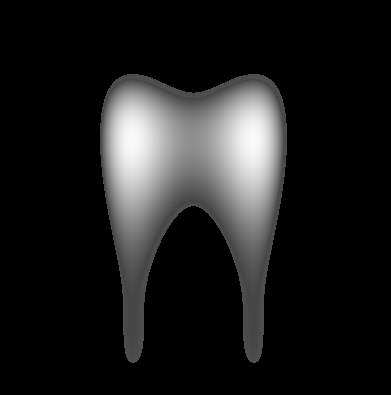
This is a variation on a post from a little while back…. it plots a modified Bicuspid that resembles a tooth:

Read snippet: Gradient Tooth

Swirl Gradient

var canvas:BitmapData=new BitmapData(200,200,false,0x000000);
addChild(new Bitmap(canvas));
scaleX=scaleY=2;
var pixNum:int=canvas.width*canvas.height;

var xp:Vector.<int> = new Vector.<int>();
var yp:Vector.<int> = new Vector.<int>();
var radius:Vector.<Number> = new Vector.<Number>();
var theta:Vector.<Number> = new Vector.<Number>();
for (var i:int = 0; i<pixNum; i++) {
	xp.push(i % 200);
	yp.push(int(i / 200));
	var dx:Number=100-xp[i];
	var dy:Number=100-yp[i];
	theta.push(Math.atan2(dy, dx));
	radius.push(Math.sqrt(dx * dx + dy * dy)/20);
}

addEventListener(Event.ENTER_FRAME, onLoop);
function onLoop(evt:Event):void {
	canvas.lock();
	var n:Number = mouseX / 100;
	for (var i:int = 0; i<pixNum; i++) {
		var swirl:Number = 1+Math.sin(6*Math.cos(radius[i]) -n*theta[i]);
		canvas.setPixel(xp[i], yp[i],  Math.abs(255 - swirl * 255));
	}
	canvas.unlock();
}

This snippet creates a swirl gradient. While this snippet is not highly optimized, it does implement a basic optimization technique … I cache some repetitive calculations in Vectors and then use them on the main loop.

I got the function for a swirl gradient from mathworld…

Read snippet: Swirl Gradient

3D Hypocycloid Shape

var matrix:Matrix3D = new Matrix3D();
var verts:Vector.<Number> = new Vector.<Number>();
var pVerts:Vector.<Number> = new Vector.<Number>();
var uvts:Vector.<Number> = new Vector.<Number>();
const TWO_PI:Number=Math.PI * 2;
var step:Number=.05;

var brush:BitmapData = new BitmapData(3, 2, true, 0x41FFFFFF);
var n:Number=8;
var xp:Number=0,yp:Number=0,a:Number=12,t:Number=0;
for (var i:Number = 0; i<TWO_PI; i+=step) {
	for (var j:Number = 0; j<TWO_PI; j+=step) {
        // unoptimized for readability
	var cosi:Number = a/n * ((n - 1) * Math.cos(i) + Math.cos(Math.abs((n - 1) * i)));
	var sini:Number = a/n * ((n - 1) * Math.sin(i) - Math.sin(Math.abs((n - 1) * i)));
	var cosj:Number = a/n * ((n - 1) * Math.cos(j) + Math.cos(Math.abs((n - 1) * j)));
	var sinj:Number = a/n * ((n - 1) * Math.sin(j) - Math.sin(Math.abs((n - 1) * j)));
		verts.push(cosi * cosj);
		verts.push(sini * cosj);
		verts.push(a * sinj);
		pVerts.push(0),pVerts.push(0);
		uvts.push(0),uvts.push(0),uvts.push(0);
	}
}
var canvas:BitmapData=new BitmapData(400,400,false,0x000000);
addChild(new Bitmap(canvas));
var dx:Number=0;
var dy:Number=0;
addEventListener(Event.ENTER_FRAME, onLoop);
function onLoop(evt:Event):void {
	dx += (mouseX - dx)/4;
	dy += (mouseY - dy)/4;
	matrix.identity();
	matrix.appendRotation(dy,Vector3D.X_AXIS);
	matrix.appendRotation(dx,Vector3D.Y_AXIS);
	matrix.appendTranslation(200, 200, 0);
	Utils3D.projectVectors(matrix, verts, pVerts, uvts);
	canvas.lock();
	canvas.fillRect(canvas.rect, 0x000000);
	var p = new Point();
	for (var i:int = 0; i<pVerts.length; i+=2) {
		p.x = pVerts[i];
		p.y = pVerts[i + 1];
		canvas.copyPixels(brush, brush.rect, p, null, null, true);
	}
	canvas.unlock();
}

Taking the Hypocycloid stuff from yesterday into 3D…

Read snippet: 3D Hypocycloid Shape

Hypocycloid Spiral

x = stage.stageWidth / 2;
y = stage.stageHeight / 2;
// change n to alter number of spikes (cuspes)
var n:Number = 8;
var xp:Number = 0, yp:Number = 0, a:Number = 10, t:Number = 0;

graphics.lineStyle(0, 0x000000);
addEventListener(Event.ENTER_FRAME, onLoop);
function onLoop(evt:Event):void {
	for (var i:int = 0; i<10; i++){
	  // unoptimized for simplicity and similarity to original equations from here:
          // http://mathworld.wolfram.com/Hypocycloid.html
      xp = a/n * ((n - 1) * Math.cos(t) + Math.cos(Math.abs((n - 1) * t)));
	  yp = a/n * ((n - 1) * Math.sin(t) - Math.sin(Math.abs((n - 1) * t)))  ;
	  
	  a *= 1.002;
	   if (t == 0){
		   graphics.moveTo(xp, yp);
	   }else{
		   graphics.lineTo(xp, yp);   
	   }
	   t += .1;
	}
}

This code draws a Hypocycloid with a radius that increments – this results in a spiral formation.

I got the math from mathworld… here.

Read snippet: Hypocycloid Spiral

Plot of sinh()

x = stage.stageWidth / 2;
y = stage.stageHeight / 2;
scaleX = scaleY = 3;

var t:Number =-5;
var xp:Number = 0;
var yp:Number = 0;
  
addEventListener(Event.ENTER_FRAME, onLoop);
function onLoop(evt:Event):void {
	 xp = t;
	 yp = sinh(t);
	 
	graphics.lineStyle(0,0);
	if (t == -5){
		graphics.moveTo(xp, yp);
	}else{
	    graphics.lineTo(xp, yp);
	}
	 if (t > 5){
		 removeEventListener(Event.ENTER_FRAME, onLoop);
	 }
	 t+=.2;
}
function sinh(x:Number):Number{
	return (Math.pow(Math.E, x) - Math.pow(Math.E, -x)) * 0.5;
}

Just a quick plot to test the sinh() function from a few days ago…

Read snippet: Plot of sinh()

sinh & cosh

function sinh(x:Number):Number{
	return (Math.pow(Math.E, x) - Math.pow(Math.E, -x)) * 0.5;
}

function cosh(x:Number):Number{
	return (Math.pow(Math.E, x) + Math.pow(Math.E, -x)) * 0.5;
}

Needed sinh and cosh today. Easy enough to create with existing math functions. If you needed more speed you could inline these and replace Math.E with 2.71828183.

Got the math over at wikipedia (as usual).

Read snippet: sinh & cosh