Browse the notebook

Tag: flash

Dial UI, Record Scratch etc…

var angOffset:Number = 0;
var percent:Number  = 0;

var dial:Sprite = Sprite(addChild(new Sprite()));
with(dial.graphics) lineStyle(1, 0x000000), beginFill(0xCCCCCC), drawCircle(0,0,100), lineTo(0,0);
dial.x = stage.stageWidth / 2;
dial.y = stage.stageHeight / 2;

dial.addEventListener(MouseEvent.MOUSE_DOWN, onDialDown);
stage.addEventListener(MouseEvent.MOUSE_UP, onStageUp);
function onDialDown(evt:MouseEvent):void {
	calcOffset();
	dial.addEventListener(Event.ENTER_FRAME, onRotateDial);
}

function calcOffset():void {
	angOffset = Math.atan2(mouseY - dial.y, mouseX - dial.x) / Math.PI * 180 - dial.rotation;
}

function onRotateDial(evt:Event):void {
	dial.rotation =  Math.atan2(mouseY - dial.y, mouseX - dial.x) / Math.PI * 180 - angOffset;
	percent = dial.rotation;
	if (percent < 0){
		percent += 360;
	}
	percent /= 360;
	// range 0 - 1
	trace(percent);
}

function onStageUp(evt:Event):void {
	dial.removeEventListener(Event.ENTER_FRAME, onRotateDial);
}

The above shows the meat of what you need to create some kind of dial UI… this would also work well if you need to create an interactive turntable (record scratching etc…).

Everytime I needed to create dials for UI, the client wanted left -> right mouse motion rather than a circular… like what you see in Reason. Someone recently asked me how to do a circular motion style dial and this is the technique I came up with.
Read snippet: Dial UI, Record Scratch etc…

lineTo() w/ drawCircle()

var dial:Sprite = Sprite(addChild(new Sprite()));
with(dial.graphics) lineStyle(1, 0x000000), beginFill(0xCCCCCC), drawCircle(0,0,100), lineTo(0,0);
dial.x = stage.stageWidth / 2;
dial.y = stage.stageHeight / 2;

This snippet shows how you can combine drawCircle() and lineTo() to quickly draw a clock/dial primitive shape. I’ll use this in tomorrows snippet…

Read snippet: lineTo() w/ drawCircle()

(HSV HSB) to RGB

[SWF(width=720,height=360,backgroundColor=0x000000,frameRate=30)]

// ported from here:
//http://www.cs.rit.edu/~ncs/color/t_convert.html

function hsv(h:Number, s:Number, v:Number):Array{
	var r:Number, g:Number, b:Number;
	var i:int;
	var f:Number, p:Number, q:Number, t:Number;
	 
	if (s == 0){
		r = g = b = v;
		return [Math.round(r * 255), Math.round(g * 255), Math.round(b * 255)];
	}
	
	h /= 60;
	i  = Math.floor(h);
	f = h - i;
	p = v *  (1 - s);
	q = v * (1 - s * f);
	t = v * (1 - s * (1 - f));
	
	switch( i ) {
		case 0:
			r = v;
			g = t;
			b = p;
			break;
		case 1:
			r = q;
			g = v;
			b = p;
			break;
		case 2:
			r = p;
			g = v;
			b = t;
			break;
		case 3:
			r = p;
			g = q;
			b = v;
			break;
		case 4:
			r = t;
			g = p;
			b = v;
			break;
		default:		// case 5:
			r = v;
			g = p;
			b = q;
			break;
	}
	return [Math.round(r * 255), Math.round(g * 255), Math.round(b * 255)];
}


//
//  -- test it out by drawing a few things
//

var canvas:BitmapData = new BitmapData(720, 360, false, 0x000000);

addChild(new Bitmap(canvas));
 
canvas.lock();
var size:int = canvas.width * canvas.height;
var xp:int, yp:int, c:Array, i:int;

for (i = 0; i<size; i++){
	xp = i % 360;
	yp = i / 360;
	c =  hsv(xp, 1, yp / 360);
	canvas.setPixel(xp, yp, c[0] << 16 | c[1] << 8 | c[2]);
}

var dx:Number, dy:Number, dist:Number, ang:Number;

for (i = 0; i<size; i++){
	xp = i % 360;
	yp = i / 360;
	dx = xp - 180;
	dy = yp - 180;
	dist = 1 - Math.sqrt((dx * dx) + (dy * dy)) / 360;
	ang = Math.atan2(dy, dx) / Math.PI * 180;
	if (ang < 0){
		ang += 360;
	}
	c =  hsv(ang, 1, dist);
	canvas.setPixel(360 + xp, yp, c[0] << 16 | c[1] << 8 | c[2]);
}
canvas.unlock();

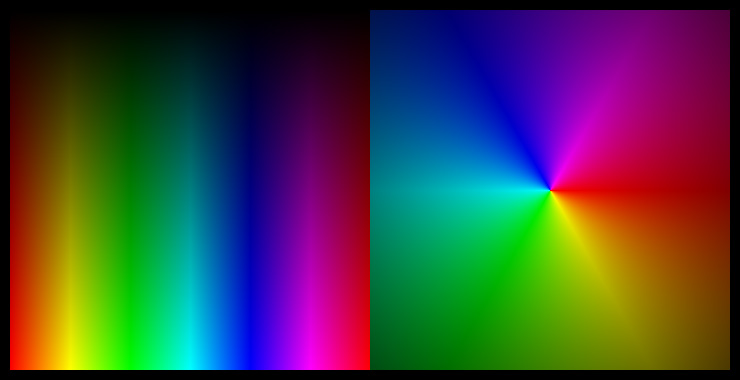
This is one of those things I’ve been meaning to play with for awhile. The above demos a function called hsv() which takes 3 arguments: angle (0-360), saturation(0-1) and value(0-1). The function returns an array of rgb values each with a range of (0-255).

There’s some room for optimization here, but for clarity I left as is. Even just playing with HSV (also know as HSB) for a few minutes, I see some interesting potential for dynamically generating color palettes for generative style experiments.

I looked around for the most elegant looking code snippet to port in order to write this… I eventually stumbled upon this great resource.

If you test the above on your timeline it will generate this image:

I usually only post one snippet a day… not sure why I decided to post two today.

Read snippet: (HSV HSB) to RGB

Math.min() Math.max() …rest

trace("min", Math.min(100, 99, 32, 75, 44, 90));
trace("max", Math.max(100, 99, 32, 75, 44, 90));
/*outputs:
32
100
*/

It’s easy not to notice that Math.min() and Math.max() can take any number of arguments. I’ve seen people nest min/max calls instead of using the above option…. like this:

trace(Math.min(1, Math.min(2, 3)));
Read snippet: Math.min() Math.max() …rest

Simple BlendMode Nav

stage.frameRate=30;
var nav:Sprite = Sprite(addChild(new Sprite()));
nav.x=nav.y=150;

var cover:Sprite;
var coverDest:Number=0;
var spacing:int=4;
var btnNum:int=6;

buildNav();

addEventListener(Event.ENTER_FRAME, onLoop);

function onLoop(evt:Event):void {
	cover.x += (coverDest - cover.x) /4;
}

function buildNav():void {
	for (var i:int = 0; i<btnNum; i++) {
		var b:Sprite=makeBox(50,50);
		b.x = i * (b.width + spacing);
		b.buttonMode=true;
		b.addEventListener(MouseEvent.CLICK, onClick);
	}
	cover=makeBox(54, 60);
	cover.blendMode=BlendMode.INVERT;
}

function onClick(evt:MouseEvent):void {
	coverDest=evt.currentTarget.x;
}

function makeBox(w:Number, h:Number) {
	var b:Sprite = new Sprite();
	with (b.graphics) {
		beginFill(0x000000),drawRect(-w/2,-h/2,w,h);
	}
	nav.addChild(b);
	return b;
}

This is something I do in my intermediate flash classes… the only difference is that we do the graphics in the flash IDE during class time instead of drawing them with ActionScript.

Read snippet: Simple BlendMode Nav

Circles & cacheAsBitmap

[SWF(width=600,height=400,backgroundColor=0x000000,frameRate=30)]
var mcs:Vector.<MovieClip> = new Vector.<MovieClip>();
var num:int = 2000;
for (var i:int = 0; i<num; i++){
	var s:MovieClip = new MovieClip();
	s.graphics.lineStyle(0,0xFFFFFF);
	s.graphics.drawCircle(0,0, Math.random()*30 + 3);
	s.x = Math.random()*stage.stageWidth;
	s.y = Math.random()*stage.stageHeight;
       // comment out to kill your cpu
	s.cacheAsBitmap = true;
	addChild(s);
	s.vx  = Math.random() * 2 - 1;
	s.vy  = Math.random() * 2 - 1;
    mcs.push(s);
}
addEventListener(Event.ENTER_FRAME, onCenter);
function onCenter(evt:Event):void{
	for (var i:int = 0; i<num; i++){
		mcs[i].x += mcs[i].vx;
		mcs[i].y += mcs[i].vy;
	}
}

This was created in response to a question about the real speed gain of cacheAsBitmap. Just comment out the cacheAsBitmap line to see the difference.

Despite it’s extreme simplicity, this is actually a rather fun file to play with, change some of the graphics class method calls around and see what happens.

Read snippet: Circles & cacheAsBitmap

split() hacks & RegExp

var path:String = "section/home.swf";

var deepLinkValue:String = path.split("/")[1].split(".swf")[0];

trace(deepLinkValue);
/*outputs:
home
*/

As a primarily self taught programmer there was a time when I didn’t know what a regular expression was. There was also a time when ActionScript didn’t have them (you had to use a library). Sometimes when I’m in a rush I still do weird things like the above instead of regular expressions… pretty nasty I know.

Here are two different regular expressions that do the same thing:

var path = "section/home.swf"

trace(path.match(/w+(?=.)/))
/*outputs:
home
*/
 
trace(path.replace(/.+/|..+/g, ""))
/* also outputs:
home
*/

Actually, I’d be curious to see other regular expressions that only return one value (not an array) that achieve this same thing… feel free to post of a comment if you can think of one…

Read snippet: split() hacks & RegExp

Is This swf Online?

private var _correctPath:String;

//.... somewhere a little later

 if (root.loaderInfo.url.split("http://").length == 1){
		_correctPath = "http://www.mywebsite.com/this/is/an/absolute/path/";
	}else{
		_correctPath = "";
	}

I like to do something like this when I’m working locally… it automatically tells my swf to use an absolute path for php files, xml files etc…. then, when I upload it, the LoaderInfo.url property contains an “http://” so it uses a relative path for all the external files. This is common especially if you don’t have php and mysql installed on your machine and need to test these using your server.

Read snippet: Is This swf Online?

The Big init() #2

// see previous post for details, this code won't run on it's own
with(addChild(window)){
	x = 10, y = 10;
	with(addChild(c0)) x = 10, y = 10;
	with(addChild(c1)) x = 20, y = 10;
	with(addChild(box)){
		x = 50, y = 10;
		with(addChild(txt)) x = 5, y = 5;
	}
}

It’s entertaining to try and think of different DisplayObject nesting techniques. I have a few more of these rolling around in my head that I’ll try out soon…. The only good/notable thing about the above is that it shows that nested with statements actually work like you’d expect them to….

Read snippet: The Big init() #2