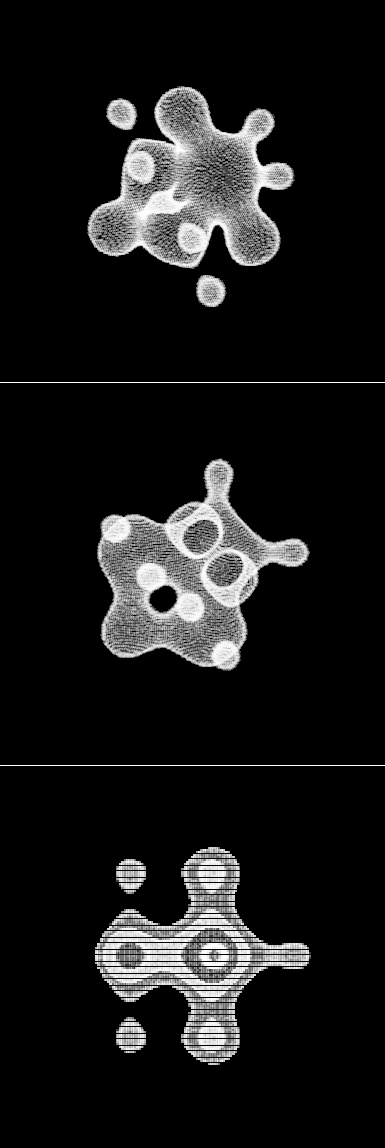
Browse the notebook

Category: Vector

sine cosine Gradient

[SWF(width=600,height=500,frameRate=30)]
var canvas:BitmapData=new BitmapData(600,500,false,0x000000);
addChild(new Bitmap(canvas));
var size:Number=canvas.width*canvas.height;
var w:Number=canvas.width;
var wd:Number=1/w;
var pix:Vector.<uint> = new Vector.<uint>();
var sin:Number;
var cos:Number;
var dx:Number=110;
var dy:Number=52;
addEventListener(Event.ENTER_FRAME, onLoop);
function onLoop(evt:Event):void {
	dx+=0.001;
	canvas.lock();
	for (var i:int = 0; i<size; i++) {
		var xp:Number=i%w;
		var yp:Number=int(i*wd);
		var xx:Number=xp*0.05+dx;
		var yy:Number=yp*0.05+dy;
		var t:Number= (xx * yy) % 3.14159265;
		//compute sine
		// technique from http://lab.polygonal.de/2007/07/18/fast-and-accurate-sinecosine-approximation/
		// by Michael Baczynski
		if (t<0) {
			sin=1.27323954*t+.405284735*t*t;
		} else {
			sin=1.27323954*t-0.405284735*t*t;
		}
		//compute cosine: sin(t + PI/2) = cos(t)
		t+=1.57079632;
		if (t>3.14159265) {
			t-=6.28318531;
		}
		if (t<0) {
			cos=1.27323954*t+0.405284735*t*t;
		} else {
			cos=1.27323954*t-0.405284735*t*t;
		}
		var c:Number=sin+cos*cos*cos;
		// fast math abs
		c=c<0? -c:c;
		c=c*140;
		// math max 255
		c=c>255?255:c;
		pix[i]=c<<16|c<<8|c;
	}
	canvas.setVector(canvas.rect, pix);
	canvas.unlock();
}

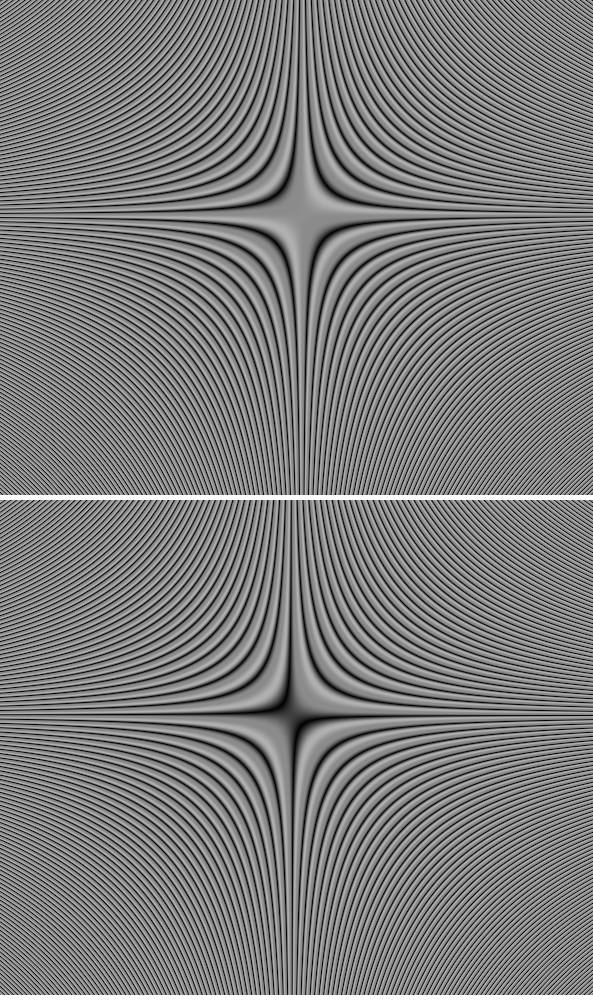
The above snippet will animate a gradient that looks like this:
Read snippet: sine cosine Gradient

Distance Render

var verts:Vector.<Number> = new Vector.<Number>();
var pVerts:Vector.<Number> = new Vector.<Number>();
var uvts:Vector.<Number> = new Vector.<Number>();

var hs:Number = 2.3;
var step:Number = 0.04;

var tVerts:Vector.<Number> = new Vector.<Number>();
var rVerts:Vector.<Number> = new Vector.<Number>();
var matrix:Matrix3D = new Matrix3D();
matrix.identity();
matrix.appendRotation(45,Vector3D.Y_AXIS);
matrix.appendRotation(45,Vector3D.X_AXIS);
var inc:int = 0;
var i:Number, j:Number, k:Number;
i = hs;
while( i > -hs){
	j = hs;
	while(j > -hs){
		k = hs;
		while(k > -hs){
			tVerts[inc] = -i;
			inc++
			tVerts[inc] = -j;
			inc++
			tVerts[inc] = -k;
			inc++
			k -= step;
		}
		j -= step;
	}
	i -= step;
}

matrix.transformVectors(tVerts, rVerts);
 
var vinc:int = 0;
inc = 0
var R:Number = 1.5;
var r:Number = .5;
for (i= -hs; i<hs; i+=step){
	for (j = -hs; j<hs; j+=step){
		for (k = -hs; k<hs; k+=step){
			var vx:Number = rVerts[inc] ;
			inc++
			var vy:Number = rVerts[inc]  ;
			inc++
			var vz:Number=  rVerts[inc] ;
			inc++
			var s:Number = Math.pow(vx  * vx  + vy * vy + vz * vz + R*R - r * r, 2) - 4 * (R * R)*(vx * vx + vy * vy); 
			if (s <0 && s > -.5){ 
				verts[vinc] = (i * 50);
				vinc++
				verts[vinc] = (j * 50);
				vinc++
				verts[vinc] = (k * 50);
				vinc++
				  inc += int((hs - k) / step) * 3;
				  k = hs;
			 }
		}
	}
}

var canvas:BitmapData = new BitmapData(400,400,false, 0x000000);
addChild(new Bitmap(canvas));
render();
function render():void{
	matrix.identity();
    matrix.appendTranslation(200, 200, 0);
	Utils3D.projectVectors(matrix, verts, pVerts, uvts);
	canvas.lock();
	canvas.fillRect(canvas.rect, 0x000000);
	var inc:int = 2;
	var c:int = 0;
	var r:Rectangle = new Rectangle();
	r.width = r.height = 2;
	for (var i:int = 0; i<pVerts.length; i+=2){
		  r.x = pVerts[i];
		  r.y = pVerts[i + 1];
		  c = Math.max(0,100 - verts[inc]);
		  canvas.fillRect(r, c << 16 | c << 8 | c);
		  inc += 3; 
	}
	canvas.unlock();
}

This snippet uses some of the techniques from the last few posts to create a distance render – this renders the implicit equation for a torus.

Read snippet: Distance Render

Array.push() Vector.push() Optimization

var tVerts:Vector.<Number> = new Vector.<Number>();
var inc:int = 0;
var t:Number, i:Number, j:Number, k:Number;
 
 // fast way
t = getTimer();
for (i= -2; i<2; i+=.03){
	for (j = -2; j<2; j+=.03){
		for (k = -2; k<2; k+=.03){
			tVerts[inc] = i;
			inc++;
			tVerts[inc] = j;
			inc++;
			tVerts[inc]= k;
			inc++;
		}
	}
}
trace(getTimer() - t);

tVerts  = new Vector.<Number>();

// slow way
t = getTimer();
for (i= -2; i<2; i+=.03){
	for (j = -2; j<2; j+=.03){
		for (k = -2; k<2; k+=.03){

			tVerts.push(i, j, k);
		//	tVerts.push(j);
		//	tVerts.push(k);
		}
	}
}
trace(getTimer() - t);

Today I needed to populate a Vector in the above manner… populating the vector using push() was quite slow in this case because (among other reasons) push() is a method call. I was curious how much faster populating the Vector without push would be… so I wrote this snippet – in this case it was significantly faster – took less than a third of the time. You can run this snippet to see what kind of results you get.

It’s important to note that this nested for loop could be optimized further but I wanted to focus on the push() optimization alone.

Warning

The most HORRIBLE thing about testing the speed of ActionScript code is that you CANNOT rely on the debug player to test optimizations. Always use the release version of the flash player. The debug player will give unusual (usually slower) results…

Read snippet: Array.push() Vector.push() Optimization

Parametric UV Surface

var matrix:Matrix3D = new Matrix3D();
var verts:Vector.<Number> = new Vector.<Number>();
var pVerts:Vector.<Number> = new Vector.<Number>();
var uvts:Vector.<Number> = new Vector.<Number>();
var sqrt2:Number = Math.sqrt(2)
var pi:Number = Math.PI;
var pi23:Number= 2 * Math.PI / 3;
var step:Number= pi / 50;
for (var u:Number = -pi; u<pi; u+=step) {
	for (var v:Number = -pi; v<pi; v+=step) {
		// from here http://local.wasp.uwa.edu.au/~pbourke/geometry/hexatorus/
		var px = Math.sin(u) / Math.abs(sqrt2+ Math.cos(v))
        var py = Math.sin(u+pi23) / Math.abs(sqrt2 +Math.cos(v + pi23))
        var pz = Math.cos(u-pi23) / Math.abs(sqrt2 +Math.cos(v - pi23))
		verts.push(px * 50);
		verts.push(py * 50);
		verts.push(pz * 50);
	}
}
var brush:BitmapData=new BitmapData(3,2,true,0x41FFFFFF);
var canvas:BitmapData=new BitmapData(400,400,false,0x000000);
addChild(new Bitmap(canvas));
var dx:Number=0;
var dy:Number=0;
addEventListener(Event.ENTER_FRAME, onLoop);
function onLoop(evt:Event):void {
	dx += (mouseX - dx)/4;
	dy += (mouseY - dy)/4;
	matrix.identity();
	matrix.appendRotation(dy,Vector3D.X_AXIS);
	matrix.appendRotation(dx,Vector3D.Y_AXIS);
	matrix.appendTranslation(200, 200, 0);
	Utils3D.projectVectors(matrix, verts, pVerts, uvts);
	canvas.lock();
	canvas.fillRect(canvas.rect, 0x000000);
	var p = new Point();
	for (var i:int = 0; i<pVerts.length; i+=2) {
		p.x = pVerts[i];
		p.y = pVerts[i+1];
		canvas.copyPixels(brush, brush.rect, p, null, null, true);
	}
	canvas.unlock();
}

More 3D shapes inspired by (taken from) Paul Bourke’s website. I figured I should probably add a parametric 3D surface to this set of posts – so I chose to plot the Triaxial Hexatorus. It’s important to note that U and V go from -PI to PI.

I googled Triaxial Hexatorus and stumbled upon a great papervision demo that creates meshes using parametric equations – it also morphs between shapes.

I also noticed that I don’t need to populate the uvts or pVerts Vectors with zeros – seems to work fine without doing that.

Read snippet: Parametric UV Surface

Wormhole

var matrix:Matrix3D = new Matrix3D();
var verts:Vector.<Number> = new Vector.<Number>();
var pVerts:Vector.<Number> = new Vector.<Number>();
var uvts:Vector.<Number> = new Vector.<Number>();
for (var i:Number = -10; i<10; i+=.04) {
	for (var j:Number = -5; j<8; j+=.04) {
		for (var k:Number = -10; k<10; k+=.04) {
			var s:Number =  i * i * j + j * k * k;
			if (s <10 && s > 9.95) {
				verts.push(i * 20);
				verts.push(j * 20);
				verts.push(k * 20);
				pVerts.push(0),pVerts.push(0);
				uvts.push(0),uvts.push(0),uvts.push(0);
			}
		}
	}
}
var brush:BitmapData=new BitmapData(3,2,true,0x41FFFFFF);
var canvas:BitmapData=new BitmapData(400,400,false,0x000000);
addChild(new Bitmap(canvas));
var dx:Number=0;
var dy:Number=0;
addEventListener(Event.ENTER_FRAME, onLoop);
function onLoop(evt:Event):void {
	dx += (mouseX - dx)/4;
	dy += (mouseY - dy)/4;
	matrix.identity();
	matrix.appendRotation(dy,Vector3D.X_AXIS);
	matrix.appendRotation(dx,Vector3D.Y_AXIS);
	matrix.appendTranslation(200, 200, 0);
	Utils3D.projectVectors(matrix, verts, pVerts, uvts);
	canvas.lock();
	canvas.fillRect(canvas.rect, 0x000000);
	var p = new Point();
	for (var i:int = 0; i<pVerts.length; i+=2) {
		p.x = pVerts[i];
		p.y = pVerts[i+1];
		canvas.copyPixels(brush, brush.rect, p, null, null, true);
	}
	canvas.unlock();
}

Yet another variation on the post from the last two days. This one plots something resembling a wormhole – I was randomly tweaking the equation for a sphere and stumbled upon this…

Read snippet: Wormhole

Kusner-Schmitt (Tetrahedral Implicit Surface)

var matrix:Matrix3D = new Matrix3D();
var verts:Vector.<Number> = new Vector.<Number>();
var pVerts:Vector.<Number> = new Vector.<Number>();
var uvts:Vector.<Number> = new Vector.<Number>();
for (var i:Number = -2; i<2; i+=.02) {
	for (var j:Number = -2; j<2; j+=.02) {
		for (var k:Number = -2; k<2; k+=.02) {
            var s:Number = (i * i + 3) * (j * j + 3) * (k * k + 3) - 32 * (i *j *k + 1);
			if (s<0&&s>-.2) {
				verts.push(i * 100);
				verts.push(j * 100);
				verts.push(k * 100);
				pVerts.push(0),pVerts.push(0);
				uvts.push(0),uvts.push(0),uvts.push(0);
			}
		}
	}
}
var brush:BitmapData=new BitmapData(3,2,true,0x41FFFFFF);
var canvas:BitmapData=new BitmapData(400,400,false,0x000000);
addChild(new Bitmap(canvas));
var dx:Number=0;
var dy:Number=0;
addEventListener(Event.ENTER_FRAME, onLoop);
function onLoop(evt:Event):void {
	dx += (mouseX - dx)/4;
	dy += (mouseY - dy)/4;
	matrix.identity();
	matrix.appendRotation(dy,Vector3D.X_AXIS);
	matrix.appendRotation(dx,Vector3D.Y_AXIS);
	matrix.appendTranslation(200, 200, 0);
	Utils3D.projectVectors(matrix, verts, pVerts, uvts);
	canvas.lock();
	canvas.fillRect(canvas.rect, 0x000000);
	var p = new Point();
	for (var i:int = 0; i<pVerts.length; i+=2) {
		p.x = pVerts[i];
		p.y = pVerts[i+1];
		canvas.copyPixels(brush, brush.rect, p, null, null, true);
	}
	canvas.unlock();
}

The same as yesterdays with a different plot from Paul Bourke’s website.

Read snippet: Kusner-Schmitt (Tetrahedral Implicit Surface)

Implicit 3D Plot

var matrix:Matrix3D = new Matrix3D();
var verts:Vector.<Number> = new Vector.<Number>();
var pVerts:Vector.<Number> = new Vector.<Number>();
var uvts:Vector.<Number> = new Vector.<Number>();
for (var i:Number = -2; i<2; i+=.04) {
	for (var j:Number = -2; j<2; j+=.04) {
		for (var k:Number = -2; k<2; k+=.04) {
			// blobby, from here www.iiit.net/techreports/ImplicitTR.pdf
var s:Number=i*i+j*j+k*k+Math.sin(4*i)-Math.cos(4*j)+Math.sin(4*k)-1;
			if (s<0&&s>-.2) {
				verts.push(i * 60);
				verts.push(j * 60);
				verts.push(k * 60);
				pVerts.push(0),pVerts.push(0);
				uvts.push(0),uvts.push(0),uvts.push(0);
			}
		}
	}
}
var brush:BitmapData=new BitmapData(3,2,true,0x41FFFFFF);
var canvas:BitmapData=new BitmapData(400,400,false,0x000000);
addChild(new Bitmap(canvas));
var dx:Number=0;
var dy:Number=0;
addEventListener(Event.ENTER_FRAME, onLoop);
function onLoop(evt:Event):void {
	dx += (mouseX - dx)/4;
	dy += (mouseY - dy)/4;
	matrix.identity();
	matrix.appendRotation(dy,Vector3D.X_AXIS);
	matrix.appendRotation(dx,Vector3D.Y_AXIS);
	matrix.appendTranslation(200, 200, 0);
	Utils3D.projectVectors(matrix, verts, pVerts, uvts);
	canvas.lock();
	canvas.fillRect(canvas.rect, 0x000000);
	var p = new Point();
	for (var i:int = 0; i<pVerts.length; i+=2) {
		p.x = pVerts[i];
		p.y = pVerts[i+1];
		canvas.copyPixels(brush, brush.rect, p, null, null, true);
	}
	canvas.unlock();
}

I was looking at some equations for implicit 3D surfaces in this pdf about raytracing… anyway, I realized I could just modify the Utils3D.projectVectors() code (that I wrote a little while ago) to easily render any of the implicit equations mentioned in the pdf. I also did some experimentation with fake lighting and distance rendering which I may post in the future.

(check out the swf on wonderfl.net)

Here are some stills of the above snippet:

Read snippet: Implicit 3D Plot

Utils3D.projectVectors() & 100,000 pixels

var matrix:Matrix3D = new Matrix3D();

const PARTICLE_NUM:int = 100000;
var verts:Vector.<Number> = new Vector.<Number>();
var pVerts:Vector.<Number> = new Vector.<Number>();
var uvts:Vector.<Number> = new Vector.<Number>();

for (var i:int = 0; i<PARTICLE_NUM; i++){
	verts.push(Math.random()*250 - 125);
	verts.push(Math.random()*250 - 125);
	verts.push(Math.random()*250 - 125);
	
	pVerts.push(0), pVerts.push(0);
	uvts.push(0), uvts.push(0), uvts.push(0);
}

var canvas:BitmapData = new BitmapData(400,400,false, 0x000000);
addChild(new Bitmap(canvas));
var dx:Number=0;
var dy:Number=0;

addEventListener(Event.ENTER_FRAME, onLoop);
function onLoop(evt:Event):void {

	dx += (mouseX - dx)/4;
	dy += (mouseY - dy)/4;
	
	matrix.identity();
	matrix.appendRotation(dy,Vector3D.X_AXIS);
	matrix.appendRotation(dx,Vector3D.Y_AXIS);
	matrix.appendTranslation(200, 200, 0);
	
	Utils3D.projectVectors(matrix, verts, pVerts, uvts);
	
	canvas.lock();
	canvas.fillRect(canvas.rect, 0x000000);
        var leng:int = pVerts.length;
	for (var i:int = 0; i<leng; i+=2){
		canvas.setPixel( pVerts[i], pVerts[i + 1], 0xFFFFFF);
	}
	canvas.unlock();
}

The above shows an easy way to use Utils3D.projectVectors() to move some pixels around in 3D. Since the 3D math is done behind the scenes by the flash player it runs quite fast…

Read snippet: Utils3D.projectVectors() & 100,000 pixels

Vector.sortOn()

var a:Vector.<Sprite> = new Vector.<Sprite>();

trace("unsorted");
for (var i:int = 0; i<10; i++){
	var s:Sprite = new Sprite();
	s.x = int(Math.random()*100);
	a.push(s);
	trace(s.x);
}

quickSortOn(a, "x", 0, a.length-1);

trace("sorted");
for (i= 0; i<10; i++){
	trace(a[i].x);
}

// modified code from kirupa.com
// http://www.kirupa.com/developer/actionscript/quickSort.htm
function quickSortOn(a:Vector.<Sprite>, prop:String, left:int, right:int):void {
    var i:int = 0, j:int = 0, pivot:Sprite, tmp:Sprite;
	i=left;
	j=right;
	pivot = a[Math.round((left+right)*.5)];
	while (i<=j) {
		while (a[i][prop]<pivot[prop]) i++;
		while (a[j][prop]>pivot[prop]) j--;
		if (i<=j) {
			tmp=a[i];
			a[i]=a[j];
			i++;
			a[j]=tmp;
			j--;
		}
	}
	if (left<j)  quickSortOn(a, prop, left, j);
	if (i<right) quickSortOn(a, prop, i, right);
}
/* outputs something like:
unsorted
26
33
20
63
7
68
75
39
67
53
sorted
7
20
26
33
39
53
63
67
68
75
*/

This demo is my first quick stab at using at a sortOn() function for the Vector class. It sorts a Vector of Sprites by their x property.

Recently there were a few times when I was prototyping ideas and suddenly realized that I needed to change my Vector to an Array because I needed to use sortOn().(If you don’t already know, there is no built in sortOn() method for the Vector class). In the past I spent some time with sorting algorithms, bubble, insertion etc… so I knew I could pretty easily write my own sortOn(), but I also realized that a generic implementation wouldn’t be easy/possible without loosing the type of the Vector. What I mean is, if you have a Vector of Sprites, you need a sorting method that takes a Vector.< Sprite > type as an argument (as seen above), if you have a Vector of TextFields you need a Vector.< TextField > type as an argument. You could of course use a generic type, but this kind of defeats the purpose of using a vector in the first place…

I will likely post a revised version of this in the near future with a slightly improved implementation of QuickSort. I haven’t spent that much time with this, but If I recall correctly this is not the ideal implementation. I ported this code from a nice Kirupa tutorial and modified it to sort based on a property…

Read snippet: Vector.sortOn()

Script List Pattern

var currentState:String = "";

var functionList:Vector.<Function> = new Vector.<Function>();

function clearFunctions():void{
	functionList = new Vector.<Function>();
}
function addFunction(f:Function):Function {
	functionList.push(f);
	return addFunction;
}

function removeFunction(f:Function):void {
	for (var i:int = 0 ; i<functionList.length; i++){
		if (f == functionList[i]){
			functionList.splice(i, 1);
		}
	}
}

function runProgram():void {
	
	currentState = "current: ";
	
	for (var i:int = 0; i<functionList.length; i++){
		functionList[i]();
	}
	
	trace(currentState);
}

function one():void{
	currentState += " one";
}

function two():void {
	currentState += " two";
}

function three():void {
	currentState += " three";
}

function dot():void{
	currentState += ".";
	
}

// test it: 
addFunction(one);
addFunction(two);
addFunction(three);

runProgram();

removeFunction(one);

runProgram();

addFunction(dot)(dot)(dot);

runProgram();

clearFunctions();

addFunction(dot)(dot)(dot);

addFunction(three)(two)(one)(dot)(dot)(dot);

runProgram();

/* outputs: 
current:  one two three
current:  two three
current:  two three...
current: ... three two one...
*/

This is a very quick implementation of a pattern that I use sometimes. The idea of this pattern is very simple and can easily be implemented in OOP or procedural style programming. The idea is to have a Vector/Array of functions or Class instances. Loop through this Vector/Array and run each function (or a given method of each Class instance). During runtime your client code can alter this list to change what the program does.

I use this technique for games quite often. All enemies get added to an enemy list – this list is looped through and each enemies run() method is called. If an enemy dies it dispatches an event that tells the enemy manager to remove it from the list. Some pseudo code:

function onMainLoop():void{
	if (!paused){
		
		runWorld();
		runKeys();
		runChar();
		
		enemyManager.runEnemies();
		
		runPickups();
		
	}else{
		// show pause screen
	}
}

//... inside EnemyManager class
function onRunEnemies():void{
	for (var i:int = 0; i<enemyList.length; i++){
			enemyList[i].run(i);
	}
}

I use the same technique for pickups (coins, lives etc….).

I first used this technique in Director with a list of parent scripts.

I’m aware of other more refined patterns that are meant to do similar things, but for small to medium sized apps this has worked very nicely for me.

Read snippet: Script List Pattern