Browse the notebook

Category: pixel manipulation

(HSV HSB) to RGB

[SWF(width=720,height=360,backgroundColor=0x000000,frameRate=30)]

// ported from here:
//http://www.cs.rit.edu/~ncs/color/t_convert.html

function hsv(h:Number, s:Number, v:Number):Array{
	var r:Number, g:Number, b:Number;
	var i:int;
	var f:Number, p:Number, q:Number, t:Number;
	 
	if (s == 0){
		r = g = b = v;
		return [Math.round(r * 255), Math.round(g * 255), Math.round(b * 255)];
	}
	
	h /= 60;
	i  = Math.floor(h);
	f = h - i;
	p = v *  (1 - s);
	q = v * (1 - s * f);
	t = v * (1 - s * (1 - f));
	
	switch( i ) {
		case 0:
			r = v;
			g = t;
			b = p;
			break;
		case 1:
			r = q;
			g = v;
			b = p;
			break;
		case 2:
			r = p;
			g = v;
			b = t;
			break;
		case 3:
			r = p;
			g = q;
			b = v;
			break;
		case 4:
			r = t;
			g = p;
			b = v;
			break;
		default:		// case 5:
			r = v;
			g = p;
			b = q;
			break;
	}
	return [Math.round(r * 255), Math.round(g * 255), Math.round(b * 255)];
}


//
//  -- test it out by drawing a few things
//

var canvas:BitmapData = new BitmapData(720, 360, false, 0x000000);

addChild(new Bitmap(canvas));
 
canvas.lock();
var size:int = canvas.width * canvas.height;
var xp:int, yp:int, c:Array, i:int;

for (i = 0; i<size; i++){
	xp = i % 360;
	yp = i / 360;
	c =  hsv(xp, 1, yp / 360);
	canvas.setPixel(xp, yp, c[0] << 16 | c[1] << 8 | c[2]);
}

var dx:Number, dy:Number, dist:Number, ang:Number;

for (i = 0; i<size; i++){
	xp = i % 360;
	yp = i / 360;
	dx = xp - 180;
	dy = yp - 180;
	dist = 1 - Math.sqrt((dx * dx) + (dy * dy)) / 360;
	ang = Math.atan2(dy, dx) / Math.PI * 180;
	if (ang < 0){
		ang += 360;
	}
	c =  hsv(ang, 1, dist);
	canvas.setPixel(360 + xp, yp, c[0] << 16 | c[1] << 8 | c[2]);
}
canvas.unlock();

This is one of those things I’ve been meaning to play with for awhile. The above demos a function called hsv() which takes 3 arguments: angle (0-360), saturation(0-1) and value(0-1). The function returns an array of rgb values each with a range of (0-255).

There’s some room for optimization here, but for clarity I left as is. Even just playing with HSV (also know as HSB) for a few minutes, I see some interesting potential for dynamically generating color palettes for generative style experiments.

I looked around for the most elegant looking code snippet to port in order to write this… I eventually stumbled upon this great resource.

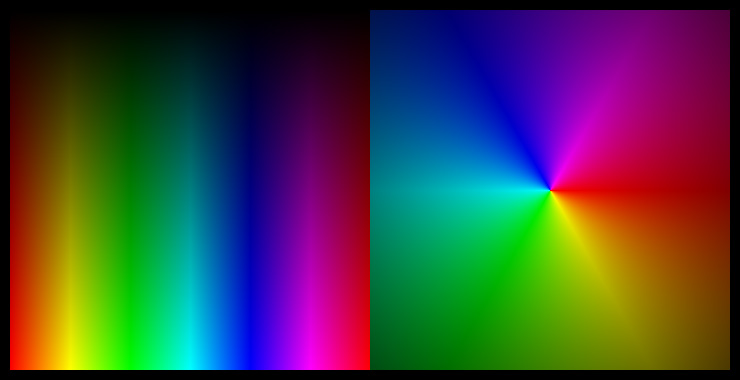
If you test the above on your timeline it will generate this image:
I usually only post one snippet a day… not sure why I decided to post two today.
Read snippet: (HSV HSB) to RGB

Visualizing Binary Numbers

[SWF(width=320,height=512,backgroundColor=0x000000,frameRate=30)]

var canvas:BitmapData=new BitmapData(32,512,false,0xFFFFFF);
addChild(new Bitmap(canvas)).scaleX = 10;
 
var a:uint ;
var s:String;
var m:Number = 0;
var d:Number = 0;
var mi:int ;
var r:Number = 0xFFFFFF / stage.stageWidth;

addEventListener(Event.ENTER_FRAME, onLoop);

function onLoop(evt:Event):void {
	
	d = mouseX * r;
	m += (d - m) / 30;
	
	mi = int(m);

    canvas.lock();
	canvas.fillRect(canvas.rect, 0xFFFFFF);

    a = 0xFFFFFFFF;
	for (var i:int = 0; i<512; i++) {
		s = (a -= mi).toString(2);
		for (var j:int = 0; j<s.length; j++) {
			if (s.charAt(j)=="0") {
				canvas.setPixel(j, i, 0x000000);
			}
		}
	}
	canvas.unlock();
}

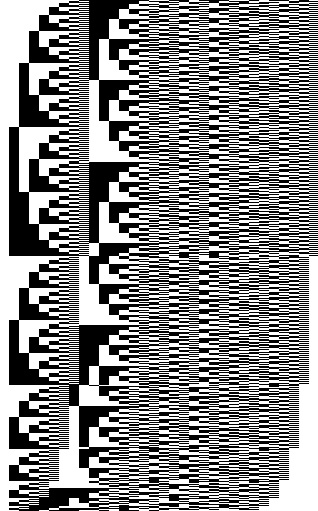
The above uses setPixel() to visualize numbers in binary format. You can move your mouse left and right to change an incremental counting value….

Here’s a still generated by this snippet:

Read snippet: Visualizing Binary Numbers

Seamless Tiles

[SWF(width=600, height=500, backgroundColor=0xFFFFFF, frameRate=30)]

function seamlessTile(img:BitmapData, featherSize:Number = 5):BitmapData{
	var pnt:Point = new Point(0,0);
	var tile:BitmapData = new BitmapData(img.width, img.height, true, 0xFF000000);
	tile.copyPixels(img, img.rect, pnt, null, null, true);
	
	var flipped:BitmapData = new BitmapData(img.width, img.height, true, 0xFF000000);
	var m:Matrix = new Matrix();
	m.scale(-1, 1);
	m.translate(tile.width,0);
	flipped.draw(tile, m);
	
	var aChannel:BitmapData = new BitmapData(img.width, img.height, true, 0x00000000);
	var grad:Sprite = new Sprite();
	m.createGradientBox(img.width, img.height, 0, 0, 0);
	
	grad.graphics.beginGradientFill(GradientType.LINEAR, [0xFFFFFF, 0xFFFFFF],  [1, 0], [0, (255 / img.width) * img.width / featherSize], m, SpreadMethod.PAD);
	
	grad.graphics.drawRect(0,0,img.width, img.height);
	aChannel.draw(grad);
 
	tile.copyPixels(flipped, flipped.rect, pnt, aChannel, pnt, true);
	
	m.identity();
	m.scale(1, -1);
	m.translate(0,tile.height);
	flipped.draw(tile, m)
	
	aChannel.fillRect(aChannel.rect, 0x00000000);
	m.createGradientBox(img.width, img.height, Math.PI / 2, 0, 0);
	grad.graphics.clear();
	grad.graphics.beginGradientFill(GradientType.LINEAR, [0xFFFFFF, 0xFFFFFF], [1, 0], [0, (255 / img.height) * img.height / featherSize],  m, SpreadMethod.PAD);
	
	grad.graphics.drawRect(0,0,img.width, img.height);
	aChannel.draw(grad, grad.transform.matrix);
	
	tile.copyPixels(flipped, flipped.rect, pnt, aChannel, pnt, true);
	return tile;
}

// test out the function:
var canvas:BitmapData = new BitmapData(600, 470, true, 0xFF000000);
addChild(new Bitmap(canvas));

var image:Loader = new Loader();
image.load(new URLRequest("https://actionsnippet.com/imgs/paper.jpg"));
image.contentLoaderInfo.addEventListener(Event.COMPLETE, onLoaded);
var texture:BitmapData;

function onLoaded(evt:Event):void {
	texture =  Bitmap(image.content).bitmapData;
	addEventListener(Event.ENTER_FRAME, onLoop);
	image.removeEventListener(Event.COMPLETE, onLoaded);
}

function onLoop(evt:Event):void{
	var tile:BitmapData = seamlessTile(texture, Math.max(1,mouseX/30));
	var p:Point = new Point();
	for (var i:int = 0; i<8; i++){
		p.x = (i % 4) * tile.width;
		p.y = int(i / 4) * tile.height;
		canvas.copyPixels(tile, tile.rect, p);
	}
}

The above demos a function called seamlessTile() which takes a BitmapData object and uses an oldschool seamless tile technique on it.

The result is that you can have an image that would normally tile like this:


end up looking like this:


You can take a look at the swf here.

I learned how seamless tiles worked by observing the KPT seamless welder filter while I was in highschool. I wish I could dig up all that old KPT stuff again….

There are better seamless tile algorithms out there…. this one is very primitive, but it will work nicely if used properly. Could work well with a composite texture in Papervision 3D for instance…

Read snippet: Seamless Tiles

Game of Life Snippets

SNIPPET ONE

SNIPPET TWO

I was very impressed when I saw Mario Klingemann’s game of line in 3 lines of code blog post late last year. I’ve been meaning to post about it for awhile – finally got around to it.

Mario Klingemann is the developer of Peacock… an excellent node based image generator written in ActionScript.

BitmapData.paletteMap() is very powerful. I haven’t done much with it, but I have some ideas floating around.

For those of you that are game of live savvy… try other rule sets from the lexicon… my personal favorite has always been coral (45678/3). Here’s a link to some more.

Another short game of life recently appeared on on the 25lines.com forums…. here… the forum post features a nice explanation for using a ConvolutionFilter and Threshold to create The Game of Life. The technique is so small and impressive looking that I figured I’d post it as is right here:

addChild(new Bitmap(new BitmapData(stage.stageWidth, stage.stageHeight, false, 0)))["bitmapData"].noise(int(Math.random()*int.MAX_VALUE),0,255,7,true);
addEventListener(Event.ENTER_FRAME, function (e) {
   getChildAt(0)["bitmapData"].applyFilter(getChildAt(0)["bitmapData"], getChildAt(0)["bitmapData"].rect, new Point(), new ConvolutionFilter(3, 3, [3,3,3,3,2,3,3,3,3],255,0,true,false,0,1));
   getChildAt(0)["bitmapData"].threshold(getChildAt(0)["bitmapData"], getChildAt(0)["bitmapData"].rect, new Point(), "==", 8, 0xFFFFFFFF, 0xFC);
   getChildAt(0)["bitmapData"].threshold(getChildAt(0)["bitmapData"], getChildAt(0)["bitmapData"].rect, new Point(), "!=", 0xFFFFFFFF, 0x00000000)})

The above code is by Daniil Tutubalin 25lines.com forums.

UPDATE:

Since writing this post the 25lines.com forum thread has grown to include a 4 line version and some additional discussion about this topic… be sure to check it out.

Read snippet: Game of Life Snippets

BitmapData lock() & unlock()

var size:Number = 400;
var pixelNum:Number = size * size;
var pixels:Vector.<uint> = new Vector.<uint>();
var r:uint;
var g:uint;
var b:uint;

var canvas:BitmapData = new BitmapData(size,size,false,0x000000);
addChild(new Bitmap(canvas));

addEventListener(Event.ENTER_FRAME, onLoop);
function onLoop(evt:Event):void {

	canvas.lock();

	// do any kind of pixel manipulation here:
	
	for (var i:int = 0; i<pixelNum; i++) {
		// draw a gradient that changes based on
	    // mouse position
		r = i % size + mouseX;
		b = i / size + mouseY;
		g = (r + b) % mouseX;
		pixels[i] = r << 16 | g << 8 | b;
	}
	canvas.setVector(canvas.rect, pixels);
	//

	canvas.unlock();
}

Using BitmapData.lock() and BitmapData.unlock() can speed up BitmaData drawing operations significantly. Simply lock your BitmapData before you draw to it, and unlock it when your done.

I often forget to do this until I get to the optimize phase of a project… but I think I’d like to get in the habit of doing it all the time….

Read snippet: BitmapData lock() & unlock()

Quadratic Bezier

var canvas:BitmapData=new BitmapData(280,280,false,0x000000);
addChild(new Bitmap(canvas, PixelSnapping.AUTO, true));
var color:uint;
// anchor x1, anchor y1,
// control-handle x2, control-handle y2,
// anchor x3, anchor y3, [resolution incremental value between 0-1]
function quadBezier(x1:Number, y1:Number, x2:Number, y2:Number, x3:Number, y3:Number, resolution:Number=.03):void {
	var b:Number,pre1:Number,pre2:Number,pre3:Number,pre4:Number;
	for (var a:Number = 0; a <1;a+=resolution) {
	
		b=1-a;
		pre1=(a*a);
		pre2=2*a*b;
		pre3=(b*b);
		
		canvas.setPixel(pre1*x1 + pre2*x2  + pre3*x3 ,
						             pre1*y1 + pre2*y2 + pre3*y3, color);
	}
}

// draw a few
color = 0xFFFFFF;

for (var i:int = 0; i<20; i++){
quadBezier(40,100, 150 , 20 + i * 10 , 200, 100,.01);
}

color = 0xFF0000;

for (i= 0; i<20; i++){
quadBezier(150,200, 100 + i * 10, 100  , 120, 30,.01);
}

The above demos a function that draws quadratic bezier curves using setPixel().

One of the first posts on this site was a snippet that used setPixel() to draw a cubic bezier curve. I recently needed to do the exact same thing but I wanted to use a quadratic bezier… I knew I had the code laying around somewhere, but I couldn’t seem to find it so I just looked on wikipedia and changed the previous cubicBezier() function accordingly.

Read snippet: Quadratic Bezier

Bresenham Circle Filled

var canvas:BitmapData = new BitmapData(400, 400, false, 0xCCCCCC);
addChild(new Bitmap(canvas));

fillCircle(100,100,50,0xFF0000);

function fillCircle(xp:Number,yp:Number, radius:Number, col:uint = 0x000000):void {
    var xoff:int =0;
	var yoff:int = radius;
	var balance:int = -radius;

	while (xoff <= yoff) {
		 var p0:int = xp - xoff;
		 var p1:int = xp - yoff;
		 
		 var w0:int = xoff + xoff;
		 var w1:int = yoff + yoff;
		 
		 hLine(p0, yp + yoff, w0, col);
		 hLine(p0, yp - yoff, w0, col);
		 
		 hLine(p1, yp + xoff, w1, col);
		 hLine(p1, yp - xoff, w1, col);
		
		if ((balance += xoff++ + xoff) >= 0) {
			balance-=--yoff+yoff;
		}
	}
}
 
function hLine(xp:Number, yp:Number, w:Number, col:uint):void {
	for (var i:int = 0; i < w; i++){
		canvas.setPixel(xp + i, yp, col);
	}
}

An implementation of yesterdays post that draws a filled circle instead of an outlined circle.

Read snippet: Bresenham Circle Filled

Bresenham Circle No Multiplication

var canvas:BitmapData = new BitmapData(400, 400, false, 0xCCCCCC);
addChild(new Bitmap(canvas));

drawCircle(200,100, 50);

// y, y radius, color
function drawCircle(xp:Number,yp:Number, radius:Number, col:uint =0x000000):void {
	var balance:int;
	var xoff:int;
	var yoff:int;
	xoff=0;
	yoff=radius;
	balance=- radius;

	while (xoff <= yoff) {
		canvas.setPixel(xp+xoff, yp+yoff, col);
		canvas.setPixel(xp-xoff, yp+yoff, col);
		canvas.setPixel(xp-xoff, yp-yoff, col);
		canvas.setPixel(xp+xoff, yp-yoff, col);
		canvas.setPixel(xp+yoff, yp+xoff, col);
		canvas.setPixel(xp-yoff, yp+xoff, col);
		canvas.setPixel(xp-yoff, yp-xoff, col);
		canvas.setPixel(xp+yoff, yp-xoff, col);

		if ((balance += xoff++ + xoff) >= 0) {
			balance-=--yoff+yoff;
		}
	}
}

The above demos a circle drawing algorithm. This will draw an outlined circle with no fill. This implementation doesn’t use multiplication.

Using setPixel to draw primitive shapes can be a good learning experience. I found this basic implementation of the Bresenham Circle algorithm a few years back and lost the original link…. I dug around for a good hour trying to find the original but to no avail. So if someone recognizes this interesting implementation …. let me know 🙂

The original code was written in java I think.

If your curious. The standard implementation I keep finding online looks something like this:

// ported from http://www.codeuu.com/Bresenham_Circle
function drawCircle(cx:Number, cy:Number, r:Number, col:uint):void{
	var xp:int  = 0, yp:int= r ;
	var d:int = 3 - (2 * r);
	
	while(xp <= yp){
		
		canvas.setPixel(cx+xp,cy+yp,col);
		canvas.setPixel(cx+yp,cy+xp,col);
		canvas.setPixel(cx-xp,cy+yp,col);
		canvas.setPixel(cx+yp,cy-xp,col);
		canvas.setPixel(cx-xp,cy-yp,col);
		canvas.setPixel(cx-yp,cy-xp,col);
		canvas.setPixel(cx+xp,cy-yp,col);
		canvas.setPixel(cx-yp,cy+xp,col);
		
		if (d<0){
			d += (4*xp)+6;
		}else{
			d += (4*(xp-yp))+10;
			yp -= 1;
		}
		xp++;
	}
	
}

I did a few speed tests against the first one that doesn’t make use of multiplication and it is only ever so slightly faster….

Read snippet: Bresenham Circle No Multiplication

BitmapData.floodFill()

var canvas:BitmapData = new BitmapData(400,400,false, 0xCC0000);
addChild(new Bitmap(canvas));

var s:Shape = new Shape();
s.graphics.beginFill(0x00CCCC);
s.graphics.moveTo(Math.random()*400,Math.random()*400);
for(var i:int = 0; i<10; i++){
	s.graphics.lineTo(Math.random()*400,Math.random()*400);
}
canvas.draw(s);

stage.addEventListener(MouseEvent.CLICK, onDown);
function onDown(evt:MouseEvent):void {
	canvas.floodFill(mouseX, mouseY, 0x000000);
}

floodFill() is basically the paint bucket (fill) tool in any bitmap drawing program. The above example draws an arbitrary blue polygon to a red background. Click anywhere on the resulting image to see floodFill() in action.

floodFill() takes 3 arguments… x, y and color.

Read snippet: BitmapData.floodFill()

Isometric Voxels

// isometric conversion
var centerX:Number=stage.stageWidth/2;
var centerY:Number=stage.stageHeight/2;
var theta:Number=Math.PI/4;// 45 degrees;
var cosX:Number=Math.cos(theta);
var sinX:Number=Math.sin(theta);
var pnt:Point = new Point();
function iso3D(x:Number, y:Number, z:Number):Point {
	pnt.x = centerX + (x-z) *  cosX
	pnt.y = centerY -  (x+z) * 0.5 * sinX - y;
	return pnt;
}
// example:
var canvas:BitmapData=new BitmapData(stage.stageWidth,stage.stageHeight,true,0xFF000000);
addChild(new Bitmap(canvas,"auto",true));
var size:int=100;
var hs:int=size / 2;
var pen:Point = new Point();
var vect:Vector3D = new Vector3D();
// draw a few shapes with offset:
for (var dist:int = 10; dist <= 80; dist *= 2) {
	// voxel space:
	for (var i:int = 0; i<size; i++) {
		for (var j:int = 0; j<size; j++) {
			for (var k:int = 0; k<size; k++) {
				vect.x=j-hs;
				vect.y=i-hs;
				vect.z=k-hs;
				pen = iso3D(vect.x,vect.y,vect.z);
				if (Math.sqrt((vect.x * vect.x) + (vect.y * vect.y) + (vect.z * vect.z)) <dist) {
					// using Vector3D.distance() is very slow compared to above
					// a few types of coloring:
					var xp:Number = pen.x + (dist <<2) - 200;
					canvas.setPixel(xp, pen.y-100, (i <<16 | j <<8 | k) <<1);
					canvas.setPixel(xp, pen.y+100, (k <<16 | k <<8 | k+j)  );
				}
			}
		}
	}
}

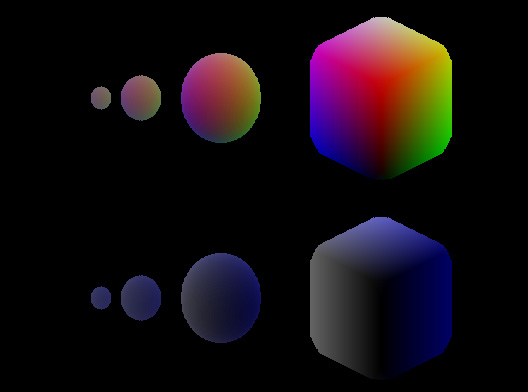
The above will draw this:

You can read more about voxels here.

This isn’t the speediest way to do voxels (especially if you want to animate). This was just the first thing that came to mind.

Read snippet: Isometric Voxels