Browse the notebook

Category: functions

JS Sketch Experiment

[SWF(width=950, height=600)]
with (graphics) beginFill(0xefefef), drawRect(0,0,stage.stageWidth, stage.stageHeight);
var btn:Sprite = Sprite(addChild(new Sprite()));
with (btn.graphics) beginFill(0x666666), drawRect(0,0,100,20);
with(btn)  x=320, y=430, buttonMode = true;
btn.addEventListener(MouseEvent.ROLL_OVER, function():void{
  with(btn.graphics) clear(), beginFill(0x222222), drawRect(0,0,100,20);
});
btn.addEventListener(MouseEvent.ROLL_OUT, function():void{
  with(btn.graphics) clear(), beginFill(0x666666), drawRect(0,0,100,20);
});
btn.addEventListener(MouseEvent.CLICK, function():void{
    var res:*= ExternalInterface.call("function(){ plot=[]; colors=[]; " + txt.text + " return {plot:plot, colors:colors};}");
    render((res == null) ? {plot:[], colors:[]} : res);
});

var v:Shape = Shape(addChild(new Shape()));
v.x = 700;
v.y = 220;
function render(obj:Object):void{
	var plot:Array = obj.plot;
	var colors:Array = obj.colors;
	var leng:int = plot.length;
	v.graphics.clear();
	var inc:int = 0;
	v.graphics.moveTo(plot[0], plot[1]);
	for (var i:int = 2; i<leng; i+=2){
		v.graphics.lineStyle(0,colors[inc++]);
		v.graphics.lineTo(plot[i], plot[i + 1]);
	}
}


var submit:TextField = TextField(btn.addChild(new TextField()));
submit.defaultTextFormat = new TextFormat("_sans", 12);
with(submit) textColor=0xFFFFFF, width=100, autoSize="center";
with(submit) mouseEnabled = false,  text="submit";

var txt:TextField = TextField(addChild(new TextField()));
with(txt) x = y = 20, type = "input", multiline=true;
with(txt) width = 400, height = 400, border = true, background = 0xFFFFFF;
txt.defaultTextFormat = new TextFormat("Monaco", 12);
txt.text = "enter text"; 
txt.addEventListener(MouseEvent.MOUSE_DOWN, onDown);
function onDown(evt:MouseEvent):void{
	txt.text = "";
	txt.removeEventListener(MouseEvent.MOUSE_DOWN, onDown);
}

This snippet is a mini code editor that allows the user to write javascript into a textfield – the javascript is then run using external interface. Optionally the javascript code can populate two arrays (plot and colors). If these arrays are populated flash, will render the data in each array using the Graphics class.

Have a look at the demo:
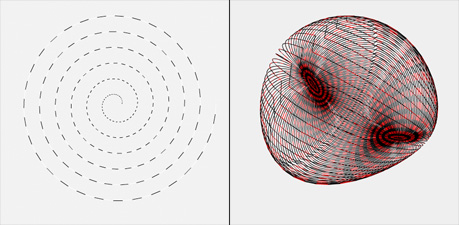
If you do something nice with this… post your javascript snippet as a comment and I’ll add it to the JS Sketch page…
Read snippet: JS Sketch Experiment

ActionScript Eval (well, not really)

var txt:TextField = TextField(addChild(new TextField()));
txt.autoSize = TextFieldAutoSize.LEFT;

var myVar:Number = 100;
// works as an expression parser
txt.text = js("return (" + myVar + " * 2 + 10) / 2");
txt.appendText("nn");

// parses javascript
txt.appendText(js("var a = []; for (var i = 0; i<10; i++){ a.push(i) } return a;"));

function js( data:String ):*{
   var res:*= ExternalInterface.call("function(){" + data + "}");
   return (res == null) ? "null" : res;
}

This one made my day – CAN’T believe I never thought of it before… haven’t done any speed tests yet… but it shows how to use ExternalInterface.call to parse math expressions and javascript code. This will only work when the swf is shown in an html page of course… so if your in flash cmd+f12…

I got the idea from this code snippet… which actually has an error in it… the decode() function should not return void… I found that snippet thanks to this tweet by makc3d.

Read snippet: ActionScript Eval (well, not really)

Recursive 2D Structure

[SWF(width = 600, height = 700, frameRate=24)]
var canvas:BitmapData = new BitmapData(stage.stageWidth,stage.stageHeight,false, 0xFFFFFF);
addChild(new Bitmap(canvas));

var maxBranches:int = 600;
var branches:int = 0;
var startX:Number = 300
makeBranch(startX,690,30,-60, 60);

function makeBranch(xp:Number, yp:Number, step:Number, min:Number, max:Number):void {
	var vectors:Shape = Shape(addChild(new Shape()));
	var cX:Number, cY:Number, eX:Number, eY:Number
	var dcX:Number=xp, dcY:Number=yp, deX:Number=xp, deY:Number=yp;
	var theta:Number = (min + Math.random()*(max-min) - 90) * Math.PI / 180;
	cX = xp + step * Math.cos(theta);
	cY = yp + step * Math.sin(theta);
	theta = (min + Math.random()*(max-min)-90) * Math.PI / 180;
	eX = cX + step * Math.cos(theta);
	eY = cY + step * Math.sin(theta);
	var run:Function = function():void{
	     dcX +=  (cX - dcX) / 2;
		 dcY +=  (cY - dcY) / 2;
		 deX +=  (eX - deX) / 8;
		 deY +=  (eY - deY) / 8;
		 with(vectors.graphics){
			  clear();
			  beginFill(0xFFFFFF,0.8);
			  lineStyle(0,0x000000,0.8);
			  moveTo(startX, yp);
			  lineTo(xp, yp);
			  curveTo(dcX, dcY, deX, deY);
			  lineTo(startX, deY);
		 }
		 if (Math.abs(dcX - cX) < 1 && Math.abs(deX - eX) < 1 && Math.abs(dcY - cY) < 1 && Math.abs(deY - eY) < 1){
			 canvas.draw(vectors);
			 removeChild(vectors);
			 if (branches < maxBranches){
				 setTimeout(makeBranch, 10, deX, deY, step - Math.random(), -90, 90);
				 branches++;
				 if (int(Math.random()*2) == 1){
				    setTimeout(makeBranch, 10, deX, deY, step - Math.random()*3, -90, 90);
					branches++;
				 }
			 }
		 }else{
		     setTimeout(arguments.callee,  1000 / 24);
		 }
	}();
}

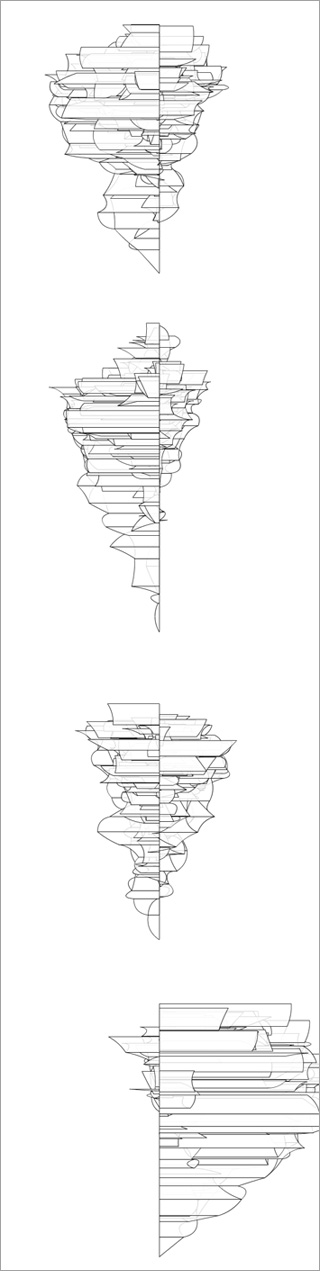
This snippet uses a technique similar to what you might use to create a recursive tree. A bit of additional logic is added for bezier branches, filled shapes and animation.

WARNING: may run slow on older machines

Have a look at the swf…

Read snippet: Recursive 2D Structure

Counter Function

var counter:Function = function(count:Array):Function{
	var leng:int = count.length;
	var index:int = 0;
	return counter = function(reset:*=""):Function{
		if (reset=="reset"){
			index = 0;
			return counter;
		}else
		if (reset is Array){
			count = reset;
			return counter;
		}
		trace(count[index % leng]);
		index++;
		return counter;
	}
}

// first time it's called you pass an array
trace("count through the array:");
// you can optionally call trigger the counter by calling the newly
// returned function
counter(["a","b","c"])();
counter();
counter();
trace("change the array:");
// here we choose to simply set the array and not trigger the counter
counter([10,20,40,60,80]);
counter();
counter()
trace("reset the counter:");
// reset and the counter is called 3 times
counter("reset")()()();

/*outputs :
count through the array:
a
b
c
change the array:
10
20
reset the counter:
10
20
40
*/

Today I felt like messing around with functions and this is the result. This snippet shows a strange and interesting technique to create a function that iterates through a given array in a few different ways.

I believe the technical term for this kind of thing is a continuation…

There are a bunch of other posts like this on actionsnippet. Some are purely experimental, others are actually quite useful… these can all be found in the functions category.

Read snippet: Counter Function

Instantiate and Set Properties

function create(obj:Class, props:Object):*{
	var o:* = new obj();
	for (var p:String in props){
		o[p] = props[p];
	}
	return o;
}

// test out the function

var txt:TextField = create(TextField, {x:200, y:100, selectable:false, text:"hello there", textColor:0xFF0000, defaultTextFormat:new TextFormat("_sans", 20)});
addChild(txt);

var s:Sprite = Sprite(addChild(create(Sprite, {x:100, y:100, rotation:45, alpha:.5})));

with (s.graphics) beginFill(0xFF0000), drawRect(-20,-20,40,40);

var blur:BlurFilter = create(BlurFilter, {blurX:2, blurY:8, quality:1});

s.filters = [blur];

This snippet shows a function called create() that takes two arguments. The first argument is the name of a class to instantiate. The second is an Object with a list of properties to set on a newly created instance of the class (referenced in the first argument).

This could be particularly useful for TextFields which for some reason have no arguments in their constructor.

This will currently only work for classes that have either all optional constructor arguments or no constructor arguments.

Read snippet: Instantiate and Set Properties

Object Argument w/ Defaults

var boxDefaults:Object = {x:10, y:10, width:100, height:100, lineThickness:0, lineColor:0x000000, lineAlpha:1, fillColor:0xCCCCCC, fillAlpha:1}
function drawBox(params:Object=null):void {
	var p:Object=setDefaults(boxDefaults, params);
	graphics.lineStyle(p.lineThickness, p.lineColor, p.lineAlpha);
	graphics.beginFill(p.fillColor, p.fillAlpha);
	graphics.drawRect(p.x, p.y, p.width, p.height);
}

function setDefaults(defaults:Object, params:Object=null):Object {
	if (params==null) {
		params = new Object();
	}
	for (var key:String in defaults) {
		if (params[key]==null) {
			params[key]=defaults[key];
		}
	}
	return params;
}

// test it out... notice that all object properties are optional and have default values										  
drawBox();

drawBox({x:200, y:200, lineColor:0xFF0000, lineThickness:2, fillColor:0xCCCC00});

drawBox({x:200, y:320, width:50, height:150, lineAlpha:0, fillColor:0x416CCF});

This is a technique I’ve been using recently… inspired by tweening engines. I find this to be suitable when a function or object constructor has lots and lots of arguments (80% of the time if I have a function or object constructor with too many arguments I re-think my design, but every now and then I use this technique).

Basically, the function or object constructor takes one argument of type Object – once passed into the function this Object argument is passed to the setDefault() function which populates it with any properties that it’s missing – each property has a default value. As a result you end up with an easy to read function call with a variable number of arguments and well thought out default values.

This snippet just draws a box (not very interesting or usefull) – I wanted to showcase the technique using a simple function. As a real world example… I recently used this technique in a mini-library I created for use with Box2D… will be posting the library in the next few days…. it’s a library for fast prototyping and custom rendering.

Read snippet: Object Argument w/ Defaults

Function Chaining & Classes

package {
    import flash.display.Sprite;
	public class Chaining extends Sprite{
		public function Chaining(){
			  print(n(100).divide(2).plus(2));
			  // outputs 52              
			  print(n(100).plus(n(10).multiply(2)));
			  // outputs 120
		}
	}
}

function print(n:Num):void{
   trace(n.getValue());
}
function n(n:Number):Num{
   return new Num(n);
}

class Num{
	private var value:Number;
	
	public function Num(n:Number):void{
       value = n;
	}
	private function convert(n:*):Number{
		if (n is Num) n = n.getValue();
		return n;
	}
	public function getValue():Number{
		return value;
	}
	public function plus(n:*):Num{
		n = convert(n);
		value += n;
		return this;
	}
	public function minus(n:*):Num{
		n = convert(n);
		value -= n;
		return this;
	}
	public function multiply(n:*):Num{
		n = convert(n);
		value *= n;
		return this;
	}
	public function divide(n:*):Num{
		n = convert(n);
		value /= n;
		return this;
	}
}

This snippet is meant to be run as a document class. It shows how one might go about designing a class to make extensive use of function chaining.

Read snippet: Function Chaining & Classes

var obj:Object = new Function()

var Pnt:Function = function(xp:Number, yp:Number){
	
	var x:Number = xp;
	var y:Number = yp
	
	this.setX = function(v:int):void{
		x = v;
	}
	this.setY = function(v:int):void{
		y = v;
	}
	this.getX = function():int {
		return x;
	}
	this.getY = function():int {
		return y;
	}
}

var p:Object = new Pnt(10,10);

trace(p.getX(), p.getY());
p.setX(100);
trace(p.getX());

/*
outputs:
10, 10
100
*/

Another way to define and instantiate Objects on the timeline. Interesting, but I don’t recommend it over actual classes…

Read snippet: var obj:Object = new Function()

Interesting Function Composition

var multBy2Add3:Function = add(3, mult(2));

trace(multBy2Add3(10));
// 10 * 2  = 20
//  20 + 3 = 23

var add2AndSquare = sq(add(2));

trace(add2AndSquare(8));
// 8 + 2 = 10
// 10 * 10 = 100

var multBy2_3times:Function = repeat(3,mult(2));

trace(multBy2_3times(3));
// 3 * 2 = 6;
// 6 * 2 = 12;
// 12 * 2 = 24

// you can also chain for even less readability
trace(sq(mult(5,add(1)))(4));
// 4 + 1 = 5
// 5 * 5 = 25;
// 25 * 25 = 625;

/*
outputs: 
12
100
24
625
*/

// function  composition
const F:Function = function(a:*):*{return a};
function mult(scalar:Number, f:Function=null):Function{
	if (f == null) f = F;
	 return function(n:Number){
		return f(n) * scalar;
	}
}

function add(off:Number, f:Function=null):Function{
	 if (f == null) f = F;
	 return function(n:Number){
		return f(n) + off;
	}
}
function sq(f:Function=null):Function{
	 if (f == null) f = F;
	 return function(n:Number){
		 var v:Number = f(n);
		return  v * v;
	}
}
function repeat(times:int, f:Function):Function {
	 if (f == null) f = F;
	 return function (n:Number){
		 var v:Number = n;
		 for (var i:int = 0; i<times; i++) v = f(v);
		 return v;
	 }
}

The above shows some interesting function composition… this demo contains the following functions:

mult();
add();
sq();
repeat();

These functions are designed to be combined to create new functions.

Read snippet: Interesting Function Composition

more(nesting(functions(graphDrawing)));

[SWF(width=800, height=600)]

var canvas:Graphics; 
var graphData:Array = sineData();

var graph0:Shape = Shape(addChild(new Shape()));
graph0.x = 50;
graph0.y = 150;

var graph1:Shape = Shape(addChild(new Shape()));
graph1.x = 400;
graph1.y = 150;

var graph2:Shape = Shape(addChild(new Shape()));
graph2.x = 50;
graph2.y = 400;

// use graphData to draw 3 different looking graphs:

canvas = graph0.graphics;
axis(lines(graphData));

canvas = graph1.graphics;
axis(dots(graphData, 0xFF0000), 0xFFCC00, 2);

canvas = graph2.graphics;
axis(dots(dots(lines(lines(graphData, 0xCCCCCC, 20))), 0x0022FF, 0, 4), 0xFF);


// generate data
function sineData():Array{
	var dat:Array = new Array();
	for (var i:int = 0; i<60; i++){
		dat.push(new Point(i * 4,  (30 + i) * Math.sin(i * 24 * Math.PI/180)));
	}            
	return dat;
}

// render lines
function lines(dat:Array, col:uint=0x000000, thick:Number=0):Array{
	canvas.lineStyle(thick, col);
	canvas.moveTo(dat[0].x, dat[0].y)
	for (var i:int = 1; i<dat.length; i++){
		 canvas.lineTo(dat[i].x, dat[i].y);
	}
	return dat;
}

// render dots
function dots(dat:Array, col:uint=0xFF0000, thick:Number=0, rad:Number=1.5):Array{
	canvas.lineStyle(thick, col);
	for (var i:int = 0; i<dat.length; i++){
		 canvas.drawCircle(dat[i].x, dat[i].y, rad);
	}
	return dat;
}

// render graph axis
function axis(dat:Array, col:uint=0x000000, thick:Number=0):Array{
	var d:Array = dat.concat();
	d.sortOn("y", Array.NUMERIC);
	var lastIndex:int = d.length - 1;
	var minY:Number = d[0].y;
	var maxY:Number = d[lastIndex].y;
	d.sortOn("x", Array.NUMERIC);
	var minX:Number = d[0].x;
	var maxX:Number = d[lastIndex].x;
	canvas.lineStyle(thick, col, .2);
	canvas.moveTo(minX, 0);
	canvas.lineTo(maxX, 0);
	canvas.lineStyle(thick, col);
	canvas.moveTo(minX, minY);
	canvas.lineTo(minX, maxY);
	canvas.lineTo(maxX, maxY);
	return dat;
}

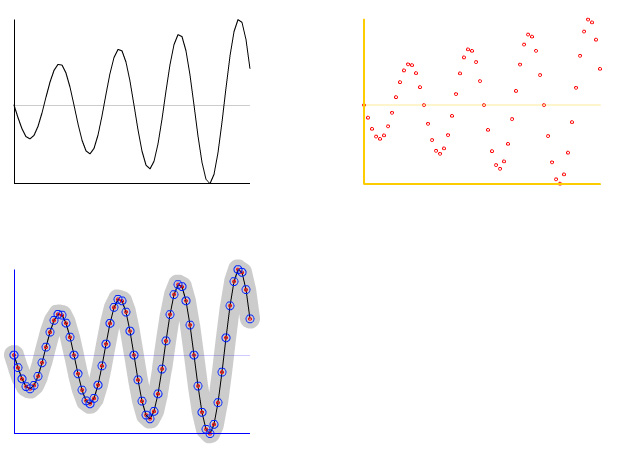
This is something I’ve been meaning to post for awhile. Finally had time to write it today… It contains functions that are designed to be nested for the purpose of rendering a small data set in a few different ways…

The upper left image is rendered with axis labels and lines… and it defaults to the color black (line 21):

axis(lines(graphData));

The upper right image is rendered with yellow axis and red dots (line 24):

axis(dots(graphData, 0xFF0000), 0xFFCC00, 2);

etc… (line 27)
axis(dots(dots(lines(lines(graphData, 0xCCCCCC, 20))), 0x0022FF, 0, 4), 0xFF);

Alternatively you could write each function call on one line:

lines(graphData, 0xCCCCCC, 20);
lines(graphData);
dots(graphData);
dots(graphData, 0x0022FF, 0, 4)
axis(graphData, 0xFF);

NOTE: If you think this post is insane, please read the warning page of this site…

Read snippet: more(nesting(functions(graphDrawing)));