Actionscript:
-
[SWF(width = 800, height = 600, frameRate = 60)]
-
import com.actionsnippet.qbox.*;
-
stage.frameRate = 60;
-
-
var sim:QuickBox2D = new QuickBox2D(this);
-
-
sim.createStageWalls();
-
-
sim.start();
-
-
var output:TextField = new TextField();
-
output.text = "Click anywhere to add points to a polygon. Hit any key to test.\n\n";
-
output.x = output.y = 50;
-
with(output) width = 300, height = 400, border = true, selectable = true, wordWrap = true, multiline = true;
-
addChild(output);
-
-
function display(str:*):void{
-
output.appendText(str.toString() + "\n");
-
}
-
-
var points:Array = [];
-
var poly:Shape = new Shape();
-
addChild(poly);
-
-
stage.addEventListener(MouseEvent.CLICK, onClick);
-
stage.addEventListener(KeyboardEvent.KEY_DOWN, onKeyPressed);
-
-
function onClick(evt:MouseEvent):void {
-
if (points.length == 0){
-
poly.graphics.beginFill(0xCCCCCC);
-
poly.graphics.lineStyle(1, 0xFF0000);
-
poly.graphics.moveTo(mouseX, mouseY);
-
}else{
-
poly.graphics.lineTo(mouseX, mouseY);
-
}
-
poly.graphics.drawCircle(mouseX, mouseY, 2);
-
-
points.push(mouseX / 30.0, mouseY / 30.0);
-
}
-
-
function onKeyPressed(evt:KeyboardEvent):void {
-
// average all points
-
var avgX:Number=0
-
var avgY:Number = 0;
-
-
for (var i:int = 0; i<points.length; i+=2){
-
avgX += points[i];
-
avgY += points[i + 1];
-
}
-
-
avgX /= points.length/2;
-
avgY /= points.length/2;
-
avgX = avgX;
-
avgY = avgY;
-
-
// subtract averages and fix decimal place
-
for (i = 0; i<points.length; i+=2){
-
var yp:int = i + 1;
-
points[i] -= avgX;
-
points[yp] -= avgY;
-
points[i] = Number(points[i].toFixed(2));
-
points[yp] = Number(points[yp].toFixed(2));
-
}
-
-
display("points array:");
-
display(points);
-
-
try{
-
var p:QuickObject = sim.addPoly({x:avgX, y:avgY, points:points});
-
p.userData.graphics.beginFill(0xFF0000);
-
p.userData.graphics.drawCircle(0,0,5);
-
}catch(e:*){
-
display("Invalid polygon data!");
-
}
-
-
poly.graphics.clear();
-
points = [];
-
}
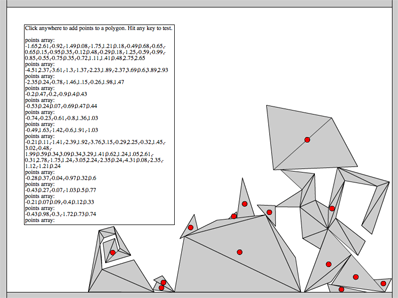
This snippet shows the basic concepts needed to go about creating a polygon editor for QuickBox2D. I have an unreleased editor that I use for my QuickBox2D projects, at some point I may release it... but for now I figured I'd post this extremely simplified version for people to expand on.
Have a look at the swf here...
23 Comments
it is impossible to select/copy point coords
made the text selectable… this snippet is really intended to be expanded on though… could be altered to write to a text file etc…
It may be good thing that I couldn’t do it - I made a giant penis and tried to copy/paste vertices list here
great ! many thanks for this and your jog in general
that is ace
Yeah ! really cool
This is great Zevan. I was looking at building something similar as a level editor but this is almost exactly what i would have ended up doing anyway.
Very much appreciate all you hard work and effort you put into your tuts.
Nice !!! Thank you for sharing !
That is excellent! Keep up the good work
Hey, i’m trying to make a gate that after it opens, it’ll close by itself. like this:
[] is a box
0——- is the gate
scene 1
………[]
=0——-===
scene 2
=0…….===
…..\[]
…….\
scene 3
=0——–===
…………
………[]
A box will push it down from gravity, then it will go back up.
How do i do that?
Thanks,
Thomas Francis
Hello Zevan,
i just want to say thank you very much for making QuickBox2D and all the corresponding examples.
thanks
I’m tryin’ to create a poly based on an array that contains the verts coords, it results like this on trace: 0,0,3.2,2,1.3,4.8
but when I give the function: var polyMade:QuickObject = st.addPoly ({x:5, y:5, mass:1, skin:poly_1, verts:act_coords});
it returns the error: ReferenceError: Error #1069: Property length not found on Number and there is no default value.
at com.actionsnippet.qbox.objects::PolyObject/build()
at com.actionsnippet.qbox::QuickObject/init()
at com.actionsnippet.qbox::QuickObject()
at com.actionsnippet.qbox.objects::PolyObject()
at com.actionsnippet.qbox::QuickBox2D/create()
at com.actionsnippet.qbox::QuickBox2D/addPoly()
at 6_fla::MainTimeline/frame1()
I’m getting mad, how can I solve this?
@tamcredi … try using the “points” param instead of the “verts” param
I tried that too, no way!
Very nice thing. i like it.
Also I’m having the same problem as ‘Tancredi’, When I paste the coordinates produced by the editors into the following
“banana=world.addPoly({x:6,y:11.5, verts:[[-1,0.37,-0.87,0.52,-0.36,0.65,0.22,0.53,0.59,0.2,0.67,-0.19,0.56,-0.3,0.52,-0.53,0.56,-0.61,0.39,-0.56,0.41,-0.47,0.41,-0.29,0.3,-0.09,0.04,0.08,-0.2,0.14,-0.49,0.16,-0.75,0.17,-0.98,0.22]],density:uniqueDensity,friction:uniqueFriction, skin:BananaSkin});”
it returns:
TypeError: Error #1009: Cannot access a property or method of a null object reference.
at com.actionsnippet.qbox.objects::PolyObject/build()
at com.actionsnippet.qbox::QuickObject/init()
at com.actionsnippet.qbox::QuickObject()
at com.actionsnippet.qbox.objects::PolyObject()
at com.actionsnippet.qbox::QuickBox2D/create()
at com.actionsnippet.qbox::QuickBox2D/addPoly()
at packedlunch_engine_fla::MainTimeline/createLvl()
at packedlunch_engine_fla::MainTimeline/frame1()
But however this works fine:
“lunchBox=world.addPoly({x:14, y:11.5, verts:[[0.2,0.03,1.13,0.03,1.33,0.33,1.33,0.96,0,0.96,0,0.33]],density:uniqueDensity,friction:uniqueFriction, skin:lunchBox_skin})”
When I created these coodinates manually, before I found this editor I found I would get the same error if I used like over 16 values in the array I also get the same errors on return.
So personally I think it is some sort of limit, but the object was created in the editor.
So confused help!
hi, What about Sensors in QuickBox2D?…
Some times game logic needs to know when two shapes overlap yet there should be no collision response… i know you can use groupIndex to avoid collissions, but Box2D has a special property for this:
myShapeDef.isSensor = true;
Maybe quickbox2d could have some variable for this? regards
Hello, guys
For those who tried to paste the generated points into the addPoly() method, I’ve tested a bit and managed to get it working. Please try the following:
for instance, instead of {verts: [[-1.38,-2.59,2.18,-2.42,2.95,0.18,1.08,2.41,-1.92,2.31,-2.92,0.11]]}, try {points:[-1.38,-2.59,2.18,-2.42,2.95,0.18,1.08,2.41,-1.92,2.31,-2.92,0.11]} (please note the single pair of brackets ‘points:[points_list]‘, and avoid the double one ‘points:[[points_list]], which I was experiencing problems with too)
Hope this can help. Lets us know if that worked for you.
PS: sorry for my english, since I’m not a native speaker
Cheers
Hi!
I’ve taken the code provided for the editor, expanded on it and built an AIR app called QuickPolyTracer:
1. you can drag and drop any image or swf to trace out and create polys
2. uses bezier controls to integrate curved lines
its still in beta but very useable. you can download it here : http://medusa.reyco1.com/apps/QuickPolyEditor.air
@reyco1 cool… for some reason your link doesn’t work though… looking forward to seeing it.
Sorry, that was the wrong link. This is the right one
http://medusa.reyco1.com/apps/QuickPolyTracer.air
hi, I have a QuickObject Group with the objects:[ob1,ob2,ob3].
and the question is there any way to change the angle of ob1 at runtime?
3 Trackbacks
[...] build yourself some kind of simple polygon editor. There is an example of such an editor on actionsnippet.com. You may want to take a look at it for a few minutes before reading on. It should help solidify [...]
[...] build yourself some kind of simple polygon editor. There is an example of such an editor on actionsnippet.com. You may want to take a look at it for a few minutes before reading on. It should help solidify [...]
[...] build yourself some kind of simple polygon editor. There is an example of such an editor on actionsnippet.com. You may want to take a look at it for a few minutes before reading on. It should help solidify [...]